The best walking app is the one you can open repeatedly without friction. Choose it by starting with your phone and wearable, deciding whether you want automatic step counting or deliberate walk recording, and selecting only the goals, reminders, progress views, and social features that make walking easier for you. Do not begin with a 10,000-step target or a paid subscription: first establish a realistic time goal, check your usual activity, and confirm what data the app needs.
What a walking app can—and cannot—do
An app can make a walk visible, give you a modest target, remind you at a useful time, and show whether you are repeating the behavior. Those functions reduce the amount of remembering and estimating required. They do not make a particular routine suitable for every person, and the available evidence here does not show that one app feature or one app produces better habit adherence than another.
As an Amazon Associate I earn from qualifying purchases.
The Centers for Disease Control and Prevention (CDC) gives a useful selection rule: “To make sure you’ll stick with it, pick physical activities that you enjoy and that match your abilities.” The same principle applies to the software. A technically sophisticated tracker that feels annoying, inaccurate for your setup, or too demanding may be a worse choice than a simple step counter.
Quick wins for a faster PC:
Scan for outdated or missing drivers - takes under a minuteDriver Scan →Clear out junk files and repair common Windows errorsFree Scan →Fix the driver behind crashes, sound loss and screen glitchesFind Drivers →Walking can count as moderate-intensity aerobic activity when the pace is brisk enough for you. U.S. adult guidance describes a target of 150 to 300 minutes of moderate-intensity aerobic activity per week, plus muscle-strengthening activity on at least two days; the CDC consumer summary states at least 150 minutes weekly and two strengthening days. Some activity is better than none, and your health, ability, age, or clinician’s advice may call for an individualized plan. See the CDC adult guidance and the Physical Activity Guidelines, Second Edition for the full U.S. recommendations.
#1 Best Overall
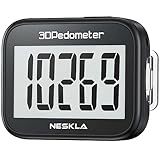
- SIMPLE & EASY TO USE: 3D Pedometer for Steps Only. No Bluetooth, no app or smartphone connections required. Only one reset button, To reset the counter, just only need to press and hold the RESET button for 3-5 seconds to get the step to "0"
- ACCURATE COUNTING: Pedometer has advanced 3D Tri-Axis Sensor technology, so it is much more accurate than most pedometers. Simple functions and design makes it user friendly for men, women, kids, seniors
- EASY TO READ: With large LCD multi-function display, you can clearly and easily read the numbers at a glance. Makes it the perfect fitness monitor for Everyone
- EASY TO CARRY: Pedometer is only 26.5g. It is easy to put it in pocket or bag. It contains a removable clip and a lanyard. Can be clip on the belt, pants, shoes. Hanging on neck
- LONG BATTERY LIFE: Included a CR2032 battery can last up to one year. Pedometer auto sleeps when you are not moving and auto wakes and counts steps when you start moving again
Start with your phone, wearable, and routine
Check the device you already carry
Before downloading anything, find out whether your phone already records steps. Apple says the iPhone Health app automatically counts steps and walking and running distances. That makes a no-extra-hardware starting point reasonable for iPhone users, although behavior and feature availability depend on the device, software configuration, and permissions. Apple’s overview is at Apple Support.
Do not assume that the same automatic behavior exists on every Android phone, iPhone configuration, or third-party app. Check the candidate’s current store listing and help pages for your operating system. If you already wear a watch or fitness tracker, verify whether the app can read its data, whether the device must remain connected, and which source is treated as primary when both phone and wearable count steps.
Match tracking to the way you walk
There are two distinct jobs an app may perform:
- Daily activity tracking: the phone or wearable counts steps and distance throughout the day. This suits people who want a passive record and do not want to start every outing.
- Deliberate walk recording: you start a session for a particular walk, then review duration, distance, or route when it ends. This suits people who prefer a scheduled event or want to separate an intentional walk from incidental movement.
Some products offer both, but you should verify the exact behavior. Ask whether a session must be started manually, whether a paused walk continues to count, how an indoor walk is handled, and whether the app needs location access for distance or route information. If your main objective is simply repeating a 10- or 20-minute walk, a session timer and a completion history may be more useful than a map.
Account for your actual schedule
Choose a tool that fits where walking happens. A person who leaves the phone at a desk may need a wearable or manual session entry; someone who carries the phone everywhere may need nothing beyond the built-in health record. Consider commuting, indoor corridors, shopping, pushing a stroller, limited connectivity, and whether you can safely look at a screen while walking. Accessibility matters too: readable text, voice prompts, large controls, and a reminder schedule you can understand are legitimate selection criteria.
Set a walking goal that you can repeat
Use time before steps
“10,000 steps a day” is popular advice, not a federal guideline. The federal guideline recommends building activity progressively and individualizing it rather than assigning one universal step number. A time goal is often easier to adapt: for example, a short walk on several days this week, followed by a gradual increase when that feels manageable.
Rank #2

- Accuracy: The step tracker has advanced 3D Tri-Axis Sensor technology, that provides superior accuracy in any position, To eliminate accidental movement as a step, this pedometer will start counting after ten steps have been detected
- Simplicity: Designed for ease of use, our 3D black pedometer focuses solely on counting steps. With just one button(press and hold for 5 seconds to reset). there's NO SETUP, NO Bluetooth, NO App, or smartphone connections are required. It's user-friendly for men, women, kids, and seniors
- USB Charging: Our black pedometer comes with a USB plug, No need to change batteries frequently, Simply plug it into any USB adapter or even your computer for hassle-free charging. With one full charge, it can last up to 3 months
- Portability: This 3D black pedometer is small and compact with a detachable clip and lanyard. You can easily clip it to your collar, shoes, waist, or even put it inside your pocket, purse, or wear it around your neck.It also features a backlight that turns on for three seconds when you press the reset button
- Smart & Energy Saving: The black pedometer automatically enters sleep mode when you're not moving. Once the pedometer senses movement, it will wake up and start counting steps when you move 10 steps in a row, from 10, 11, 12 .etc
The guideline’s walking-tracking example starts with a time goal, measures the steps taken during the walk, and combines those steps with usual daily steps. It illustrates a person who normally records 5,000 steps, takes 1,000 steps during a 10-minute walk, and wants a 20-minute goal; the resulting illustrative total is 7,000 steps. This is an example from page 112 of the guideline, not a prescription for everyone. Someone with a lower fitness level may need fewer steps to accumulate the same duration of walking. The complete source is the Physical Activity Guidelines, Second Edition.
Turn the goal into an app setting
- Record your baseline. Look at several ordinary days, rather than choosing a target from a motivational poster. Note both total steps and the amount of intentional walking you can comfortably do.
- Pick a repeatable time target. Choose a duration and number of days that fit your current ability and schedule. If you are inactive, a smaller starting point is valid.
- Measure one typical walk. Use the app’s step count or a session record to see how many steps your chosen duration produces for you.
- Add gradually. Increase duration, frequency, or steps in small increments only when the current level is comfortable. Avoid changing several variables at once.
- Review after a defined period. At the end of a week or another interval you can manage, decide whether the goal was too easy, too difficult, or about right. Adjust the setting instead of treating missed days as failure.
A useful app therefore needs editable goals, a clear record of completed activity, and enough history to see a pattern. It does not need to pressure you into an arbitrary number. If seeing a streak makes you skip a walk because you cannot achieve a perfect day, turn the streak off or choose a weekly measure instead.
The Tool Desk
Outbyte Driver Updater FREEScan for outdated or missing drivers - takes under a minuteDriver Scan →Outbyte PC Repair FREERepair Windows errors before they cause bigger problemsFix Now →Compare candidate apps on the features that affect repetition
Make a short list, then check each candidate in its current listing and documentation. The sources available for this guide do not establish current subscription prices, named-app feature availability, or comparative habit outcomes, so those details must be verified separately before you commit.
| Question | What to verify | Why it matters |
|---|---|---|
| Platform and device fit | Does it run on your phone’s operating system? Can it read your existing phone, watch, or tracker data? Is a particular account or connection required? | A feature you cannot use on your device adds setup work rather than support. |
| Tracking method | Does it count daily steps, record a deliberate walk, or both? Must you start and stop a session? Does it work for indoor walking? | The right method depends on whether you want passive awareness or a scheduled walk record. |
| Goal controls | Can you set time, steps, frequency, or weekly goals? Can you edit them and choose a gradual progression? | Flexible goals let the plan match your baseline and ability. |
| Reminders | Can you choose days and times, limit notifications, and pause them? Does the app distinguish a reminder from an alert to start a live session? | A reminder should prompt a realistic opportunity, not create notification fatigue. |
| Progress view | Can you see duration, steps, completed sessions, and a useful time range without digging through menus? | Fast feedback helps you decide what to repeat or adjust. |
| Privacy and permissions | Does it request motion, health, or location access? Can you allow only the required data and revoke access later? What does its privacy notice say? | Health and location data are sensitive; unnecessary access is a cost of the app. |
| Ease and cost | How many setup screens and account steps are required? Are there ads, subscriptions, accessibility limits, or current regional price differences? | A low-friction tool is more likely to remain usable. Confirm current terms directly. |
| Social functions | Are sharing, challenges, contacts, or public profiles optional? What exact activity information is visible? | Accountability can help some people, while unwanted sharing can make the app unsuitable. |
A practical two-minute trial
Install no more than one or two finalists at a time. During the trial, check whether the app detects today’s steps, set a small test goal, start and stop a short walk if that function exists, and open the history view. Then inspect the permission screen and notification controls. If you cannot explain what the app is measuring or why it needs a permission, stop and read its documentation before granting access.
Decide whether you need a separate app or tracker
A paid tracker is not automatically necessary. If your phone already counts steps and you only need a simple record, use the built-in health function first. Apple documents automatic step and walking/running-distance counting in Health, and its HealthKit documentation describes step-counting apps as one possible use when the user grants permission: HealthKit documentation.
Rank #3

- SIMPLE & EASY TO USE: 3D Pedometer for Steps Only. No Bluetooth, no app or smartphone connections required. Only one reset button, To reset the counter, just only need to press and hold the RESET button for 3-5 seconds to get the step to "0"
- ACCURATE COUNTING: Pedometer has advanced 3D Tri-Axis Sensor technology, so it is much more accurate than most pedometers. Simple functions and design makes it user friendly for men, women, kids, seniors
- EASY TO READ: With large LCD multi-function display, you can clearly and easily read the numbers at a glance. Makes it the perfect fitness monitor for Everyone
- EASY TO CARRY: Pedometer is only 26.5g. It is easy to put it in pocket or bag. It contains a removable clip and a lanyard. Can be clip on the belt, pants, shoes. Hanging on neck
- LONG BATTERY LIFE: Included a CR2032 battery can last up to one year. Pedometer auto sleeps when you are not moving and auto wakes and counts steps when you start moving again
Consider a separate app when it solves a specific problem that the built-in record does not, such as a clearer walking schedule, a deliberate-session timer, a particular reminder pattern, a progress view you can interpret quickly, or optional accountability. Consider a wearable when carrying the phone is impractical or when its continuous measurement is important to you; federal guidance recognizes pedometers and fitness trackers as useful tools for tracking walking progress, but does not make purchasing hardware a requirement.
What’s actually slowing this PC down?
Pick the symptom - the matching free tool is one click away.
Do not buy a device solely to chase a larger number. Extra hardware introduces charging, pairing, account, cost, and data-sharing decisions. If those burdens make you less likely to walk, the device is working against your goal.
Set up tracking without giving away more data than necessary
Understand the permission categories
Walking tools may request access to motion and fitness data, health records, or location. Motion and health access can support step counts and activity summaries. Location may be needed for a route map or GPS distance, but it is not automatically necessary for a simple indoor timer or a phone-based step total. The exact requirement depends on the app’s design.
Apple advises minimizing collection and requesting permission for sensitive inputs such as health, fitness, motion, and location. Its September 2025 privacy overview describes granular controls for third-party access to Apple Health data: Apple Developer health and fitness guidance and Apple’s September 2025 privacy overview.
Use a least-privilege setup
- Read the app’s current privacy disclosure before creating an account, paying attention to data collected, sharing, retention, and deletion.
- Allow only the categories needed for the function you selected. A step counter may not need precise location; a route recorder may.
- Check whether the app can work with approximate or “while using” location instead of continuous access.
- Open the phone’s health, motion, and location settings after setup and confirm what is enabled.
- Revoke access when you stop using the app, and review permissions again after a major update.
On iOS, Google Fit’s help documentation describes connecting with Apple Health and selecting data permissions that can be switched off. Treat that as documentation of the iOS flow, not as a guarantee about other operating systems or a judgment that one service is more private than another: Google Fit permission help.
Do these 3 things before closing this tab:
1Repair Windows errors before they cause bigger problems2Fix the driver behind crashes, sound loss and screen glitches3Clear out junk files and repair common Windows errorsRank #4

- Accurate Step Tracking:The black Pedometer employs a professional 3D Tri-Axis sensor to track your steps accurately; Built-in 10-step error prevention helps minimize steps calculation error
- Simple & Non-Bluetooth Design: Avoid complicated settings or unnecessary features with our step tracker
- Innovative Carabiner Design: Featuring a creative carabiner design, this step counter easily hooks to your belt loop, pocket, or bag; No lanyard or clip needed, and its simplicity ensures easy usability
- Easy to Reset: Our black pedometer is designed for effortless operation; Hold the CLEAR button on the back for 3-5 seconds, and your step count returns to 0, ready for your next walking adventure
- Long battery life: The battery can be used for up to one year; The black pedometer automatically sleeps when you are not moving, and wakes up and counts steps when you start moving again; Save battery life
Platform controls do not audit every app. Read the candidate’s own privacy policy, store disclosures, and account-deletion instructions. A permission toggle tells you what access you granted; it does not by itself tell you how the company stores or shares data.
Independent reader supportYour contribution helps us test, update, and keep practical guides available for everyone.Use reminders and progress views as aids, not punishments
Make reminders actionable
Schedule a notification at a time when a walk can actually happen: after a meal, during a predictable break, or before an existing errand. Start with one or two reminders. If you dismiss them repeatedly, change the time, shorten the planned walk, or turn them off rather than adding more alerts. A reminder that asks you to start a session should say what to do next; a general notification that only reports an unmet target is less useful.
Choose feedback you can interpret
Look for a view that answers one question quickly: How long did I walk this week? How many planned sessions did I complete? Are my usual days getting more consistent? Daily steps can be informative, but they include incidental movement and may fluctuate for reasons unrelated to your intentional walk. Weekly duration or completed sessions may therefore be a better habit signal for some people.
Use social features only when they fit your motivation. A private record may be enough. If you choose a challenge or sharing feature, confirm whether it exposes step totals, routes, timestamps, or a profile to contacts or the public. You should be able to leave a social feature disabled without losing basic tracking.
Outdated Drivers Are Slowing You Down
One free scan finds every outdated or missing driver and matches the right update for your exact hardware.Free scan · exact hardware matchWindows Errors? Fix Them Before They Spread
Repair common Windows errors and clear accumulated junk for a smoother, more stable PC - no reinstall needed.Free scan · no reinstallTroubleshoot common walking-app problems
The step count is missing or unexpectedly low
- Confirm that motion or health permission is enabled for the app and that the phone has been carried in a way that lets its sensors detect movement.
- Check whether another device is the data source and whether it has recently synchronized.
- Look for duplicate or conflicting sources in the phone’s health settings.
- Test a short walk and compare the result with the phone’s built-in health record before changing your goal.
A difference between two counts does not automatically mean one is fraudulent; devices may use different sources, timing, or duplicate-data rules. Use one consistent source for your own trend where possible.
Best Value

- SIMPLE & EASY TO USE: 3D Pedometer for Steps Only. No Bluetooth, no app or smartphone connections required. Only one reset button, To reset the counter, just only need to press and hold the RESET button for 3-5 seconds to get the step to "0"
- ACCURATE COUNTING: Pedometer has advanced 3D Tri-Axis Sensor technology, so it is much more accurate than most pedometers. Simple functions and design makes it user friendly for men, women, kids, seniors
- EASY TO READ: With large LCD multi-function display, you can clearly and easily read the numbers at a glance. Makes it the perfect fitness monitor for Everyone
- EASY TO CARRY: Pedometer is only 26.5g. It is easy to put it in pocket or bag. It contains a removable clip and a lanyard. Can be clip on the belt, pants, shoes. Hanging on neck
- LONG BATTERY LIFE: Included a CR2032 battery can last up to one year. Pedometer auto sleeps when you are not moving and auto wakes and counts steps when you start moving again
The distance or route looks wrong
- Check whether the app requires location access for GPS distance and whether access is limited to “while using.”
- Expect indoor routes, tall buildings, poor signal, and battery-saving settings to affect location-based records.
- If you only need duration, turn off route recording and use a timer or step total instead.
Notifications are overwhelming
- Reduce the schedule to a single realistic prompt.
- Disable promotional and social notifications while keeping the reminder you chose.
- Replace an aggressive daily target with a weekly time or session goal.
The goal is too hard or too easy
Return to your baseline and the time-first method. Lower the target if completing it requires pain, exhaustion, or unsafe behavior, and seek clinical advice for health concerns. Raise it gradually only after the current level feels repeatable. A missed day is information about the plan, not evidence that you need a harsher app.
A decision checklist before you keep the app
- It works on your phone and with the wearable, if any, that you already use.
- You know whether it counts background steps, records deliberate walks, or both.
- You can set a modest, editable time or step goal based on your baseline.
- The progress screen shows the measure you actually intend to repeat.
- Reminders are optional, scheduled at useful times, and easy to pause.
- You can use the core function without unwanted social sharing.
- You have read the current privacy disclosure and granted only needed permissions.
- You have checked the current price, ads, subscription terms, and accessibility for your region.
- After a short trial, opening the app feels easier than guessing whether you walked enough.
If several answers are “no,” choose a simpler tool or the phone’s built-in health record. The goal is a repeatable walking routine, not a more elaborate dashboard.
Frequently Asked Questions
Do I need a fitness tracker to count steps?
No. A phone may already count steps; Apple says the iPhone Health app automatically counts steps and walking and running distances. A separate tracker is useful only if it solves a problem such as not carrying your phone or needing a particular progress view.
Is 10,000 steps a day the right goal?
Not automatically. The federal Physical Activity Guidelines describe 10,000 steps as popular advice rather than a federal recommendation. Start with a realistic time goal and your usual activity, then adjust steps if that measure motivates you.
Should I allow a walking app to use my location?
Only when the function you want requires it, such as route recording or GPS distance. Review the app’s disclosure, choose the least extensive access available, and revoke it when you no longer need the feature.
Are app reminders proven to build a walking habit?
The sources used here do not establish that any specific reminder, app, or feature produces better habit adherence. Treat reminders as optional prompts and keep them only if they help you repeat walks.
Quick Recap
Product prices and availability are accurate as of the date/time indicated and are subject to change. Any price and availability information displayed on Amazon at the time of purchase will apply.

