Free tools Windows power users keep installed
One-click scans. No signup required.
Short answer: A PS2 disc does not play on a normal PS5 through Sony’s supported disc features. On a jailbroken PS5, the PS5SX2 emulator’s release 2.03 (11 October 2026) adds experimental physical-disc access, but the option is disabled by default. Compatibility therefore depends on four separate checks: the disc’s medium (DVD or CD), the PS5SX2 build and experimental setting, your console model and firmware, and the individual game’s test result.
Do not treat a readable disc as proof that the game will run. Sony’s PS5 Disc Drive Instruction Manual lists supported DVD media while explicitly excluding PlayStation, PS2 and PS3 software playback. PS5SX2 is a homebrew project, not an official backward-compatibility feature, and its own test table warns that results can change between builds.
As an Amazon Associate I earn from qualifying purchases.
What “compatible” means in this case
There are three different questions that are often confused:
- Can the drive recognize the physical medium? A PS2 game may be pressed on a DVD or a CD. The drive’s ability to read DVD media does not establish that the emulator supports every PS2 disc type.
- Can PS5SX2 access that drive? Physical-disc support is experimental in release 2.03 and is switched off by default. Earlier release 2.01 notes described disc auto-play as a beta feature.
- Does the particular game work? A title may boot, run slowly, have graphical faults or fail after a menu. The project’s compatibility table is a record of testing, not a guarantee.
A useful result is therefore not simply “yes” or “no.” You are looking for a supported disc type, an enabled feature in a tested homebrew environment, and evidence for the specific game.
#1 Best Overall

- WORKS WITH PS2 & PS1 — PHAT AND SLIM — Connect your PS2 (both original Phat and Slim models) or PS1 directly to any modern HDTV, monitor, or projector via HDMI. No drivers required. Just plug in and play your classic game library on your modern display within minutes.
- WHAT TO EXPECT FROM THE PICTURE — This adapter converts your PS2/PS1's analog AV signal to HDMI so it works on modern TVs. The PS2 hardware outputs a standard-definition signal (480p max) — the adapter upscales this to 720p for a cleaner look, but cannot go beyond the console's own limits. Great for retro gaming; not a 4K upgrade.
- 4:3 / 16:9 ASPECT RATIO SWITCH — One button to toggle between classic 4:3 and widescreen 16:9 display. Supports 480p and 720p resolution output. Low-latency signal processing for responsive, lag-free gameplay — ideal for action and rhythm games where timing matters.
- POWER REQUIRED — PLEASE READ BEFORE BUYING — This adapter requires an external DC 5V/1A USB power source to operate. A USB cable is included; a USB power adapter is NOT included. Use any standard phone charger or plug into your TV's USB port. No power = no signal output.
- IMPORTANT — PS2 AND PS1 ONLY — Works exclusively via the PS2/PS1 AV output port. Does NOT support PS3, PS4, or PS5. Does NOT work with HDMI capture cards, splitters, or passthrough devices — connect directly from console to TV. Not compatible with BlackMagic brand displays.
What an ordinary PS5 can and cannot do
Sony’s PS5 Disc Drive Instruction Manual (CFI-ZDD1) lists DVD-ROM, DVD+R/RW and DVD-R/RW among the media formats the drive can handle. In a separate statement, the same manual says that PlayStation, PS2 and PS3 software cannot be played from disc on PS5. These facts are not contradictory: “the drive accepts DVD media” describes the mechanism, while “PS2 software cannot be played” describes the console software and licensing support.
Consequently, inserting a PS2 DVD into an unmodified PS5 is not a compatibility test for PS5SX2. The stock system has no supported PS2-disc emulator path. A result such as an error message, an unrecognized game disc or a prompt to format media does not indicate that your disc is defective; it is expected that ordinary PS5 software will not launch PS2 code from that disc.
The situation is different only after installing and operating homebrew on a compatible jailbroken console. That changes the software environment; it does not turn PS2 playback into an official Sony feature.
Outdated Drivers Are Slowing You Down
One free scan finds every outdated or missing driver and matches the right update for your exact hardware.Free scan · exact hardware matchPC Slower Than It Used to Be?
A free scan shows the junk files, broken settings and background clutter dragging Windows down - then fixes them in one click.Free scan · Windows 10 & 11Check the PS2 disc’s medium first
PS2 games were distributed on both DVD and CD. The color or artwork on the label is not enough to establish what the data side contains, so identify the medium from the disc packaging, catalog information or a computer optical drive that reports the disc type. Record whether it is a DVD-ROM or a CD-ROM before changing emulator settings.
Why DVD and CD status matters
PS5SX2’s release notes establish experimental physical-drive support, but the cited notes do not publish a complete list of supported media or confirm CD-based PS2 discs. A DVD-based title is therefore the better-supported case to investigate, while a blue or otherwise CD-based disc remains unconfirmed from the project’s published information. Do not infer CD support merely because the console can read some optical CDs in another context.
Rank #2

- 🎮HD LINK🎮Convert and upscale the analog RGB signals to digital HDMI signals for modern HDTVs/monitors/projectors, which makes the HD link cable compatible with classic PS1, PS One, Fat PS2, Slim PS2
- 🎮EASY TO USE🎮Plug and play with well-prepared cables. Detachable design, so high-end or extended HDMI cables can be used
- 🎮AWESOME IMAGE🎮Provide the best upscaled signal processing with great precision, colors, resolution and details at this price
- 🎮ASPECT RATIO SWITCH & LOW LATENCY🎮Support 4:3 and 16:9 with a toggle switch & unnoticeable lag when playing games
- 🎮ONE-YEAR WARRANTY🎮Offer the free replacement without asking and helpful customer service
What the Sony manual does—and does not—prove
The manual’s DVD entries show that the hardware recognizes several DVD formats. They do not promise that a PS2 DVD game will be passed to an emulator, and they say nothing that confirms PS2 CD-game playback. Keep the medium check separate from the official-media list.
Verify the PS5SX2 release and the disc option
Use the project’s release page and README for the build actually installed on your console. Release numbers matter because disc support has changed over time: release 2.01 called disc auto-play beta, while release 2.03, dated 11 October 2026, describes drive access as experimental.
The Tool Desk
Outbyte Driver Updater FREEScan for outdated or missing drivers - takes under a minuteDriver Scan →Outbyte PC Repair FREEClear out junk files and repair common Windows errorsFree Scan →- Confirm the installed version. Open PS5SX2’s information or about screen, or inspect the package name shown by your homebrew launcher. If it is not release 2.03 or a later build whose notes explicitly mention physical discs, do not assume the feature exists.
- Read that build’s release notes. Look specifically for physical-disc or disc-drive support. Do not substitute a forum post or a result from a different emulator build for the notes belonging to your package.
- Enable the experimental setting. In PS5SX2’s settings, locate the physical-disc or experimental disc-drive flag and turn it on. The exact label and location can change between builds; release 2.03 says the flag is off by default, so an untouched installation will not test the drive path.
- Restart if the build requests it. Some homebrew features are initialized when the application starts. If the notes or on-screen prompt asks for a restart, close PS5SX2 and launch it again before inserting the disc.
- Insert the disc only after the feature is enabled. Use the emulator’s documented disc-launch or auto-play action. A stock PS5 menu response is not evidence about PS5SX2, because the emulator must be the program opening the drive.
Maintainer Swordpdf described the change in the release notes this way: “The disc drive support in this release (an experimental flag, off by default) builds on Heyde Moura’s contribution in PR #34.” That wording is important: it identifies a test feature, not a finished, universal compatibility layer.
Check the console model and firmware before troubleshooting a disc
PS5SX2 requires a jailbroken PS5. The project README lists firmware versions tested on some PS5 models, including Slim and PS5 Pro variants, and reports coverage through version 12.70 for certain models. It also says that unlisted firmware has not been tried.
“Tested” has a narrow meaning here. It does not promise that a particular console can be jailbroken, that every regional model behaves the same way, or that a later or unlisted firmware will work. Before blaming the disc, write down:
Rank #3

- Avoid Black Screen – Easy Setup Required: Make sure to set your PS2 output to YPbPr/YCbCr (component mode) before using this HDMI converter. Search “How to set up PS2 to HDMI adapter” online to avoid black screen or “out of range” errors..
- Wide Compatibility – Works with HDTVs & Monitors: This PS2 to HDMI adapter supports all standard PS2 display modes (480i, 480p, 576i) and connects seamlessly to HDTVs, HDMI monitors, projectors, and more for a great gaming experience.
- High-Definition Video & Audio Output: Enjoy crystal-clear digital video and audio via HDMI with perfect sync. This converter only supports YPbPr/YCbCr signals (component), delivering lossless quality for your classic PS2 games. (Note: CVBS signals are not supported.)
- Designed for Original PS2 Consoles Only: Our converteronly compatible with PS2 console models (10000/ 30000/ 50000/ 70000 series). Not for PS2 90000 consoles. If your PS2 has been hardware- or software-modified, the PS2 HDMI adapter may not function correctly, potentially resulting in a black screen or loss of signal.
- Plug & Play with USB Power Supply: No drivers needed. Simply connect the converter between your PS2 and display, with no complex drivers required, this PS2 to HDMI converter ensures a straightforward installation for a seamless gaming experience.
- the exact PS5 model family (original, Slim or Pro, as applicable);
- the installed system-software version, including all digits;
- whether the console is already running the project’s supported jailbreak environment; and
- the PS5SX2 build number.
If your firmware is not in the project’s tested list, classify the result as untested, not incompatible. Do not update or downgrade solely on the assumption that a different version will be supported; consult the project’s current documentation for that decision.
Check the individual game, not just the emulator
Open the PS5SX2 project’s game-testing table and find the exact regional release or serial where it is listed. Note whether the entry says that the game started, and read any caveat attached to it. “Started” usually means the testers reached an initial point; it does not establish full-speed gameplay, correct graphics, working audio, complete saves or an error-free ending.
The project reported 108 games started in its September 2026 testing. That is a count of titles that reached a start condition, not a success rate and not the percentage of the PS2 library that works. The README explicitly warns that the table is not a compatibility guarantee and that results can change as the emulator changes.
How to interpret a table entry
- Exact match: A test for the same title and region is more useful than a report for a similarly named release.
- Boot-only result: Treat it as evidence that the emulator recognized and launched something, not as proof of sustained playability.
- Known caveat: Follow the note literally. A requirement for a particular setting or an observed fault may apply only to that build.
- No entry: Absence from the table means there is no published result in that list; it is not a statement that the game definitely fails.
A practical compatibility procedure
Run these checks in order so that a failure at one layer is not mistaken for a failure at another.
- Identify the disc. Confirm that it is a PS2 title and record DVD-ROM or CD-ROM. Keep the disc surface and label free of assumptions about format.
- Confirm the official limitation. If you are testing on an unmodified PS5, stop: Sony does not support PS2 software from disc. The remaining steps apply only to a jailbroken homebrew setup.
- Confirm the homebrew environment. Verify that your model and firmware are among the versions the PS5SX2 project has tested, or mark them as untested if they are not listed.
- Install a documented PS5SX2 build. Check the release notes for physical-disc support rather than relying on an older package or an unrelated PCSX2 guide.
- Turn on the experimental disc flag. It is disabled by default in release 2.03. Save the setting and restart the application when requested.
- Launch through PS5SX2. Use the emulator’s disc or auto-play command with the disc inserted. Do not judge the result from the standard PS5 home screen.
- Compare the behavior with the game table. Record the exact game, region, observed behavior and build number. A boot that stops at a logo is different from a title that reaches gameplay.
- Classify the outcome. Use one of four labels: documented working condition, starts with caveats, untested, or not currently usable. This prevents an experimental boot from being presented as guaranteed compatibility.
Physical disc versus a user-created image
When the drive path is unavailable, PS5SX2 documents a second route: load a user-supplied game image and a user-supplied PS2 BIOS. The project lists ISO, CHD, CSO and ZSO image formats and does not bundle games, BIOS files or keys.
Do these 3 things before closing this tab:
1Repair Windows errors before they cause bigger problems2Scan for outdated or missing drivers - takes under a minute3Clear out junk files and repair common Windows errorsRank #4
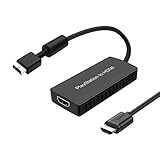
- PS2 Adapter: Convert PlayStation1/2/3 signal to HDMI signal (sony playstation game console connection to HDTV)
- No need to install drivers, portable, flexible, plug and play.
- PS2 to HDMI Converter: Support HDMI 16:9/ 4:3 output switch.
- NOTE: Compatible with PlayStation1/2/3 only.(Note: It's just a converter, you also can play PS1 games on PS2)
- RGB signal mode display. Video signal transfer only, can't improve the video quality.
| Check | Physical-disc path | Image-file path |
|---|---|---|
| Required medium | A PS2 DVD or CD; CD support is not confirmed in the cited PS5SX2 notes. | A game image in ISO, CHD, CSO or ZSO format. |
| PS5SX2 feature state | Release 2.03 physical-drive support is experimental and off by default. | The README documents image loading as the normal user-supplied game path. |
| Console requirement | A jailbroken PS5 in a project-tested or explicitly supported environment. | The same jailbroken PS5 and PS5SX2 requirements. |
| Game evidence | Check the title’s row and any disc-specific caveat. | Check the title’s row, then account for differences between builds and image formats. |
| What you supply | Your own physical disc. | Your own game image and your own PS2 BIOS; the project supplies neither. |
PCSX2’s “Dumping Discs” documentation explains how to create a personal backup with a suitable optical drive and distinguishes DVD and CD dumping formats. Follow that documentation for the drive and software procedure rather than downloading an image from an unknown source. An extension such as .iso identifies a container format; it does not by itself prove that the dump is complete or that the game is compatible with PS5SX2.
When an image is the more informative test
An image can separate emulator compatibility from experimental drive access. If a user-created image of your disc reaches the same point where the project’s test table says it should, but the physical disc is not detected, the remaining problem is likely in the drive-access path or the disc-medium support rather than in the game’s basic emulation. That comparison is diagnostic, not a guarantee that every image will behave identically.
Independent reader supportYour contribution helps us test, update, and keep practical guides available for everyone.Troubleshooting by symptom
The stock PS5 reports an unreadable or unsupported disc
That response is expected when you insert PS2 software without launching a homebrew emulator. Confirm that the console is actually jailbroken, start PS5SX2, enable its experimental disc option and use the emulator’s launch function. Do not use the stock response to conclude that the game itself is damaged.
PS5SX2 does not see the disc at all
- Recheck whether the disc is a DVD or CD. The published notes do not confirm CD-based PS2 support.
- Confirm that you are running a release whose notes mention physical-drive support; release 2.03 is the cited release with that feature.
- Open settings and verify the experimental flag after every update or reinstall. It is off by default in 2.03.
- Check the PS5 model and firmware against the project’s tested list. An unlisted version has not been tried by the project.
- Use a documented image of your own disc as a comparison test if your optical-drive setup permits it.
The game appears in the table but will not start from the disc
Match the region and release, then check the table’s caveat and your PS5SX2 build. Results can change between builds, and a table entry is not a guarantee. If the physical medium is a CD, the absence of confirmed CD support is a more immediate explanation than the game’s name alone.
Recommended Free Tools
The game boots, then freezes or shows broken graphics
Record the exact point of failure and compare it with the project’s notes. A title counted among the 108 games started in September 2026 may still have problems after the initial boot. Test a user-created image in a documented format only as a separate diagnostic; do not describe a start result as full compatibility.
Best Value

- Composite to HDMI Converter: Converts analog AV composite (Yellow, White, Red) input to HDMI 720P/1080P (60HZ) output, displayed on smart TV, Projector or HD Display, which bring back your old and cherish memories.
- Plug to Play: This HDMI Converter no extra drivers need, just plug and play,easy to use. Please hook up the USB Power Cable (included) to 5V power source during use. Note: The Video Converters only support converts AV to HDMI, can't converts HDMI to AV.
- Widely Used: This composite to hdmi adapter is widely applied to PS1, PS2, PS3, Xbox, N64, Wii, STB, VHS, VCR, DVD Players and other devices with standard composite AV input. Note: It can only be used when PS2 is set to RGB output.
- Wide Compatibility: This Video Audio Converter Adapter supports source formats of PAL, NTSC3.58, NTSC4.43, SECAM, PAL/M, PAL/N standard TV. Provide advanced signal processing with great precision, colors, resolutions, and details. Important Note: This converter can't improve video quality!
- Attention & Package: Please ensure to connect this av hdmi converter to power source to make it work. Package include: 1*AV to HDMI Adaptor, 1*USB Power Cable(adapter not included), 1*User Manual.
Your firmware is newer than every listed version
Mark the setup as untested. The README’s tested-firmware list is evidence of what the developers tried, not a promise for every later release. Avoid treating a successful report from another model or firmware as proof for yours.
How to report a useful result
If you want your finding to help other users, include enough detail to reproduce the conditions:
- PS5 model family and complete firmware version;
- PS5SX2 release number and whether the experimental disc flag was enabled;
- disc medium (DVD or CD), game title, region and serial when visible;
- the exact launch stage reached; and
- whether a user-created ISO, CHD, CSO or ZSO image behaved differently.
Separate observations from conclusions. “The DVD was detected and reached the title screen on release 2.03” is a reproducible observation. “All PS2 DVDs work” is not supported by the project’s release notes or testing table.
Decision guide
| Your situation | Best interpretation | Next action |
|---|---|---|
| Unmodified PS5 | PS2 disc playback is not supported by Sony. | There is no official disc-compatibility path to test. |
| Jailbroken PS5, unlisted firmware | Homebrew behavior is untested for that firmware. | Consult current project documentation before changing the system. |
| DVD, release 2.03, flag off | The feature has not actually been tested yet. | Enable the experimental flag and relaunch through PS5SX2. |
| CD, release 2.03 | Physical CD support is not established by the cited notes. | Check for a current project statement or use a personal image as a separate diagnostic. |
| Game listed as started | Initial launch was observed, not guaranteed full playability. | Read the caveat and test the part of the game you need. |
| No game-table entry | No published result is available in that table. | Treat the title as untested rather than automatically incompatible. |
Bottom line
A PS2 disc is a plausible PS5 homebrew test only when all of the conditions line up: a jailbroken PS5 in a tested environment, a PS5SX2 build with experimental physical-disc access enabled, a disc medium the project supports, and a game whose own test result matches your expectations. Sony’s normal PS5 software does not play PS2 discs, release 2.03’s drive feature is experimental and disabled by default, CD support is not confirmed in the cited notes, and the project’s game results—including the 108 titles started in September 2026—are not guarantees.
Quick Recap
Product prices and availability are accurate as of the date/time indicated and are subject to change. Any price and availability information displayed on Amazon at the time of purchase will apply.

