Do not trust an accessory because its outer dimensions look similar to Steam Frame. Before printing, identify the exact interface the part uses, inspect Valve’s published CAD or interface information, and make a cheap test print. Valve’s strongest compatibility signal is its Steam Frame Compatible mark: “Products with the Steam Frame Compatible mark have been tested to work with Steam Frame.” An unmarked model still requires your own geometry and physical checks.
What actually proves that an accessory fits Steam Frame?
There are three useful levels of evidence, and they should not be treated as interchangeable.
As an Amazon Associate I earn from qualifying purchases.
Valve’s compatibility mark
The clearest official signal is the mark described on Valve’s Steam Frame product page. Valve states: “Products with the Steam Frame Compatible mark have been tested to work with Steam Frame.” That wording establishes that Valve has tested a marked product with Steam Frame. It does not promise that the item will be comfortable for every face, compatible with every other modification, or suitable for every use case. It also does not mean an unmarked part is dangerous; it means the gathered Valve statement supplies no equivalent compatibility proof for that part.
A maker’s documented test
A designer may publish photographs, fit notes, revision history, or a test protocol for a particular Steam Frame model. Treat that as evidence about the specific design and revision, not as a guarantee that every copy, printer, material, or headset setup will behave identically. A documented test is stronger when it names the contact points, the headset revision, the material, and the failure checks performed.
#1 Best Overall

- 【STAINLESS STEEL MATERIAL】The vernier caliper is made of high-strength stainless steel and is waterproof and dirt-proof. The service life of this stainless steel digital caliper is longer than that of calipers with plastic or carbon fiber parts.
- 【ACCURATE MEASUREMENT AND ZERO SETTING】This digital caliper glides smoothly. Measuring range: 0 -6" / 0-150mm; Accuracy: ± 0.001"/ 0.02mm; Resolution: 0. 0005"/0. 01mm. At the same time, the smart design allows you to easily reset to zero by pressing a button and start a new measurement at any point on the scale, which is very suitable for differential measurement.
- 【4 MEASUREMENT MODES】The digital caliper has 4 measurement modes, which can be used to measure inside and outside diameter, depth, and step with two sets of jaws and a probe. Multiple measurement modes can bring more usage scenarios to people, and the measurement process is also very convenient.
- 【UNIT CONVERSION & LARGER LCD SCREEN】These Digital Calipers have a one-key button to quickly switch from inches (inch), fractions (F), millimeters (mm). The 6" digital caliper has a large, easy-to-read LCD DISPLAY which is easy to use and read even under strong sunlight. It will automatically turn off after 5 minutes of non-use to save power.
- 【Wide Applications】 Compared to the ordinary rulers, this stainless steel caliper can measure not only length but also caliber and depth, allows you to measure circular and cylindrical objects, more functions and better performance will satisfy you. It has always been used by professionals and hobbyists alike, jewelers, hobbyists, woodworkers, machinists, DIY, automotive mechanics, and more.
An unverified model
A downloadable file with no compatibility mark and no documented test is a starting point, not a fit decision. Matching a broad outside measurement, seeing a similar silhouette, or reading an anecdotal comment cannot establish that the attachment seats correctly, clears the lenses, or avoids pressure on the headset.
| Evidence | What it tells you | What it does not tell you |
|---|---|---|
| Steam Frame Compatible mark | Valve says the marked product has been tested to work with Steam Frame. | Universal comfort, compatibility with your other accessories, or a perfect fit for every user. |
| Maker’s documented test | The named design was checked under the maker’s stated conditions. | That your printer, material, headset revision, or face geometry will produce the same result. |
| Unmarked design | Usually only the designer’s intended dimensions and geometry, if supplied. | Any independent proof of attachment, clearance, comfort, or electrical safety. |
Use Steam Frame’s published dimensions correctly
Valve’s 2026 product information lists the Steam Frame core module plus facial interface at 175 mm × 95 mm × 110 mm. Those figures are useful for checking whether a proposed part is in the right general size range, planning a test print, and spotting an obvious scale error. They are not an interface drawing and do not define the clearance or tolerance at every mounting point.
For example, a printed visor may fit inside the listed envelope yet collide with the facial interface because its attachment tabs are misplaced. A strap clip can have the right overall width but still fail if its hook depth, insertion angle, or locking surface is wrong. Use the published dimensions as a reference, never as proof that an arbitrary model will attach.
| Published figure | Source and scope | Appropriate use | Not established by the figure |
|---|---|---|---|
| 175 mm × 95 mm × 110 mm | Valve, 2026 product information; core module plus facial interface. | Overall scale and gross interference checks. | Mounting-hole locations, tab tolerances, insertion force, or comfort. |
| 140 mm maximum eyeglasses width | Valve, 2026 product information; listed device specification. | Initial comparison with a glasses frame’s measured width. | Comfort for a particular frame, lens shape, bridge, face, or prescription. |
Before printing, identify the interface the model uses
“Fits Steam Frame” is incomplete unless you know what the part touches. Open the model description and inspect the geometry to classify it.
Core-module attachments
Parts that clip, screw, or otherwise register against the core module depend on exact hard-surface geometry. Look for locating faces, bosses, hooks, or slots rather than judging only the outside shell. Check whether the design leaves room for ventilation, buttons, cameras, microphones, and any moving or tracking-related hardware.
Rank #2

- [INCH/MM Conversion]: One button can quickly convert two measuring unit (INCH/MM). Measuring Range:0 - 150mm (6") / Resolution: 0.01mm (0.0005")/Accuracy: ±0.02mm (0.001")
- [Stainless Steel Material]: The vernier caliper is made of high-strength stainless steel, which is waterproof, stain-proof and oil-proof. The ergonomic design brings you a comfortable feeling.
- [Large and Clear Display Screen]: Large LCD display gives you a clear reading. The thumb rolling and locking screw provide easy sliding, accurate positioning, and fine adjustment.
- [Multifunctional Use]: The digital micrometer can easily and accurately measure internal, external, height and depth dimensions.
- [Automatically shut off]: When you have no action on the dial caliper, it can automatically shut off after 4 minutes.
Facial-interface parts
A facial-interface spacer, gasket, cover, or light-blocking piece affects the surface that contacts your face. Confirm the intended seating plane and inspect every edge that could create a pressure point. A part can be dimensionally close yet uncomfortable because a narrow rim concentrates force or changes the interface angle.
Headstrap parts
Strap adapters must match the strap’s insertion path and load direction. Examine how the printed part carries tension when you tighten the headset. A clip that merely snaps in during a relaxed test may pull out under normal adjustment. Check for sharp edges near the strap and for any movement that could alter headset position.
Crashes, No Sound, or Screen Glitches?
Random freezes, missing sound and display glitches usually trace back to one bad driver. Find and replace yours safely.Free scan · under a minuteWindows Errors? Fix Them Before They Spread
Repair common Windows errors and clear accumulated junk for a smoother, more stable PC - no reinstall needed.Free scan · no reinstallController or other accessories
Controller mounts and storage pieces have different contact surfaces from headset attachments. Confirm that the model was designed for the Steam Frame ecosystem rather than a visually similar controller. Check trigger, button, sensor, charging, and cable clearances before applying force.
Electrical, optical, or tracking interfaces
Do not infer electrical pinouts, connector clearances, optical spacing, or tracking-safe geometry from photographs. The available material does not define a universal safe design or test for arbitrary printed parts. If the model touches an electrical interface or moving/tracking component, obtain the relevant Valve information and follow the design’s specified clearances; otherwise stop and ask the designer for the missing requirements.
Find and inspect Valve’s CAD and interface information
Valve’s Steam Hardware announcements report that Steam Frame CAD files and electrical interface information are available for non-commercial use. This gives makers a better reference than a product photograph. It does not mean Valve endorses a particular third-party model, certifies your print, or grants commercial rights.
Rank #3

- Best Cost-effectiveness: We've crafted this plastic digital caliper with a singular focus – delivering unmatched value at an unbeatable price. While others chase high-precision innovations, we prioritize essential features that truly matter.
- 4 Measurement Modes and Precision: Outside diameter, inside diameter, depth, and step measurements. Measurement range: 0-6 inches / 0-150 mm, accuracy: ±0.2 mm / 0.01 inches. Whether it's for home projects, DIY, or 3D print, having this caliper will elevate you to be a measurement star.
- Low Energy Consumption Design with Smart Auto-Off Function: With just a single battery, our caliper can support 8+ months of measurements. It can automatically turns on when you slide it, and turns off within 5 mins when not in use, effectively conserving battery power.
- Tough Plastic Case Packaging and Secure Measurements: The plastic case packaging effectively protects the caliper from external impacts and friction, ensuring that it stays in optimal condition at all times. Moreover, our digital caliper is made of extra strong carbon fiber composites that are not easy to damage the measured object during use.
- What You Get: Digital Caliper *1, Tough Plastic Case *1, and LR44 button batteries *3(with one pre-installed). Additionally, we offer a lifetime warranty and friendly customer service to ensure your complete satisfaction.
- Locate the relevant Valve release. Use the Steam Hardware announcements and identify the CAD or interface material that corresponds to the attachment you are evaluating.
- Open the actual geometry. Inspect the surfaces, holes, tabs, slots, insertion direction, and any keep-out areas that the proposed accessory uses. Do not rely on a screenshot or a dimension copied from a forum post.
- Match coordinate systems and orientation. Make sure the accessory and the Valve reference are aligned in the same front, rear, left, right, top, and bottom directions. A model can appear to have the right measurements while being mirrored or rotated.
- Check the interface, not just the envelope. Compare the mating features and the surrounding clearance. Record where the part must float, slide, flex, or stop.
- Save the source and revision. Keep the Valve file version and the accessory file version with your project. If either changes, repeat the comparison instead of assuming the old result still applies.
Because Valve describes these materials as non-commercial, treat a commercial print-and-sell plan as a separate legal question. The availability of CAD for non-commercial use is not a blanket license for manufacturing or branding.
A practical pre-print fit-check workflow
The following sequence is general maker guidance, not a Valve-issued fit protocol or a test performed on a particular accessory.
1. Describe the contact in one sentence
Write a precise statement such as “This clip hooks onto the left headstrap rail” or “This spacer sits between the facial interface and the user’s face.” If you cannot identify the contact and load path, the design is not ready to print.
2. Confirm the target headset
Check the model description, file name, revision notes, and photographs for an explicit Steam Frame target. Reject designs described only as “universal,” “VR headset,” or compatible with a visually similar product unless the designer supplies Steam Frame-specific geometry.
3. Compare mating geometry
Overlay or otherwise compare the accessory against the relevant Valve CAD/interface reference. Check the locations and sizes of locating surfaces, holes, lips, hooks, and stops. Note any dimension that the designer has not specified instead of guessing it from the outer shell.
Rank #4
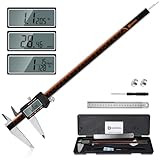
- 【Stainless steel material】Digital calipers are made of high quality stainless steel, waterproof and rustproof, and the sturdy frame reduces the wear and tear of vernier calipers, allowing a longer service life
- 【Accurate measuring range】 0-12 inches/300mm; Display: 14mm x 40mm oversized LCD; Accuracy: ±0.04mm/0.0015 inches; Resolution: 0.01 mm/0.0005 inches. The knurled thumb roller ensures smooth gliding in use; the locking screw enables accurate positioning. These two designs ensure smooth operation during measurement and prevent slippage or jams from occurring
- 【4 measurement modes】The digital caliper comes with two pairs of jaws and a probe to easily measure depth, step length, outside diameter and inside diameter. Four measurement methods meet most of your measurement needs
- 【3 unit conversions】 With the push of a button, you can quickly switch between the 3 units of the digital caliper: inches, millimeters and fraction; plus the large LCD screen makes it easy to read. You can reset it to zero with the zero button, plus the digital vernier caliper will automatically turn off after 5 minutes of non-use to save power
- 【Wide application】HARDELL digital caliper comes with 1*ruler, 1*screwdriver, 2*batteries. The case is resistant to pressure, shock and drop for easy storage and carrying. 12 inch caliper micrometer has been used by professionals and amateurs, it is the best choice for mechanics, woodworkers, jewelers, craftsmen, DIY enthusiasts, auto mechanics, etc
4. Use the published envelope as a secondary check
Compare the proposed part’s overall size with the 175 mm × 95 mm × 110 mm core-module-plus-facial-interface reference. This catches gross scaling mistakes, but it cannot replace the interface comparison.
5. Plan a low-cost test print
Print only the geometry needed to test the interface when practical: a short section containing the clip, hole pattern, locating face, or strap channel. A test coupon uses less filament and reveals scale errors before you print the complete accessory. The coupon must preserve the mating dimensions and relevant wall thickness; a decorative shell alone is not a valid test.
6. Inspect the printed part before mounting
- Remove brims, supports, strings, and elephant-foot deformation that could change the fit.
- Check that holes are open, edges are not cracked, and thin tabs have printed completely.
- Compare the print with the digital model for shrinkage, warping, or accidental scaling.
- Round or deburr edges only where doing so cannot change a locating surface or locking feature.
7. Perform a gentle physical fit check
Align the part in the intended orientation and apply only the force needed for normal engagement. It should seat against its designed stops without crushing the headset or requiring tools. Do not force a clip past a hard stop; a part that needs excessive force may damage the headset or fail later.
8. Check function and clearance
- Verify that buttons, cameras, microphones, vents, lenses, sensors, charging ports, and adjustment controls remain unobstructed.
- Check that the headset does not shift when you move your head normally.
- Look for pressure on the facial interface, nose, brow, temples, ears, or glasses.
- Confirm that the accessory cannot contact moving or tracking components through the full range of intended adjustment.
- Remove the part and inspect the headset for scratches, scuffs, whitening, or bent components.
9. Test the real use case gradually
Wear or use the headset for a short session first. Recheck the attachment after adjustment, cable movement, and ordinary head motion. Stop if you feel unusual pressure, see visual obstruction, notice tracking changes, or hear cracking from the printed part. A successful static fit is not proof of long-term durability.
The Tool Desk
Outbyte PC Repair FREEClear out junk files and repair common Windows errorsFree Scan →Outbyte Driver Updater FREEFix the driver behind crashes, sound loss and screen glitchesFind Drivers →Glasses wearers need a separate fit check
Valve lists a 140 mm maximum eyeglasses width. Measure your frame at its widest point and compare it with that specification, but do not treat the number as a comfort guarantee. Frame depth, bridge shape, temple angle, lens curvature, facial width, and the position of the facial interface all affect whether glasses feel comfortable inside a headset.
Best Value

- Solid stainless steel build – This digital caliper 6 inch resists rust, wear, and corrosion, outlasting plastic models. The sturdy metal body handles daily workshop use without bending. The shockproof case protects your measuring tool from drops and impacts, keeping it safe and ready for each job
- Reliable accuracy with smooth glide – This digital vernier caliper measures 0‑6″ / 0‑150mm with ±0.02mm / 0.001″ accuracy and 0.01mm resolution. The thumb roller glides without sticking, and the locking screw holds your reading steady. From checking 3D print filament and woodworking joints to measuring jewelry and small parts for repairs, you can trust the results
- Four measurement modes in one – Use two jaw pairs and a depth probe for ID, OD, depth, and step measurements. No need to switch digital caliper measuring tool – this versatile dial caliper covers tubing, bores, recesses, and shoulders. Press the zero button anywhere to reset for quick comparative checks. Close and re‑zero before each use to ensure consistent readings
- Metric & Imperial conversion with large LCD – This electronic vernier caliper lets you switch between millimeters and inches with one click. The oversized LCD screen displays crisp, bold numbers that are easy to read at a glance. The wide viewing angle means you can read it clearly without tilting the caliper. Auto‑off powers down after 5 minutes of non‑use to save battery
- Complete kit – ready out of the box – Your package includes the digital micrometer, a sturdy case, two batteries (one spare), a mini screwdriver, and a stainless steel ruler. No extra trips to the store – just open and start working. A practical choice for DIYers, hobbyists, and makers who need reliable measurements at home or in the workshop
Measure the frame you actually wear
- Measure the outside width across the front of the frame, including the widest parts of both rims.
- Record the bridge shape and the distance from the lenses to the brow and cheeks.
- Check whether the temples or hinges touch the facial interface when the glasses are worn normally.
- Repeat the check with the headset adjusted as you intend to use it; do not test only with the glasses held in front of your face.
A digital caliper can make a width or clearance measurement more repeatable, but it cannot determine comfort or replace wearing the headset. No particular caliper model is established as a Steam Frame requirement.
Prescription inserts are a different option
On September 15, 2026, Zenni Optical announced prescription inserts designed for Steam Frame through its press release. The announcement states a price of $67.95 for the prescription insert. Price, availability, prescription limits, and ordering details can change, so verify them directly before buying. The announcement identifies a headset-specific insert option; it does not prove that an unrelated printed lens carrier or spacer will fit.
If you are comparing a printed glasses spacer with inserts, evaluate whether you want to keep wearing your everyday frames, use a purpose-built prescription insert, or make a custom modification. Each choice has a different fit target and test burden.
Free tools Windows power users keep installed
One-click scans. No signup required.
Compare your options before committing filament
| Option | Compatibility evidence | Fit target | Test-print reversibility and cost | Best for |
|---|---|---|---|---|
| Valve-marked accessory | Valve says products with the Steam Frame Compatible mark have been tested to work with Steam Frame. | The interface named by the accessory. | Usually no custom test print is needed, though you still check personal comfort and accessory interactions. | Readers who want the strongest published compatibility signal. |
| Documented third-party model | Maker-supplied geometry and test notes, if complete. | Face, glasses, strap, controller, or core module, depending on the design. | A small interface coupon can limit wasted material. | Readers who want a custom modification and can reproduce the stated conditions. |
| Unmarked downloadable model | No compatibility proof established by the available sources. | Whatever the file claims; verify it yourself. | Requires a low-cost test print and physical inspection before a full print. | Experienced makers willing to measure, modify, and accept uncertainty. |
| Prescription insert announced for Steam Frame | Zenni’s September 15, 2026 announcement identifies it as designed for Steam Frame. | Prescription-lens fit inside the headset. | No custom print, but purchase price and prescription constraints apply. | Glasses wearers who prefer a named insert option over a printed spacer. |
Common failure modes and what to do
| Symptom | Likely cause | Response |
|---|---|---|
| The part will not start or seat | Wrong orientation, mirrored geometry, printer scaling, or an incorrect headset target. | Verify orientation and file units, then compare the mating features with the Valve reference before sanding or forcing anything. |
| The part clicks in but moves | Missing stop or hook geometry, excessive clearance, or a load path different from the design’s assumption. | Identify which surface should resist movement. Revise the model or stop using it until the attachment is secure under normal adjustment. |
| A clip needs excessive force | Warping, elephant foot, undersized clearance, or an incorrect insertion path. | Inspect the print and reprint the test coupon. Do not force the clip onto the headset. |
| Buttons, cameras, vents, or ports are blocked | The model was checked only by outside dimensions. | Remove the accessory and map every keep-out area against the actual headset and Valve interface reference. |
| Glasses press into the headset | Frame width alone was used; bridge, lens depth, temple angle, or facial geometry was ignored. | Measure the complete frame and test with the headset adjusted for normal wear. Consider a purpose-built prescription insert. |
| Tracking or electrical behavior changes | Unverified proximity to sensors, moving components, or electrical interfaces. | Stop testing, remove the part, and obtain the relevant interface requirements. Do not guess at electrical or tracking clearances. |
| The print cracks during fitting | Thin walls, layer-direction weakness, sharp stress concentrators, or excessive insertion force. | Stop using that revision, inspect the headset for damage, and redesign the attachment rather than increasing force. |
What a fit check cannot establish
The available Valve information does not publish a universal tolerance for every Steam Frame accessory, a standard material specification for custom prints, or a single approved test method for arbitrary designs. Therefore, no one can honestly declare that an unspecified third-party file fits solely from the headset’s outer dimensions.
A careful maker can establish that a particular revision seats on a particular headset, clears the relevant controls, and remains comfortable during an initial use check. That result is narrower than certification. It does not establish fatigue life, impact resistance, heat behavior, chemical compatibility, or safety after repeated removal unless those properties are separately tested.
Documentation to keep with your model
- The exact accessory file name, revision, and unit scale.
- The Valve CAD or interface reference and its release location.
- The interface dimensions you checked and the clearances you intentionally left.
- Printer, material, layer orientation, and settings that affect the attachment.
- Photos of the test print seated on the headset, including the underside and contact points.
- Any observed pressure, movement, obstruction, or tracking issue.
This record makes a later revision testable and prevents a successful fit on one print from being mistaken for proof that every copy will match it.
A concise decision rule
Choose a Valve-marked accessory when you want the strongest published compatibility evidence. Choose a documented custom model when you can inspect its interface and reproduce a physical test. Treat every unmarked file as unverified: compare it with Valve’s CAD or interface information, print the smallest useful test piece, and check alignment, secure engagement, clearance, pressure, and function before making the full accessory. For glasses, use the 140 mm specification only as an initial screen and assess the complete frame—or investigate the announced prescription-insert option—rather than assuming width alone predicts comfort.
Do these 3 things before closing this tab:
1Fix the driver behind crashes, sound loss and screen glitches2Repair Windows errors before they cause bigger problems3Scan for outdated or missing drivers - takes under a minuteQuick Recap
Product prices and availability are accurate as of the date/time indicated and are subject to change. Any price and availability information displayed on Amazon at the time of purchase will apply.

