Outdated Drivers Are Slowing You Down
One free scan finds every outdated or missing driver and matches the right update for your exact hardware.Free scan · exact hardware matchPC Slower Than It Used to Be?
A free scan shows the junk files, broken settings and background clutter dragging Windows down - then fixes them in one click.Free scan · Windows 10 & 11To see free space on a Steam Deck, open Steam > Settings > Storage. To inspect the internal SSD’s reported health information, use the SMART view in Desktop Mode; it can show drive telemetry, but it is not a guarantee that the SSD will keep working.
Check available storage in Gaming Mode
- Press the Steam button.
- Choose Settings, then Storage.
- Review the internal drive and any connected storage shown on the screen.
Valve documents this screen as the place to manage system and connected storage in its Steam Deck Basic Use & Troubleshooting Guide. If your menu labels differ, SteamOS updates may have changed them. The amount of usable space you see depends on the installed system, updates, and your own files; Valve’s listed SSD capacities are configurations, not a promise of a particular free-space figure.
As an Amazon Associate I earn from qualifying purchases.
Inspect SSD SMART information in Desktop Mode
Graphical route
- Switch to Desktop Mode.
- Open KDE Menu > System > Info Center.
- Under Devices, select SMART Status, then Detailed Information.
This path was described in a Steam Community answer dated December 10, 2022, rather than in Valve’s troubleshooting guide, so the menu may differ across software versions. The SMART view may include drive-reported information such as power-on hours and read/write errors.
How to interpret the readout
SMART information is telemetry reported by the drive, not a definitive forecast of its remaining life. A normal status cannot guarantee that the SSD will not fail, and the available guidance does not establish a Steam Deck-specific error threshold for replacement. NVMe supports health and log monitoring as well as device self-test mechanisms, but those general capabilities do not create a Deck-specific pass/fail rule; see the NVM Express Association’s NVMe 1.3 presentation.
#1 Best Overall
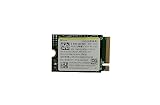
- Capacity: 256GB / Interface: M.2 2230 PCIe NVME SSD
- Dimension: 22mm x 30mm x 2.38mm / Key Type: M Key
- Size: Fits 2230 as is / Compatibility: Laptop & Desktop Compatible
- Bulk Packaging - Only the Drive is included. Any screws, cables, or adapter needed are sold separately
- Warranty: 1-Year Oemgenuine Warranty
If the readout shows errors, the Deck is behaving unusually, or important data is at risk, back up saves and user data and contact Steam Support or a repair professional before trying an invasive fix.
Optional terminal inspection
A user report for SteamOS 3.6.20 (build 20241030.1) shows this example:
Rank #2

- Top choice for STEAM Deck capacity upgrade. Top choice for capacity upgrade on lightweight devices
- Small-size and High Performance 22x30mm small form factor with sequential read/write speeds up to 5,000 / 3,500 MB/s
- Heat dissipating graphene label for enhanced heat dissipation and system operating stability.
- Gen4 read/write speed compatible with PCIe Gen3 interface
- Small-size solution offering TB-grade massive capacity.
sudo smartctl -a /dev/nvme0
The report also describes a graphical route through Settings > About This System > Show More Information > Devices > SMART Status. These are examples tied to one reported build, not a universal Valve procedure. The command targets a device name that may not match every Deck. Verify the drive name on your own system before running it; if you are not comfortable identifying the device, use the graphical route or ask a repair professional. The example is documented in a SteamOS GitHub issue. For a basic health check, do not run write, erase, or self-test commands.
What’s actually slowing this PC down?
Pick the symptom - the matching free tool is one click away.
If you need more room
Valve lists a built-in microSD slot and UHS-I support in its Steam Deck Tech Specs. Its troubleshooting guide says UHS-I Class 3 or better cards are supported; UHS-II and UHS-III transfer speeds are not supported. A compatible UHS-I microSD card can add storage, but it does not diagnose or repair the internal SSD.
Quick Recap
Product prices and availability are accurate as of the date/time indicated and are subject to change. Any price and availability information displayed on Amazon at the time of purchase will apply.

