Freezing and SSD disconnect errors are reasons to check the drive, but they do not prove that the SSD has failed. In Windows, start with the built-in storage status and reliability counters, then use the drive maker’s official utility to identify supported health data and check firmware for your exact model. Back up important files before firmware updates or extended troubleshooting.
Back up files and identify the SSD
If the drive still responds, copy important files to a separate location before troubleshooting further. Record the manufacturer, exact model, interface and installed firmware revision from Windows, BIOS/UEFI or the manufacturer’s utility. Do not choose firmware based only on capacity or a similar product name.

As an Amazon Associate I earn from qualifying purchases.
For Samsung SSDs, Samsung recommends backing up even though its documented firmware update process is not intended to erase data. Samsung’s tools and downloads page provides its utility and firmware resources.
Check Windows-reported SSD status
View physical disk status
Open PowerShell and run:
Get-PhysicalDisk | Select-Object FriendlyName, Manufacturer, Model, HealthStatus, OperationalStatus, SizeMicrosoft documents Get-PhysicalDisk as listing physical disks visible through available storage management providers. The command can show fields such as HealthStatus and OperationalStatus, but a drive may be absent if the provider does not expose it. A “Healthy” result is useful, not proof that every possible failure mode is absent. Microsoft’s Get-PhysicalDisk documentation describes the cmdlet and its output.
#1 Best Overall

- 【Why choose ZE's purple NVMe SSD enclosure】Powered by 10Gbps USB 3.2 Gen 2, UASP & TRIM, and a 4X cooling system, it delivers pro-level speed, stability, and thermal performance for creators. It also lets you instantly transform that unused M.2 NVMe SSD from your old computer into a high-speed portable drive—saving you money and being eco-friendly by avoiding the need to buy a new SSD.
- 【10Gbps High-Speed Transfer】This M.2 SSD enclosure features the latest USB 3.2 Gen 2 Type-C interface, delivering blazing transfer speeds of up to 10Gbps.This ssd adapter supports USB 3.2/3.1/3.0/2.0 interfaces, ensuring wide device compatibility and stable performance across various systems. Equipped with RTL9210, supporting UASP and TRIM, improving data transmission efficiency, maintaining the service life of SSDs, and supporting S.M.A.R.T. health status monitoring.
- 【Exclusive 4-Layer Cooling System】Prevent slowdown and extend SSD Lifespan. ① Gear-Inspired surface: +30% contact area, +20% faster cooling. ② Premium aluminum shell:237 W/m·K for rapid heat transfer. ③ High- Efficiency thermal pad: 3W/m·K conductivity & shock absorption. ④ Heat dissipation hole: accelerate heat escape.
- 【Toolless &Compact & Portable】A toolless NVMe enclosure makes SSD swaps effortless—no screwdriver needed, install in 5 seconds with one hand. Its compact, lightweight design fits easily in your bag or pocket, perfect for quick backups, drive sharing, or on-the-go use during travel, work, or daily tasks.
- 【Realtek RTL9210| Fast, Stable, Reliable】 The advanced Realtek RTL9210 chip with multi-protection (short-circuit, over-current) keeps your SSD and data safe. UASP cuts latency for smoother transfers, TRIM sustains SSD speed and responsiveness, and S.M.A.R.T. lets you monitor drive health. Even under heavy workloads, this M.2 enclosure runs cool, fast, and stable.
Inspect available reliability counters
For a disk exposed as a physical disk object, run:
Get-PhysicalDisk | Get-StorageReliabilityCounter | Format-ListDepending on the drive and provider, the output can include temperature, errors, wear and time in use. Not every device reports every counter: a blank or missing field is not the same as a measured zero, and it is not a universal pass/fail result. Save the output if you contact the manufacturer or support. See Microsoft’s Get-StorageReliabilityCounter documentation.
Check the manufacturer’s utility and firmware
Use the manufacturer’s official support or download site and search for the exact SSD model. Its utility may show supported health attributes and installed firmware; compare that revision with the release notes for the same model. Windows status commands and manufacturer utilities complement each other: what they can see depends on the drive, provider, controller or enclosure, and supported SMART attributes.
Rank #2

- USB4 technology with USB-C connector to deliver blazing-fast up to 40Gbps data transfers
- Four-level smart cooling fan ensure consistent low-noise, high-speed performance
- Tool-free design with push-to-open mechanism for quick SSD installation or removal
- USB-C interface compatible with high-speed NVMe SSDs (2230/2280)
- Exclusive ProArt SSD Dashboard offers real-time monitoring through a custom UI
Samsung Magician is designed for Samsung SSDs, not as a general utility for other brands. Samsung says health and total-usage readings depend on the SSD’s supported SMART attributes, so unavailable data may reflect a reporting limitation rather than a diagnosis. Check Samsung’s Magician and firmware downloads for current, model-specific information.
Recommended Free Tools
For example, Samsung lists 990 PRO firmware 8B2QJXD7 with a December 2025 note about improving read-operation stability, and 7B2QJXD7 with a September 2025 note about intermittent non-recognition and blue-screen issues. Those releases apply to the named model family; they are not fixes to apply to unrelated SSDs. Check Samsung’s official downloads and release notes for current availability and exact compatibility.
Rank #3

- [Strong Heat Dissipation] M.2 adapter adopts aluminum alloy shell, slim design, and excellent heat dissipation.
- [SUPPORT MULTIPLE OPERATING SYSTEMS] is engineered with USB 3.2 Type c interface, support hot-shippable, Plug and Play, No Driver required. Supports /forMac/ This external hard disk box is suitable for connecting computers, Smartphones, laptops and other devices. Please note, all new solid-state drives must be formatted before use.
- [HD Screen Design] Come with HD display to monitor your hard drive usage in real time. Display content includes: USB operating speed, cumulative number of hard disk power-on times, cumulative hard disk operating time, total hard disk write volume, real-time health monitoring, operating temperature, USB voltage.The datas on the display allow you to monitor the usage of the hard disk more directly,When your hard drive health is below 100%, you need to attention to backup data in time.
- [10Gbps Supper Speed] USB3.2 Type C NVME enclosure transmission speed is up to 10Gbps, After installing the SSD, the read and write speed can reach 1000-1200MB/s.And HD movie transmission only takes 2 seconds. The perfect data transfer and backup solution. Backward compatible with USB 3.1 Gen1 and USB 3.0 with speeds up to 6 Gbps.
- [Wide Compatibility] This only compatible with NVMe in sizes 2230 2242 2260 2280, such as M.2 NVMe M key SSD; For the System, NVME Enclosure support Multi OS, , for OS, Linux, Android.
Before installing firmware
- Confirm the firmware is for the exact model and supported interface or connection method.
- Back up important files, close other applications, keep the computer powered, and follow the maker’s instructions.
- Samsung says its firmware update cannot be performed through an external USB connection, requires a reboot, and cannot be downgraded through its documented process.
- Microsoft says supported Windows drive firmware updates require a drive that implements the relevant commands and advises obtaining firmware directly from the OEM or drive vendor. See Microsoft’s drive firmware guidance.
Interpret freezing and disconnect errors carefully
Note whether the SSD disappears from Windows, whether an application or Windows reports a warning or timeout, and whether available reliability counters show errors or abnormal readings. A disconnect can have several causes; a health utility that cannot see a drive during an intermittent disappearance cannot rule out a problem.
Microsoft’s Storage Spaces guidance documents a “Lost communication” state in which a drive is missing, along with timeout states and actions such as restoring server availability where relevant, reconnecting or replacing a drive, or collecting further diagnostics. That guidance is for Storage Spaces and Storage Spaces Direct, not a universal repair procedure for every consumer PC. See Microsoft’s Storage Spaces troubleshooting guidance.
Rank #4
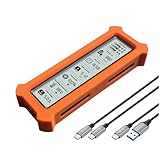
- See Everything, Worry Less:Glance at the built-in display to check your SSD’s health percentage, real-time temperature, total usage hours, remaining capacity, and USB voltage. Green icons = safe. Red icons = act now! No more surprise failures.
- Blazing 10Gbps Speeds:Harness USB 3.2 Gen 2’s full power (Type-C included). Transfer 4K movies or game libraries in seconds – perfect for creators, gamers, and professionals.
- Cool Under Pressure:Our patented aluminum finned cover isn’t just sleek – it slashes heat by 50% vs. flat designs! Combined with high-conductivity thermal pads, your SSD stays frosty even during heavy workloads.
- Your Data’s Bodyguard:Smart warnings protect against:Overheating (>65°C),Failing health (under 100%),Unstable USB power (under 4.6V/over 5.5V),→ Backup reminders keep disasters at bay.
- Plug & Play in 60 Seconds:No tools needed! Works with ALL M.2 sizes (2230/2242/2260/2280) and both SSD types (NVMe PCIe or SATA). UASP + TRIM support maintains SSD speed over time.
If the SSD is intermittently absent or files are becoming unreadable, prioritize copying recoverable data and contacting the drive maker or a qualified support provider. Avoid repeated firmware attempts or destructive reset and repair commands until you have a backup and understand their effects.
The Tool Desk
Outbyte Driver Updater FREEFix the driver behind crashes, sound loss and screen glitchesFind Drivers →Outbyte PC Repair FREERepair Windows errors before they cause bigger problemsFix Now →Which check should you use?
| Route | Useful for | Limits to keep in mind |
|---|---|---|
Get-PhysicalDisk |
Windows-reported identity, health status and operational status for disks visible through available storage providers. | A disk or field may not be exposed; “Healthy” does not rule out every fault. Microsoft documentation. |
Get-StorageReliabilityCounter |
Available temperature, error, wear and usage-time counters. | Support varies by device and provider; absent data is not a zero reading. Microsoft documentation. |
| Drive maker’s official utility and support page | Model-specific supported health attributes, installed firmware and matching firmware release notes. | Support is brand- and model-specific; visibility can depend on the connection, and not every SMART attribute is supported. Samsung’s tools page is for Samsung products. |
When comparing results, first check whether the tool supports the exact drive and can see it through its current controller or enclosure. Then distinguish a reported reading from an unsupported or unavailable field, and verify any firmware against the exact model and connection requirements.
Quick Recap
Product prices and availability are accurate as of the date/time indicated and are subject to change. Any price and availability information displayed on Amazon at the time of purchase will apply.

