Do these 3 things before closing this tab:
1Clear out junk files and repair common Windows errors2Scan for outdated or missing drivers - takes under a minute3Repair Windows errors before they cause bigger problemsOn a OnePlus phone, open Settings > Battery > Battery Health if that menu is available. The health or maximum-capacity reading, when provided, is the closest built-in check. Menus and readings vary by model and OxygenOS version, so a missing percentage does not by itself mean the battery is faulty.
Check for a built-in battery-health reading
- Open Settings and tap Battery.
- Look for Battery Health and open it. If your phone displays a health or maximum-capacity value, review it there.
- If you do not see the menu, use Settings search for battery health. Confirm your phone model and OxygenOS version in the device information, then check the manual or support page for that exact model.
The OxygenOS 14 manual documents Settings > Battery > Battery health > Smart charging, which confirms that the submenu exists on devices covered by that manual; it does not establish that every OnePlus phone shows a numerical capacity percentage. The OnePlus Open manual says, “Functions may vary with different models. Please refer to your actual phone.” OnePlus OxygenOS 14.0 User Manual · OnePlus Open User Manual
As an Amazon Associate I earn from qualifying purchases.
OnePlus Community users have discussed missing battery-health percentages on particular models or software versions. Those reports are anecdotal, not proof of a battery defect or a complete list of supported devices. OnePlus Community discussion
Quick wins for a faster PC:
Clear out junk files and repair common Windows errorsFree Scan →Fix the driver behind crashes, sound loss and screen glitchesFind Drivers →Repair Windows errors before they cause bigger problemsFix Now →Understand what the other battery screens tell you
Battery usage helps find drain, not remaining capacity
Battery-use details show which apps or processes have consumed power over a period. They can help identify a drain source, but they do not directly measure the battery’s remaining maximum capacity. The OnePlus 9 manual describes usage since the last full charge; the OxygenOS 14 manual describes usage details for the last 24 hours. The screen and time range depend on the model and software. OnePlus 9 User Manual · OxygenOS 14.0 User Manual
#1 Best Overall
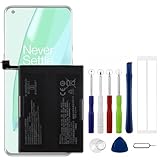
- Compatible Model No.:OnePlus 9 Pro 5G 1+9 Pro 5G LE2127 LE2123 LE2121 LE2125 LE2120,Capacity:2250mAh,Voltage:7.74V. Make sure your device is suitable for this replacement battery before ordering.
- Our battery is 100%, tested premium quality 100%, specially used Class A battery cells with UL,CE and RoHS certification. Each battery has a battery that has been tested under strict quality control standards and offers you a charge of up to 526+ cycles with fast and efficient charging.
- The battery comes with high quality repair tools and 3M adhesive tapes, no installation guide, a professional technician is recommended if you do not know how to replace it yourself.
- If as the product you received is broken, crashed or dented, please do not install it in your phone, contact us first and we will help you solve the problem immediately.
- Installation videos could be found on the internet like YouTube.
Smart Charging manages charging; it does not measure capacity
On supported OxygenOS 14 devices, Smart Charging can learn charging habits and adjust charging—for example, pausing at 80% overnight and resuming before the expected wake time. This is a battery-protection feature, not a current-capacity reading. OnePlus OxygenOS 14.0 User Manual
When the phone does not show a percentage
If Battery Health is absent, first verify the exact model and OxygenOS version and consult that model’s manual or OnePlus support information. The available documentation does not establish a complete list of OnePlus models and releases that display a numerical health percentage, so do not assume the menu is universal.
Rank #2
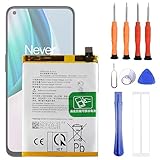
- 1. Applicable Models:Compatible with OnePlus 1+ Nord N10 5G BE2029 BE2025 BE2026 BE2028 ,Please carefully check your mobile phone model before purchasing to avoid purchasing the wrong model and damaging your product
- 2. Product Parameters: Battery Model:BLP815,Capacity parameter:4300mAh / 16.64Wh,4.45V,Please use a charger that is compatible with the battery or the original charger that came with the phone to extend the battery life
- 3.Excellent Performance: Features A+ grade battery cells, ensuring more than 900 charging cycles. Multi-layer protection design ensures safe use for users and devices, with a built-in microchip that prevents overcharging, over-discharging, and overheating.
- 4. Maintenance Instructions: Before using the battery for the first time, please fully discharge it three times and then charge it once to achieve optimal performance. Please note that optimal performance and service life can only be achieved after completing 3 to 5 full charge and discharge cycles.
- 5.After-sales service: If you have any questions after receiving the product, please contact us immediately. We will provide you with a solution, which will resolve your issue more efficiently. Thank you for contacting us
You can use a third-party monitor such as AccuBattery as a secondary option. Its health screen estimates capacity from charging data collected over time, and its help materials describe manual benchmarking. Allow it to gather charging sessions before interpreting the estimate; it is not an official OnePlus diagnostic or a guaranteed precise measurement. AccuBattery Help Center
The Tool Desk
Outbyte Driver Updater FREEScan for outdated or missing drivers - takes under a minuteDriver Scan →Outbyte PC Repair FREEClear out junk files and repair common Windows errorsFree Scan →When to contact OnePlus
If runtime remains poor or you have other persistent battery problems, contact OnePlus support or an authorized service center for a model-specific assessment. Repair and service pathways differ by region; the United States support page describes options for that market. OnePlus Support (United States)
Quick Recap
Rank #4

- The battery is manufactured and tested under strict quality control standards before sent out
- Compatible Model: for 7 Pro GM1917 GM1915 GM1910 GM1913 GM1911. Please verify your old battery part number and model before purchasing this replacement battery
- Safety and Reliable: All batteries are tested before shipment, your phone will work as great as when you first got the device
- Useful Reminder: It is recommended to fully drain and fully charge the battery especially during the first 3 charging and discharging cycles, doing so may greatly improve the overall life of the battery. Please remember that its full performance and longevity is only achieved after 3 to 5 complete charge and discharge cycles
- Customer Service: Please contact us if there is any problem with our product, we promise you a satisfaction resolution in 24 hours
Rank #3

- Compatible with:OnePlus 10T CPH2415, CPH2413, CPH2417; Please check your battery type before purchasing
- High Quality Battery: Made of high quality Class A batteries that are durable and long lasting. Built-in microchip prevents overcharging, over-discharging and overheating to extend battery life
- Brand New Batteries: Batteries are 100% brand new and have been factory-tested for optimal performance after three to four full charge/discharge cycles to resolve power issues
- Tools Included: Professional tool kit is provided for quick and easy installation. Before installation, please watch the YouTube video tutorial
- If you have any questions about our products, please leave us a message, we will reply you as soon as possible, thank you for your patience
Product prices and availability are accurate as of the date/time indicated and are subject to change. Any price and availability information displayed on Amazon at the time of purchase will apply.

