Do these 3 things before closing this tab:
1Repair Windows errors before they cause bigger problems2Scan for outdated or missing drivers - takes under a minute3Clear out junk files and repair common Windows errorsYou can check a Nikon D3200’s recorded shutter count by examining an original image file with software that reads Nikon MakerNote metadata. Treat the result as a clue, not an exact lifetime total: Nikon says there is no method to accurately determine every shutter release, and the count can be reset or cleared in some circumstances. Nikon lists the D3200 among models tested to over 100,000 shutter cycles, but that is an estimate—not a guaranteed lifespan or a failure threshold.
How to check the Nikon D3200 shutter count
- Get an original image from the camera. Use a file that preserves its metadata, rather than a screenshot or an image that has been edited or exported in a way that may remove metadata.
- Open it in software that supports Nikon MakerNote data. A third-party D3200 guide identifies the shutter-count value in the Nikon NEF MakerNote EXIF tag
0x00A7(decimal 167). The software must be able to read Nikon-specific maker notes; support and file handling vary. ShutterCount.app’s D3200 guide describes this field, but this is third-party guidance, not a Nikon-endorsed procedure. - Interpret the displayed value cautiously. Record it as the count reported in that file’s metadata, not as a certified total of all shutter releases. Nikon warns that no method accurately establishes the total.
For a used D3200, ask the seller for an original camera file rather than relying only on a typed number or screenshot. Then assess the camera’s physical condition and operation separately; metadata cannot establish whether the camera is currently working properly.
As an Amazon Associate I earn from qualifying purchases.
What Nikon’s 100,000-cycle figure means
Nikon says the D3200 is among DSLR models “tested to over 100,000 cycles.” The figure applies to a group that also includes the D5600, D5500, D5300, D5200, D5100, D5000, D3100, D3000, and D90. Nikon describes this as an estimate based on testing, not a promised service life. The company says actual shutter cycles may be higher or lower. Nikon’s support article was published on 2019-12-20 and last updated on 2025-05-16.
So, a reading near or above 100,000 does not mean every D3200 is about to fail. Nor does a lower reading guarantee that a particular camera has ample life remaining. Nikon does not provide a precise remaining-life calculation or a pass/fail count for an individual body.
#1 Best Overall
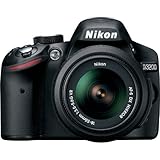
- This Certified Refurbished product is manufacturer refurbished, shows limited or no wear, and includes all original accessories plus a 90-day warranty
- 24.2 MP DX-format CMOS sensor,Display Screen 3.0-Inch Rear Screen, LCD (921000)
- EXPEED III Image Processing
- Wide ISO sensitivity range,Filter Thread: 52 mm
- One-touch Full HD 1080p movie recording
Why a reported count may be incomplete
Nikon states: “There is no method to accurately tell the total number of times your camera’s shutter has been released.” It also notes that firmware updates may reset a release count and that replacing service parts may clear it. A metadata reader can therefore provide useful evidence of recorded use without proving the camera’s complete history.
Do not confuse the D3200’s playback frame information with a lifetime mechanical shutter count. The reference manual describes frame number and total number of images among playback information; it does not establish that the displayed frame numbering is a lifetime shutter-release total. Nikon’s D3200 Download Center provides the model’s documentation.
Quick Recap
Rank #3

- 24MP CMOS DX-format sensor
- 4 frames per second continuous shooting
- 11 AF points (with 3D tracking)
- ISO 100-6400 (plus ISO 12,800-equivalent Hi1 setting)
- Full HD 1080p video
Rank #2

- Wi-Fi Connectivity (w/ adapter)
- 24.2 MP DX-format CMOS sensor
- EXPEED III Image Processing
- Wide ISO sensitivity range
- One-touch Full HD 1080p movie recording
How to use the count when evaluating a used camera
- Prefer an original image file with readable metadata over an unsupported seller claim.
- Consider the reported count as one indication of recorded use, not a reliable price formula or purchase cutoff.
- Check physical condition and operation independently; count alone does not diagnose shutter failure or confirm overall condition.
- If the camera shows symptoms, consider having it inspected. Nikon notes that a shutter may eventually need service or replacement, but a count by itself does not diagnose the problem.
Product prices and availability are accurate as of the date/time indicated and are subject to change. Any price and availability information displayed on Amazon at the time of purchase will apply.

