Do these 3 things before closing this tab:
1Clear out junk files and repair common Windows errors2Scan for outdated or missing drivers - takes under a minute3Repair Windows errors before they cause bigger problemsThe longest-lived lithium-ion batteries are charged with the manufacturer’s specified charger, kept cool, recharged before intentional deep discharge, and not left at 100% longer than necessary. For storage lasting months, shut the device down near 50% in a cool, dry place. An 80% limit can reduce aging when you can accept less runtime, but it is a useful option—not a rule every battery requires.
Why charging habits affect lithium-ion battery life
A lithium-ion cell ages through both use and time. High voltage at a full charge, elevated temperature, deep discharge, and unsuitable charging equipment accelerate chemical and physical changes inside the cell. The result is declining capacity, higher internal resistance, shorter runtime, and sometimes swelling or other safety problems.
As an Amazon Associate I earn from qualifying purchases.
A “charge cycle” does not mean one trip from empty to full. Apple defines a cycle as cumulative use equal to 100% of the battery’s capacity. Using 30% today and 70% later counts as one cycle, even though the battery was never completely discharged. Partial charging therefore does not create a special penalty and is preferable to deliberately running the battery to zero.
What’s actually slowing this PC down?
Pick the symptom - the matching free tool is one click away.
Battery-management electronics normally control voltage, current, balancing, temperature and cutoff behavior. Those controls are designed around a particular cell chemistry and pack. Your manual and the device’s charging system therefore take priority over generic percentages found online.
#1 Best Overall

- Wide Application:2 Bay Intellicharge LCD Display Charger fit for 21700 20700 10440 14500 16340 16650 14650 18350 18500 18650 3.7V rechargeable battery,for 1.2V battery AA AAA AAAA SC C F6
- 18650 battery charger:Adjustable charging current: 0.5A/1A/2A. (Note: The adjustable charging speed is only applicable to lithium batteries. The nickel-metal hydride battery charges at 0.5A.)
- Intelligent LCD Display:Large screen displays charging voltage, charging current, charging time, battery type, battery power percentage, easy to understand the charging data.Independent charging, non-interference, full charge automatic stop, automatic judgment 1.2V nickel-metal hydride battery and 3.6/3.7V lithium battery
- SAFE CHARGING:Safe and fire prevention PC+ABS material Battery Charger, with heat-resisting, low temperature resistance and scratch resistance;Built-in intelligent circuits protection to protect the battery safety charged.Intelligent circuit to prevent short circuit, over voltage, automatic stop charging after fully charged
- What You Get:1*2 slot LCD Display battery Charge;1*charging cable;1* user manual. If you have any questions, please tell us at first time. We will provide professional service to solve your problems
Start with the correct charger and limits
Match the complete charging specification
Use the charger supplied by the manufacturer or a replacement explicitly rated for the device. Voltage, maximum current, connector, battery chemistry and charging-temperature limits all need to match. A connector that fits physically is not proof that the charger is electrically suitable.
The University of Pittsburgh safety manual advises following the manufacturer’s charger recommendations. Some chargers also provide a storage mode that sets a safer partial charge for equipment that will sit unused. If your pack has a dedicated charger, use it rather than improvising with a general-purpose power adapter.
What to check before buying a replacement charger
Read the label on the original charger and the device manual. Confirm the required output voltage, current or wattage, connector and polarity, charging protocol, and whether the charger is approved for the battery’s chemistry. For a removable pack, verify that the charger is intended for that exact pack or model family; “lithium” alone is not a sufficient specification. A USB-C plug, for example, can physically fit products with very different power requirements.
Free tools Windows power users keep installed
One-click scans. No signup required.
Use a certified charger and an undamaged cable. Do not select a replacement only because it promises a higher wattage: the device may accept less, and an incompatible adapter can violate voltage or current limits. A correctly specified slow charger is preferable to a fast charger that the manufacturer does not approve.
Let the battery-management system do its job
The battery-management system (BMS) may taper current near full charge, stop charging at a programmed limit, balance cells, or refuse charging outside a safe temperature range. Do not bypass those protections, modify firmware to defeat them, or connect a bare cell directly to a power source. A battery that behaves unexpectedly—rapidly heating, swelling, leaking, or producing an odor—should be disconnected if it is safe to do so and handled according to the manufacturer’s safety guidance.
A practical everyday charging routine
- Read the manual first. Confirm the approved charger, chemistry, voltage, current and permitted temperature range for the exact model.
- Enable an 80% limit or optimized charging when available. Use the feature on days when maximum runtime is unnecessary. It reduces time at a high state of charge; it is not mandatory for every lithium-ion product.
- Recharge when convenient. Do not wait for 0%. Apple says, “Charge your Apple lithium-ion battery whenever you want.” Partial charging is normal operation.
- Keep the battery cool while charging. Place the device where air can circulate. Remove a case that traps heat, especially during fast charging or heavy use.
- Watch for abnormal heat. If the temperature rises more than 10°C above the surrounding temperature during a normal charge, Battery University advises stopping use and allowing the battery to cool.
- Never charge a frozen pack. Let a battery that has been below freezing return to a moderate temperature before connecting the charger.
- Disconnect according to the device’s design. Modern electronics can manage a full battery without a traditional trickle charge, but avoiding unnecessary hours at 100% still reduces high-voltage dwell.
Is charging to 100% bad?
Charging to 100% is not automatically harmful and is appropriate when you need the longest possible runtime—for travel, field work or a long day away from an outlet. The concern is leaving a battery at full voltage for many hours and repeating that pattern every day when you rarely need the extra capacity.
Apple’s optimized charging and charge-limit features are intended to reduce time spent fully charged. Enable them when your routine allows it. If the device offers a selectable limit, an 80% setting generally favors longevity over runtime. You can temporarily charge to 100% for a trip without undoing the benefit of using a lower limit on ordinary days.
The Tool Desk
Outbyte PC Repair FREERepair Windows errors before they cause bigger problemsFix Now →Outbyte Driver Updater FREEScan for outdated or missing drivers - takes under a minuteDriver Scan →Battery University reports that cycling in a middle state-of-charge range generally gives better longevity. The trade-off is straightforward: a lower limit means fewer watt-hours available between charges. Choose the highest limit that meets your daily needs rather than treating 80% as a universal requirement.
Is the 20–80% rule really better?
The 20–80% range is a convenient shorthand for avoiding both extremes, not a precise law. Staying away from very low and very high states of charge can reduce stress, but the best range depends on cell design, firmware, cooling and the manufacturer’s limits.
| Charging approach | What it optimizes | Evidence and trade-off |
|---|---|---|
| Charge to 100% when needed | Maximum immediate runtime | Appropriate for demanding days; leaves the battery at high state of charge longer. |
| Use an 80% limit or optimized charging | Less time at high voltage | Built-in device features reduce full-charge dwell; runtime is lower between charges. |
| Recharge before empty | Avoid intentional deep discharge | Apple says there is no need to discharge its lithium-ion batteries to 100% before recharging. |
| Store near 50% | Long-term preservation | Apple recommends about 50% for storage, with the device powered off. |
Do not force a battery to remain exactly between 20% and 80% if doing so makes the device inconvenient to use. Frequent short charges are acceptable, and cumulative use—not the number of times a cable is connected—determines cycles.
Temperature: the most important environmental factor
Keep charging cool
Heat speeds battery aging. Apple warns that ambient temperatures above 35°C (95°F) can permanently reduce capacity in its devices and recommends removing heat-trapping cases during charging. A phone in direct sun, a laptop on bedding, or a power tool in a hot vehicle can exceed safe operating conditions even when the charger itself is working normally.
Rank #2
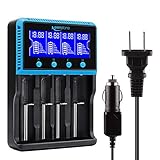
- 🔋UNIVERSAL CHARGER FOR: Li-ion LiFePO4 IMR INR ICR 25500 22650 𝟏𝟖𝟔𝟓𝟎 18490 18500 18350 16340 RCR123A 14500 10440 Batteries, Ni-MH Ni-Cd A AA AAA AAAA SC Batteries.
- 🔋HIGH QUALITY: Compliant standard - UL CUL CE TUV GS PSE FCC RoHS C-TICKCB. Built-in intelligent circuits protection to protect the battery safety charged.
- 🔋LCD DISPLAY: LCD display to monitor the four slots information. Each battery parameter such as voltage (V), current (mA), time (h) can be showed independently by pressing the A/B/C/D button.
- 🔋MULTI CHARGE OPTIONS: 4 independently bay, 2 charge curent (500mA,1000mA) to meet your various needs; Black and grey are just different in color to meet your multiple aesthetic.
- 🔋SAFETY: Protection of overcharge, over-discharge, short circuit and reverse polarity.
Battery University’s BU-410 technical reference presents 10–30°C (50–86°F) as a best-results charging range, while noting that permissible limits vary by pack design. Treat that range as a practical target, not a substitute for the exact limits in your manual.
Never charge below freezing
Battery University warns that charging a lithium-ion pack below 0°C can plate metallic lithium on the anode. That can permanently degrade performance and create a safety risk. If a device has been left in a cold car or outdoors, bring it indoors and allow the battery to reach a moderate temperature before charging. Do not try to warm it rapidly with an oven, heater, hot-water bottle or other direct heat source.
Separate use heat from charger heat
Navigation, gaming, video recording and high-performance computing can heat a device while it charges. If the device becomes unusually hot, pause demanding tasks, stop charging if necessary, remove an insulating case and let it cool. A warm surface is not automatically dangerous, but a rapid temperature rise, swelling or repeated thermal shutdown warrants service.
Can you leave a lithium-ion battery plugged in overnight?
For a modern phone, laptop or other product with a functioning BMS and its approved charger, overnight charging is normally managed by the device: current tapers or stops when the programmed limit is reached. Battery University notes that lithium-based batteries do not receive a conventional trickle charge when full.
Overnight charging still has two avoidable stresses: many hours at a high state of charge and heat trapped by bedding, furniture or a case. Use optimized charging or an 80% limit if the device offers one, place it on a hard surface with airflow, and do not charge a damaged, swollen or wet battery unattended. Older packs, aftermarket chargers and removable cells may have different rules; follow their manuals rather than assuming phone behavior.
How to store a lithium-ion battery for months
- Charge or discharge it to approximately 50%.
- Power the device or pack off completely; do not leave it in sleep mode if the manufacturer calls for shutdown.
- Store it in a cool, dry location away from direct sun, heaters and moisture.
- Keep the battery in its intended protective enclosure and prevent metal objects from shorting exposed terminals.
- If storage continues beyond six months, check it and return it to about 50% every six months, following Apple’s storage guidance.
Do not store a battery fully empty. Self-discharge can push a deeply depleted pack below its protection threshold, after which a normal charger may refuse to start. Do not attempt to revive such a pack with an unapproved “boost” method; ask the manufacturer or a qualified service provider.
What the available measurements actually show
Apple says the exact cycle count at which a battery reaches 80% of its original capacity varies by product. That 80% figure is a manufacturer health benchmark, not a promise that every battery reaches it at the same age or number of cycles.
A Chalmers University experiment, as reported on Battery University’s 2023 page, estimated a 44–130% increase in vehicle-battery lifetime expectancy when the battery operated at a reduced 50% state of charge. This is an experiment result for vehicle batteries, not a guarantee for phones, laptops or every lithium-ion chemistry.
PC Slower Than It Used to Be?
A free scan shows the junk files, broken settings and background clutter dragging Windows down - then fixes them in one click.Free scan · Windows 10 & 11Outdated Drivers Are Slowing You Down
One free scan finds every outdated or missing driver and matches the right update for your exact hardware.Free scan · exact hardware matchBattery University’s table estimates that, after one year of storage at 25°C, a battery could retain about 96% recoverable capacity when stored at 40% charge versus about 80% when stored at 100%. Those are estimates for the battery type and conditions described by that source, not a universal forecast. They illustrate why partial charge is preferable for long storage.
Fast charging, convenience and longevity
Fast charging saves time but generally uses higher current and can create more heat. The device’s thermal controls are designed to manage that process, so use the approved fast charger when you need it. To reduce stress during routine charging, avoid gaming or other sustained high-power work at the same time, keep air vents clear and remove an insulating case if the manufacturer permits.
Do not replace a certified charger with one that merely advertises a higher wattage. The device negotiates the power it can accept, but an incompatible charger can violate voltage, current or safety requirements. A slower, correctly specified charger is safer than a fast but unsuitable one.
Rank #3
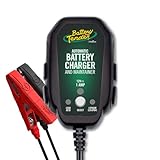
- Stay Charged: 12V Battery Charger, 800mA Selectable Lead Acid/Lithium Battery Charger It will keep your battery fully charged so that it is ready to go when you are
- Lead Acid and Lithium: Power lead-acid (AGM, flooded, or gel) or lithium (LiFePO4) batteries with this smart charger and maintainer by switching to the desired battery type with the push of a button
- Smart Technology: An ISM microcontroller constantly updates charge sequence to ensure the proper level is sent to your motorcycle, ATV, UTV, personal watercraft, or scooter battery at all times. Smarter than a trickle charger
- Easy to Use: A low maintenance design that's quick and easy to use, our powersport 12v battery charger and maintainer is lightweight and compact allowing it to operate everywhere even in small spaces
- Safe and Secure: Our 12V battery charger and maintainer is spark-proof during lead connection and automatically detects reverse polarity to ensure a correct, locked-in connection before providing power. It is ETL US/CSA, FCC, ICES, BC, certified including a 5 Year Industry Leading Warranty
Common problems and what to do
The battery gets hot every time it charges
- Move it to a cooler room and a hard, ventilated surface.
- Remove a thick case and stop demanding applications while charging.
- Check whether the charger and cable are the manufacturer-approved combination.
- If the temperature remains abnormal, charging stops repeatedly, or the pack swells, stop using it and seek manufacturer service.
Charging stops before 100%
An 80% limit, optimized charging schedule, temperature protection or a worn battery can all explain this behavior. Check the device’s battery settings and manual before treating it as a fault. If the device reports a service warning or the percentage remains fixed despite normal temperatures and settings, arrange a diagnostic check.
Recommended Free Tools
The battery was exposed to freezing conditions
Do not plug it in while it is still cold. Let it warm naturally to a moderate temperature, inspect it for damage or swelling, and then use the approved charger. A pack that was charged while frozen may have permanent degradation even if it still appears to work.
The device reaches empty unexpectedly
Capacity loss, calibration behavior, high temperature and heavy workload can all shorten runtime. Recharge before the indicator reaches zero, keep the device cool, and review battery-health information if provided. Repeated shutdowns or swelling require professional service rather than repeated deep-discharge cycles.
Requirements for specialist and removable packs
Power-tool, camera, e-bike, medical and hobby packs can use different cell counts, chemistries, connectors and balancing arrangements. Their chargers may identify the pack, communicate with its BMS or provide a dedicated storage mode. Never substitute a phone adapter or a charger for a different pack simply because the plug fits. Follow the pack maker’s instructions for transport, storage, charging temperature and end-of-life handling.
For equipment with an external charger, inspect contacts and cables before each use and keep terminals dry and free of conductive debris. Charge on a stable, nonflammable surface where heat can dissipate. If the pack is dropped, cracked, swollen, wet or unusually hot, remove it from service instead of testing it through repeated charge cycles.
Choosing the right habit for your situation
- Need maximum runtime today: charge to 100% with the approved charger, but keep the device cool and unplug or limit it when practical.
- Use the device near an outlet every day: enable an 80% limit or optimized charging to reduce high-state-of-charge time.
- Traveling or working outdoors: prioritize the manufacturer’s temperature limits and airflow; do not charge a frozen pack or leave it in a hot vehicle.
- Putting equipment away for months: shut it down near 50%, store it cool and dry, and check it every six months.
- Using a removable or specialist pack: follow that pack’s chemistry-specific manual and storage mode rather than applying phone charging assumptions.
Frequently Asked Questions
Should I wait until a lithium-ion battery is empty before charging it?
No. Recharge whenever convenient. Apple defines a cycle as cumulative use equal to 100% of capacity, so partial charging is normal and does not require a full discharge.
Is charging my phone or laptop to 100% harmful?
Not automatically. Charge to 100% when you need maximum runtime, but use optimized charging or an 80% limit when practical to reduce hours spent at high voltage.
Is 20–80% a mandatory rule?
No. It is a useful longevity-oriented range, not a precise requirement. Follow the device’s built-in limits and choose the highest charge limit that meets your needs.
What temperature is safe for charging?
Limits vary by pack. Battery University gives 10–30°C (50–86°F) as a best-results range, while Apple warns that ambient temperatures above 35°C (95°F) can permanently reduce capacity. Never charge a lithium-ion pack below freezing.
Can I leave a lithium-ion battery plugged in overnight?
A modern device with its approved charger and functioning BMS normally tapers or stops charging. Use an optimized schedule or 80% limit, provide airflow, and never leave a damaged, swollen or wet battery charging unattended.
How should I store a lithium-ion battery for several months?
Shut it down near 50%, keep it cool and dry, protect exposed terminals, and check it every six months if storage continues. Do not store it fully empty or fully charged.
The Bottom Line
Use the exact charger and limits specified for the pack, recharge before intentional deep discharge, control heat, and never charge below freezing. Limit time at 100% when convenient, and store unused batteries powered off near 50% in a cool, dry place.
Quick Recap
Product prices and availability are accurate as of the date/time indicated and are subject to change. Any price and availability information displayed on Amazon at the time of purchase will apply.
Quick wins for a faster PC:
Scan for outdated or missing drivers - takes under a minuteDriver Scan →Repair Windows errors before they cause bigger problemsFix Now →
