Free tools Windows power users keep installed
One-click scans. No signup required.
In OBS Studio, open Settings > Video and change Output (Scaled) Resolution. That is the setting for the resolution sent to YouTube. Leave Base (Canvas) Resolution unchanged if you only want to alter the stream output; the canvas is the workspace OBS uses to arrange your sources.
Change the stream output resolution in OBS
- Open the video settings. In OBS Studio, go to Settings > Video.
- Choose the output size. Set Output (Scaled) Resolution to the resolution you want the encoder to send. OBS identifies this as the stream output resolution; examples include 720p and 480p. A 1080p source can, for example, be sent at 720p.
- Keep the canvas as it is. Leave Base (Canvas) Resolution at its current value if you only want to change the output. It controls the scene-layout workspace; changing it can require you to resize or realign sources.
- Check encoding settings. Review the bitrate for your selected resolution, frame rate and codec against YouTube’s current live encoder settings.
- Test before relying on the change. Test with representative video movement and audio, then monitor YouTube’s stream-health messages.
For an encoder other than OBS, use that software’s current documentation to find its output-resolution setting. YouTube’s encoder guidance applies generally, but menu names vary by product.
As an Amazon Associate I earn from qualifying purchases.
Set resolution in YouTube Live Control Room when needed
YouTube normally detects the resolution and frame rate sent by the encoder. If you need to choose a resolution manually in Live Control Room, YouTube’s guidance is to create a custom stream key and turn on manual settings under Stream Resolution. This controls YouTube’s resolution detection; your encoder must still send the intended output size. See YouTube’s live encoder settings and resolution guidance.
Match bitrate to resolution and frame rate
Bitrate recommendations depend on the ingestion codec, resolution and frame rate. In its live encoder settings guidance retrieved on October 3, 2026, YouTube lists these H.264 recommendations:
#1 Best Overall
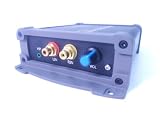
- INTERNET AUDIO ENCODER: Designed for flexible internet audio transmission, enabling live audio streaming, program distribution, network broadcasting, and conference room interconnection without requiring a public IP or self-built media server
- VERSATILE PROTOCOL SUPPORT: Supports multiple network audio streaming protocols including SRT, RTMP, ICECAST, RTP, and MPEG-TS, as well as audio encoding formats such as OPUS, AAC, AAC-HE, MP3, and MP2 for broad compatibility
- RELIABLE AUTO-RECONNECT: Automatically restores the connection after network interruptions or drops, ensuring uninterrupted broadcasting or remote audio playback for emergency systems, surveillance, and chain-store remote broadcasting applications
- FLEXIBLE CONNECTIVITY: Features a stereo analog RCA input (L/R), headphone monitoring output (HP), USB port, Ethernet port, and DC-12V power input. Supports 48kHz sampling rate with adjustable bitrate from 24Kbps to 256Kbps and digital gain control from -12dB to +12dB
- REMOTE MANAGEMENT: Supports HTTP+JSON protocol for remote network configuration and management, IP address announcement, and LAN cross-segment transmission plus remote VPN connectivity for complex network environments
| Output configuration | YouTube recommended bitrate |
|---|---|
| 1080p at 30 fps | 10 Mbps |
| 1080p at 60 fps | 12 Mbps |
| 720p at 60 fps | 6 Mbps |
| 240p–720p at 30 fps | 4 Mbps |
These are YouTube recommendations for the stated H.264 configurations, not a guarantee that a particular internet connection or encoder will remain stable. Check YouTube’s current table for your exact codec and settings: Choose live encoder settings, bitrates, and resolutions.
Choose a practical setting for a radio stream
Consider the resolution, frame rate, codec, recommended bitrate, available upload capacity and your computer’s rendering and encoding load together. For a radio stream with a static image, you may decide that a lower frame rate is sufficient, but that is a production choice—not a universal rule. Test the actual stream rather than assuming a configuration will remain stable around the clock.
Rank #2

- ADVANCED MULTI-BAND RECEPTION: Equipped with the high-sensitivity TEF6686 chip for automotive-grade signal reception. This receiver supports FM (65-108 MHz), LW, MW, SW (5.9-27 MHz), OIRT, and AIR (Aviation) bands. It features an automatic station search function, saves up to 100 stations in the program list, and supports RDS text decoding for FM broadcasts.
- WIFI INTERNET RADIO & MP3 PLAYER: Connect to WiFi to stream HTTP/HTTPS internet radio stations. It also functions as a multimedia player supporting FAT32 U-disks up to 32GB (MP3, FLAC, WAV, AAC, M4A) with LRC lyric support. Customize your audio experience with multiple built-in EQ modes including Standard, Pop, Rock, Classic, and Bass.
- PC SOUND CARD & CUSTOM CONFIGURATION: Connect to a computer via USB to utilize the device as a high-quality USB Audio sound card. Using the dedicated PC configuration tool, you can easily manage WiFi settings, edit station lists, update weather region codes, and upload a personalized 320x240 PNG boot logo.
- COLOR DISPLAY & INTUITIVE CONTROL: Features a crisp 320x240 TFT color screen displaying an 8-grid main menu, real-time weather (temperature, humidity, wind speed), and an NTP-synced perpetual calendar. Navigation is streamlined via a multi-functional rotary encoder (rotate, short press, double click) and a dedicated power button, avoiding complex multi-button layouts.
- INNOVATIVE 3P EXTERNAL CONTROL: Designed for advanced desktop setups, it includes a 3-pin (H.G.M) external control interface. The "H" pin outputs voltage for timer-based power control of external devices like amplifiers, while the "M" pin acts as a squelch trigger, activating external equipment only when a valid radio signal is received.
If the computer struggles to render or encode, OBS identifies lowering output resolution and frame rate as ways to reduce the workload. Reducing the canvas is generally not recommended as a performance fix because it can complicate source capture and asset management. See OBS encoding performance troubleshooting.
Quick wins for a faster PC:
Scan for outdated or missing drivers - takes under a minuteDriver Scan →Repair Windows errors before they cause bigger problemsFix Now →Fix the driver behind crashes, sound loss and screen glitchesFind Drivers →Test a 24/7 broadcast safely
Do not assume a resolution change made during an active broadcast will take effect without interruption: the official guidance does not establish that. For a continuously running channel, test the new configuration in a controlled test or maintenance window before relying on it. YouTube recommends testing before going live and monitoring stream health during a broadcast.
Rank #3

- Fully dynamic FM broadcast RDS encoder with up to four independent communication ports
- USB connectivity for local settings and maintenance purposes
- Ethernet connectivity for linking with broadcast automation system
- Control interface based on ASCII commands and UECP protocol
- Supports internet functions and remote monitoring
Or let it run in the cloud
If your radio stream plays pre-recorded videos rather than broadcasting a live camera, StreamNeo can keep the YouTube stream running without leaving a computer or home connection on:
- Upload a recording or build a playlist.
- Add your YouTube stream key once.
- Go live; StreamNeo loops the uploaded video from the cloud.
There is no computer that has to stay on at home. Video streams as uploaded, at any quality up to 4K 60fps, for one flat price per slot. StreamNeo automatically recovers if YouTube drops the stream. The first day is free with no card. Monthly pricing is $9.99 per month. StreamNeo is for YouTube streams of uploaded videos, not live camera feeds. Learn more at StreamNeo, or start your free first day.
Quick Recap
Product prices and availability are accurate as of the date/time indicated and are subject to change. Any price and availability information displayed on Amazon at the time of purchase will apply.
Recommended Free Tools

