To change how fizzy a SodaStream drink is, use your maker’s carbonation control. To make the drink taste stronger, carbonate plain, cold water first and then increase the amount of flavoring. These are separate adjustments on most SodaStream machines. The FOUNTAIN model combines them in one appliance with separate fizz and flavor controls.
Controls differ by model, so first find the model name on the machine or its manual. A three-press recipe for one machine is not a universal setting for every SodaStream maker.
As an Amazon Associate I earn from qualifying purchases.
What “drink strength” means
Carbonation strength: how much fizz is in the water
Carbonation is the amount of dissolved carbon dioxide in the water. More carbonation produces a sharper bite and more bubbles; less carbonation gives a softer, gentler drink. SodaStream makers expose this adjustment through preset buttons, repeated button presses, lever strokes or, on the FOUNTAIN, a dedicated fizz selector.
The Tool Desk
Outbyte Driver Updater FREEScan for outdated or missing drivers - takes under a minuteDriver Scan →Outbyte PC Repair FREERepair Windows errors before they cause bigger problemsFix Now →Flavor strength: how concentrated the drink tastes
Flavor strength is controlled separately on ordinary SodaStream makers. Add drink mix or drops only after you have finished carbonating the water. Adding more syrup or drops makes the taste stronger; adding less makes it lighter. The amount printed on a flavor product is a starting point, not a universal ratio for every product.
#1 Best Overall
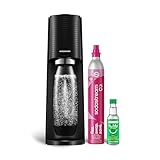
- FRESH FIZZ ON DEMAND: The SodaStream TERRA turns plain tap water into fresh sparkling water in seconds, right on your countertop. One slow press gives a light fizz, a few more build a stronger bubble. This carbonated water machine puts every glass exactly where you like it, made by you, every time.
- A SECURE SNAP AND SEAL: The Quick Connect CO2 cylinder clicks in with one push, and the bottle snaps into place before you fizz. The seal is built to keep the bubbles in the bottle and the water off your counter, so even your first drink feels easy.
- THE QUICK CONNECT CO2 SYSTEM: Each 60L Quick Connect cylinder makes up to 60 liters (16 gallons) of sparkling water. When it runs low, return, refill, and reuse it through SodaStream CO2 cylinder exchange at participating retailers. The Quick Connect fit makes every swap simple, so you are back to fizzing fast.
- BUILT FOR DAILY USE: The reusable bottles are BPA free and dishwasher safe, ready for the next round whenever you are. The slim machine sits neatly on the counter and tucks under most upper cabinets, built to keep up with you day after day.
- ONE MACHINE, EVERY KIND OF DRINK: After fizzing your water, add flavor drops for zero sugar sparkling water, stir in Pepsi or Mountain Dew syrups for a classic soda, or add a squeeze of citrus for a fresh twist. One soda maker, every kind of drink, made by you.
Do not try to solve a weak-tasting drink by carbonating it again after flavoring. SodaStream’s safety guidance says to carbonate water only and not to re-carbonate a flavored liquid.
Prepare the machine before changing a setting
Identify the model
Look for the model name on the front, top or rear of the machine. The instructions below cover E-DUO, TERRA, GAIA, ART, ONE TOUCH, FOUNTAIN and the Classic instructions. If your controls do not match one of these descriptions, use the manual for the exact model rather than applying another machine’s press count.
Use cold water and the fill line
Fill the compatible bottle with cold water to its marked line. Water that is too warm can produce less satisfactory carbonation and increases the chance of foaming when flavor is added. Do not exceed the line: the empty space above the water allows carbon dioxide to enter the bottle safely.
What’s actually slowing this PC down?
Pick the symptom - the matching free tool is one click away.
Check the bottle and release mechanism
Use a bottle approved for your maker and make sure it is seated and locked exactly as the instructions show. On machines with a locking bottle mechanism, wait for the carbonation cycle and pressure release to finish before removing the bottle. Never force a bottle out while it is still pressurized.
How the models compare
| Model or family | Carbonation control | Flavor adjustment | Important distinction |
|---|---|---|---|
| E-DUO | Three buttons for light, medium or strong fizz | Add flavor after carbonation | Electronic selection followed by a three-second wait and flask release |
| TERRA | Repeated carbonation-button presses | Add flavor after carbonation | Each press lasts about one to two seconds |
| GAIA | Repeated short button presses | Add flavor after carbonation | Manufacturer specifies different repetitions for standard and strong fizz |
| ART | Repeated full lever strokes | Add flavor after carbonation | Each stroke is held for about one second |
| ONE TOUCH | One-, two- or three-drop buttons | Add flavor after carbonation | Buttons directly represent light, medium and strong |
| FOUNTAIN | Still, light, medium or strong | Separate flavor dial from 0 to 4, plus B boost | Fizz and flavor are selected in the appliance |
| Classic instructions | Repeated carbonation-button presses | Add flavor after carbonation | The product page identifies the pink Quick Connect cylinder as compatible |
Set carbonation on each SodaStream model
E-DUO
- Fill the E-DUO bottle with cold water to the fill line.
- Insert and secure the flask according to the machine’s locking instructions.
- Press the left button for light fizz, the middle button for medium fizz or the right button for strong fizz.
- After the machine reaches the selected level, wait three seconds.
- Unlock the flask lever to release the bottle. Do not pull the bottle out while it remains locked or pressurized.
The E-DUO support instructions explicitly say not to carbonate anything other than water. Add flavor only after the bottle has been released.
TERRA
- Fill the bottle with cold water to the line and attach it securely.
- Press and hold the carbonation button for about one to two seconds, then release it.
- Repeat the press-and-release cycle three times for the manufacturer’s standard fizz setting.
- Repeat it five times when you want the manufacturer’s stronger setting.
- Wait for the excess carbon dioxide to release before removing the bottle.
Three and five repetitions are SodaStream’s stated instructions for these settings; they are manufacturer guidance, not an independently measured carbonation scale.
GAIA
- Fill the compatible bottle with cold water to the marked line.
- Use short presses of the carbonation button.
- Make three presses for standard carbonation.
- Make five presses for stronger carbonation.
- Wait for the pressure-release stage to finish before detaching the bottle.
Keep the presses short and consistent. Holding the button continuously does not turn the GAIA procedure into a different, officially specified setting.
ART
- Fill and attach the cold-water bottle.
- Press the carbonation lever fully for about one second, then release it completely.
- Repeat the lever stroke three times for standard fizz.
- Repeat it five times for stronger fizz.
- Allow the machine to complete its release cycle before removing the bottle.
The lever must be pressed fully for each stroke. If the bottle is difficult to remove, stop and wait rather than forcing the locking mechanism.
Rank #2

- FRESH FIZZ ON DEMAND: This SodaStream TERRA CO2 bundle is perfect for Seltzer lovers; It contains 3 ready-to-use CO2 cylinders that together make 180 liters (48 gallons) of fresh sparkling water in seconds, right on your countertop.
- A SECURE SNAP AND SEAL: The Quick Connect CO2 cylinder clicks in with one push, and the bottle snaps into place before you fizz. The seal is built to keep the bubbles in the bottle and the water off your counter, so even your first drink feels easy.
- THE QUICK CONNECT CO2 SYSTEM: Each 60L Quick Connect cylinder makes up to 60 liters (16 gallons) of sparkling water. When it runs low, return, refill, and reuse it through SodaStream CO2 cylinder exchange at participating retailers. The Quick Connect fit makes every swap simple, so you are back to fizzing fast.
- BUILT FOR DAILY USE: The reusable bottles are BPA free and dishwasher safe, ready for the next round whenever you are. The slim machine sits neatly on the counter and tucks under most upper cabinets, built to keep up with you day after day.
- ONE MACHINE, EVERY KIND OF DRINK: After fizzing your water, add flavor drops for zero sugar sparkling water, stir in Pepsi or Mountain Dew syrups for a classic soda, or add a squeeze of citrus for a fresh twist. One soda maker, every kind of drink, made by you.
ONE TOUCH
- Fill the bottle with cold water and install it as directed for the ONE TOUCH.
- Press the one-drop button for light carbonation.
- Press the two-drop button for medium carbonation.
- Press the three-drop button for strong carbonation.
- Wait until the machine indicates that the cycle is complete before releasing the bottle.
Because the buttons are presets, you do not need to count repeated manual presses on this model.
FOUNTAIN
- Fill the water container with cold water to the indicated level.
- Choose still, light, medium or strong fizz with the FOUNTAIN’s carbonation control.
- Select the flavor level separately with the flavor dial: 0 means no flavor, levels 1 through 3 increase intensity, and level 4 is the recommended classic-soda serving level.
- Use the B setting only when you want the boost option. SodaStream cautions against combining flavor selections above the total of level 4.
- Dispense the drink and follow the appliance’s cleaning and release instructions.
The FOUNTAIN’s published chart amounts are targets and may vary by unit. Adjust one control at a time so you can tell whether fizz or flavor caused the change you notice.
Classic instructions
The Classic product instructions describe three carbonation-button presses for standard fizz and five for stronger fizz. They also identify the pink Quick Connect carbon dioxide cylinder as compatible with that product. Confirm that your own Classic machine and cylinder connection match the current instructions before installing a replacement.
Quick wins for a faster PC:
Clear out junk files and repair common Windows errorsFree Scan →Scan for outdated or missing drivers - takes under a minuteDriver Scan →Repair Windows errors before they cause bigger problemsFix Now →Make the flavor stronger after carbonation
Classic or Pepsi drink mix
SodaStream’s flavor guidance gives a product-specific example for a 1-liter bottle: add the Classic or Pepsi mix to the bottle’s flavor line, approximately three tablespoons. Carbonate the water first, then pour in the measured mix slowly and close the bottle before gently inverting it to combine. Do not shake a freshly flavored, carbonated bottle aggressively because pressure can force liquid out of the cap.
That three-tablespoon amount applies to the cited mixes and bottle size. It is not a universal syrup formula. If your bottle is a different size or your product label gives a different line or quantity, follow that product’s directions.
bubly drops
The same official guidance gives about one-half tablespoon of bubly drops per 1-liter bottle. Add the drops after carbonating, cap the bottle and mix gently. Start with the product’s stated amount; add more only after tasting, and keep the bottle closed while adjusting to limit pressure and spills.
Using less flavor
For a lighter drink, carbonate the same amount of water but add less mix or fewer drops. Changing flavor quantity without changing carbonation lets you keep the mouthfeel you like while reducing sweetness or intensity.
Using the FOUNTAIN flavor dial
On the FOUNTAIN, level 0 produces no flavor and levels 1 through 4 progressively increase flavor. Level 4 is the manufacturer’s recommended serving level for classic soda, while B provides a boost option. The appliance’s size-based chart gives target amounts, but SodaStream notes that amounts can vary by unit. Do not stack selections beyond the chart’s total of level 4.
Rank #3
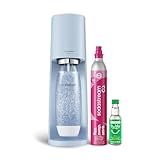
- 🥤 Elevate Your Hydration Experience: Transform ordinary water into refreshing sparkling water with the sleek SodaStream Terra; perfect for creating personalized beverages with your favorite Bubly, Pepsi or Mountain Dew flavors | Enjoy a delightful fizz with every sip
- 🩵 Sleek and Modern Kitchen Addition: The elegant Misty Blue SodaStream Terra sparkling water maker complements any kitchen décor; its updated slim silhouette and matte finish bring both style and functionality to your countertop | No power or batteries required
- 🌍 Eco-Friendly Hydration Solution: Each reusable carbonating bottle in the SodaStream Terra Starter Kit helps reduce single-use plastic waste | BPA Free | Save thousands of bottles over time | Reduce plastic waste at the push of a button
- 🍹Versatile Beverage Customization: Compatible with all SodaStream and Pepsi flavors, the Terra machine lets you experiment with endless flavor combinations; from classic sparkling water to creative concoctions with Bubly Drops, Pepsi- and Mountain Dew syrups; the possibilities are endless
- 👍 Effortless Sparkling Water Creation: Experience the convenience of the SodaStream Terra sparkling water maker; its innovative Quick Connect technology allows for CO2 cylinder installation in seconds | Easy-to-use snap-lock bottle insertion for quick carbonation
A practical tuning method
When the drink is not right, change only one variable per trial. This prevents a stronger fizz setting and a larger syrup dose from masking each other.
- Start with cold water at the bottle’s fill line.
- Choose the model’s standard carbonation setting.
- Add the flavor product at its stated amount or line.
- Taste the drink after it has been mixed.
- If the bubbles are too weak, increase only the carbonation setting on the next bottle.
- If the taste is too weak but the bubbles are right, increase only the flavor amount within the product’s directions.
- If the drink is too sharp, reduce carbonation first; if it is too sweet or concentrated, reduce flavoring instead.
Keep a simple note of the model setting, bottle size and flavor amount. A repeatable note is more useful than assuming that another model’s three-press or five-press instruction will produce the same result.
Troubleshooting weak fizz, excess foam and weak flavor
The drink is not fizzy enough
- Confirm that the bottle was filled only to its line and that the water was cold.
- Verify that you used the control intended for your model: preset button, repeated press or lever stroke.
- On TERRA, GAIA and ART, use the manufacturer’s stronger setting rather than adding uncounted extra cycles.
- Check that the carbon dioxide cylinder is installed correctly and is the type specified for the machine.
The bottle foams when flavor is added
- Carbonate plain water first and add flavor afterward.
- Pour or dose the flavor slowly down the inside of the bottle.
- Leave headspace and avoid shaking; gently invert the closed bottle instead.
- If foaming remains excessive, chill the water further and check that you did not overfill the bottle.
The machine will not release the bottle
- Wait for the machine’s pressure-release stage to finish.
- Follow the unlocking sequence in the model manual.
- Do not twist, pull or force a bottle that is still locked or pressurized.
The drink tastes weak even though the fizz is correct
- Measure the flavor product instead of estimating by eye.
- Check that you used the correct product-specific line or dose for the bottle size.
- Increase flavor gradually on a new bottle rather than pouring extra concentrate into an already pressurized drink.
Bottle and cylinder compatibility
Replacement bottles and carbon dioxide cylinders are model-dependent. A bottle that fits one SodaStream maker may not lock into another, and connection systems can differ between machines. Check the model name, bottle marking and cylinder connection in the manual or product documentation before buying replacements.
Recommended Free Tools
The Classic product information specifically identifies a pink Quick Connect cylinder as compatible. Treat that as a Classic-specific instruction, not proof that every SodaStream model accepts the same cylinder.
Safety rules to keep beside the machine
- Carbonate plain water only. Do not carbonate juice, syrup, wine, milk or another flavored liquid.
- Never re-carbonate a flavored drink.
- Use only an approved bottle in good condition and respect its fill line and expiration guidance.
- Keep the bottle secured during carbonation and wait for pressure release before removal.
- Do not force a locked bottle or bypass the machine’s release mechanism.
- Add flavor after carbonation and mix gently with the bottle capped.
Which setting should you choose?
| Your goal | Adjustment to make | What to leave unchanged |
|---|---|---|
| More bubbles with the same taste | Choose the next stronger carbonation option for your model | Use the same flavor amount |
| Less bite with the same flavor | Choose a lighter carbonation option | Use the same flavor amount |
| Stronger-tasting soda | Increase the mix or drops after fizzing | Keep the carbonation setting constant |
| Lighter-tasting soda | Reduce the mix or drops after fizzing | Keep the carbonation setting constant |
| Both more fizz and stronger flavor | Change carbonation first, then flavor in a separate bottle | Do not re-carbonate the flavored drink |
How to choose between controls
The control style tells you how precisely you can repeat a preferred drink. E-DUO and ONE TOUCH offer named or symbol-based presets, so they are straightforward when different people want light, medium or strong fizz. TERRA and GAIA require repeatable button timing, while ART requires repeatable full lever strokes. Record the number of repetitions and the approximate duration so another person can reproduce the same bottle.
FOUNTAIN is different because carbonation and flavor are both selected at the appliance. That can be convenient when you want a repeatable serving, but its flavor chart is tied to the drink size and the unit. Treat level 4 as the published classic-soda target and B as an optional boost, rather than assuming B is simply “one level stronger” for every recipe.
When comparing a replacement machine, check four things before focusing on the number of fizz levels: the control method, whether flavor is manual or integrated, which bottles lock into it, and which cylinder connection it accepts. A machine with more buttons is not automatically more flexible if its bottle or cylinder system does not match the accessories you already own.
Examples of separate adjustments
If the drink tastes right but feels flat, keep the same flavor dose and move from the standard carbonation setting to the next stronger option available on your model. If it has plenty of bubbles but tastes thin, keep carbonation unchanged and add a little more of the same flavor product to a fresh bottle. If it is both too sharp and too sweet, make two separate changes on separate bottles: lower the fizz first, then reduce the flavor dose.
Rank #4

- 🍹 Elevate your hydration game with the SodaStream ART Sparkling Water Maker Starter Pack; transform ordinary tap water into refreshing sparkling water with a simple pull of a lever; ideal for creating fizzy beverages for family gatherings or solo refreshment moments. This kit contains 1x 32 Fl Oz Slim Carbonating Bottle and 1x 16 Fl Oz On-The-Go My Only Bottle with a carrying strap, making it easy to take your bubbles with you for any occasion
- 🖤 Discover the sleek elegance of the SodaStream ART in Black; its stylish design with retro metal accents complements any kitchen décor; a perfect blend of form and function for modern living
- 🌿 Enjoy eco-friendly carbonation with the SodaStream ART; powered by reusable CO2 cylinders, each cylinder carbonates up to 16 gallons of water, the equivalent of 120 plastic bottles; reduce your carbon footprint while enjoying endless sparkling drinks at home
- 🎨 Unleash your creativity with the SodaStream ART, compatible with SodaStream, Pepsi, Bubly and Mountain Dew flavors, and many more! | Mix and match to create your own signature drinks, whether you prefer classic sparkling water or unique flavored concoctions
- 🥤 Experience the convenience of the SodaStream ART with its easy-to-use snap-lock bottle insertion; quickly carbonate your water with minimal effort, making it suitable for busy mornings or spontaneous gatherings with friends
For a family using different preferences, carbonate one plain bottle at the level most people enjoy and let each person flavor a glass separately. This avoids repeated carbonation and makes it easier to use different mixes or drops without changing the base water for everyone.
Independent reader supportYour contribution helps us test, update, and keep practical guides available for everyone.Questions readers commonly ask
Can I press the carbonation button more times than the manual says?
Use the manufacturer’s stated settings rather than inventing extra cycles. TERRA, GAIA and ART instructions identify three repetitions for standard fizz and five for stronger fizz. If those settings do not match your model, consult its manual.
Is three presses always medium carbonation?
No. Three presses is a stated standard setting for particular models and instructions, not a universal SodaStream measurement. E-DUO, ONE TOUCH and FOUNTAIN use different controls.
Free tools Windows power users keep installed
One-click scans. No signup required.
Can I add syrup before carbonating?
No. SodaStream directs users to carbonate plain water only. Add the mix or drops after the bottle has completed carbonation and pressure release.
Can I carbonate a drink again if it goes flat?
No. Do not re-carbonate a flavored liquid. Make a fresh bottle of plain water, carbonate it, and add flavor afterward.
Why does the same flavor amount taste different in two bottles?
Check the bottle size and the product’s own flavor line or dose. The approximately three tablespoons of Classic or Pepsi mix and one-half tablespoon of bubly drops are examples for a 1-liter bottle, not universal ratios. FOUNTAIN chart amounts may also vary by unit.
What should I do if I cannot identify my model?
Look for a model name on the front, top or rear, then compare the controls with the manual. Do not apply the TERRA, GAIA or ART press counts to a machine with electronic presets unless its instructions say to do so.
Which accessories should I buy?
Choose only a bottle and cylinder listed as compatible with your exact maker. The Classic information identifies a pink Quick Connect cylinder, but that does not establish compatibility with every SodaStream model.
Best Value

- FRESH FIZZ ON DEMAND: The SodaStream TERRA turns plain tap water into fresh sparkling water in seconds, right on your countertop. One slow press gives a light fizz, a few more build a stronger bubble. This carbonated water machine puts every glass exactly where you like it, made by you, every time.
- A SECURE SNAP AND SEAL: The Quick Connect CO2 cylinder clicks in with one push, and the bottle snaps into place before you fizz. The seal is built to keep the bubbles in the bottle and the water off your counter, so even your first drink feels easy.
- THE QUICK CONNECT CO2 SYSTEM: Each 60L Quick Connect cylinder makes up to 60 liters (16 gallons) of sparkling water. When it runs low, return, refill, and reuse it through SodaStream CO2 cylinder exchange at participating retailers. The Quick Connect fit makes every swap simple, so you are back to fizzing fast.
- BUILT FOR DAILY USE: The reusable bottles are BPA free and dishwasher safe, ready for the next round whenever you are. The slim machine sits neatly on the counter and tucks under most upper cabinets, built to keep up with you day after day.
- ONE MACHINE, EVERY KIND OF DRINK: After fizzing your water, add flavor drops for zero sugar sparkling water, stir in Pepsi or Mountain Dew syrups for a classic soda, or add a squeeze of citrus for a fresh twist. One soda maker, every kind of drink, made by you.
How do I adjust strength without wasting a full bottle?
Make one controlled change on the next bottle and note the model setting, water amount and flavor dose. Changing fizz and flavor separately makes the result easier to repeat.
The reliable sequence is therefore: identify the model, chill and fill the water correctly, select carbonation with that model’s own control, release the bottle safely, and then adjust flavor. If your maker’s controls differ from the examples here, its manual takes priority.
Frequently Asked Questions
How do I make SodaStream fizz stronger?
Use the stronger carbonation control for your exact model. TERRA, GAIA and ART specify five repetitions for stronger fizz; E-DUO, ONE TOUCH and FOUNTAIN use dedicated stronger settings.
Do these 3 things before closing this tab:
1Scan for outdated or missing drivers - takes under a minute2Clear out junk files and repair common Windows errors3Fix the driver behind crashes, sound loss and screen glitchesHow do I make the drink taste stronger?
Carbonate cold, plain water first, then increase the flavor product gradually. For a 1-liter bottle, SodaStream gives approximately three tablespoons of Classic or Pepsi mix or about one-half tablespoon of bubly drops as product-specific examples.
Can I carbonate flavored water?
No. SodaStream says to carbonate water only and not to re-carbonate a flavored drink.
Why does my SodaStream press count differ from the instructions online?
Controls vary by model. Some use preset buttons, some repeated button presses, some lever strokes and FOUNTAIN has integrated fizz and flavor controls. Confirm the model name before following a press count.
What does the FOUNTAIN B setting do?
B is the FOUNTAIN flavor boost option. SodaStream cautions against combining flavor selections above the total of level 4.
PC Slower Than It Used to Be?
A free scan shows the junk files, broken settings and background clutter dragging Windows down - then fixes them in one click.Free scan · Windows 10 & 11Crashes, No Sound, or Screen Glitches?
Random freezes, missing sound and display glitches usually trace back to one bad driver. Find and replace yours safely.Free scan · under a minuteWhy is my bottle foaming after I add syrup?
Add flavor only after carbonation, pour it slowly, leave headspace and gently invert the capped bottle instead of shaking it.
Can I use any SodaStream bottle or cylinder?
No. Bottle and cylinder compatibility is model-dependent. Check the maker’s manual and product documentation before buying replacements.
The Bottom Line
Choose carbonation with the control built into your exact SodaStream model, then adjust flavor after fizzing plain, cold water. Use the product’s own dose or flavor line, change one variable at a time, and never carbonate or re-carbonate a flavored drink.
Quick Recap
Product prices and availability are accurate as of the date/time indicated and are subject to change. Any price and availability information displayed on Amazon at the time of purchase will apply.
Recommended Free Tools

