In OBS Studio, add the sermon video as a source, then place an Image source for the church logo and a Text source for service times above it. Connect OBS to YouTube with the stream URL and stream key, then check the Live Control Room preview and the public watch page before relying on the stream. For a channel meant to run around the clock, plan separately for YouTube’s stated archive limit: streams under 12 hours are automatically archived.
Prepare a logo and service-time text
Use a clear logo image; a transparent-background file can sit over the video without a rectangular background. Keep both the logo and service times away from the preacher, captions, and other important parts of the picture. Use short, readable wording and check it at the actual stream canvas size. These are practical layout choices, not YouTube or OBS requirements.
As an Amazon Associate I earn from qualifying purchases.
If the times change regularly, decide who will update them and how. OBS can display text entered directly or read from a text file, which can make recurring edits easier. Test the file path and formatting on the computer that will run OBS before depending on it.
Add the logo and times in OBS
- Open or create a scene. In OBS Studio, select a scene for the sermon stream, or create one. Scenes combine the sources that make up the outgoing picture.
- Add the sermon picture. In the Sources dock, select the plus button and add the source used for your sermon video, such as a camera or other video input. If the church already has a compatible camera input, no extra capture device is needed just to add overlays.
- Add the logo. Select the Sources plus button, choose Image, and select the logo file.
- Add the service times. Select the Sources plus button, choose Text, then enter the times. To use a text file instead, configure the text source to read that file.
- Set the layer order and placement. Sources higher in OBS’s source list appear in front of those below them. Put the logo and text above the sermon video, then drag them in the preview to position and size them. Check that neither blocks the speaker or captions.
- Review the full composition. Inspect the scene at the canvas dimensions used for the stream. Confirm that the logo is not clipped and the service times are legible.
OBS’s source controls and labels may vary between versions; its official documentation for sources and text was dated 2021–2022. Consult the current OBS controls if a label differs.
#1 Best Overall

- Portable PA System with Stands: Everything for a mobile setup ships in one box - two 10" passive PA speakers, a powered 6-channel mixer, two adjustable tripod stands, a wired dynamic microphone, and all cables. 600 watts of power drives the pair with the headroom to fill weddings, church services, and karaoke nights for up to 150 guests. This complete portable PA system connects speaker-to-mixer with the included 1/4" cables - a true wired rig, not a standalone Bluetooth speaker.
- Built-in 6-Channel Mixer: The built-in mixer gives you four XLR mic/line channels, each with its own bass, treble, echo FX, and volume, plus 48V phantom power for condenser mics. A separate stereo AUX channel handles RCA and 1/8" sources, so all four mic and instrument inputs stay open for your performers. Peak-indicator LEDs and a master limiter keep your mix clean and distortion-free.
- Bluetooth, USB and SD Playback: Stream wirelessly from any phone, tablet, or laptop over Bluetooth, or play MP3, WAV, and FLAC files from USB, SD card, or the built-in FM radio. Every media source runs through one dedicated media-volume knob, keeping all mixer channels free for mics and instruments. Monitor outputs and a headphone jack let you check the mix on the fly.
- Road-Ready Build, Fast Setup: Rugged ABS impact-resistant cabinets with top and side handles, plus a built-in storage compartment that packs the mixer, mic, and cables inside the speakers for transport. The full system weighs 48.5 lbs and mounts on the two included tripod stands to raise sound above the crowd. Front-firing bass reflex ports keep low end punchy against any wall.
- Built for Live Events: Made for mobile DJs, bands, karaoke, weddings, church services, fitness classes, and school functions. Wide-dispersion horns spread sound evenly so every guest hears clearly, without the hot spots of smaller point-source speakers. A full 35Hz-20kHz range covers deep bass to crisp vocals, and everything you need to run a show is in the box.
Connect OBS to YouTube and test the stream
- Create or schedule an encoder stream. In YouTube Studio, open Create → Go Live and create or schedule a stream using an encoder.
- Copy the connection details. In YouTube’s Live Control Room, copy the stream URL and stream key into OBS’s stream settings. YouTube Help describes the key as the encoder’s credential: “Stream keys are like your YouTube stream’s password and address.” Keep it private, and reset it if you believe it has been exposed.
- Start with a test. Set up ahead of the intended broadcast and start a short test stream. Check the Live Control Room preview before going live, then confirm that the watch page is accessible.
- Check picture and sound in playback. Verify the logo position, service-time readability, video, and audio. Check on a computer and a phone so you can catch layout or legibility problems on different screens.
YouTube’s interface and live-stream behavior can change, so confirm the current controls and status in Live Control Room. OBS recommends testing before relying on a first setup.
Plan for the 24/7 schedule and YouTube archives
YouTube’s encoder instructions state that streams under 12 hours are automatically archived. That statement does not establish that one uninterrupted 24/7 event will produce a complete archive. If complete recordings matter, plan an archive strategy separately and confirm current behavior in the channel’s Live Control Room. Consider how the church will rotate scheduled or live events rather than assuming a single event will cover both continuous viewing and archiving.
Rank #2

- 8 CHANNEL MIXER: This portable stage and studio PA speaker system and DJ mixer bundle by Pyle includes an 8 channel powered amplifier console audio mixer with digital LCD display which is perfect for mixing audio from multiple sources
- 300 WATT POWER: The dual heavy duty PA loudspeakers are equipped w/ 300 watt 8" full range subwoofer speaker and 1" tweeter for full range surround stereo sound reproduction. the box also includes universal speaker stand mount support for easy setup
- BLUETOOTH AUDIO STREAMING: The PA loud speaker set features bluetooth for wireless audio streaming and works with devices like iPhone, android mobile phone, iPad, tablet, PC. Ideal for personal indoor home and outdoor use
- 9 INPUTS: Aside from the Bluetooth connection the product also features a USB flash and SD memory card readers, (4) XLR 3 pin connectors, (2) 1/4" microphone / guitar inputs, and RCA (L/R) audio line input / output jacks
- BUNDLE INCLUSIONS: The bundle includes an amplifier mixer console, two 8" PA speakers and a wired handheld Mic. Two tripod speaker stands, two 1/4" connection cables, and power cable are also included in the package.
Choose an overlay approach that fits the church
| Approach | Best suited to | Important distinction |
|---|---|---|
| OBS Image and Text sources | Static branding and service times that staff can update in the encoder. | Position and layer the sources directly in the scene; text can be entered in OBS or read from a file. |
| Browser-based overlay | A graphic or information layout already produced as a web page. | Use an encoder feature that can display the page; test its appearance in the actual stream. |
| YouTube Live Control Room break overlay URL | An away screen during a break. | This is a break feature, not a general-purpose, always-on church logo and service-times overlay. |
For a camera connection, an HDMI capture card is only a possible accessory when the church needs to feed an HDMI camera into a computer encoder and lacks a compatible input. It is not required for adding graphics. Churches with an existing compatible camera input do not need one for the overlay workflow.
Free tools Windows power users keep installed
One-click scans. No signup required.
Troubleshoot common overlay and connection problems
- The logo or times are hidden: Move the relevant source above the sermon video in OBS’s source list, then inspect the preview again.
- The logo is clipped or covers the speaker: Resize and reposition it in the preview, then check the full composition at the stream canvas dimensions.
- The service times are out of date: Update the Text source or the text file it reads. If using a file, verify its path and formatting on the streaming computer.
- YouTube does not receive the encoder: Check that OBS has the stream URL and key from the correct Live Control Room stream. Treat the key as a password; reset it if compromised.
- The preview looks right but viewers cannot watch: Check that the watch page is accessible and test playback on both a computer and a phone before depending on the setup.
- The archive is shorter or absent for a long-running event: YouTube’s cited automatic-archive statement applies to streams under 12 hours; it does not promise a complete archive for a 24/7 event. Check the event in Live Control Room and use a separate archive plan if needed.
Or let it run in the cloud
For a YouTube stream made from uploaded sermon videos, StreamNeo runs the loop in the cloud, so nothing has to stay on at home. The three steps are: upload a recording or build a playlist, add the YouTube stream key, and go live. It automatically recovers if YouTube drops the stream, and it streams uploaded video as made, up to 4K 60fps, at one flat price per slot. It does not go live from a camera, so it is not a replacement for an OBS camera-production workflow. The first day is free with no card. Monthly: $9.99 per month. Visit StreamNeo for details, or start the free first day.
Quick Recap
Best Value

- COMPLETE DUAL 12-INCH PA SYSTEM — Two 12-inch passive speakers work with a powered 6-channel mixer to create a complete portable PA system for DJs, live performances, weddings, churches, presentations and events. The dual-speaker configuration provides clear, balanced sound for both music and speech applications.
- 2000W PEAK / 400W RMS POWER — Built for versatile event sound, the S-1202 delivers up to 2000W peak power with 400W RMS output. Dual 12-inch speakers provide solid low-frequency response while maintaining clear vocals and music reproduction across different event spaces.
- 6-CHANNEL POWERED MIXER — Connect microphones, instruments and playback devices through the built-in 6-channel powered mixer with independent level control. The mixer gives users flexible control over multiple audio sources for live sound, karaoke, presentations and event use.
- BLUETOOTH + FLEXIBLE AUDIO CONNECTIVITY — Stream music wirelessly from phones and tablets or connect professional audio sources through USB, XLR, 1/4-inch and RCA inputs. Multiple connection options make the system easy to integrate with microphones, instruments, mixers and media players.
- COMPLETE EVENT-READY PACKAGE — The S-1202 includes two 12-inch passive speakers, a powered mixer, two speaker stands, a wired microphone and the required connection cables for a complete setup. The portable design makes the system easier to transport, assemble and use for rehearsals, performances and events.
Rank #4
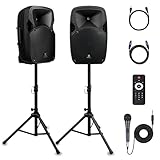
- 1800W Peak Power for Powerful & Immersive Sound Experience: This portable high-power 2-way full-range sound reinforcement system delivers an impressive 1800W peak power, allowing you to play your favorite tracks freely and enjoy stunning, room-filling sound. Whether you’re listening to music, hosting gatherings or holding outdoor events, it provides dynamic and shocking audio performance that brings every note to life.
- 12-Inch Subwoofer + 1-Inch Tweeter for Clear Sound & Deep Bass: The active + passive speaker set is equipped with a 12-inch bass unit, a high-performance 1-inch tweeter, and a titanium diaphragm compression driver. It achieves clear sound restoration and powerful low-frequency response, with deep bass penetration and crisp high notes, delivering a professional-level immersive listening experience.
- Multi-Functional Connectivity: Bluetooth, USB, SD Card & FM Radio: Supports Bluetooth wireless audio transmission, compatible with smartphones, tablets and PCs. It also features USB, SD card reader and FM radio functions—simply connect via Bluetooth, insert an SD card or USB flash drive to play your favorite audio files, or tune in to your preferred radio programs. Equipped with an LCD screen that clearly displays the current mode, plus remote control for easy mode switching from a distance.
- Professional Equalization & Rich Input/Output Interfaces: This professional-grade sound system comes with a digital LCD display and a control center with knobs/buttons on the back panel, allowing you to adjust master volume, microphone volume, treble and bass freely to balance audio levels. It is also equipped with XLR & 1/4-inch microphone input, RCA line input/output, and Speakon output (compatible with 30ft Speakon cable to connect passive speaker) for versatile use.
- Easy Installation, Portability & Complete Accessories: Standard 35mm stand mounting hole is included, coming with 2 stands, a remote control, a wired microphone and a power cord—ready to use right out of the box. Dual transport wheels at the bottom make it easy to move the speaker to any location with minimal effort, perfect for indoor home use, outdoor DJ parties, personal gatherings and more.
Rank #3
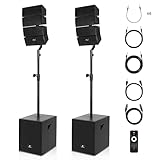
- ★ PRORECK CLUB 3000 PA SYSTEM: All-in-one 4000 watt bluetooth PA system consists of (1) active subwoofer, (1) passive subwoofer, (2) 4x4-inch array speakers(totally eight speakers), (2) speaker stands, (1) 30-feet speakon cable, (6) 8-inch 6.35mm cables,(1) 6-feet 6.35mm cables, (1) 33-feet 6.35mm cables, (1) remote control and (1) user manual. The active subwoofer features a 12-inch amplifier and streams music to the passive speaker and line array speakers, to deliver music to all audiences.
- ★ WIRELESS CONNECTION & OPERATION: Instantly pair with iPhone,iPod, iPad, android devices, etc with line of sight of up to 66 feet. You can also use the remote control to switch mode, play/pause, switch to previous/next song, increase/decrease volume from up to 20 feet; Telescoping speaker pole to adjust the pa system from 65 inch to 80 inch. Use side handles to lift and transport the subwoofers conveniently.
- ★HUGE COMPATABILITY & VERSATILE CONNECTIONS: The powered system set features BLUETOOTH/USB DRIVE/SD CARD functions. Simply insert USB drive/SD CARD to playback songs. Versatile 4-channel mono & stereo inputs (two mono XLR inputs for microphone or line-level source, one stereo 6.35mm input and one stereo RCA input) and one stereo RCA outputs. Individual volume controls and treble/bass control, master volume to set the general volume conveniently
- ★ WIDE RANGE OF USAGE:The PA system has 4000 Watt Peak /1000 RMS, and can accommodate up to 200 persons and 500 m2. Wide frequency response (from 40-20KHz) makes it suitable for amplifying any type of audio including music or vocals. Great for wedding, meeting, speeches, churches, class teaching, gymnastics, conference, home theater, etc. Easily connect to multiple musical instruments.
- ★ DEEP & THRILLING STEREO SOUND: Two rock-solid subwoofers are made of MDF material and reduces resonance for distortion-free and accurate response. Eight tweeters and eight mid-tweeters ensures clear and deep stereo sound. Note: Items are shipped with three packages separately.
Product prices and availability are accurate as of the date/time indicated and are subject to change. Any price and availability information displayed on Amazon at the time of purchase will apply.

