Do these 3 things before closing this tab:
1Scan for outdated or missing drivers - takes under a minute2Clear out junk files and repair common Windows errors3Fix the driver behind crashes, sound loss and screen glitchesThe Moto G Stylus’s built-in pen is a screen input tool with software shortcuts for writing, magnifying content, marking up screenshots, collecting material in notes and—on Motorola’s documented 2026 model—turning sketches into generated images. The exact menu and available features vary by model year and software version, so check the guide for your specific phone before following a path described for another generation.
How does the Moto G Stylus pen work?
You use the pen on the phone’s screen and access compatible actions through Motorola’s pen toolbar or menu. On the documented 2026 model, that toolbar includes writing, magnification, screenshot annotation, note-related actions and a sketch-to-image tool. Motorola’s guides describe what these software features do, but do not establish the pen’s sensing technology, pressure sensitivity or latency.
As an Amazon Associate I earn from qualifying purchases.
Removing the pen can also open a shortcut, depending on the model and phone state. Motorola’s 2025 instructions say pressing the stylus end releases it. On that model, removal while the phone is locked opens Moto Note; removal while unlocked opens a stylus menu. The menu can be configured, collapsed to a movable bubble or disabled. These are 2025-specific instructions, not a guarantee for every Moto G Stylus.
Crashes, No Sound, or Screen Glitches?
Random freezes, missing sound and display glitches usually trace back to one bad driver. Find and replace yours safely.Free scan · under a minuteWindows Errors? Fix Them Before They Spread
Repair common Windows errors and clear accumulated junk for a smoother, more stable PC - no reinstall needed.Free scan · no reinstallWhat can you do with the Moto G Stylus pen?
Write by hand and convert it to typed text
On Motorola’s documented 2026 model, open an app’s on-screen keyboard, choose Write in text fields, and enable Use stylus to write in text fields. Write in the field with the pen; pausing or starting a new line converts the handwriting to text. A floating toolbar includes emoji, enter or new line, delete and a menu with shortcuts such as settings, clipboard, Google Translate and restoring the full keyboard. Motorola’s 2026 pen instructions describe this workflow.
#1 Best Overall

- Compatibility: This case Fit for Moto G Stylus 2026(6.7 Inch, Released in 2026) and Moto G Stylus 2025(6.7 Inch, Released in 2025). Please confirm your phone moderl before purchasing
- Strong Magnetic Charging: This Moto G Stylus 2026 Case has built with 38 super-strong N52 magnets, delivering 2400 gf magnetic attraction—over 7× stronger than standard cases. Ensures a secure, stable connection to Magnetic chargers, car mounts, and wireless charging stands. Perfectly aligned for fast, stable charging every time
- Tempered Glass Screen Protector: Includes 1× premium tempered glass screen protector that preserves original touch sensitivity and HD clarity. Offers reliable scratch and drop defense for your Moto G Stylus 2025 Screen, without compromising responsiveness or display quality
- Translucent Matte Back: This Moto G Stylus 2026 Phone Case crafted from high-quality matte TPU and translucent PC, this case reveals the phone logo with an elegant, refined finish. The frosted texture delivers a comfortable, non-slip grip, while the nano antioxidant layer effectively resists stains, sweat, and minor scratches—keeping your case clean and clear longer
- 14FT Military Grade Drop Protection: Phone Case Moto G Stylus 2025 has rigid polycarbonate backplate paired with flexible, shock-absorbing TPU bumpers around the edges, plus 4 built-in corner airbags. Provides comprehensive protection against accidental drops, bumps, and impacts
Magnify part of the screen
Choose Hover to magnify from the pen toolbar, then hover over the area you want enlarged. Tap the screen to turn magnification off. If the shortcut is not visible, Motorola says to add it to the toolbar.
Annotate and share a screenshot
Open the pen toolbar and select Annotate. Draw or highlight on the screenshot, erase marks if needed, and crop if you want. You can then share the annotated image or use Quick Share.
Rank #2

- 【Compatible with Moto G Stylus 5G 2026/Moto G Stylus 5G 2025】【Not for Moto G 5G 2026/2025 or Moto G Power 5G 2026/2025 or Moto G Play 2026/2025 or Moto G Stylus 5G 2024】【wireless charging is not supported!】Package includes Soft HD Screen Protector (Plastic) and install them according to the instructions.
- 【Camera Lens Protection】 This phone case use lens slide design, it easy to slide and not to loose, and enhance protective of your phone camera from scratches, collision, scuffs and impact, not only improve safety, protect your privacy but also has a sense of fashion.
- 【360° Rotable Magnetic Kickstand】 Advanced Ring Metal kickstand can rotate 360°, easy to rotate and sturdy on the phone case. Built in kickstand gives you the convenience to watch videos and movies hands-free with desired comfort and stability.
- 【Full Body Protection】The phone case is made of anti-scratch hard rigid PC bumper and shock resistance soft TPU, with Air-Cushion Technology for all corners and the raised TPU bezel design, provide all around double protection of your phone from drops, scratches and bumps.
- 【High quality after sales service】SunStory provides 180 days warranty. If there is any problem with Your product, please feel free to contact us by email,we will provide you with the most Reasonable solution.
Collect text or images in a note
When you highlight text in a browser or email, choose Add to note to save it in a note. To add an image from another app, Motorola’s 2026 guide describes dragging it while the apps are open in split screen, or copying and pasting it into a note.
Turn a sketch into an image
Select Sketch to image on the pen toolbar, draw with the pen or finger, and choose one of the listed styles: watercolor, realistic, sketch clean-up or abstract ink. You can regenerate the result, copy it, save it or share it. Motorola says a Moto Account sign-in or account creation may be requested if prompted; its instructions do not say that account access is always required.
Rank #3
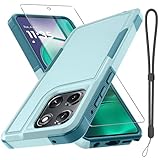
- Compatible Model: Only compatible with Moto G Stylus 5G 2025 & Moto G Stylus 5G 2026. Package included: 1 x phone case,1 x separate HD tempered glass screen protector,1 x nylon wrist wtrap lanyard.
- Military Grade Protection: Hard PC back cover,soft TPU bumper combined to provide dual layer protection. The shock-absorbing TPU bumper keep your phone safe from the occasional drop,while its PC back will protect your phone from daily wear and tear.
- Comfortable Grip: The new super cool dual layer design adds non-slip stripes to the side of the case,and the surface of the hard PC back cover is specially frosted. It makes the phone slim and easy to hold for a natural and comfortable feel.
- Precise Cutting: Precise clipping ensures easy access to all buttons and ports. Besides,0.08 inch raised screen bezel and 0.12 inch raised camera bezel to provide extra protection for your Moto G Stylus 5G 2025/Moto G Stylus 5G 2026.
- Full Body Protection: This two-in-one combination of military grade tough protective case, Four-corner grooved airbags, unique shock absorption design. Raised lips keeps camera lifted to prevent your lens from shock, collision and scratch.
How do I write with the Moto G Stylus pen?
For handwriting that should become regular text, follow the text-field setup above on the documented 2026 model. The steps and available gestures are not necessarily the same on other generations.
Motorola’s 2025 guide also describes writing in a larger writing area and using gestures to delete or select words and add or remove spaces. An earlier Motorola user guide describes stylus shortcuts for writing a note, editing a screenshot, Moto Note and Keep Notes, as well as opening Moto Note from the lock screen when the stylus is removed. Those older instructions show how features have varied; they do not establish that the same apps, gestures or menus appear on current models. See the 2025 stylus instructions and the earlier user guide for their respective model guidance.
Rank #4

- Compatible With: Specially designed for Motorola Moto G Stylus 5G 6.8"(2021
- Military Grade Drop Protection: Double combination of soft TPU frame and anti-scratch hard PC back achieves military grade drop protection. Perfectly passed thousands of high altitude drop tests to ensure forceful protection after an accidental drop
- Extra Screen and Camera Protection: Subtly enhanced 2mm lifted bezel on screen and camera lens can prevent daily scratches when you put cellphone face down. Ensuring every aspect of your phone is protected with uniquely
- Built in Metal Kickstand: Built in kickstand gives you the convenience to watch videos and movies hands-free with desired comfort and stability. Additional, magnetic stand can be directly stably attached to the magnetic car phone mount. You will love how convenient it is with such powerful functions
- Warranty: Our products come with 30 days warranty. If you have any questions or anything you feel unsatisfied, please feel free to contact us by E-mail. LeYi will happy to solve for you within 12 hours.
Why the model year matters
Moto G Stylus is a family of phones, not one unchanging pen interface. Motorola’s current 2026 help page documents handwriting conversion, hover magnification, screenshot annotation, adding content to notes and sketch-to-image. Its 2025 guide covers removal-triggered shortcuts and additional handwriting editing gestures; an earlier guide names Moto Note and Keep Notes. Do not assume a feature or menu described for one year is present on another. Check the exact phone’s current guide and software version. Motorola’s 2026 support page is associated with the 2026 model.
The official instructions cited here explain user-facing workflows, but do not verify how the pen senses the screen or provide a universal compatibility list for replacement or third-party pens. A generic capacitive stylus should not be assumed to provide the built-in pen’s shortcuts or behave as an equivalent.
Quick Recap
Best Value

- Compatibility: Moto G Stylus 2025/2026 Case cares for every detail with precise cutouts allow easy access to all ports, speakers, cameras, buttons, and other functions. Won't compatible with any other phone models. Notice: Due to the metal ring on the back, the case will 𝗡𝗢𝗧 𝘄𝗼𝗿𝗸 𝘄𝗶𝘁𝗵 𝗪𝗶𝗿𝗲𝗹𝗲𝘀𝘀 𝗖𝗵𝗮𝗿𝗴𝗶𝗻𝗴 𝗳𝘂𝗻𝗰𝘁𝗶𝗼𝗻
- 𝗜𝗻𝘀𝘁𝗮𝗹𝗹𝗮𝘁𝗶𝗼𝗻 𝗧𝗶𝗽𝘀: This case has a 2-in-1 polycarbonate front cover, frame, and back cover. 𝗖𝗿𝘂𝗰𝗶𝗮𝗹𝗹𝘆, 𝗱𝗲𝘁𝗮𝗰𝗵 𝘁𝗵𝗲 𝗳𝗿𝗼𝗻𝘁 𝗰𝗼𝘃𝗲𝗿 𝗳𝗶𝗿𝘀𝘁. After applying the film, install the front cover onto your phone. 𝗜𝗳 𝘆𝗼𝘂 𝗲𝗻𝗰𝗼𝘂𝗻𝘁𝗲𝗿 𝗱𝗶𝗳𝗳𝗶𝗰𝘂𝗹𝘁𝗶𝗲𝘀 𝗶𝗻𝘀𝘁𝗮𝗹𝗹𝗶𝗻𝗴 𝗶𝘁, 𝗰𝗼𝗻𝘁𝗮𝗰𝘁 𝗰𝘂𝘀𝘁𝗼𝗺𝗲𝗿 𝘀𝗲𝗿𝘃𝗶𝗰𝗲
- Tempered Glass Screen Protector : The Moto G Stylus 2025/2026 phone case presents [2 Packs] advanced HD clarity 9H hardness ultra resistant tempered glass screen protector. The cellphone case front cover provides 360-degree all-round protection for your phone, effectively prevents screen scratches, supports fingerprint recognition, and improved touch-smooth surface for better handheld experience
- Premium Material Construction: Our phone cases are made of high - quality, impact - resistant polycarbonate. This combo offers great durability, withstanding daily bumps, drops, and scratches to protect your phone long - term. The materials are robust, rarely cracking or deforming
- Weather and Chemical Resistance: Our phone cases are built to withstand physical impacts, elements, and common chemicals. They resist sunlight, humidity, and spills of water, coffee, or hand - sanitizer. This protection against environmental factors and chemicals enhances durability and longevity, ensuring optimal performance and year - round phone safety
Product prices and availability are accurate as of the date/time indicated and are subject to change. Any price and availability information displayed on Amazon at the time of purchase will apply.

