Recommended Free Tools
Deleting a file—or even emptying a computer’s trash—does not prove that its data has been securely disposed of. Files may remain recoverable, and an otherwise sound wipe can still fail if a business overlooks a storage location, uses a method unsuitable for the device, or cannot verify what a contractor did. A reliable disposal process starts with identifying the information and media, then choosing and validating a suitable method before the drive leaves controlled custody.
Why ordinary deletion is not secure disposal
Deleting a filename changes how a computer presents or tracks that file; it does not, by itself, establish that the information on the storage device is inaccessible. The Federal Trade Commission (FTC) says in Protecting Personal Information: A Guide for Business that “Deleting files using the keyboard or mouse commands usually isn’t sufficient because the files may continue to exist on the computer’s hard drive and could be retrieved easily.”
As an Amazon Associate I earn from qualifying purchases.
That distinction matters when equipment is sold, recycled, returned to a lessor, or sent to a destruction provider. Disposal is about the recorded information, not just the visible files or the physical device. NIST puts it this way in SP 800-88 Rev. 2, Guidelines for Media Sanitization: “The information security concern regarding disposal and sanitization revolves around the recorded information rather than the media itself.”
Do these 3 things before closing this tab:
1Clear out junk files and repair common Windows errors2Scan for outdated or missing drivers - takes under a minute3Repair Windows errors before they cause bigger problemsNIST defines media sanitization as “a process that renders access to target data on the media infeasible for a given level of effort.” The standard is a framework for making and documenting a risk-based decision—not a promise that one wipe command is right for every drive.
#1 Best Overall

- Permanently Erase Files So They Can Never Be Recovered - Deleting files or emptying the recycle bin doesn’t truly remove data—but Data Shredder Stick does. It uses secure overwrite methods to permanently destroy files, folders, and entire drives, making them unrecoverable by hacking tools or standard recovery software. Perfect for protecting personal, financial, and business data.
- Simple Plug-and-Play USB – No Installation Required - Just plug the USB into any Windows computer and start shredding instantly—no downloads, setup, or technical skills needed. The easy-to-use interface lets you drag and drop files for secure deletion in seconds. Designed for anyone who wants powerful data protection without complexity.
- Wipe Entire Hard Drives or Individual Files and Folders - Going beyond file deletion, Data Shredder Stick can completely erase internal and external drives. Manually delete all data from the drive then shred all deleted data. Our hard drive shredder ensures your information is truly gone before it leaves your hands.
- Fast, Portable & Reusable - Compatible with Windows systems, this portable USB tool works across multiple computers without needing internet access. Use it again and again to securely erase data whenever needed. Great for households, offices, and IT professionals managing multiple devices using precision tools.
- Protect Your Privacy with Military-Grade Data Destruction - Designed for maximum security, the advanced overwrite process of this hard drive eraser ensures your data is destroyed beyond recovery. Helps safeguard passwords, financial records, photos, and confidential files from identity theft or unauthorized access. A reliable solution for complete peace of mind.
Why a single wipe policy can fail
The current final NIST guidance identified here is SP 800-88 Rev. 2, published September 26, 2025, superseding Rev. 1 from 2014. It emphasizes an organization-wide sanitization program, method selection based on risk and media, validation, and confidence in vendor implementation. It points organizations toward methods aligned with IEEE 2883, NSA specifications, or an organizationally approved standard; it treats cryptographic erase as a specific technique.
In practice, a disposal decision needs to account for several things together:
- Information sensitivity: What data is on the media, and what level of assurance is required?
- Storage technology: Is the proposed procedure supported and appropriate for this specific kind of drive or other media?
- Disposition: Will the device be reused, leave the organization’s control, or be destroyed?
- Verification and control: Can the method be validated, and can the organization trust the people and tools carrying it out?
- Retention obligations: Is the information still needed for business, records-retention, or legal-hold purposes?
Sanitization does not always mean destroying the device. NIST recognizes clearing, purging, cryptographic erase, and destruction, with de-identification relevant in some contexts. Which approach is appropriate depends on the information, media, intended reuse or release, and applicable requirements. Destruction may be necessary when other methods cannot be applied or do not provide the required assurance.
Rank #2
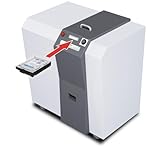
- Industrial media destruction: Shreds HDDs, SSDs, CDs, DVDs, USB drives, and credit cards
- High-volume performance: Destroys up to 250 hard drives per hour
- H-3 security level: Produces 1-9/16 in random cross-cut particles
- Touch screen control: LED-FCS panel monitors load and operation
- Continuous duty motor: Heavy-duty 4 HP motor handles long sessions
| Approach | Role in a disposal decision | What to establish |
|---|---|---|
| Clearing | A sanitization option to consider when the medium may remain in use or under control. | That the chosen procedure is suitable for the media and the required level of protection, and that its result can be validated. |
| Purging | A distinct sanitization option for cases where the required assurance and media support call for it. | That the selected method follows an approved standard and is supported for the device. |
| Cryptographic erase | A specific technique recognized by NIST, not a synonym for every software wipe. | That it is supported and validated for the device and circumstances; the label alone is not proof of success. |
| Destruction | Physical destruction when other methods cannot be applied, the media will not be reused, or the required assurance calls for it. | That the process is approved for the media, the outcome is documented, and custody is controlled through treatment. |
This comparison is a decision aid, not a substitute for the detailed procedures in the standard selected by an organization. NIST does not make one method universally sufficient for all drives or businesses.
Match the method to the storage medium
A method designed for a magnetic hard disk drive (HDD) may not work as intended on a solid-state drive (SSD), USB flash drive, or other nonmagnetic media. For example, degaussing is a magnetic-media technique; it is not a general-purpose way to sanitize all storage devices.
IRS Publication 4812, Revision 9-2026, gives a specific operational example for contractors handling IRS information. Within that scope, it prohibits degaussing SSDs and other nonmagnetic media, including flash, NVMe, USB, and optical media. It calls for supported, media-specific procedures—such as manufacturer-supported Secure Erase, Sanitize, cryptographic erase, or block erase commands where supported and validated—and requires methods appropriate to the storage technology.
Rank #3

- A single shredding volume of 15 sheets.
- 34L capacity shredder bucket
- Shatterable CDs, shatterable cards.
- Three entrance design, silent standard.
- Overheat protection, sliding door power off.
Those are IRS contractor controls, not rules that bind every business. They illustrate why an organization should identify the exact media before selecting a method. A tool’s name, a vendor’s general claim, or a procedure that worked on another device is not enough to establish suitability.
Inventory every place information can remain
Organizations can sanitize the computer on a desk and still miss the data. NIST calls for identifying information categories and locations as part of a sanitization program. The inventory should therefore cover more than end-user laptops and standalone hard drives.
- Office equipment: The FTC warns that digital copier hard drives can hold information about documents copied, printed, scanned, faxed, or emailed.
- Virtual and cloud environments: For contractors handling IRS information, Publication 4812 includes virtual-machine images, volumes, object storage, shares, snapshots, backups, databases, containers, serverless storage, and log repositories in sanitization activities.
- Physical storage media: Include devices awaiting repair, return, resale, recycling, or destruction, as well as media removed from equipment.
The IRS list is an example of the breadth an inventory may need; its specific requirements apply to its covered contractors. Each organization needs to map its own systems, services, equipment, and data flows rather than assume that its desktop-drive list is complete.
Rank #4

- Email us for accurate specs & competitive pricing.
- Our heavy-duty shredder is engineered to handle the toughest materials, including tires, wood, cardboard, and industrial waste. Built for durability and performance, it delivers consistent shredding power for recycling facilities, manufacturing plants, and waste management operations. With customizable blade configurations and motor outputs, this machine adapts to your specific material processing needs—from fine particle reduction for recycling to coarse shredding for volume reduction.
- Blade Hardness: 58–62 HRC (Rockwell C scale) with 0.3–0.5 mm surface coating. Blade Gap Tolerance: ±0.1 mm (ensures uniform particle size distribution).
- Shredding Capacity: 200–3,500 kg/h (material-dependent)
- Emergency Stop: EN 60204-1 Category 4/PLe (dual-channel redundancy).
Build a process that preserves control and proof
A disposal method is only one part of the control. NIST Rev. 2 emphasizes program governance, validation, and confidence in vendor implementation. A practical workflow should settle retention questions first, identify the media, authorize a suitable procedure, and preserve custody and records through treatment.
- Check whether information may be disposed of. Consult privacy, records-management, and management officials before sanitizing media. Resolve business retention needs and legal holds before data is made inaccessible.
- Inventory and identify the media. Record what is being retired and identify its type and relevant identifier. Include equipment and storage locations beyond conventional computer drives.
- Select an approved, media-appropriate method. Base the choice on sensitivity, technology, intended disposition, and applicable policy or contract. Do not assume an HDD procedure applies to an SSD or flash device.
- Validate the procedure and its implementation. Establish that the method is supported for the media and that the people, tools, and process performing it meet the organization’s requirements.
- Secure media until treatment is complete. Control access and movement while devices are staged, transported, or awaiting sanitization or destruction.
- Record the outcome. Keep evidence that ties the treatment to the media and documents the method, date, and responsible personnel. Retain vendor documentation where relevant.
When outsourcing, due diligence is part of the control. FTC guidance on the Disposal Rule says reasonable practices for consumer-report information may include reviewing a destruction contractor’s independent audits, references, certification, and security policies. A certificate or vendor assertion should fit into a process that also establishes what media was handed over, what method was authorized, and what happened to it.
Quick wins for a faster PC:
Fix the driver behind crashes, sound loss and screen glitchesFind Drivers →Clear out junk files and repair common Windows errorsFree Scan →Publication 4812 sets more specific requirements for contractors handling IRS information: secure media while awaiting treatment; document the date, media type, identifier, method, and personnel; and maintain chain of custody. Where a third-party destruction service is used under those requirements, the publication calls for approved methods and a Certificate of Destruction. These are requirements within that IRS contractor context, not universal business rules.
Best Value

- Data Security Tool: Physically destroys hard drives to prevent unauthorized data recovery
- Optimal Sizing: Designed with practical dimensions for efficient use and storage
- Versatile Functionality: Suitable for multiple professional and personal applications
- Enhanced Design: Engineered features improve usability and performance
- Multi-Purpose Application: Appropriate for various professional and personal uses
Understand which regulations apply to your organization
Regulatory examples can inform a disposal program, but their scope matters. They should not be generalized into a single deadline or procedure for every company.
FTC Disposal Rule
The FTC’s Disposal Rule concerns consumer reports and information derived from them and applies to anyone using a consumer report for a business purpose. FTC guidance gives June 1, 2005, as the Rule’s effective date. For covered information, the rule calls for reasonable measures to protect against unauthorized access or use during disposal; the FTC’s contractor due-diligence examples are guidance on practices that may help meet that standard.
FTC Safeguards Rule
The FTC’s Safeguards Rule business guidance says covered financial institutions should securely dispose of customer information “2 years after your most recent use to serve the customer,” unless a legitimate business need or legal requirement calls for retention, or targeted disposal is infeasible because of how the information is maintained. The guidance page was checked October 7, 2026. This is not a universal two-year deadline for every organization or every record.
Sector contracts and other jurisdictions
NIST SP 800-88 Rev. 2 is guidance; it does not automatically bind every business. Contracts, sector-specific requirements, and laws in the relevant jurisdiction may impose distinct obligations. IRS Publication 4812 is a current operational example for contractors handling IRS information, not a general regulation for all media disposal. Confirm which rules actually cover your organization, data, and transaction.
Quick Recap
Product prices and availability are accurate as of the date/time indicated and are subject to change. Any price and availability information displayed on Amazon at the time of purchase will apply.

