Recommended Free Tools
Most PS5 players should buy the standard DualSense for GTA VI. Sony and the PlayStation Store confirm vibration and trigger effects for the PS5 game, and the regular controller provides those documented features. Choose the DualSense Edge only if you will use its remappable controls, rear buttons, adjustable trigger travel, custom stick settings, profile switching or replaceable stick modules. Sony has not announced a GTA VI-specific Edge mode, so the premium model’s advantage is flexibility—not extra confirmed GTA VI effects.
What is officially confirmed about GTA VI controllers
GTA VI launches on PlayStation 5 on November 19, 2026. PlayStation’s June 24, 2026 announcement says the game “will play best on PS5 by taking advantage of PS5’s immersive features” and that the DualSense wireless controller reacts to actions in the game. The PlayStation Store listing is more specific: “Vibration function and trigger effect supported (DualSense wireless controller).”
As an Amazon Associate I earn from qualifying purchases.
That wording establishes the standard DualSense as the reference controller for the PS5 release. It does not promise that every action will use the same intensity, nor does it describe a special control scheme for the DualSense Edge. Rockstar’s platform listing names PlayStation 5 and Xbox Series X|S; the controller details above apply to the PS5 version.
Windows Errors? Fix Them Before They Spread
Repair common Windows errors and clear accumulated junk for a smoother, more stable PC - no reinstall needed.Free scan · no reinstallOutdated Drivers Are Slowing You Down
One free scan finds every outdated or missing driver and matches the right update for your exact hardware.Free scan · exact hardware match- Confirmed: DualSense vibration support.
- Confirmed: DualSense trigger-effect support, including the adaptive-trigger hardware’s game-controlled resistance where implemented.
- Not confirmed: GTA VI-only functions for Edge rear buttons, trigger stops, custom profiles or other Edge controls.
- Not implied: That the Edge renders the game’s haptics or triggers more powerfully than a standard DualSense.
DualSense vs. DualSense Edge at a glance
| Decision axis | Standard DualSense | DualSense Edge |
|---|---|---|
| GTA VI features documented by Sony | Vibration and trigger effects are listed for the PS5 game. | Retains DualSense haptics and adaptive triggers in supported games, but no GTA VI-specific Edge feature has been announced. |
| Button layout | Fixed layout with no rear buttons. | Remappable controls plus two sets of rear buttons. |
| Trigger adjustment | Standard trigger travel. | Hardware trigger stops and software adjustment of trigger dead zones. |
| Stick adjustment | Standard stick response and caps. | Adjustable stick sensitivity and dead zones, with changeable caps. |
| Profiles | No controller profile-switching system. | Multiple control profiles and an on-controller interface for switching and customization. |
| Repairability | Replace the controller if a stick wears out; individual stick-module replacement is not the standard design. | Individual stick modules are replaceable, and Sony sells replacement modules separately. |
| Published launch pricing | A regional price is not fixed by the cited GTA VI materials. | Launch RRP: $199.99 USD, €239.99 or £209.99. Replacement stick module launch RRP: $19.99 USD, €24.99 or £19.99. |
| Best fit | Players who want the intended PS5 feel with the least complexity and a lower upfront position. | Players who will actively use customization, accessibility adjustments, competitive-style inputs or replaceable sticks. |
What the standard DualSense gives you in GTA VI
Vibration and haptic feedback
The Store listing’s vibration statement means the PS5 version can communicate game events through the controller rather than relying only on the television or headset. The exact events, patterns and intensity are determined by the game, so the listing should be read as feature support—not as a promise of a particular sensation for every vehicle, weapon or environmental effect.
#1 Best Overall

- Ultra Customizable Controls
- Mappable Back Buttons
- DualSense Wireless Controller Features Built In
- Replaceable Stick Modules and Caps
Adaptive trigger effects
“Trigger effect supported” confirms that GTA VI can control resistance or other effects on the DualSense’s L2 and R2 triggers. This is distinct from ordinary rumble: the trigger mechanism itself can change how a press feels. The listing does not publish a trigger map or explain which actions will use resistance, so avoid treating any unofficial demonstration as a guaranteed final behavior.
No setup is required for the documented features
On a PS5, the standard controller is the straightforward option: pair it with the console, update the system and controller when prompted, and play the PS5 version. There is no indication that GTA VI requires an Edge profile or a special accessory to access the listed vibration and trigger effects.
What the DualSense Edge adds
Remapping and rear buttons
Edge lets you assign different functions to its controls and use rear buttons for inputs that would otherwise require moving a thumb from a stick. The package includes two back-button sets. This can help players who find simultaneous camera movement and face-button presses uncomfortable, or who simply prefer to keep both thumbs on the sticks during driving and combat.
The Tool Desk
Outbyte Driver Updater FREEFix the driver behind crashes, sound loss and screen glitchesFind Drivers →Outbyte PC Repair FREERepair Windows errors before they cause bigger problemsFix Now →Remapping is a user preference, not a GTA VI feature announced by Sony. The game must still expose the actions through the PS5 control system, and any in-game contextual behavior remains governed by Rockstar’s design.
Rank #2

- Aim and move with precision by swapping in fresh stick modules* so you’re always playing with equipment that’s in great shape. Plus, three types of changeable stick caps help you stay comfortable in-game without sacrificing grip or stability.
- Mappable back buttons The DualSense Edge wireless controller’s two swappable sets of back buttons can be configured to any other button input, so you’ve always got game-changing actions and essential controls at your fingertips.
- Adjustable trigger lengths Manually set the travel distance of your left and right triggers for an optimal experience with whatever you’re playing. Fast-paced FPS? Set a shorter travel distance to shoot faster on the field. Competitive racer? Set a longer travel distance for precise throttle control on the track.
- Remappable buttons Remap or even deactivate specific button inputs, so you can create a completely personalized control setup that’s ideal for the game at hand.
- Quick-swap control profiles Once you’ve found your ideal control settings, you can save them to unique profiles and swap between them on-the-fly, so your favourite configurations are always ready when you are.
Adjustable trigger travel and dead zones
Physical trigger stops can shorten how far L2 and R2 travel. Software controls can fine-tune trigger dead zones. A shorter press may feel quicker for actions that do not need a full analog range; full travel is more suitable when gradual input matters. Because Sony has not documented an Edge-specific GTA VI mode, trigger stops should be considered a personal control setting rather than a performance upgrade validated for this game.
Stick sensitivity, dead zones and caps
Edge supports stick-sensitivity and dead-zone adjustments, along with interchangeable stick caps. These settings can make a stick feel faster near the center, reduce unwanted drift response or change the height and shape under your thumbs. They are useful if you already know the response curve you prefer; they are not necessary to receive GTA VI’s standard haptics or trigger effects.
Quick-swap control profiles
You can save more than one configuration and switch between profiles using the controller’s controls and on-controller interface. A practical arrangement might use one profile for driving, another for on-foot play and a third with accessibility-oriented remaps. Profile switching is valuable only if you expect to maintain and use those configurations. Otherwise, it adds a layer of setup without changing the game’s confirmed feature set.
Do these 3 things before closing this tab:
1Scan for outdated or missing drivers - takes under a minute2Clear out junk files and repair common Windows errors3Fix the driver behind crashes, sound loss and screen glitchesReplaceable stick modules
The Edge’s stick modules are designed to be replaced individually, and Sony sells replacement modules separately. Sony’s published launch RRP was $19.99 in the United States, €24.99 in the euro area and £19.99 in the United Kingdom. Availability and current prices can vary by region and date. Replacement modules reduce the need to replace the entire controller when a module is worn, but installation still requires purchasing and fitting the part.
Rank #3

- Aim and move with precision by swapping in fresh stick modules* so you’re always playing with equipment that’s in great shape. Plus, three types of changeable stick caps help you stay comfortable in-game without sacrificing grip or stability.
- Mappable back buttons The DualSense Edge wireless controller’s two swappable sets of back buttons can be configured to any other button input, so you’ve always got game-changing actions and essential controls at your fingertips.
- Adjustable trigger lengths Manually set the travel distance of your left and right triggers for an optimal experience with whatever you’re playing. Fast-paced FPS? Set a shorter travel distance to shoot faster on the field. Competitive racer? Set a longer travel distance for precise throttle control on the track.
- Remappable buttons Remap or even deactivate specific button inputs, so you can create a completely personalized control setup that’s ideal for the game at hand.
- Quick-swap control profiles Once you’ve found your ideal control settings, you can save them to unique profiles and swap between them on-the-fly, so your favourite configurations are always ready when you are.
Does GTA VI use the Edge back buttons or trigger stops?
No GTA VI-specific support for those Edge-only controls has been announced. The Edge hardware can apply your remaps and trigger settings at the controller level, but that is different from Rockstar publishing a dedicated Edge layout or a special game mode.
In practical terms:
- Back buttons can duplicate or move functions you choose, subject to the actions available through the PS5 control interface.
- Trigger stops can shorten the physical press, but they do not create new in-game actions.
- Stick curves and dead zones alter your input response; they do not add a higher-fidelity GTA VI graphics, audio or haptics mode.
- A future update could add more explicit support, but there is no published announcement to rely on at launch.
Which controller is best for different PS5 players?
Buy the standard DualSense if you want GTA VI’s documented features
Choose the regular controller if your priority is simply playing GTA VI with the PS5 features Sony lists. It supplies the confirmed vibration and trigger effects, follows the game’s intended fixed layout and avoids paying for controls you may never configure. It is also the sensible choice if you want a second controller for local multiplayer or a replacement that behaves like the one included with the console.
Buy the Edge if customization solves a real problem
The premium model is easier to justify when you have a specific use for its hardware. Examples include moving frequently used actions to the rear buttons, limiting trigger travel for a preferred response, compensating for a comfort or reach issue, maintaining separate control profiles, or planning to replace worn stick modules rather than replace the whole controller.
Quick wins for a faster PC:
Scan for outdated or missing drivers - takes under a minuteDriver Scan →Clear out junk files and repair common Windows errorsFree Scan →Fix the driver behind crashes, sound loss and screen glitchesFind Drivers →Choose based on your other games, not an unannounced GTA VI mode
If you already play shooters, racing games or competitive titles that benefit from custom dead zones, trigger stops or rear buttons, those games may provide the value that justifies Edge. GTA VI alone is not documented as requiring or uniquely exploiting the Edge. Conversely, if none of your games use those settings, the standard DualSense is less complicated and better aligned with the confirmed GTA VI experience.
Rank #4

- INNOVATIVE MATERIAL - TALONGAMES PS5 Controller Grip Skin is optimized for the different touch-points of your fingers. It is a multi-textured grip created for optimized feel and control. Our PS5 Controller Grip is made with an ultra-comfortable slip-resistant polymer material.
- UNRIVALED QUALITY - Our Controller Grips are very durable. Its unique integrated molding structure not only ensures product performance, but also prolongs life! Provide full protection for your controller and save your money! Controller Grips allows you to enjoy the fun of the game! [Note: To eliminate odor, please expose the grip sticker to air for 48 hours.]
- EXCELLENT FEEL,PERFECT CUTTING - Provides maximum grip ! It is manufactured by advanced equipment, using 3D stereo scanning and professional laser instruments to develop models accurately. Our engineers have created a perfect shape to achieve maximum coverage, which can fit perfectly with your controller! The professionally designed average 0.45mm thickness can provide a more comfortable grip and support for your palm!
- EASY TO APPLY - Our Controller Grips are pre-cut, and users can complete the application within 3 minutes according to the instructions. It uses the removable adhesive technology of 3M in the United States, which can be re-sticked and removed without leaving residue, which is easy to clean and replace. Taking into account the different needs of users, we provide a variety of kinds to choose.
- YOUR BEST CHOICE - Specially designed for PlayStation 5 DualSense Edge Controller, All our efforts are for players to get a better gaming experience! ※WARNING:The inner side of the PS5 DualSense Edge Controller is made of non-slip material (rubber), and it's easy to leave residue after pasting, so please stick it according to your needs.Please note that not only our grip tape but all grip tape will cause this problem. *Note: This product is grip tape only and does not include the controller itself.
Price and long-term value
Sony announced a DualSense Edge launch RRP of $199.99 USD, €239.99 or £209.99 in 2022. Those are launch recommended retail prices, not a guarantee of what a retailer charges in October 2026 or in any particular country. The cited GTA VI materials do not establish a fixed regional price for the standard DualSense, so a precise price gap depends on your market and the offers available when you buy.
Edge’s replaceable modules change the long-term calculation. A $19.99, €24.99 or £19.99 module at launch is less expensive than replacing a whole premium controller, but it is still an additional part and may be unavailable temporarily. A standard DualSense generally has the simpler replacement path: replace the controller if its sticks or buttons become unusable.
Do not treat the Edge’s higher launch price as evidence of better GTA VI graphics, frame rate, loading time, audio or officially stronger haptics. Controller hardware does not upgrade the PS5 game itself.
GTA VI limited-edition DualSense controllers
Sony announced two GTA VI limited-edition DualSense designs, one black and one white. The controllers feature molded palm-tree details and official GTA VI branding. Sony says they will be available in limited quantities through direct.playstation.com and participating retailers.
Best Value
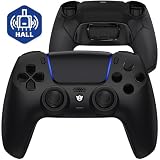
- Design for gamers – Based on official controllers with a custom design made for tactical eSports performance.
- Mappable Back Buttons – Four rear buttons support instant remapping of 15 buttons (X, O, Triangle, Square, Up, Down, Left, Right, L1, L2, R1, R2, L3, R3, Touchpad).
- Next-Gen Precision – Hall Effect joysticks and mouse-click triggers deliver smooth, responsive, and reliable control.
- Customizable Comfort – Includes 8 swappable thumbsticks in two heights and three styles (domed, concave, concave widened).
- Package Included – ULTIMATE Controller, 8 interchangeable thumbsticks, and user manual. Cable and other accessories not included. Not compatible with official charging dock.
These editions are standard DualSense controllers for the purposes of the documented feature set. The announcement describes their appearance and availability, not a separate performance tier. Buy one for its design or collectibility, not because it has an Edge-style control system or an additional GTA VI mode. Compatibility is the same PS5 DualSense category covered by the Store listing’s vibration and trigger-effect statement.
How to choose before launch
- Confirm your platform. The controller evidence discussed here applies to the PlayStation 5 version. Rockstar also lists Xbox Series X|S, but these DualSense details do not describe the Xbox release.
- List the features you will actually use. Mark rear buttons, remapping, trigger stops, stick adjustments, profile switching and replaceable modules only if you have a concrete reason for each.
- Compare the current local prices. Edge’s published launch RRP is historical; retailer prices and availability vary by region and date. The same is true of limited-edition stock.
- Decide whether appearance matters. A GTA VI-branded DualSense offers the game’s documented controller effects in a collectible shell, but it does not replace Edge customization.
- Buy the standard DualSense when the checklist is blank. You will still receive the officially listed vibration and trigger effects without configuring an advanced controller.
Setup and troubleshooting
Vibration or trigger effects are not working
- Verify that you are running the PS5 version of GTA VI and that the controller is connected as a DualSense wireless controller.
- Install available PS5 system, game and controller updates before changing advanced settings.
- Check the console’s controller settings to ensure vibration and trigger-effect functions have not been disabled or reduced.
- Test with the standard DualSense if you are using an Edge profile with unusual remaps or trigger settings. This separates a controller configuration issue from a game-support issue.
Edge remaps feel wrong
Return to the profile-management controls, identify which rear button or face-button assignment changed, and save a clearly named profile for GTA VI. Keep a neutral profile available so you can compare the game’s default layout without deleting your custom setup.
Trigger stops interfere with an action
Switch to full trigger travel when an action needs analog range or when a shortened press feels inconsistent. Trigger stops are optional hardware settings; disabling them does not remove the game’s ability to provide the documented trigger effects through the controller.
Stick drift or a worn module appears
Update the controller, check the selected dead-zone settings and test another profile. If the problem persists and you use Edge, an individual replacement stick module is the relevant serviceable part. For a standard DualSense, the usual remedy is controller replacement rather than swapping a Sony-supplied module.
Bottom line: which GTA VI controller should you buy?
For most PS5 players, buy the standard DualSense. It is the controller Sony and the PlayStation Store explicitly associate with GTA VI’s vibration and trigger effects, and no GTA VI-only benefit for Edge has been announced.
Buy the DualSense Edge when its remapping, rear buttons, adjustable triggers, stick controls, profiles or replaceable modules address a need you can name. Its premium price pays for hardware flexibility and maintenance options, not a separately confirmed GTA VI experience. Choose a limited-edition GTA VI DualSense if you value the black or white design and can find one at a price you accept; its appeal is cosmetic and collectible.
Quick Recap
Product prices and availability are accurate as of the date/time indicated and are subject to change. Any price and availability information displayed on Amazon at the time of purchase will apply.
What’s actually slowing this PC down?
Pick the symptom - the matching free tool is one click away.

