What’s actually slowing this PC down?
Pick the symptom - the matching free tool is one click away.
Google’s AI-powered search experience did surface links associated with scams, spam and malware in reports from March 2024. The clearest evidence concerns Search Generative Experience (SGE), Google’s early experiment that preceded AI Overviews—not proof of a current, widespread 2026 campaign. In the reported cases, harmful pages already existed on the web; search manipulation helped them become discoverable, and an AI-assisted interface could summarize or recommend them in a way that looked trustworthy.
What the reports found
A March 2024 incident summary linked reporting about Google’s AI search experience to scam and malware-related pages. Reported destinations included fraudulent giveaways, fake software or browser updates, malicious browser extensions, spam pages and sites that could redirect visitors toward phishing or malware infrastructure. The summary establishes a reported exposure risk, not an infection rate or proof that every example affected every user. OECD.AI’s incident summary is an aggregation of the reporting, rather than an independent prevalence study.

That distinction matters: seeing a suspicious result is not the same as visiting it, and visiting it is not the same as installing malware or surrendering credentials. The more consequential steps are downloading and running a file, installing an extension, granting permissions, entering account or payment details, or following instructions from an untrusted page.
Which Google search product was involved?
SGE was the experiment
Google introduced Search Generative Experience, or SGE, as an experimental Search Labs feature. Its initial availability was limited to the United States, in English, through Chrome on desktop and the Google app. SGE put generative-AI answers into a search experience that also included links to websites. Google’s SGE announcement describes that launch scope.
AI Overviews became the public-facing feature
In May 2024, Google began rolling out AI Overviews to users in the United States. AI Overviews and SGE are related stages of Google’s AI-assisted Search, but they are not interchangeable names for one unchanged product. Google later introduced AI Mode as a more conversational, exploratory search mode; that does not make the 2024 SGE reports evidence about the current safety of every Search feature. Google’s May 2024 rollout announcement describes the AI Overviews launch.
How a malicious page can reach an AI-assisted answer
The incident is best understood as a failure risk across search and generation, not proof that an AI model independently authored malware websites. Google says AI Overviews combine a customized language model with Search’s web-ranking systems and provide links for further exploration. A model can therefore draw on a polluted set of results: the dangerous page may already be in the web index, while the AI layer selects, summarizes or presents it. Google’s explanation of AI Overviews describes that relationship.
- Attackers create, compromise or repurpose pages. A page may be built to target popular searches, hosted as deceptive third-party content, or placed on a compromised or expired domain.
- Search manipulation makes a page discoverable. Tactics can include query-focused spam, link schemes, redirects or abuse of a site’s reputation. Google’s spam policies recognize scaled content abuse, site-reputation abuse and expired-domain abuse, although those policies do not prove which tactic was used in each reported case. Google’s March 2024 Search update outlines these categories.
- The AI layer may elevate or summarize what Search retrieves. A generated answer or recommendation can make a questionable destination more prominent and can lend it the familiar appearance of Google Search. That is a presentation and retrieval risk as well as a ranking risk.
- A user may act on it. Harm occurs when someone clicks through and then, for example, installs a file, grants an extension access, enters credentials or pays a scammer. A result being shown does not establish that this final step occurred.
These failure modes are related but different. A model can state something false; Search can retrieve a malicious page; a presentation can make a weak source look authoritative; or an advertisement can lead to a harmful destination. None of those, by itself, proves that the model created the site or that a user’s device was infected.
Rank #2

- Stateful firewall throughput: 250 Mbps
- Recommended maximum clients: 50
- Managed centrally over the web
- Layer 7 traffic analysis and shaping
- Licensing sold separately, POE (Power Over Ethernet)
Why the AI presentation changes the stakes
Ordinary search already exposes users to manipulated rankings, malicious ads, compromised websites and deceptive downloads. Generative search adds another layer: it compresses retrieval, ranking and summarization into a concise answer. That can save time, but it can also make it less obvious which source supports a recommendation. A link inside a Google-branded answer is not a security certificate, and an AI summary is not a substitute for checking the destination and source.
Outdated Drivers Are Slowing You Down
One free scan finds every outdated or missing driver and matches the right update for your exact hardware.Free scan · exact hardware matchWindows Errors? Fix Them Before They Spread
Repair common Windows errors and clear accumulated junk for a smoother, more stable PC - no reinstall needed.Free scan · no reinstallSearch manipulation can target many kinds of queries, including software downloads, security tools, financial services, giveaways, troubleshooting and breaking news. Those are threat-model examples, not a measured ranking of which query types were most affected in the 2024 reports. Risk also varies with language, location, device, query wording and the pages available at the time.
What Google said it changed
Search spam policies and ranking systems
In March 2024, Google announced changes addressing scaled content abuse, site-reputation abuse and expired-domain abuse. The company initially said the changes were expected to reduce low-quality, unoriginal content in Search by 40%; it later reported a 45% reduction after rollout. Both figures are Google’s own evaluations of low-quality content, not independent measurements of scam or malware exposure. Google’s update announcement contains its account.
Rank #3

- The WatchGuard Trade Up Program allows customers to exchange eligible older WatchGuard or competitive firewall models for the latest WatchGuard appliances at a reduced cost, making it easier and more affordable to upgrade to current-generation hardware with the newest performance capabilities and security features.
- Trade Up to Watchguard T125 Firebox with 5 Year Total Security Suite License (WGT125675) - The Firebox T125 provides enterprise-grade protection for branch offices and remote sites. Featuring 2.5Gb and 1Gb ports, it delivers fast throughput, advanced malware detection with IntelligentAV, and SD-WAN compatibility in a compact form factor.
- The Total Security Suite is WatchGuard’s most comprehensive security package, bundling every advanced service into one subscription. It delivers layered defense with AI-driven malware detection, DNS filtering, cloud sandboxing, and security correlation. Ideal for organizations that demand maximum protection and visibility across their network.
- The Total Security Suite equips your WatchGuard Firebox with the full set of advanced defenses. It adds AI powered malware detection, DNS filtering, cloud sandboxing, threat correlation, and automated response, all managed in WatchGuard Cloud. Ideal for organizations that need maximum protection, compliance ready reporting, and end to end visibility.
- Interfaces and deployment: 1x 2.5Gb and 4x 1Gb Ethernet to simplify uplinks, carve out segmented zones, and keep branch wiring minimal.
AI Overview changes
After inaccurate and unhelpful AI Overviews drew attention, Google said it made more than a dozen technical improvements. These included changes to handling nonsensical queries, reducing reliance on user-generated content for potentially misleading advice and applying stricter limits to when an Overview appears. Google also said that policy-violating overviews occurred on fewer than one in seven million unique queries where AI Overviews appeared. That is a company-reported statistic about policy violations; it is not a rate for all incorrect answers, spam, scams or security risks.
Google also said some widely shared screenshots of bizarre AI Overviews were fabricated, while acknowledging that genuine inaccurate or unhelpful examples existed. A screenshot alone cannot establish what a user actually saw, whether it was reproducible or where a link led. Google’s account of its changes and examples provides the company’s position.
What the incident does—and does not—show
- It shows: reporting in March 2024 associated Google’s early AI-search experience with scam, spam and malware-related destinations.
- It does not show: that all AI Overviews were unsafe, that every circulating screenshot was genuine, or that Google’s AI directly created the malicious sites.
- It does not establish: how many users were exposed, how many were infected, or the current prevalence of such results in 2026.
- It does not mean: that a suspicious result is harmless if it came from a familiar search interface. Verify the destination before acting.
How to search and download more safely
- For software, updates and security tools: go to the maker’s official website or a trusted app store instead of choosing a download because an AI answer or search result displayed it.
- Check the domain carefully: read the full address, watching for misspellings, extra words and lookalike characters. A legitimate-looking page can still redirect elsewhere.
- Be wary of urgency: do not trust pop-ups claiming your device is infected, and do not call numbers shown in alarming browser messages.
- Treat extensions cautiously: install only extensions you need, from a trusted source, and review the permissions they request.
- Cross-check consequential advice: compare several reputable sources, especially before paying, sharing personal information or following health, legal or financial instructions.
- Keep protections current: update your browser and operating system, leave security warnings enabled and use multifactor authentication on important accounts.
- Report suspicious results: use Google’s Search feedback or spam-reporting options where available.
What to do if you already clicked
You opened the page but did not interact
Close it. Do not accept notification prompts, download files or follow instructions on the page. If the browser displayed a security warning, do not bypass it. Simply opening a page does not prove the device is compromised.
Rank #4
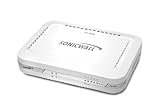
- Firewall Protection: Remote Access Authentication, Content Filtering, Malware Protection, URL Filtering, Web Content Filtering, Deep Inspection Firewall, Reassembly-free Deep Packet Inspection, and
- Firewall Protection (continued): Gateway Antivirus, Anti-spyware, Denial of Service (DoS), Distributed Denial of Service (DDoS), Egress Filtering, Cookies Blocking, Dead Peer Detection
- Encryption Standard: DES, 3DES, AES (142-bit), AES (128-bit), AES (256-bit), SHA-1, MD5 Intrusion Prevention, NAT, PAT, IPSec NAT Traversal, 5 Network (RJ-45) Ports, Fast Ethernet, 10/100Base-TX
- Virtualization: 8000 x Maximum UTM/DPI Connections, 8000 x Maximum Connections, 1000 x New Connections/Sec, 1 x SonicPoints Supported, 5 x Site-to-Site VPN Tunnels, 5 x VLANS
- USB Port, AC Adapter (Power Source) 12 V DC, Management Port, 32 MB Flash Memory, 256 MB Standard Memory, Secure Digital (SD) Card , Height: 1.4", Width: 7.5", Depth: 5.6
You downloaded or installed something
Do not open a downloaded file you no longer trust. If you installed an app or extension, remove it and run a scan with reputable security software. If the device behaves unusually or the scan finds a threat, follow the security provider’s removal guidance before using the device for sensitive accounts.
You entered a password or payment details
From the legitimate service—not the suspicious link—change the password, change it anywhere else you reused it, and revoke active sessions if the service offers that option. Contact your bank or card issuer promptly if you submitted payment information, and monitor the account for unauthorized activity.
You called a number or granted remote access
End the session and disconnect the device from the network if a caller had remote access. From a separate trusted device, secure affected accounts and contact your organization’s IT team if it was a work device. Do not pay a caller or give them more access to “undo” the problem.
The Tool Desk
Outbyte PC Repair FREEClear out junk files and repair common Windows errorsFree Scan →Outbyte Driver Updater FREEScan for outdated or missing drivers - takes under a minuteDriver Scan →Quick Recap
What businesses and publishers can take from it
For businesses
- Train staff that search placement—even inside an AI summary—is not proof that a vendor or download is legitimate.
- Restrict unauthorized software installation and use endpoint protection and browser controls appropriate to the organization.
- Use multifactor authentication, monitor lookalike domains and make a clear process for reporting suspicious links.
For publishers
- Audit user-generated and third-party areas for deceptive or compromised content.
- Review redirects, expired domains and unexpected changes in search traffic or indexing.
- Understand what each search control does before relying on it. Google’s Google-Extended control concerns use of content for Gemini model training; it is not a universal block on appearing in Search or AI Overviews. Google’s page on controls for Search AI features explains the distinction.
Product prices and availability are accurate as of the date/time indicated and are subject to change. Any price and availability information displayed on Amazon at the time of purchase will apply.




