Pixel owners can start with Settings > Device health & support for device status and available symptom checks. A separate tool, Pixel Repair Diagnostics, launches from the Phone app by entering *#*#7287#*#*. Which tests appear depends on the Pixel model, software and, for some features, location.
Which Pixel diagnostic route should you use?
| Tool | Best for | Availability and access |
|---|---|---|
| Device health & support | Overall device status, feature summaries and links to checks or support | Pixel 6 and later, including Fold. Open Settings > Device health & support. Google’s Device health & support instructions |
| Pixel Repair Diagnostics | Device checks before or after repair | Pixel 3 and later phones and Pixel Tablets. On a phone, open the Phone app, tap the dial pad and enter *#*#7287#*#*. Google’s Repair Diagnostics instructions |
| Bluetooth diagnostics | A Bluetooth-specific symptom | Pixel 6 and later, including Fold. Settings > Connected devices > Bluetooth diagnostics. Google’s diagnostics availability index |
| Touch diagnostics | Unresponsive or inconsistent touchscreen input | Pixel 9 and later. The test is not listed for Pixel 8a and earlier, including Fold. Google’s Device health & support instructions |
Most diagnostics in Device health & support are available on Pixel 6 and later, including Fold. Calls, mobile data and Wi-Fi diagnostics are limited to the Pixel 11 series in the US. These are feature-availability limits, not evidence that an older phone is faulty.
As an Amazon Associate I earn from qualifying purchases.
Find device health and checks in Settings
- Open Settings and tap Device health & support.
- Review the overall status and feature summaries, which can include battery health and phone temperature.
- Scroll to the available diagnostics, or use Settings search for “diagnostics” or a specific concern such as battery, charging or touch.
- Choose an available check and follow its prompts. The hub also links to support and repair options.
Menu labels and available tests can vary by model and software version. If a test does not appear, that alone does not establish a hardware problem.
Run Pixel Repair Diagnostics from the Phone app
- Open the Phone app on the Pixel phone.
- Tap the dial pad and enter
*#*#7287#*#*. - Follow the on-screen instructions and tap Confirm when prompted.
Google describes the app as a way to check a device before and after repair. Its manual covers categories such as visual, sensor, connectivity, camera, audio and screen checks, but the available checks can differ by model; some manual tests require you to interact with the phone. Read Google’s Pixel Repair Diagnostics manual.
#1 Best Overall
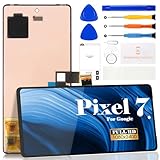
- Compatibility:for Google Pixel 7 screen replacement, fits GVU6C, GQML3 models. This OLED display digitizer assembly with frame resolves cracked glass, dead pixels, touch unresponsiveness, display lines, black screen, and color distortion. Please confirm your phone model before purchase (Settings > About Phone > Model Number). NOT compatible with Google Pixel 7 Pro, Pixel 7A, Pixel 6, or other models.
- Installation Precautions:1.Electrostatic Protection: Wash your hands to discharge static electricity before operation, or wear an anti-static wristband; 2.Flex Cable Operation: Unplug and plug flex cables only when the power is off. Hold only the plastic part of the interface; avoid pulling the cable or damaging the clips. Operate the clips gently and do not break them. 3.Avoid Forced Operation: Do not pry or pull hard when encountering tight adhesion or resistance during disassembly.
- Installation NOTE:1. Check whether the product is in good condition and test it before installation. Do not remove protective film or labels during testing; 2. The screen is glass, which is a very fragile product. Testing before installation is strongly recommended; 3. During installation and testing, make sure the LCD cable is not bent; 4. If your phone has a black screen, press and hold the power key and volume key at the same time. If the phone vibrates, reinstall the product.
- Application Scenarios:Capable of resolving various screen issues such as cracks, dead pixels, touch response problems, color inaccuracies, and non-functional screens, rejuvenating your device. It guarantees a smooth display performance for multiple everyday uses, including regular browsing and high-definition video watching
- Complete Repair Kit: Each package includes 1×for Google Pixel 7 LCD screen replacement and a set of professional opening kits (Note: Install screws according to the recorded positions during disassembly. Avoid damaging the shell or motherboard due to mismatched screw lengths or thicknesses) , allowing for an easy and safe screen replacement. No need for additional purchases, saving you both time and money
For Pixel Tablet diagnostics, Google’s companion instructions use Google Pixel Update and Software Repair with a USB connection rather than the phone’s dialer code. See Google’s Repair Diagnostics instructions.
Check charging, battery and temperature concerns
In Device health & support, review the status summaries and look for the checks offered on your model. Google’s support example for its Ask Pixel Help feature uses the query “Can’t charge phone”; describing the symptom plainly can help you find relevant guidance. Battery or charging checks are not the same as a guarantee that a particular component is defective.
Rank #2

- 【Parameters】For Google Pixel 6 GB7N6 G9S9B16 LCD digitizer screen assembly replacement with frame, OLED Material, With Fingerprint Function (Please note: this product includes the fingerprint function, but it requires to install the Original flex cable, so that the fingerprint function can be used. If you don't know how to install it, please contact us), please confirm your phone model before purchasing
- 【Quality Guarantee】All our products are strictly QC tested before shipment. Make sure there are no scratches, no dead zones, no dot pixels or lines on the screen. High color saturation, high resolution, wide color gamut and smooth hand feel
- 【Application】Used to replace the defective LCD display touch screen digitizer assembly for Google Pixel 6. Examples include incorrect screen response, display issues, pixel distortion, cracked LCD screen, wrong colors, old or frozen LCD.
- 【Installation and Service】 Please test the screen before installation to ensure the normal use of the screen. Non-professional installation is not recommended. If you need help, please contact us and we will get back to you (The screen does not include power buttons, volume buttons or other buttons. Please remove them from old screen, and then re-install.)
- 【Complete Repair Kit】Each package includes 1×LCD screen replacement and a set of professional opening kits, allowing for an easy and safe screen replacement. No need for additional purchases, saving you both time and money
Test a Pixel touchscreen that is not responding
Touch diagnostics are available on Pixel 9 and later. On Pixel 8a and earlier, including Fold, Google’s documented advice focuses on troubleshooting rather than that diagnostic test. Google’s touchscreen troubleshooting guidance recommends checking whether the response improves after cleaning the screen or removing a case or screen protector, as well as considering software and app causes. A removed screen protector may not be reusable.
Run Bluetooth diagnostics
On Pixel 6 and later, including Fold, open Settings > Connected devices > Bluetooth diagnostics, then describe the problem and follow the prompts. The option is model-limited, and its result is a troubleshooting aid; it cannot be assumed to identify every possible Bluetooth fault. Check Google’s diagnostics availability guidance.
Rank #3

- 【Compatible Model】 This screen replacement For Google Pixel 6 Screen GB7N6, G9S9B16, G9S9B, GR1YH.please confirm the model before purchasing.
- 【OLED Quality】 Compared with traditional LCD screens, OLED screens bring vibrant and vibrant images and battery life is superior to LCD screens, more durable and more resistant to image aging.OLED display offers High color saturation, high brightness, ultra-wide field, high resolution, thinner and lighter than LCD.
- 【With FringerPrint Funtion】This Google Pixel 6 Screen is with Fingerprint Function (Please note: this product includes the fingerprint function, but it requires to install the Original flex cable, so that the fingerprint function can be used. If you don't know how to install it, please contact us)
- 【Application】Used to replace the defective LCD display touch screen digitizer assembly for Google Pixel 6. Examples include incorrect screen response, display issues, pixel distortion, cracked LCD screen, wrong olors, old or frozen LCD.
- 【Installation and Service】 Please test the screen before installation to ensure the normal use of the screen. Non-professional installation is not recommended. If you need help, please contact us and we will get back to you (The screen does not include power buttons, volume buttons or other buttons. Please remove them from old screen, and then re-install.)
What to do when a diagnostic points to repair
A passed check does not guarantee that every hardware or software issue is absent, and a failed check is not itself a repair. Use the result alongside the symptom and Google’s troubleshooting steps. Device health & support can surface support, warranty and repair information.
Protect personal data during service
Repair Mode is intended to protect personal data while a device is being serviced, avoiding the time-consuming process of backing up, wiping and restoring data. Follow the current repair-preparation instructions for your model and situation. Google’s Repair Mode announcement.
Rank #4

- 【Compatible Model】 This screen replacement For Google Pixel 8 Screen Replacement GKWS6, G9BQD, GA04851-US, GZPFO, GPJ41.please confirm the model before purchasing.
- 【Strictly Quality Control】All our products are strictly quality tested before shipping and are 100% intact. Make sure the screen is free of scratches, dead spots, dot pixels, or lines. High color saturation, high resolution, wide color range, and nice to the touch.
- 【No FringerPrint Funtion】This product, made of TFT, No FringerPrint Funtion.
- 【Application】Used to replace the defective LCD display touch screen digitizer assembly for Google Pixel 8. Examples include incorrect screen response, display issues, pixel distortion, cracked LCD screen, wrong colors, old or frozen LCD.
- 【Installation and Service】 Please test the screen before installation to ensure the normal use of the screen. Non-professional installation is not recommended. If you need help, please contact us and we will get back to you (The screen does not include power buttons, volume buttons or other buttons. Please remove them from old screen, and then re-install.)
If you choose self-repair
Google’s US Store repair page identifies iFixit as its authorized parts partner and provides model-specific manuals and guidance on tools and parts. Google recommends self-repair only for people with relevant technical expertise. Repair options and parts availability on that page should not be assumed to apply outside the US. See Google Store repair options.
Quick Recap
Product prices and availability are accurate as of the date/time indicated and are subject to change. Any price and availability information displayed on Amazon at the time of purchase will apply.

