Google Photos still includes manual adjustment tools, but its editor now puts AI-driven suggestions and text or voice requests ahead of them. If you want to set exposure and color by hand and make local changes without describing them first, Snapseed is the clearest documented alternative. Whether it is the better choice depends on the task, and the sources available here do not include a head-to-head test or a satisfaction study that would settle that question.
What changed in the Google Photos editor
The 2020 redesign already had manual controls
Google’s September 30, 2020 announcement, “A new, more helpful editor in Google Photos,” described two things at once: a suggestions tab and a section headed “Granular manual controls that are easy to use.” The manual tools were part of the redesign from the start. Any claim that Google Photos removed them needs a source Google itself would stand behind, and none of the Google material reviewed for this piece says that.
As an Amazon Associate I earn from qualifying purchases.
Conversational editing arrived in 2025
On August 20, 2025, Google published “Edit images in Google Photos by simply asking.” The feature lets you describe an edit by text or voice inside the editor. Google’s product manager, Selena Shang, wrote that “You can simply describe the edits you want to make by text or voice in Photos’ editor, and watch the changes appear.” On September 23, 2025, Google followed with “Google Photos expands conversational editing.”
Who gets it, and where
The first announcement specified Pixel 10 and the United States. The September 2025 follow-up described a rollout to eligible Android users in the U.S. Both announcements are U.S.-specific. The sources reviewed do not establish availability in other countries, on other Android phones, or on iPhone, so treat your own experience as the test. If the feature is missing from your editor, the sources do not explain why.
#1 Best Overall
![G Stylus 2021 Pen Stylus Pen Replacement for Motorola Moto G Stylus 2021 XT2115 Touch Pen [Not for G Stylus 5G (2021)]](https://m.media-amazon.com/images/I/31aJTKJKX9L._SL160_.jpg)
- High quality replacement sensor touch stylus for moto g stylus 2021 XT2115.
- ❤Not for Moto G Stylus 5G! ! ! ! ! ! Not for Moto G Stylus 2020(moto g stylus)! ! ! Not fit Moto G Stylus 2022! ! ! Please check the model before buying! ! !
- Way more accurate than your finger, you can edit photos, jot notes, sketch artwork, copy and paste text, mark up screenshots.
- The integrated stylus provides you with precise control and a whole new way to express yourself.
- ❤If you have any questions, you can contact Amazon for return and exchange.The stylus is seamlessly integrated with the Moto Note app, so you can start writing without even unlocking your phone.
Is manual editing actually gone?
The sources reviewed do not support that conclusion. They show that Google added a new way to start an edit and that manual controls predate it. The word “buried” here is editorial judgment about layout and emphasis: when the first thing the editor asks you to do is describe a change, the tools you once reached directly now take more steps to find. That is a fair critique of hierarchy, but it is not a measured fact about how the editor works.
The sources also do not document a setting that makes the editor open in a manual-first layout. If you want that, the Google Photos Help pages for Android editing are the place to confirm the current menu structure on your device, since those instructions change with app updates.
Rank #2
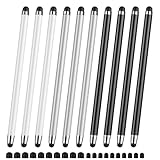
- 【Stylus Pen for Touchscreen】Our stylus pen requires no Bluetooth pairing or charging, you can unleash your creativity anytime and anywhere, just pick up the stylus and express your thoughts freely on the touchscreen.
- 【2-in-1 Stylus Pen】: Tablet pen for touchscreen, made of lightweight alloy, no need for Bluetooth connection or charging, ready to use after opening the package, comfortable in hand, sturdy, durable and anti-aging, so you can use it anytime, anywhere Easily capture inspiration and make everything feel like writing on paper, giving you a more accurate writing/drawing/touching experience.
- 【High Sensitivity & Precision】Acempire stylus can flexibly fit on the screen without delays, interruptions, or screen scratches, allowing you to have a smoother writing or drawing experience and enhance your creative pleasure.
- 【Compatibility and multi-purpose】: Universal stylus, suitable for touchscreen devices (Apple, Samsung, nintendo switch 2, switch lite, Moto, Lenovo, Xiaomi, etc., and also compatible with major operating systems, such as: Google, Android, Microsoft, etc.), you can use it like a real pen, You can use our stylus to write on drawing applications, take notes, read news, play games, etc. just like any other touchscreen device.
- 【Professional customer service】: we provide professional 24-hour customer service. If you encounter any product problems, please feel free to contact us through the store, and you will get a solution in the shortest time.
What Snapseed documents
Snapseed’s Google Play listing, published by Google LLC and last updated September 10, 2026, describes more than 30 tools and filters. The features relevant to this comparison are listed below. Cells marked “not stated” mean the sources reviewed do not describe that feature for Google Photos; that is not a claim that the feature is absent.
| Axis | Google Photos (per Google’s 2020 and 2025 announcements) | Snapseed (per its Google Play listing, updated September 10, 2026) |
|---|---|---|
| How an edit starts | Suggestions tab, granular manual controls (2020), and text or voice requests (2025) | Open a named tool and adjust directly |
| Manual exposure and color | Manual controls described in 2020; specific tools not detailed in the sources reviewed | Listed as direct exposure and color controls |
| Selective changes to part of a photo | Not stated in the sources reviewed | Listed, including masking |
| Healing | Not stated in the sources reviewed | Listed |
| RAW support | Not stated in the sources reviewed | Listed |
| Batch editing | Not stated in the sources reviewed | Listed |
| Undo and revert | Not stated in the sources reviewed | Listed; the listing describes non-destructive editing |
| Cost and ads | Not stated in the sources reviewed | Listing states no subscriptions, purchases, ads, or watermarks |
The table shows what each source says, not how the two apps compare in practice. Snapseed’s listing is the developer-facing description; it is not an independent review, and it does not say how any feature behaves on a particular phone or file format.
Rank #3
- UNIVERSAL COMPATIBILITY: Works seamlessly with all capacitive touch screen devices including smartphones, tablets, and other touch-enabled gadgets
- DUAL PACK VALUE: Includes 2 black stylus pens, providing a spare or allowing simultaneous use on multiple devices
- PRECISION CONTROL: Smooth-gliding tip enables accurate writing, drawing, and navigation on touch screens with enhanced accuracy
- PORTABLE DESIGN: Lightweight and compact construction makes it easy to carry in pockets, bags, or device cases
- RESPONSIVE PERFORMANCE: Capacitive technology ensures quick response time and fluid interaction with touch screen surfaces
A repeatable task to compare them yourself
Instead of judging the two apps by general impressions, use one task and time or note each step. A good test is brightening a shadow area on one side of a face without changing the rest of the frame.
- Choose a photo with an underexposed area and a clear subject, and export or save an untouched copy first.
- In Google Photos, make the change by describing it in the editor, then by using the manual tools if you can reach them. Note how many steps each route takes and whether the change stays on the area you meant.
- In Snapseed, open the same photo, select the exposure or a selective tool, and make the same change. Note whether masking lets you limit the change to the area you chose.
- Undo each change and check that the original is still intact. Snapseed’s listing says it supports undo and revert; confirm that behavior on your own file.
- Record the result you would actually keep, not the one you find most impressive on the first try.
Your notes from this test are your own evidence. They cannot be generalized to other photos, phones, or app versions.
Rank #4

- Unleash your creativity with the KP 504E Pen and its advanced pressure sensitivity, allowing for precise and accurate drawing on your tablet or pen display.
- Crafted from high quality materials, this pen offers durability and comfort, ensuring a smooth and enjoyable drawing experience.
- Designed for artists, designers, and enthusiasts, the KP 504E Pen provides a reliable tool to bring your ideas to life.
- Whether you're working on detailed illustrations, photo editing, or creating stunning artwork, this pen is perfect for achieving precise and intricate designs.
- Enhance your skills and explore new possibilities in the world of digital creativity with the KP 504E Pen. Experience control and precision like never before.
When each approach makes sense
- Choose Google Photos if you mostly want a quick, described change and you are happy to accept a suggested edit.
- Choose Snapseed if you want named controls, local masking, or RAW editing, and you prefer to set each value yourself.
- Use both if your library mixes casual snapshots with photos that need careful, targeted correction.
What the evidence does not show
- No head-to-head usability test of Google Photos and Snapseed was found in the sources reviewed.
- No satisfaction statistic or study compares manual and AI-assisted editing preference.
- The “100M+ downloads” figure on Snapseed’s Google Play listing is a store-reported threshold. It says how many times the app has been installed, not how many people still use it or prefer manual editing.
- Google’s announcements describe what the features are meant to do. They are not independent measurements of quality.
Without that evidence, the stronger claim is that Google Photos has added a faster, language-based route to edits and that Snapseed documents direct, detailed controls. Which route you prefer is a question you can only answer with your own photos.
Quick Recap
Best Value

- replacement touch stylus pen for Moto G Stylus (2023) / Moto G (2023). Not for Moto G Stylus 2022, Not applicable to Moto g stylus 2020, moto g stylus 2021, moto g stylus 5g 2021.
- Stylus pen more accurate than your finger, you can take quick notes, edit photos, sketch artwork, copy and paste text, mark up screenshots and all other typical touch screen commands.
- The integrated stylus provides you with precise control and a whole new way to express yourself,release your creativity.The integrated stylus provides you with precise control and a new way of expression.
- More accurate than your fingers, you can edit photos, take notes, sketch artwork, copy and paste text, mark screenshots, and more. The stylus is seamlessly integrated with the Moto app, so you don’t need to unlock your phone to start writing.
- Package Included: 1x Moto G Stylus 2023 stylus pen.
Product prices and availability are accurate as of the date/time indicated and are subject to change. Any price and availability information displayed on Amazon at the time of purchase will apply.

