Recommended Free Tools
There is no reliable universal winner. Available documentation explains why navigation consumes power and how to inspect battery activity, but it does not provide a controlled, same-phone test proving that Google Maps or Apple Maps always lasts longer. Your result depends more on screen time, brightness, route duration, location updates, cellular signal, device condition and settings than on the app name alone.
The fairest answer is therefore personal: run both apps on comparable trips, then inspect the Battery screen on your iPhone. Google also offers a documented Power saving mode for driving on certain Pixel 10 phones, but that feature compares a reduced Google Maps experience with standard Google Maps navigation—not with Apple Maps.
As an Amazon Associate I earn from qualifying purchases.
What the available evidence actually shows
A battery percentage from one journey is not an efficiency benchmark. Two trips can use different amounts of power because one has more stop-and-go traffic, a longer route, brighter sunlight, weaker cellular coverage or a screen that stayed visible throughout. Apple notes that battery life varies with use and settings, and its Battery page separates on-screen activity from background activity.
| Question | What can be said confidently | What has not been established |
|---|---|---|
| Does Google Maps always drain faster? | No. The available evidence does not support that general claim. | A universal Google Maps disadvantage across iPhones, Android phones and trip types. |
| Does Apple Maps always use less power? | No. There is no matched, controlled comparison showing that result. | A battery-life win for Apple Maps on every iPhone or route. |
| What causes navigation drain? | Display rendering, a lit screen, location updates, GPS, cellular communication and poor coverage can all contribute. | How much each factor contributes for a particular app on a particular phone. |
| Can you measure your own result? | Yes. Keep conditions similar and review app activity in Settings > Battery on iPhone. | A laboratory-grade conclusion from unrelated trips or different devices. |
That distinction matters because general guidance from Google’s Navigation SDK documentation describes power behavior in apps built with the SDK. It is useful for understanding mobile navigation, but it is not a head-to-head test of the consumer Google Maps and Apple Maps apps.
#1 Best Overall

- 67W 3-Port Super Fast Car Charger: Total 67 Watt USB C car charger Support PD 37W Max (USB C) and QC 30W Max (USB-A) output, can fast Charge for Most USB-A and USBC Devices Simultaneously. One car charger for all your USB A & USBC devices, your ideal travel companion
- 3X Fast Charge Speed: with upgrade PD and QC Fast Charging Technology, it can rapid charging for iPhone and Samsung or other phones from 0-50% in about 30 minutes, up to 3X faster than before, even can fast charge for Macbook air and iPad in high speed
- Broad Compatibility: with USB-C and USB-A output, can charge almost all USB Devices, compatible with iPhone 18 Pro/18 Pro Max, iPhone Duo, iPhone 17/17 Pro Max, iPhone Air, iPhone 16/16e/16 Pro Max/16 Plus, iPhone 15/15 Pro Max/15 Plus, iPad, Samsung Galaxy S26/S25/S24/S23/S22/S21/S20, Note 20/10/9, Google Pixel 11/10/9/8/7/6/5, android Cell Phone and other devices
- Safe & Reliable: USB C Car Charger Cigarette Lighter with intelligent chip inside, the Car Charger Adapter provides multi protections against over-current, over-voltage, over-heating and short-circuit. will automatically stop charging when power is full; the product shell made by ABS + PC fireproof material, ensure Protect your device and charge safely all the time
- What You Get: 1 x 67W 3-Ports USB-C & USB-A car charger Adapter + 1 x 3FT USB C to USB C Cable (Color: Black), 1-Year Replacement
Why navigation uses so much battery
The display and map rendering
Navigation continually draws a moving map, route line, labels, traffic information and interface controls. Rendering those elements requires CPU and GPU work. Google’s developer guidance identifies screen rendering as the largest power-use category in mobile navigation applications. Keeping the display illuminated for an entire drive adds another substantial demand, especially at high brightness.
A phone that is mounted in direct sunlight may raise brightness automatically, increasing consumption even if the route and app are unchanged. A dark interface can reduce power on OLED or AMOLED displays because black pixels emit less light, but the benefit depends on the screen technology, brightness and the rest of the interface. It is not a guaranteed saving on every phone.
Location, GPS and route updates
Turn-by-turn guidance needs repeated location updates to determine where you are and when to announce a turn. GPS-related activity and the processing needed to interpret those updates consume energy. A long route, frequent recalculation or a complicated urban environment can keep the location system busy for longer than a short, uninterrupted highway trip.
Outdated Drivers Are Slowing You Down
One free scan finds every outdated or missing driver and matches the right update for your exact hardware.Free scan · exact hardware matchWindows Errors? Fix Them Before They Spread
Repair common Windows errors and clear accumulated junk for a smoother, more stable PC - no reinstall needed.Free scan · no reinstallCellular communication and signal quality
Maps may exchange route, traffic and map data over the cellular network. Radio power varies with conditions, and Google’s Android guidance notes that cellular and GPS power use can depend on factors such as proximity to a base station. In a weak-signal area, the phone may work harder to maintain communication. Apple also lists low cellular coverage as a possible explanation for higher app use in Battery settings.
Foreground versus background activity
An app visible on the screen is doing more display work than one providing directions while the phone is locked. That does not make background navigation free: directions and location updates can continue while the app is not visible. iPhone’s Battery view labels these categories separately, which helps distinguish a display-heavy trip from background activity.
Rank #2

- Universal High-Speed Charging: PowerIQ 3.0 ensures rapid charging for USB-C phones, tablets, and more with fast charging capabilities.
- Space-Saving Design: Ultra-Compact build provides easy access to other dashboard functionalities while supporting fast charging for your devices.
- Wide Device Compatibility: Effortlessly powers USB-C devices with fast charging technology, enhancing user experience across gadgets.
- Safe and Reliable Charging: Built-in safety technology helps protect devices with safeguards for stable, high-speed charging.
- What You Get: PowerDrive III Duo car charger, welcome guide, our worry-free 18-month warranty, and friendly customer service.
Phone condition and environment
Battery age, temperature, charging state and other running apps affect the percentage you see. Heat is particularly unhelpful: a phone in a hot dashboard or direct sun may consume power faster and may reduce performance to protect itself. Apple’s general guidance recommends keeping the device cool. These variables can overwhelm a small difference between navigation apps.
How to inspect navigation battery use on an iPhone
Apple’s current iPhone battery guide provides an app-level view for today and previous days. Use it after a trip rather than relying only on the percentage shown before and after driving.
The Tool Desk
Outbyte Driver Updater FREEScan for outdated or missing drivers - takes under a minuteDriver Scan →Outbyte PC Repair FREERepair Windows errors before they cause bigger problemsFix Now →- Open Settings.
- Tap Battery.
- Review the chart and the list of app and system activity for today or an earlier day.
- Tap Google Maps or Apple Maps to open its daily details.
- Note the app’s battery share and whether the activity was labeled On Screen or Background.
On Screen means the app was open and visible. Background can include directions and other work while the app was not visible. If an entry is unexpectedly high, check whether the phone had weak cellular coverage during that period; Apple identifies low coverage as one possible cause.
The percentages are shares of the phone’s reported battery activity for the selected period, not a standardized watts-per-hour measurement. A navigation app can show a larger share simply because you used it for most of the day. Compare similar durations and look at the activity labels before drawing a conclusion.
How to make a fair Google Maps versus Apple Maps comparison
If you want an answer for your own phone, treat the exercise as an informal controlled comparison. You are trying to hold the major variables steady, not produce a universal industry benchmark.
Rank #3

- 67W 3-Port Car Charger USB C Fast Charge: KENHAO 67 Watt Cigarette lighter USB charger support PD 37W Max (USB C) and QC 30W Max (USB-A) output, can fast charge for most USB-A and USB-C devices simultaneously. One Multiport car charger accessories para carro for all your USB A & USB C devices, your ideal travel essentials companion
- Super Fast & Powerful Charging: with upgrade PD and QC3.0 Car Charger Fast Charging Technology, 12V-24V USB outlet can rapid charging for phones, even can fast charge for Macbook air or for iPad in high speed. USB C car charger adapter can charge for iPhone 18/17/16/15/14/13/12 series and most android devices from 0% to 60% in 35 minutes
- Safe & Reliable: Equip with the intelligent chip, the Car phone charger provides multi protections against over-current, over-voltage, over-heating and short-circuit. USB C car charger will automatically stop charging when power is full. The all-metal housing delivers superior heat dissipation and a sturdy shock-resistant design, ensuring safety and durability
- Broad Compatibility: Cell phone automobile chargers with Two USB-C and One USB-A Port output, can charge almost all USB Devices, compatible with iPhone 18 Pro/18 Pro Max/iPhone Duo, 17/Air/16/16e/15/14/13/12 Pro Max/Plus, XS/XR/X/8/7/6, iPad, Samsung Galaxy S26/S25/S24/S23/S22, Note 20/10/9, Google Pixel 10/9/8/7/6/5/4XL, Smart watches, driving recorder, GPS navigation, car vacuum cleaner, and more. Also fits all 12V-24V vehicles, cars, sedans, trucks, SUVs
- What You Get: 1-Pack 67W 3-Ports USB-C & USB-A Car Charger Accessories for women and men, One-Year Replacement. This is a practical truck accessories or car essential item designed for your daily commutes, road trips, and family travels
- Use the same phone. Do not compare an iPhone result with an Android result; hardware, display and operating-system power management differ.
- Start with a similar battery state. Begin each run at approximately the same charge level and avoid charging one app’s test during the route.
- Choose comparable trips. Use the same origin, destination and route type where practical. Record the route duration and distance.
- Match screen behavior. Decide whether the map will remain visible. Keep brightness, auto-brightness behavior and display timeout as similar as possible.
- Keep connectivity comparable. Run the tests in similar signal conditions. A tunnel, rural dead zone or congested network can change radio power use.
- Use the same navigation mode. Compare active turn-by-turn guidance with active turn-by-turn guidance, not one app in the foreground against another with the phone locked.
- Record interruptions. Note calls, music streaming, camera use, notifications, charging, temperature changes and route recalculations.
- Inspect Battery after each run. Record the app’s activity category and the observed battery change, but keep the notes alongside trip duration and conditions.
- Repeat before deciding. One drive can be dominated by traffic, signal or unrelated phone use. Several comparable runs provide a more useful personal pattern.
| Variable to hold steady | Why it matters | What to record |
|---|---|---|
| Device and battery health | Different hardware and aging batteries change baseline consumption. | Phone model, operating-system version and starting charge. |
| Screen visibility and brightness | Rendering and an illuminated display are major navigation loads. | On-screen or locked, brightness setting and sunlight conditions. |
| Trip length and route | Longer guidance and more recalculation create more work. | Distance, elapsed time, traffic and route changes. |
| Cellular conditions | Weak coverage can increase radio activity. | Strong, variable or weak signal areas. |
| Other phone use | Streaming, calls and background apps add unrelated drain. | Any interruptions or simultaneous apps. |
| Navigation state | Foreground and background work are reported differently. | Battery labels for on-screen and background activity. |
Do not convert separate-day battery percentages into a claimed “percent per hour” winner unless the procedure controls these variables and is repeated. Even then, describe the result as your phone’s observed behavior under those conditions, not a rule for everyone.
What’s actually slowing this PC down?
Pick the symptom - the matching free tool is one click away.
Google Maps Power saving mode: what it does and who gets it
Google’s Pixel Phone Help documentation describes a simplified Power saving mode for driving navigation. Compared with standard Google Maps navigation, Google says the mode can significantly extend phone battery life. It presents a simplified map with key information such as the next turn on the lock screen, reducing the need to keep the full navigation display active.
The documented availability is narrow:
- Pixel 10
- Pixel 10 Pro
- Pixel 10 Pro XL
- Pixel 10 Pro Fold
It is for driving navigation only, not walking or biking, and the page requires portrait orientation. Google says the mode is on by default on supported devices. The documentation does not establish that it uses less power than Apple Maps, nor does it make the feature available on iPhone or on all Android phones.
If you are using one of the listed Pixel phones, the relevant comparison is between standard Google Maps navigation and the simplified lock-screen experience. If you are on an iPhone, do not expect this Pixel-specific feature to change the Google Maps-versus-Apple Maps question.
Ways to reduce drain with either app
Reduce unnecessary screen time
When it is safe and legal to do so, lock the phone or let the navigation experience use a less demanding display state. A driver should never hide visual guidance that is needed for a safe maneuver simply to save power. If you need the map visible, reduce brightness only to the lowest level that remains clearly readable.
Rank #4

- Triple-Port 167.5W Max: Seamlessly power up all your essential devices with the first USB-C port delivering a powerful 100W, the second USB-C port providing 45W, and the USB-A port adding an additional 22.5W.
- Ultra-Fast 100W USB-C1 Port: With the first USB-C port offering 100W, quickly charge your 16-inch MacBook Pro from 0 to 50% in only 47 minutes.
- Reliable 45W USB-C2 Port: The second USB-C port offers 45W max of power, providing fast and reliable charging for iPhones and Samsung devices, keeping you connected without any delays.
- Tiny and Mighty: Designed to be unobtrusive, this super-compact charger won't clutter your car's interior.
- What You Get: Anker Car Charger (167.5W, 3 Ports), 3.3 ft USB-C to USB-C cable, welcome guide, 18-month warranty, and our friendly customer service.
Use dark mode where it helps
On OLED or AMOLED screens, dark mode may reduce display energy at suitable brightness levels. The effect is smaller or absent on other panel types, so treat it as a device-dependent option rather than a guaranteed fix.
Keep the phone cool
Move the device out of direct sun when possible, avoid trapping it under insulating material and keep airflow around the mount. Heat can increase drain and trigger protective behavior.
Charge during long drives
A USB-C car charger is a practical way to prevent a navigation session from exhausting the battery. Match the charger and cable to the phone’s connector and charging requirements. Charging addresses the immediate energy deficit; it does not prove that either app is intrinsically more efficient.
Limit unrelated activity
Calls, video, music streaming and other demanding apps compete for the same battery budget. Close or pause activities you do not need for the trip, while retaining any safety-critical communication or accessibility feature.
Free tools Windows power users keep installed
One-click scans. No signup required.
How to troubleshoot unusually high drain
Battery falls quickly only in one location
Check cellular coverage first. A weak or fluctuating signal can increase radio work, and Apple specifically lists low coverage as a possible reason for higher app use. Repeat the trip in a stronger-signal area before blaming the map app.
Best Value
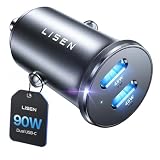
- THROW AWAY THE OLD A+C CAR CHARGER: What sets the LISEN usb c cigarette lighter adapter fast charger for iphone Duo & 18 pro max apart is its dual USB-C ports, each capable of delivering up to 45W of power. This configuration is particularly beneficial for users looking to fast charge two high-power devices at once, such as an iPhone 17 Pro Max and an iPad Pro. The simultaneous 45W output is a game-changer, significantly reducing charging times and ensuring your devices are ready to go when you are
- DUAL USB C FOR VERSATILE CHARGING: The LISEN 90W cigarette lighter adapter usb c car charger for iPhone 18 Pro Max 12v lives up to its promise of super fast charging. It supports Power Delivery (PD) 3.0. In practical terms, this means it can charge an iPhone 18 Pro from 0 to 83% in just about 30 minutes, a claim that holds up under testing. The charger is equally adept at handling other PD-compatible devices, ensuring that everything from smartphones to tablets receives an efficient power boost
- PREMIUM METAL ALLOY SHELL: The LISEN 90W usb c car charger adapter for iPhone 18 Pro Max fast charging impresses right out of the box with its sleek, all-metal design. Not only does the metal construction give it a premium feel and look, but it also aids in heat dissipation, ensuring the charger stays cool even when powering two devices simultaneously
- SMALL SIZE, BIG POWER: The tiny thumb-sized (2.1" (L) x 0.9" (W)) body fits most car 12V cigarette lighter usb c charger, providing a trim, less cluttered look. Its mini size is noteworthy, making it unobtrusive and a perfect fit for most car interiors without sacrificing accessibility
- UL AND FCC CERTIFICATION: LISEN iPhone Duo & iPhone18 Pro Max Car Charger USB C Fast Charging equipped with the intelligent power management chip, and passed UL, CE, FCC, and RoHS certifications. Made with PC fuel barrier V-0 grade material, it won 't get heat, is flame retardant, and is environmentally friendly
Drain is high when the map is visible
Review brightness, sunlight and on-screen time. A bright display and continuous rendering can dominate the result. Repeat with matched brightness for both apps; otherwise you are testing display conditions rather than app efficiency.
Battery shows background activity
Tap the app in Settings > Battery and inspect the daily breakdown. Background directions or location work may continue after the app is no longer visible. Note whether navigation was still active and whether you ended the route before leaving the app.
The phone becomes hot
Improve ventilation, remove direct sun exposure and stop nonessential workloads. If the device remains unusually hot or battery behavior changes across ordinary use, investigate the phone’s battery health and operating-system status rather than switching map apps blindly.
Results change from day to day
That is expected when route duration, traffic, signal, brightness or other phone activity changes. Repeat the comparison with a written record of conditions and avoid treating one unusually good or bad run as a verdict.
What the published 2023 Google Maps figure means
A 2023 Journal of Engineering Research paper hosted by CAPES Educapes reports Google Maps battery use of 1.52% in 30 minutes in that paper’s experiment. The retrieved material does not report a corresponding Apple Maps result, and the study was not a controlled, head-to-head comparison of the two consumer apps.
That number therefore cannot establish that Google Maps is more or less efficient than Apple Maps. It is a result from one experiment under that paper’s conditions, not a standardized rate that can be transferred to another phone, route or operating system.
The practical decision
Choose the app whose routing, map data, voice guidance and interface you prefer, then measure its behavior on your own device if battery life is critical. For a meaningful comparison, match the phone, route, duration, screen use, brightness and signal conditions, and read the app-level details in Settings > Battery.
Quick wins for a faster PC:
Scan for outdated or missing drivers - takes under a minuteDriver Scan →Clear out junk files and repair common Windows errorsFree Scan →Fix the driver behind crashes, sound loss and screen glitchesFind Drivers →The only documented low-power feature in the evidence here is Google’s simplified driving mode on specified Pixel 10 phones. It may significantly extend battery life versus standard Google Maps navigation on those devices, but it does not answer the broader Google Maps-versus-Apple Maps question. Without a controlled cross-platform test, claiming a permanent winner would be more confidence than the evidence supports.
Quick Recap
Product prices and availability are accurate as of the date/time indicated and are subject to change. Any price and availability information displayed on Amazon at the time of purchase will apply.

