If your Galaxy A57 5G has received One UI 9, make two privacy controls your first changes: learn to use the new blue location-access indicator and the secure-lock shortcut that disables biometrics for the next unlock. One UI 9’s A57 release notes do not document a new battery-saving switch or a measured battery improvement, so treat battery tuning as a careful review of ordinary display, background-activity, connectivity and power-saving controls on your own phone—not as a guaranteed One UI 9 feature.
Samsung’s model-specific record for Galaxy A57 5G SM-A576B identifies build A576BXXU6BZIE, Android 17 and the September 5, 2026 security patch, released October 12, 2026. Rollout and menu wording can differ by model, country and carrier.
As an Amazon Associate I earn from qualifying purchases.
Confirm that One UI 9 is installed
Before changing settings, open the phone’s software-update screen and check the version shown on the device. The documented release applies specifically to model SM-A576B; another regional model may receive a different build or a different schedule. Samsung’s support material also warns that availability and changes vary by device, market and service provider.
Samsung’s UK product page still describes the A57 at launch with One UI 8.5, and Samsung Mobile Press dates that launch to March 25, 2026. That is launch-era information, not evidence that the later One UI 9 update is absent. The update record dated October 12, 2026 is the relevant source for the newer A57 build.
#1 Best Overall

- ELEVATED DESIGN. EVERYDAY EASE: Galaxy A57 5G features the best of A Series design that’s lighter, slimmer¹ and made to fit with your outfit
- A VIVID VIEWING EXPERIENCE: Dive deeper into your content with the Super AMOLED Plus display² on Galaxy A57 5G that features slimmer bezels for a more immersive viewing experience
- SNAP IT. LOVE IT. SHARE IT: The triple-lens camera on Galaxy A57 5G lets you capture everything from low-light videos with Nightography Video to landscapes in awesome detail
- BIG-TIME BATTERY LIFE: The 5,000mAh battery in Galaxy A57 5G lets you do what you want without worrying about running out of power and the 45W Super Fast Charging 2.0³ recharges your phone faster
- AWESOMELY FAST PERFORMANCE: Galaxy A57 5G⁴ keeps you connected with faster speeds so you can enjoy every online experience with ease. Stream videos, share photos, video call or simply surf your favorite sites without interruption
The available A57 user manual on Samsung Support is labelled Android 16 and was modified March 26, 2026. It predates the One UI 9 update, so use it for general device context only. For a current procedure, use the Settings app’s search field on the updated phone and confirm the label that appears on your model.
Privacy settings that One UI 9 explicitly adds or highlights
Use the blue indicator to identify location access
Samsung says: “A blue indicator will appear at the top of the screen when an app accesses your location.” This is a visibility feature. It tells you that location is being accessed; it does not automatically block the app or prove that access has been revoked.
- When the blue indicator appears, open the Quick panel by swiping down from the top of the screen.
- Tap the indicator or its related notice. Samsung says the resulting view identifies the app accessing your location.
- Decide whether that access matches what you were doing. Navigation, a location-tagged camera feature or a weather refresh can be expected; an unrelated app deserves closer inspection.
- To change the permission, open Settings and search for location permission, app permissions or the app’s name. Select the app and choose the least-privileged option that still supports its purpose, such as allowing access only while the app is in use when that option is offered.
Check the permission screen on your handset rather than relying on an older manual. Names and choices can vary with the app, Android 17 configuration and regional software. The indicator is most useful as an ongoing audit: notice unexpected access first, then adjust the responsible app’s permission.
Free tools Windows power users keep installed
One-click scans. No signup required.
Trigger secure lock before handing over or putting down the phone
One UI 9 documents a quick way to require your fallback unlock method. Hold Volume down and Side together, or tap the Power button in the Quick panel. Samsung says this “prevents biometrics from being used the next time you unlock your phone.”
- Open the Quick panel and locate the Power control. If it is not visible, use the panel’s edit controls to add or expose it.
- Tap the Power control, or press Volume down and Side together.
- Leave the phone locked. At the next unlock, use your PIN, password or pattern instead of face or fingerprint recognition.
- After the fallback unlock succeeds, biometric unlocking can be used normally again unless the phone requests the credential for another security reason.
This is useful at an airport, during a work handoff, in a crowded place or whenever you want the phone to require knowledge of the credential. It is a lock-state action, not a replacement for a strong PIN or password. Anyone who knows that credential can still unlock the device.
Rank #2
- ELEVATED DESIGN. EVERYDAY EASE: Galaxy A57 5G features the best of A Series design that’s lighter, slimmer¹ and made to fit with your outfit
- A VIVID VIEWING EXPERIENCE: Dive deeper into your content with the Super AMOLED Plus display² on Galaxy A57 5G that features slimmer bezels for a more immersive viewing experience
- SNAP IT. LOVE IT. SHARE IT: The triple-lens camera on Galaxy A57 5G lets you capture everything from low-light videos with Nightography Video to landscapes in awesome detail
- BIG-TIME BATTERY LIFE: The 5,000mAh battery in Galaxy A57 5G lets you do what you want without worrying about running out of power and the 45W Super Fast Charging 2.0³ recharges your phone faster
- AWESOMELY FAST PERFORMANCE: Galaxy A57 5G⁴ keeps you connected with faster speeds so you can enjoy every online experience with ease. Stream videos, share photos, video call or simply surf your favorite sites without interruption
Rearrange the Quick panel for faster privacy and display decisions
The One UI 9 notes allow Quick panel controls to be rearranged. They also describe resizing the brightness and volume sliders and the media player, and separating the sound-mode button from the volume slider. Put the controls you use during a privacy check—such as the Power control and brightness slider—where they are easy to reach.
Do not treat this layout change as a battery optimization. Samsung’s notes describe convenience and visibility, not a reduction in power consumption. A larger or more accessible brightness control can help you lower brightness promptly, but the panel customization itself has no documented battery gain.
What’s actually slowing this PC down?
Pick the symptom - the matching free tool is one click away.
Use the new warranty and diagnostic area as a health check
One UI 9 adds a settings menu for warranty information and diagnostic checks. Use it to find device-care information or investigate a suspected hardware problem. It is not described as a battery-optimization feature, so do not expect opening the menu to extend runtime.
What is actually known about Galaxy A57 battery life
Samsung lists a 5,000 mAh typical battery for the Galaxy A57 and advertises “up to 2 days” between charges. Both figures are manufacturer statements. “Typical” is a rated capacity rather than a promise that every unit stores exactly that amount, and “up to 2 days” is not an independent test result or a guarantee for your usage pattern.
| Fact | What it means |
|---|---|
| 5,000 mAh typical capacity | Samsung’s stated battery capacity for the Galaxy A57. |
| Up to 2 days | A Samsung product claim; actual endurance depends on display use, signal, apps, camera use, gaming and other conditions. |
| One UI 9 A57 release notes | No battery-specific new setting or measured battery-life gain is identified. |
| Documented software support | Samsung Mobile Press states up to six generations of OS upgrades and up to six years of security updates. |
Because Samsung’s One UI 9 record does not quantify a battery improvement, do not describe any ordinary Android or Samsung control as a newly introduced A57 feature without checking the updated phone. The practical approach is to change one setting at a time, observe a comparable day of use and keep a setting only when the convenience cost is acceptable.
Rank #3
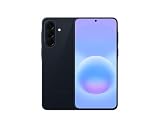
- International Model – Global Connectivity – Plug & Play with an active SIM on AT&T, Verizon, T-Mobile, and most U.S. carriers. New activations are supported on T-Mobile and Its MVNO's in the U.S., as some carriers may not recognize International IMEI's as Compatible. (No U.S. manufacturer warranty; Seller Return policy applies.)
- This model is Dual SIM with eSIM capability however the configuration is either SIM+SIM or eSIM+SIM 6.7” Super AMOLED Display (120Hz). Enjoy ultra-smooth scrolling and vibrant colors with a large Full HD+ screen, perfect for streaming, gaming, and browsing.
- Powerful Performance Equipped with an advanced Exynos processor and 8GB RAM, delivering fast multitasking and efficient performance for apps and games. 256GB Storage Store your photos, videos, apps, and files without worrying about space.
- Triple Camera System (50MP Main) Capture sharp, detailed photos with optical image stabilization, plus ultra-wide and macro lenses for versatile shooting.
- Long-lasting 5,000mAh Battery Stay powered all day with fast charging support, keeping you connected longer. Premium Build & Durability Sleek gray finish with water and dust resistance (IP68 rating) for added durability.
Battery controls worth reviewing on the updated phone
The following are general settings categories, not a claim that One UI 9 introduced them. Samsung’s current menu paths should be verified on the A57 itself; the older Android 16 manual cannot establish the exact One UI 9 labels.
Do these 3 things before closing this tab:
1Clear out junk files and repair common Windows errors2Scan for outdated or missing drivers - takes under a minute3Repair Windows errors before they cause bigger problemsScreen brightness and screen timeout
The display is often the most visible source of avoidable consumption. Open Settings and search for brightness or screen timeout. Prefer adaptive brightness when it suits your environment, and shorten the timeout if the screen frequently remains on after you stop using it. A brightness slider in the Quick panel makes a temporary reduction faster in dark rooms or during reading.
Do not force the lowest brightness if it makes you repeatedly raise it or strains your eyes; a setting that causes extra interaction can erase the practical benefit. Check outdoor readability separately from indoor use.
Refresh behavior
Search Settings for motion smoothness, refresh rate or a similar display term. If your software offers a lower-refresh option, compare it with the higher-refresh setting during the activities you care about. Scrolling may feel less fluid at a lower rate, while static reading may show little difference. Keep the option that provides the right balance rather than assuming a particular mode is universally better.
Power-saving mode
Search for power saving in Settings or the Quick panel. Read the restrictions before enabling it: power-saving modes can reduce background activity, limit performance, change display behavior or delay notifications. Use it when you need additional runtime, and test essential messaging, navigation and authentication while it is active.
Rank #4

- International Model – Global Connectivity – Plug & Play with an active SIM on AT&T, Verizon, T-Mobile, and most U.S. carriers. New activations are supported on T-Mobile and Its MVNO's in the U.S., as some carriers may not recognize International IMEI's as Compatible. (No U.S. manufacturer warranty; Seller Return policy applies.)
- This model is Dual SIM with eSIM capability however the configuration is either SIM+SIM or eSIM+SIM. 6.7” Super AMOLED Display (120Hz). Enjoy ultra-smooth scrolling and vibrant colors with a large Full HD+ screen, perfect for streaming, gaming, and browsing.
- Powerful Performance Equipped with an advanced Exynos processor and 8GB RAM, delivering fast multitasking and efficient performance for apps and games. 256GB Storage Store your photos, videos, apps, and files without worrying about space.
- Triple Camera System (50MP Main) Capture sharp, detailed photos with optical image stabilization, plus ultra-wide and macro lenses for versatile shooting.
- Long-lasting 5,000mAh Battery Stay powered all day with fast charging support, keeping you connected longer. Premium Build & Durability Sleek gray finish with water and dust resistance (IP68 rating) for added durability.
Background activity and notification volume
Review apps that refresh frequently, send many notifications or remain active after you leave them. Search Settings for battery usage, background usage or an app’s battery controls. Restrict an app only after considering what will stop working: delayed mail, missed messages, late calendar reminders or a navigation interruption can be more costly than the saved energy.
Start with apps whose activity is unexpected or whose use is occasional. Avoid applying aggressive restrictions to system components, security tools or apps that must receive time-sensitive alerts unless you have tested the consequences.
Connectivity and radios
When you are not using a connection, review Wi-Fi, Bluetooth, mobile data and hotspot controls in the Quick panel or Settings. In a location with weak cellular coverage, the phone may work harder to maintain service; airplane mode can help when you deliberately need no calls or data. Do not disable a radio that supports an active accessory, emergency communication or location-dependent task.
Location and scanning
Location can be both a privacy and battery consideration. Use the blue indicator to identify unexpected access, then review the responsible app’s permission. If the phone offers separate scanning or precision choices, read their descriptions and disable only functions you do not need. Because One UI 9’s documented indicator is for transparency, changing location permissions remains a separate action.
A safe sequence for changing settings
- Install the update only when the software screen confirms the intended A57 build for your model and region.
- Use the blue location indicator during normal use and note which apps appear.
- Apply the least-permissive practical location choice to apps you do not want running location checks.
- Practice the secure-lock shortcut once while the phone is at hand, then use it before situations in which biometric unlocking would be undesirable.
- Record a normal day’s battery percentage at a consistent morning and evening time.
- Change one battery-related control—brightness, timeout, refresh behavior, background activity, connectivity or power saving—rather than changing all of them simultaneously.
- Compare a similar day of calls, screen time, travel and media use. Keep the change only if the result is useful and the side effects are acceptable.
Common mistakes and how to recover
Assuming the blue indicator means access was blocked
The indicator identifies access; it does not deny it. Open the app’s permission screen and change the permission explicitly if the access is unwanted.
Best Value

- International Model – Global Connectivity – Plug & Play with an active SIM on AT&T, Verizon, T-Mobile, and most U.S. carriers. New activations are supported on T-Mobile and Its MVNO's in the U.S., as some carriers may not recognize International IMEI's as Compatible. (No U.S. manufacturer warranty; Seller Return policy applies.)
- This model is Dual SIM with eSIM capability however the configuration is either SIM+SIM or eSIM+SIM 6.7” Super AMOLED Display (120Hz). Enjoy ultra-smooth scrolling and vibrant colors with a large Full HD+ screen, perfect for streaming, gaming, and browsing.
- Powerful Performance Equipped with an advanced Exynos processor and 8GB RAM, delivering fast multitasking and efficient performance for apps and games. 256GB Storage Store your photos, videos, apps, and files without worrying about space.
- Triple Camera System (50MP Main) Capture sharp, detailed photos with optical image stabilization, plus ultra-wide and macro lenses for versatile shooting.
- Long-lasting 5,000mAh Battery Stay powered all day with fast charging support, keeping you connected longer. Premium Build & Durability Sleek gray finish with water and dust resistance (IP68 rating) for added durability.
Expecting fingerprint or face unlock immediately after secure lock
That behavior is intentional. Enter the fallback PIN, password or pattern once. Samsung’s release note specifically says biometrics are prevented at the next unlock.
Following an Android 16 manual for a One UI 9 menu
The available manual predates the update. Use Settings search and the labels on your current phone, and expect differences by model, country and carrier.
Blaming every battery change on One UI 9
Usage, signal strength, app updates, temperature and display time can change endurance from one day to the next. Samsung’s A57 One UI 9 record does not provide a battery test or a new battery setting, so separate update effects from ordinary usage variation.
Recommended Free Tools
Disabling too much at once
Large batches of restrictions make it impossible to identify the useful change and can break notifications, navigation or accessories. Restore the last changed option if a required function stops working, then test changes individually.
Privacy and battery decision table
| Control | Documented privacy value | Documented battery effect | Practical trade-off |
|---|---|---|---|
| Blue location-access indicator | Shows which app is accessing location when tapped. | None stated. | Requires you to investigate and change permissions yourself. |
| Secure-lock shortcut | Requires the fallback credential at the next unlock by preventing biometrics. | None stated. | Unlocking is slower until the credential is entered. |
| Quick panel rearrangement | Makes security and privacy controls easier to reach. | None stated. | Improves access, but does not itself reduce consumption. |
| Brightness, refresh, background, connectivity and power-saving reviews | Privacy benefit depends on the individual control. | Possible effect varies with use; no A57 One UI 9 measurement is supplied. | Lower consumption can mean less brightness, slower refresh, delayed activity or reduced connectivity. |
How to interpret the result
After the update, the clearest privacy improvements are awareness and control: the indicator exposes location use, and secure lock gives you a fast way to demand a credential instead of biometrics. Battery improvement is an optimization exercise rather than a documented One UI 9 capability. Samsung’s 5,000 mAh typical rating and “up to 2 days” claim provide product context, not a promise for a particular owner.
If your A57 shows a setting or menu that differs from these descriptions, follow the updated device’s wording and your carrier’s instructions. Keep the phone’s security patch current, and use the diagnostic area when battery behavior suggests a hardware or software fault rather than merely higher daily usage.
Quick Recap
Product prices and availability are accurate as of the date/time indicated and are subject to change. Any price and availability information displayed on Amazon at the time of purchase will apply.
Quick wins for a faster PC:
Fix the driver behind crashes, sound loss and screen glitchesFind Drivers →Repair Windows errors before they cause bigger problemsFix Now →Scan for outdated or missing drivers - takes under a minuteDriver Scan →
