Everyday Total Paw Protection is Australian accident-and-illness pet insurance for eligible dogs and cats. Its value depends on the annual limit, reimbursement percentage, excess and optional benefits you select—and on whether your pet’s treatment meets the policy terms. There is no single price or guaranteed claims outcome to recommend: premiums are quote-dependent, and claims are assessed individually.
For policies purchased on or after 29 January 2026, the governing document is Everyday Insurance’s Total Paw Protection Product Disclosure Statement (PDS), read alongside your certificate of insurance. The Target Market Determination (TMD) summarizes intended customers and key features but does not replace those policy documents.


As an Amazon Associate I earn from qualifying purchases.
What does Total Paw Protection cover?
The policy provides financial assistance toward eligible veterinary expenses for covered conditions, subject to the cover you select and the policy terms. Everyday’s PDS says, “The only pets we insure are dogs and cats.” A pet must be younger than nine when its owner first applies for a new policy, live with the owner, and be under the owner’s regular care and supervision at the supplied address.
A treatment expense is not automatically covered just because it is veterinary care. It must be eligible under the selected cover, occur in the relevant policy period and after any applicable waiting period, and meet the other PDS requirements. Your certificate of insurance records the selections that apply to your policy.
#1 Best Overall
What are the annual limits and reimbursement options?
The 29 January 2026 TMD lists four annual benefit-limit options and benefit percentages from 70% to 90%. Annual excess options include $0. These are selectable policy settings, not a promise that the same share of every bill will be paid. The actual combination on your certificate, eligible expenses, excess and remaining limit all affect a claim.
| Setting | Options stated by Everyday Insurance | What to consider |
|---|---|---|
| Annual benefit limit | $7,500, $12,500, $24,000 or $35,000 per policy period, depending on selection | A lower limit can be used up sooner during significant or ongoing treatment. |
| Benefit percentage | 70%–90% | A higher percentage may reduce your share of eligible costs after the policy’s other terms are applied. |
| Annual excess | Options include $0 | A higher excess may reduce the premium but increase your out-of-pocket cost after a successful claim. |
The TMD describes a general trade-off: a lower limit, lower percentage or higher excess may reduce the premium while leaving you with more expense after a successful claim. Higher limits, higher percentages or a lower/no excess may reduce that cost exposure while increasing the premium. This is not a price estimate for an individual pet.
What is Booster Care?
Booster Care is an optional benefit with a stated $2,000 limit. The TMD describes it as covering specified dental conditions and specialised therapies. Whether a particular procedure qualifies depends on the detailed PDS terms and the selections recorded on your certificate; check both before relying on it.
Free tools Windows power users keep installed
One-click scans. No signup required.
What does the policy exclude, and when do waiting periods apply?
The PDS identifies pre-existing conditions, breeding-related expenses and grooming as examples of exclusions. It also requires treatment to take place after the policy begins and any applicable waiting period, and to be included in the selected cover. The examples are not a complete list of exclusions: consult the current PDS for the full wording and definitions that apply to your circumstances.
Independent reader supportYour contribution helps us test, update, and keep practical guides available for everyone.How should you compare it with another pet policy?
Compare equivalent settings and terms rather than headline limits alone. Everyday’s pet insurance comparison page provides a starting point for its benefit information, but the available materials do not establish standardized premiums across insurers. Obtain an individualized quote for your pet and compare it with another policy using the same profile and broadly equivalent cover.
Quick Recap
Rank #4
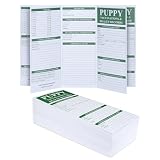
- PROFESSIONAL 100-PACK BULK VALUE - Massive 100-card inventory specifically engineered for professional breeders, animal shelters, and multi-pet households. Each tri-fold booklet provides comprehensive tracking for an individual pet’s entire early-life medical journey
- ULTIMATE HEALTH TRACKING MATRIX - Data-optimized layout covers 8+ critical health dimensions: Vaccination schedules, food transition, Deworming treatments, Heartworm screening, Weight logs, and specialized medical history. Zero-missing data architecture for professional-grade record keeping
- PREMIUM 175 GSM NO-BLEED STOCK - Crafted from heavy-duty 175 GSM duplex paper with ink-resistant properties. Tested with all pen types to ensure zero bleed-through or ghosting, keeping your records crisp and legible for years.
- COMPACT PORTABLE TRI-FOLD DESIGN - Precision engineered size:8.5 x 3.8" (Folded) and 8.5 x 11"(Unfolded). Fits perfectly into standard pet travel bags, vaccination folders, or vet clinic organizers. Tri-fold structure protects internal sensitive medical data from exposure
- ESSENTIAL FOR NEW OWNERS & VETS - A non-negotiable tool for pet adoption transitions. Provides clear, chronological medical evidence for new pet owners and instant diagnostic reference for veterinarians during emergencies. Includes dedicated space for clinic stamps and vaccine stickers.
- Annual benefit limit and any separate sublimits.
- Benefit percentage and how it is applied to eligible expenses.
- Annual excess and how it is applied.
- Waiting periods, pre-existing-condition rules and any review process.
- Covered conditions and exclusions, including dental and ongoing or chronic treatment terms.
- Optional benefits, their limits, and whether each is an insurance or non-insurance benefit.
- Eligibility rules, including species and age at first application.
- Premium for the same pet profile and comparable settings.
- Claim process and required evidence, as stated in current policy terms.
How to check the policy before requesting a quote
- Read the current PDS. For a policy purchased on or after 29 January 2026, start with the Total Paw Protection PDS. Everyday’s useful documents page is its document hub.
- Choose settings to evaluate. Consider the annual limit, benefit percentage, excess and whether Booster Care is relevant. The TMD explains the product’s intended market and settings, but the PDS governs policy terms.
- Check fit for your pet. Confirm the eligibility rules, waiting periods, exclusions, and any treatment-specific conditions that matter to your pet.
- Request a quote. Use Everyday’s pet insurance page to obtain pricing for your pet and selected settings. Then compare that quote with equivalent cover elsewhere; no general premium or claims success rate is established by the available policy materials.
Product prices and availability are accurate as of the date/time indicated and are subject to change. Any price and availability information displayed on Amazon at the time of purchase will apply.

