What’s actually slowing this PC down?
Pick the symptom - the matching free tool is one click away.
Upgrading from Intel Xeon E5 v3 to E5 v4 is often attractive for homelab and always-on server builds because the v4 generation brings Broadwell-EP refinements, broader core-count options, and generally better efficiency under load. The idle-power question is less straightforward, especially when comparing standard SKUs with low-power “-L” variants.
Low-TDP Xeon E5 “-L” models can reduce peak and sustained power by limiting clocks and package power behavior, but they do not automatically guarantee a large drop at idle. At low utilization, the motherboard, chipset, memory configuration, power supply efficiency, add-in cards, fans, firmware settings, and C-state support often dominate total wall power more than the exact CPU SKU.
As an Amazon Associate I earn from qualifying purchases.
A useful E5 v3 to v4 power comparison needs to separate CPU package behavior from whole-system draw, account for BIOS power-management settings, and measure consistently at the wall and, where possible, through platform sensors. For many systems, the best upgrade choice is not simply the lowest-TDP processor, but the CPU that meets performance needs while allowing the platform to enter deep idle states reliably.
E5 v3 vs E5 v4: Architectural and Process Changes That Affect Power
Xeon E5 v3 processors are based on Intel’s Haswell-EP generation, while Xeon E5 v4 processors are based on Broadwell-EP. For the dual-socket and workstation/server platforms most people are upgrading, both families use the same general LGA2011-3 ecosystem and DDR4 memory, but the silicon changed from a 22 nm process on v3 to a 14 nm process on v4. That process shrink is the main reason v4 parts can offer more cores in the same broad power envelope, and it can also improve efficiency at moderate load.
#1 Best Overall

- Intel Xeon E5-2699 V4 Docosa-core (22 Core) 2.20 Ghz Processor - Socket Lga 2011-v3 - 5.50 Mb - 55 Mb Cache - 64-bit Processing - 14 Nm - 145 W
At idle, however, the architectural change is less dramatic than many expect. A server sitting at the OS desktop, hypervisor console, or a lightly loaded Linux shell is not consuming only “CPU power.” The platform is also powering memory channels, voltage regulators, chipset functions, storage controllers, NICs, fans, BMC/IPMI, PCIe devices, and power-supply conversion losses. The CPU package may drop into low-power C-states, but the rest of the system often remains a large part of the wall draw.
Broadwell-EP did bring refinements that can help idle and near-idle behavior. These include improved leakage characteristics from the newer process, mature package power management, and generally better performance per watt when the system periodically wakes to do small tasks. If the motherboard BIOS exposes and correctly enables deeper C-states, EIST/SpeedStep, package C-states, and OS-directed power management, an E5 v4 CPU can idle very efficiently for its class. In practice, the difference versus a comparable E5 v3 is usually modest rather than transformative.
Where E5 v4 tends to save power
- Light to medium load: v4 often completes the same work using less energy, especially when core count and frequency are chosen sensibly.
- Higher core-count consolidation: one v4 system may replace multiple older systems, reducing total platform overhead.
- Better binning options: Broadwell-EP has a wider selection of SKUs, making it easier to choose a CPU with the right core count, cache, and frequency for the workload.
- Lower leakage potential: the 14 nm process can reduce wasted power, though this is highly dependent on the individual SKU, board firmware, and operating state.
The main catch is that same-socket compatibility does not guarantee the same idle behavior. Some X99 and C612 boards received BIOS updates for E5 v4 support but still vary widely in how aggressively they enter package C-states. A workstation board with gaming-oriented firmware may idle higher than a server board tuned for data-center power management. Conversely, a server board with a BMC, mulle NICs, SAS controllers, and high minimum fan speeds may consume more at the wall than a simpler workstation board even if the CPU package power is lower.
Crashes, No Sound, or Screen Glitches?
Random freezes, missing sound and display glitches usually trace back to one bad driver. Find and replace yours safely.Free scan · under a minutePC Slower Than It Used to Be?
A free scan shows the junk files, broken settings and background clutter dragging Windows down - then fixes them in one click.Free scan · Windows 10 & 11For an always-on machine, the most realistic expectation is that moving from an E5 v3 to a similar E5 v4 may shave a few watts at true idle if firmware and OS power settings are favorable. Larger savings usually come from choosing fewer DIMMs, removing unused PCIe cards, using efficient power supplies at low load, enabling deep idle states, and selecting a CPU that avoids unnecessarily high core count or frequency for the workload. The E5 v4 generation is meaningfully more efficient overall, but idle power is a whole-platform result, not a CPU specification alone.
What “-L” Xeon SKUs Actually Change: TDP, Base Clock, and Idle Behavior
Intel Xeon E5 “-L” models are often described as low-power CPUs, but the label mostly changes the processor’s power envelope under load, not its minimum power draw at idle. In the E5 v3 and E5 v4 families, -L SKUs typically have a lower TDP rating and a lower base clock than nearby non-L models with similar core counts. For example, a standard dual-socket E5 part may be rated at 85 W, 105 W, 120 W, or higher, while an -L variant may sit around 55 W or 65 W. That rating is useful for sizing cooling and estimating sustained all-core workload behavior, but it does not mean the CPU continuously consumes that amount.
TDP is not an idle-power specification. It is closer to a thermal design target for sustained operation at base frequency under defined workloads. A Xeon E5-2650L v4 and a Xeon E5-2650 v4 can both drop into deep idle states when the operating system, BIOS, and platform allow it. At that point, the active frequency and base clock rating matter far less than package C-state residency, uncore behavior, memory power, PCIe devices, fans, and motherboard firmware. The -L chip’s lower base frequency limits how much power it can draw during heavy all-core work, but when the server is sitting at a shell prompt or lightly serving files, both CPUs may be spending most of their time clock-gated or power-gated.
What the -L suffix usually changes
- Lower TDP: The CPU is constrained to a lower sustained power and heat output under heavy workloads.
- Lower base clock: The guaranteed all-core frequency is usually reduced to keep the part within its smaller power envelope.
- Similar idle capabilities: The same generation of -L and non-L parts generally supports the same idle states, SpeedStep, Turbo behavior, and package power-management features.
- Potentially different turbo behavior: Short bursts may still boost, but sustained turbo headroom is more limited on many -L models.
In practical terms, a low-power E5 v4 SKU can be much cooler and more efficient when the machine spends time compiling, transcoding, running dense virtualization loads, or doing sustained database work. It may also help in systems with limited cooling, quiet fan profiles, or strict power caps. However, if the server spends 95% of its time idle, the difference between an -L and non-L CPU of the same generation may be only a few watts at the wall, and sometimes it is too small to separate from normal variation in fan speed, PSU efficiency, BMC activity, or add-in card power.
Quick wins for a faster PC:
Clear out junk files and repair common Windows errorsFree Scan →Scan for outdated or missing drivers - takes under a minuteDriver Scan →Rank #2

- Total Cores 14
- Total Threads 28
- Processor Base Frequency 2.60 GHz
- Max Turbo Frequency 3.50 GHz
- Sockets Supported LGA2011-3
There is also a performance tradeoff. Because -L models reduce base frequency, a job may take longer to finish. If the non-L CPU completes a task quickly and returns to a deep idle state sooner, the total energy used for that task can be similar or occasionally lower. This is especially relevant for bursty homelab workloads such as backups, software updates, media indexing, and short-lived virtual-machine activity. A low-TDP CPU is not automatically the lowest-energy choice across a full day; it mainly lowers the ceiling.
| CPU attribute | Effect on idle draw | Effect under load |
|---|---|---|
| TDP rating | Minimal direct effect | Strong effect on sustained power and cooling needs |
| Base clock | Minimal when deep C-states work | Lower base clock can reduce performance and load power |
| Package C-states | Major effect | Less relevant during continuous load |
| Platform firmware | Major effect | Can affect turbo, fan curves, and power caps |
For an E5 v3 to E5 v4 upgrade, choose an -L SKU when sustained thermals, noise, rack power limits, or constrained cooling are the main concern. Do not choose it solely expecting a dramatic idle-power reduction. For idle-focused systems, a standard E5 v4 with good BIOS power settings, working C-states, efficient power supplies, fewer PCIe devices, and tuned fan behavior can idle very close to its -L counterpart while offering better burst performance.
Expected Idle Power Differences Between -L and Non-L Variants
At true idle, the difference between an Intel Xeon E5 v3 or E5 v4 “-L” processor and a standard-power sibling is usually small. The “-L” suffix mainly lowers the rated TDP by reducing base frequency, all-core turbo behavior, and sustained power limits under load. It does not automatically mean the chip consumes dramatically less power while sitting at an operating system login prompt, running a light hypervisor, or serving a few background services.
For example, a Xeon E5-2630L v4 and a Xeon E5-2630 v4 can both enter similar low-power C-states when the system is genuinely idle. Once cores are parked, clocks are reduced, and package C-states are active, the CPU package power may differ by only a few watts. In many dual-socket systems, the wall-power difference between comparable “-L” and non-L CPUs at idle may be in the range of roughly 0–5 W per socket, sometimes even within normal measurement variance. Under sustained load, however, the gap can be much larger because the non-L part is allowed to maintain higher clocks and draw more package power.
Typical idle behavior
| Scenario | Expected difference from using “-L” CPUs | What usually dominates instead |
|---|---|---|
| Single-socket server, OS idle | Often negligible to a few watts | Motherboard chipset, fans, RAM, storage |
| Dual-socket server, OS idle | Potentially a few watts per socket | Second CPU, extra memory channels, PCIe devices |
| Light virtualization host | Small unless VMs prevent deep idle states | Background interrupts, timers, network activity |
| Sustained CPU load | Large, due to lower clocks and power limits | CPU package power and cooling policy |
The more accurate comparison is not “-L versus non-L” in isolation, but “which processor lets the whole platform idle deeply.” A standard Xeon E5 v4 with fewer active background tasks, working package C-states, and balanced firmware settings can idle lower than an “-L” CPU in a board that keeps the package awake. Likewise, a higher-core-count “-L” part may not idle better than a lower-core-count standard part if the platform has to keep more cache, interconnect, and memory resources active.
Core count and stepping can also blur the picture. Moving from an E5 v3 to an E5 v4 often brings modest efficiency improvements from the Broadwell-EP process and refinements, but those gains are not limited to “-L” models. A standard E5 v4 with the same or lower core count than the outgoing v3 chip may reduce idle or near-idle draw slightly, while a much larger v4 SKU can offset that improvement. In practice, replacing an E5-2630 v3 with an E5-2630L v4 may show a small idle reduction, but replacing it with an E5-2680 v4 or E5-2690 v4 may not, even though the newer CPU is more efficient per unit of work.
For always-on systems, the practical expectation should be modest idle savings from “-L” parts and meaningful savings only when the server spends time under moderate to heavy CPU load. If the machine is mostly idle, money is often better spent reducing DIMM count, replacing old spinning disks with SSDs, removing unused PCIe cards, improving fan control, and enabling CPU package C-states. Choose “-L” CPUs when lower heat output, quieter cooling, or capped load power matters; choose standard variants when purchase price, higher burst performance, and similar idle behavior make them the better fit.
Rank #3
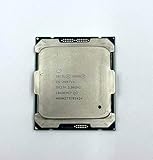
- Intel Xeon Processor E5-2697 v4 SR2JV
- 45 MB Intel Smart Cache
- 2.3GHz
- 18-Core
Platform Factors That Often Matter More Than the CPU
On dual-socket Xeon E5 v3 and E5 v4 systems, the processor is only one part of the idle power picture. Once the machine is sitting at the OS prompt with no meaningful workload, differences between an E5-2630 v4, E5-2630L v4, or similar standard and low-power SKU can be small compared with the draw from the motherboard, chipset, memory, storage, fans, add-in cards, and power supply. This is especially true in rack servers, where the platform is designed for reliability, expansion, and airflow rather than the lowest possible idle wattage.
Memory configuration is often one of the largest variables. Registered DDR4 DIMMs consume power even when the CPU is mostly idle, and high-capacity LRDIMMs typically draw more than smaller RDIMMs. A system with 16 DIMMs installed can easily idle noticeably higher than the same board with 4 or 8 DIMMs, even if the CPU is changed to an “-L” model. Memory speed settings also matter: running DDR4 at 2400 MT/s on E5 v4 may use more power than lower-speed operation, though the difference depends on the platform and DIMM type.
Storage and expansion cards can outweigh CPU savings as well. A hardware RAID controller with cache protection, a 10/25/40 GbE NIC, Fibre Channel HBA, GPU, SAS expander, or NVMe add-in card may each add several watts to tens of watts at idle. Spinning disks are another major factor: eight 3.5-inch enterprise HDDs can consume far more idle power than the difference between a low-TDP Xeon and a standard Xeon. If the goal is an always-on homelab node, reducing unnecessary PCIe cards and consolidating disks can produce a larger drop than swapping CPU SKUs.
BIOS and firmware settings that affect idle draw
- CPU C-states: Enable package C-states and deeper idle states where available. If disabled, the CPU may remain in higher-power idle modes.
- Power profile: Prefer a balanced or energy-efficient profile over maximum performance. Vendor presets can aggressively bias toward low latency.
- Turbo behavior: Turbo mainly affects load power, but some performance profiles also restrict idle power management.
- Memory patrol scrub: Frequent memory scrubbing improves error detection but can raise background activity and power use.
- Fan policy: A quiet or energy-efficient fan mode can save power, provided temperatures remain safe.
- Unused devices: Disable unused onboard SATA, NICs, serial ports, audio, or PCIe features if the BIOS allows it.
Fan power deserves special attention in server chassis. Small high-RPM fans can consume a surprising amount of power, and many systems raise fan speed when they detect unsupported PCIe cards, missing shrouds, third-party drives, or nonstandard cooling conditions. In those cases, the system can burn more extra power in fans than it would ever save by moving from a standard E5 v4 to an E5 v4 “-L” part. Updating firmware, using supported drive trays, and ensuring proper airflow paths can reduce fan speed at idle.
The power supply also affects the result at the wall. Many enterprise servers ship with redundant PSUs sized for peak load, not for best efficiency at a 60-120 watt idle point. A 750 W or 1100 W PSU can be inefficient at very low utilization, especially if both redundant supplies are active and sharing a light load. Some platforms offer PSU efficiency modes, cold redundancy, or options to run a single supply in noncritical homelab use. The impact varies, but it is another place where the measured wall power may change more than the CPU idle difference.
For an E5 v3 to E5 v4 upgrade, the most practical approach is to treat the CPU as one optimization among many. Choose the processor for the core count, frequency, price, and load-power target you need, then tune the platform around it. A well-configured system with standard E5 v4 CPUs, fewer DIMMs, efficient storage, sane fan behavior, and proper BIOS power settings may idle lower than a poorly configured system using “-L” processors.
How to Measure Idle Power Accurately Before and After the Upgrade
To compare an E5 v3 and E5 v4 system fairly, measure total wall power under the same conditions before and after the CPU swap. The difference between a low-power “-L” Xeon and a standard SKU at idle can be small enough that fan curves, drive spin state, BIOS defaults, or a background service can hide it completely. A repeatable test setup matters more than chasing a single instantaneous wattage number.
Rank #4

- Manufacturer: Intel CPU Frequency: 2.20 GHz CPU Max Turbo Frequency: 3.60 GHz Number of Cores: 22 Threads: 44 Cache: 55 MB Intel Smart Cache Number of UPI Links: 0 Lithography: 14 nm Thermal Design Power: 145 W Memory Types: DDR4 1600/1866/2133/2400 Max Memory Size: 1.5 TB Max # Memory Channels: 4 Sockets Supported: FCLGA2011-3 E5-2699v4
Use a plug-in AC power meter, a UPS with reliable load reporting, or an inline rack PDU that reports watts. Motherboard BMC/IPMI readings can be useful for trends, but they are often less accurate at low loads and may exclude some losses depending on how the board reports power. If possible, record both wall power and IPMI package power so you can separate platform-wide changes from CPU-specific behavior.
Keep the test conditions identical
- Use the same hardware: Keep the same motherboard, RAM population, PSU, drives, PCIe cards, fans, and network links where possible.
- Use the same firmware settings: After a CPU swap, many boards reset BIOS options. Recheck C-states, package C-state limit, EIST/SpeedStep, Turbo Boost, ASPM, memory patrol scrub, fan profiles, and power policy.
- Boot the same operating system: Use the same kernel, hypervisor version, drivers, and power governor. On Linux, compare
powersave,schedutil, andperformanceonly if you document the setting. - Stabilize the system: Let the server sit for 10 to 20 minutes after boot so indexing, updates, VM startup, RAID checks, and thermal ramping settle down.
- Control storage state: Decide whether drives should be spun up or allowed to sleep. Mixing these states can change wall power more than the CPU upgrade.
A good idle test is not simply “boot and look at the meter.” Define what idle means for your machine. For a homelab hypervisor, it may mean all usual VMs running but no user workload. For a NAS, it may mean network services running with disks spun up. For a bare-metal benchmark, it may mean a clean OS install with only SSH enabled. The most useful result is the one that matches how the server will run 24/7.
Free tools Windows power users keep installed
One-click scans. No signup required.
Suggested measurement process
- Record the current E5 v3 configuration: CPU model, RAM quantity and speed, number of drives, PCIe cards, PSU model, BIOS version, and key power settings.
- Measure wall power at idle for at least 15 minutes and write down the average, minimum, and maximum wattage.
- Optionally record OS-level data such as CPU frequency, C-state residency, load average, and package power from tools like
turbostat,powertop, or vendor IPMI sensors. - Swap to the E5 v4 CPU, update BIOS only if required, then reapply the same firmware settings.
- Repeat the same idle test with the same services, VM state, fan profile, ambient temperature range, and storage state.
When reading the results, focus on averages rather than brief dips. A 2 W to 5 W difference can be real, but it is also within the noise range of many home measurements if fans change speed or disks change power state. A 10 W or larger reduction is more convincing and often points to a broader platform improvement, better C-state residency, reduced voltage, fewer active devices, or a more efficient CPU stepping. If a “-L” v4 part shows no meaningful idle reduction versus a standard v4 part, that is normal: the -L suffix mainly limits sustained power and base frequency under load, while deep idle behavior depends heavily on the platform’s ability to enter low-power states.
Independent reader supportYour contribution helps us test, update, and keep practical guides available for everyone.Upgrade Recommendations for Homelab and Always-On Servers
For most homelab and always-on server builds, upgrading from Xeon E5 v3 to E5 v4 is worth considering for efficiency, but choosing an “-L” processor purely to reduce idle power is usually not the best use of money. At idle, the difference between a low-power Xeon such as an E5-2630L v4 and a standard Xeon such as an E5-2630 v4 is often small if the system is configured correctly. The larger savings usually come from moving to Broadwell-EP, enabling deep power-saving states, reducing unnecessary peripherals, and improving PSU efficiency at low load.
If the server spends most of its life idle or lightly loaded, prioritize a balanced E5 v4 SKU with a modest core count and reasonable clocks rather than chasing the lowest TDP number. Low-TDP “-L” models mainly limit sustained power under load by reducing base frequency and package power limits. They can be useful in thermally constrained chassis, dense 1U systems, or fan-noise-sensitive builds, but they do not automatically make a dual-socket platform idle like a mini PC. A dual-socket E5 system with many DIMMs, HBAs, NICs, and enterprise fans can still idle far above the processor’s own minimum package power.
Practical CPU selection guidance
- For general virtualization: choose a mid-range E5 v4 such as an E5-2630 v4, E5-2640 v4, E5-2650 v4, or similar, depending on pricing and core requirements.
- For low idle and occasional bursts: favor fewer cores and newer stepping over very high core-count models. A 10-core or 12-core part may be more efficient for light workloads than an 18-core or 22-core CPU that never gets used.
- For quiet or thermally limited systems: consider “-L” SKUs if the chassis has limited cooling, the server is in a living area, or sustained workload power must be capped.
- For maximum idle reduction: consider whether a single-socket configuration can replace dual socket. Removing the second CPU also removes its memory channels, associated VRM losses, and attached platform overhead.
Before buying CPUs, check the motherboard or server vendor’s CPU support list and BIOS requirements. Many C612 and OEM platforms need a BIOS update before accepting E5 v4 processors. Also verify whether the board exposes useful power-management controls such as C-states, Package C State Limit, Energy Performance Bias, ASPM, and fan profiles. An E5 v4 upgrade on a board that locks the CPU in shallow idle states may show disappointing idle numbers, while the same CPU in a better-configured platform can behave much more efficiently.
Do these 3 things before closing this tab:
1Scan for outdated or missing drivers - takes under a minute2Repair Windows errors before they cause bigger problems3Fix the driver behind crashes, sound loss and screen glitchesMemory and expansion choices should be part of the upgrade plan. Running eight or sixteen RDIMMs, mulle SAS HBAs, 10/25/40 GbE adapters, NVMe carrier cards, and a remote-management controller can dominate wall-power consumption. If the system is oversized, consolidating RAM into fewer larger DIMMs, removing unused PCIe cards, replacing spinning disks with fewer larger drives, or using a more efficient NIC may save more at idle than switching from a standard E5 v4 to an “-L” model.
Best Value
- Powerful Processing: 14 cores and 28 threads for multi-tasking and high-performance computing
- High Base Frequency: 2.4 GHz for quick data processing and efficient multitasking
- Large Cache Size: 35 MB for faster data access and improved system performance
- Energy Efficient: 120W TDP for reduced power consumption and lower operating costs
- Scalable Performance: Part of the Intel Xeon Scalable Processor family for flexible and efficient data center solutions
Recommended upgrade path
- Measure current idle draw at the wall with the existing E5 v3 CPU, normal disks installed, and the operating system fully booted.
- Update BIOS and firmware before swapping CPUs, especially on OEM servers and workstation boards.
- Install a sensible E5 v4 SKU based on workload needs, not TDP alone.
- Enable power-saving settings in BIOS and the operating system, then confirm that the CPU package reaches low-power idle states.
- Retest wall power after the upgrade using the same workload, same peripherals, and same measurement method.
In practice, the best recommendation is simple: buy the E5 v4 CPU that matches your workload at the best price, and treat “-L” as a thermal and load-power choice rather than an idle-power guarantee. For a 24/7 homelab, the biggest wins usually come from right-sizing the platform, avoiding unnecessary dual-socket builds, minimizing installed hardware, and ensuring firmware and OS power management are actually working.
Frequently Asked Questions
Will an E5 v4 CPU idle noticeably lower than an E5 v3 in the same server?
Usually the difference is modest if the rest of the platform is unchanged. E5 v4 moved to a newer 14 nm process and can be more efficient, but at wall power you may only see a few watts saved at true idle, depending on BIOS power settings, DIMM count, drives, fans, and PSU efficiency. The larger gains usually appear under light-to-moderate load rather than at complete idle.
Do low-power Xeon “-L” models reduce idle power compared with standard E5 v4 CPUs?
Not by much in most systems. The “-L” rating mainly lowers TDP by reducing base clock and sustained power limits, but idle states are similar to non-L models from the same generation. If both CPUs can enter deep C-states, the idle difference is often small enough to be hidden by motherboard, memory, fan, or power supply variation.
Recommended Free Tools
Is it better to buy an E5-2630L v4 or a standard E5-2630 v4 for an always-on homelab server?
If your server spends most of its time idle, choose based on price, core count, clock speed, and workload needs rather than expecting the “L” chip to save a lot of idle power. A standard SKU may finish tasks faster and return to idle sooner, while an “L” SKU can help limit heat and sustained power in dense or thermally constrained systems. For a quiet rack or 24/7 NAS, the platform and fan behavior often matter more than the CPU suffix.
Which BIOS settings have the biggest effect on idle power for E5 v3 and E5 v4 systems?
Enable CPU C-states, package C-states, OS-controlled power management, and Energy Efficient Turbo if available. Avoid maximum-performance profiles that lock clocks high or disable deeper sleep states. Also check fan profiles, PCIe ASPM settings, and memory patrol scrub options, because server defaults often prioritize responsiveness and reliability over lowest idle wattage.
How should I measure whether the upgrade actually reduced idle power?
Measure wall power with the same chassis, PSU, DIMMs, drives, PCIe cards, fan profile, OS, and workload before and after the CPU swap. Let the system boot fully, wait for background tasks to settle, then record a multi-minute average from a reliable plug-in power meter or PDU. Also compare OS-reported C-state residency and CPU package power, but treat wall power as the number that matters for electricity cost.
Bottom Line
Moving from Xeon E5 v3 to E5 v4 can bring modest efficiency gains, but idle power is usually dominated by the whole platform: motherboard design, memory count, PSU efficiency, add-in cards, fans, storage, and BIOS power-management settings. The “-L” SKUs mainly cap peak power and sustained load behavior; they rarely deliver a dramatic idle-power reduction versus comparable non-L chips when C-states and package power management are working correctly.
If your goal is lower idle draw, first measure at the wall with a known-good meter, update BIOS/firmware, enable deep C-states and OS power-saving policies, and remove or consolidate unnecessary DIMMs, drives, and PCIe devices. Choose E5 v4 for performance-per-watt or compatibility reasons, pick “-L” parts only if you need lower heat under load, and consider a newer platform if very low idle power is the priority.
Quick Recap
Product prices and availability are accurate as of the date/time indicated and are subject to change. Any price and availability information displayed on Amazon at the time of purchase will apply.

