Some do, but “Bluetooth” on a DVD or Blu-ray system does not automatically mean it can send movie sound to wireless headphones. A model may only receive music from a phone, support a Bluetooth remote, or transmit audio. Check the exact model’s manual and audio-output ports before buying anything.
Bluetooth on a DVD player can mean three different things
DVD players are not built to one universal specification. A product listing that mentions Bluetooth may describe an entirely different function from the one you need for private listening.
As an Amazon Associate I earn from qualifying purchases.
Bluetooth audio input
Some disc players and home-theater systems accept music from a phone, tablet or other Bluetooth source. You pair the phone to the player, then the player’s speakers or connected amplifier play the phone’s audio. A Sony DVD home-theater manual, for example, documents listening to music from a Bluetooth mobile phone or Bluetooth device over a wireless connection. That is receiving Bluetooth audio; it does not show that the system can send DVD sound to Bluetooth headphones.
Free tools Windows power users keep installed
One-click scans. No signup required.
Bluetooth audio output
A player with a Bluetooth transmitter can send its own audio to compatible headphones or a speaker. The manual should explicitly mention Bluetooth headphones, a Bluetooth speaker output, audio transmission, or a transmitter mode. “Bluetooth playback” often means the opposite: the player receives music.
#1 Best Overall
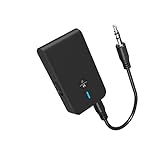
- 【2-IN-1 Bluetooth Transmitter & Teceiver】OiDiPi Bluetooth audio transmitter supports transmitter and receiver mode. In TX mode, plug the Bluetooth transmitter into non-Bluetooth devices such as TV/PC/MP3/Airplane to transmit the audio to the Bluetooth headphone/speaker/sound bar; In RX mode, plug the Bluetooth receiver into wired speaker/headphone/car stereo and receive audio from cell phone/tablet/computer via Bluetooth.
- 【Wide Compatibility】This 2 in 1 Wireless Bluetooth Adapter is compatible with devices of 3.5mm interface, including TV, car stereos, home stereo system, headphones, audio music streaming sound system, PC, speakers, projector, MP3, MP4 etc.
- 【Easy To Use 】According to its status indicators, the bluetooth transmitter for headphones is quite easy to install and use. Just insert the Bluetooth 5.3 adapter into the AUX port of Bluetooth receiver or transmitter, then press and hold the multifunction button for 3 seconds to power on and ready for pairing. The adapter will automatically pair with and connect to your devices.
- 【Stable Connection】 With Bluetooth 5.3 technology, OiDiPi bluetooth transmitter would reduce power consumption and offer a fast and stable transmission. The playtime of the wireless 3.5mm bluetooth transmitter is up to 10 hours in RX mode and 8 hours in TX mode.
- 【Note】Bluetooth adapter is not for live music, musical instruments, karaoke, we don't suggest that you use it for electronic pianos or guitars which require 2.4G transmission for audio synchronization.
Bluetooth for control
Bluetooth may also be used for a remote-control link or another accessory. That connection does not carry the soundtrack. Treat audio transmission as a separate specification.
Bluetooth audio is not Bluetooth video
Sony Support states, for the product category covered by its article, “No, video files cannot be played back via Bluetooth. The player supports playback via Bluetooth for music or audio files only.” The article identifies A2DP 1.2 and AVRCP 1.3 profiles. Those details apply to the models covered by that support page, not to every DVD player. In practice, Bluetooth is normally an audio link; the disc’s picture still travels through the player’s video connection.
How to verify whether your particular player can transmit sound
Use the model number rather than the product family name. Regional variants can have different hardware and menus, and a similar-looking player may omit the transmitter.
Recommended Free Tools
Rank #2

- The Latest Bluetooth 5.3: The latest Bluetooth 5.3 technology enables your aux Bluetooth adapter backward compatible with Bluetooth 5.2/5.1/5.0/4.2/4.0/3.0/2.0 and it can deliver more stable wireless to your devices.
- aptX Low Latency: With advanced aptX low latency technologies, it can deliver up to 80% lower latency. Whether you are playing video games or watching movies, you'll experience high quality sound without audio and video to be out of sync issue.
- 2-in-1 Transmitter and Receiver: In TX mode, it is very easy to turn a non-Bluetooth tv, pc, gym/flight equipment into Bluetooth transmitter. In RX mode, it can make music stream to those speakers/car/home stereo systems which without Bluetooth.
- Wide Compatibility: 1Mii Bluetooth audio adapter supports the devices with 3.5mm aux/2RCA audio jack. Please make sure your TV has 3.5mm AUX AUDIO OUT jack or Headphone jack or 2RCA AUDIO OUT jack.
- Long Battery Life: 1Mii Bluetooth receiver for home stereo deliver 18 hours in transmitter mode and up to 18 hours in receiver mode, all on one charge.
- Find the exact model. Read the label on the front or rear panel, the underside of the unit, or the System Information screen. Record the complete model suffix.
- Open the manufacturer’s operating instructions. Search within the manual for “Bluetooth,” “headphones,” “wireless audio,” “transmitter,” and “pairing.” A statement that the player “plays music from a Bluetooth device” describes input, not output.
- Look for an output procedure. A transmitting player normally has a menu command to place Bluetooth headphones or speakers in pairing mode. If the manual only explains how to pair a phone as a music source, it is an input-only implementation.
- Inspect the rear and front ports. If no built-in transmitter is documented, identify an audio output that an external transmitter can use: optical digital audio out, red-and-white RCA audio out, or a 3.5 mm headphone/audio out.
- Check the sound format. For an optical connection, verify what digital formats the transmitter accepts. The cited Sennheiser transmitter documentation supports PCM; an incompatible incoming digital signal will not play.
Manufacturers direct owners to model-specific instructions for this reason. Panasonic provides manuals by DVD and Blu-ray model, and Sony’s connection guidance likewise says that available connections and the resulting sound depend on the devices and connection type. Sony’s UK connection guide was last modified on 19 January 2026; its separate Bluetooth support article lists a 25 May 2022 modification date. Those page dates do not make the specifications universal or current for every product.
Connecting headphones when the player has built-in Bluetooth output
Menu names differ, but the sequence is generally the same. Keep the headphones close to the player and disconnect them from phones or televisions that might capture the pairing request.
- Turn on the headphones or speaker and hold its pairing button until the status light or voice prompt indicates pairing mode.
- On the DVD player, open the audio or Bluetooth settings and choose the option that adds or connects a Bluetooth audio device. Do not choose a menu item described only as “Bluetooth input” or “mobile device” if you want to transmit.
- Select the headphones from the discovered-device list. If a code is requested, use the code specified by the headphone manual; do not assume every product uses the same code.
- Start the disc and confirm that the player’s audio is routed to the Bluetooth device. Some systems mute their wired speakers; others provide a separate speaker-volume setting.
- Check dialogue timing and volume at your normal viewing distance. Bluetooth delay varies by the devices and codec, so a setup that pairs successfully can still be unsuitable for films if lip-sync is distracting.
If the player has no documented audio-transmitter mode, its Bluetooth menu cannot be converted into one with a setting change. Use a wired output and an external transmitter instead.
Rank #3

- 2-in-1 Bluetooth 5.4 Transmitter Receiver: This UGREEN 3.5mm wireless adapter supports TX and RX modes to meet all your wireless audio needs.TX: Plug into non-Bluetooth devices like TV or airplane jack to send audio to Bluetooth headphones/earbuds. RX: Plug into wired speakers or old car stereo to receive Bluetooth audio from phone/laptop and output sound. Ideal for home, car, and flights, it helps you ditch messy, tangled wires for convenient wireless audio
- 8H Battery Life & Dual Pairing: This Bluetooth adapter delivers up to 8 hours playback in TX mode and 5.5 hours in RX mode under ideal test conditions. It supports simultaneous pairing with two devices, allowing you to share music with travel companions during flights. Equipped with a built-in microphone for hands-free call answering and ending. (Note: Calls are only supported in RX mode. Actual battery life varies by connected devices, volume and environmental interference.)
- Easy to Use: Simply press and hold the function button for 3 seconds to power on and pair with Bluetooth devices. After the first pairing, this airplane headphone adapter will auto-reconnect when powered on again. No complicated setup needed, so you can easily enjoy wireless audio on flights or in your car
- Wide Compatibility: This Bluetooth transmitter works with most devices with a 3.5mm AUX port, including car , TVs, projectors and more, bringing Bluetooth wireless audio to non-Bluetooth gear. The AUX wireless adapter supports mainstream Bluetooth devices like AirPods and Bluetooth headphones. Whether upgrading old wired speakers or pairing airplane audio jacks with wireless headphones, this adapter gets it done without complicated setup
- Compact and Portable: This UGREEN Bluetooth transmitter receiver features a pocket-sized compact design. Lightweight and travel-friendly, it fits easily into your pocket or travel bag to access wireless audio anywhere at any time
Using an external Bluetooth audio transmitter
A Bluetooth audio transmitter takes a wired audio signal from the player and sends it to headphones or a speaker. Buy one according to the output actually present on the player, not according to the word “Bluetooth” on the box.
Match the player’s output to the transmitter’s input
| DVD-player output | Transmitter input to select | Important check |
|---|---|---|
| Optical digital audio out (TOSLINK) | Optical digital input | Confirm supported digital formats. The cited Sennheiser system accepts PCM; an incompatible signal will not play. |
| Red/white RCA audio out | RCA analog input, or RCA-to-3.5 mm analog input | Use output jacks, not similarly colored audio inputs. A cable or adapter may be required. |
| 3.5 mm headphone or audio out | 3.5 mm analog input | Set the player’s headphone/analog level high enough for the transmitter without audible distortion. |
| SCART analog audio path (where fitted) | SCART-compatible input or the correct SCART adapter | Verify that the adapter is wired for audio output from the player. |
| HDMI only | HDMI-capable transmitter, or an active HDMI audio extractor that provides a compatible audio output | A transmitter without HDMI input cannot connect directly. Extractors vary by format and copy-protection support. |
Sennheiser’s transmitter instructions document optical, 3.5 mm, RCA and SCART source connections. The required lead may be included or may need to be purchased separately, so check the transmitter’s contents and connector diagram.
Optical setup and the PCM requirement
- Connect a TOSLINK cable from the player’s optical audio out to the transmitter’s optical input.
- Open the player’s sound or digital-audio settings. If the transmitter accepts PCM only, choose PCM or “stereo PCM” rather than a bitstream, Dolby, DTS or other mode the transmitter does not list.
- Set the transmitter to its optical input and power it on.
- Put the headphones or speaker in pairing mode, then press the transmitter’s pairing control. Wait for both devices to show a connected status.
- Play a disc and increase volume on the receiving device. If there is no sound, return to the format setting before replacing cables.
“Optical” describes the connector, not every signal that can travel through it. A cable can be correctly connected while the transmitter receives an unsupported format.
Rank #4

- Bluetooth 5.4 Version: The latest Bluetooth 5.4 technology allows for 33 feet long range transmission and stable connection, giving you a pleasant music environment while driving with an aux Bluetooth adapter.
- Enjoy High-Quality Music: The Bluetooth receiver converts non-Bluetooth devices into Bluetooth devices for wireless connection, In Transmitter Mode, send audio from your TV to Bluetooth headphones for private listening. In Receiver Mode, stream music wirelessly from your phone to your car stereo , cutting the cord. Suitable for cars with a bluetooth aux adapter for car, speakers, stereo systems and headphones.
- Plug and Play: Bluetooth car adapter auxiliary design with ON/OFF switch, when you turn on the switch, it will automatically enter the pairing mode, very easy to use
- Built-in HD Microphone: This 3.5mm bluetooth aux adapter has a built-in HD microphone, just press the power button to answer or hang up, pause or play music, no need to operate the phone interface, so you can drive safely
- Premium Portability: The size of this bluetooth transmitter is very mini, you can carry this adapter with you, and when you need it, you can easily take it out and use it immediately
RCA or 3.5 mm analog setup
- Connect the player’s left/right RCA output, or its 3.5 mm audio output, to the transmitter’s matching analog input.
- Select the corresponding input on the transmitter.
- Pair the headphones or speaker with the transmitter.
- Play the disc and adjust volume on the player or receiver as appropriate. If the player’s RCA sockets are inputs, they cannot provide a signal; consult the manual for the actual output jacks.
What to do when the player has only HDMI
HDMI carries both picture and sound, but many simple Bluetooth transmitters accept only optical or analog audio. In that case, an HDMI audio extractor can separate sound and provide optical or 3.5 mm output for the transmitter. The cited Sennheiser instructions describe an active HDMI audio adapter in certain television arrangements; that is not a universal DVD-player solution.
Before buying an extractor, verify that it accepts the player’s HDMI signal, passes the required video resolution to the display, and outputs a format your transmitter supports. An extractor can also introduce another power supply, remote-control dependency or copy-protection limitation. If the player has an optical or analog audio output, that simpler path is usually easier to diagnose.
The Tool Desk
Outbyte Driver Updater FREEFix the driver behind crashes, sound loss and screen glitchesFind Drivers →Outbyte PC Repair FREERepair Windows errors before they cause bigger problemsFix Now →Troubleshooting a Bluetooth listening setup
| Symptom | Likely cause | What to check |
|---|---|---|
| The player cannot find the headphones | The headphones are connected to another device or are not in pairing mode. | Disconnect them elsewhere, clear old pairings if necessary, restart both devices and retry within a short distance. |
| Pairing succeeds but there is no sound | Wrong transmitter input, muted output, or unsupported optical format. | Select the correct input, confirm the player’s audio output is enabled, and set optical output to PCM when required. |
| Sound comes from speakers instead of headphones | The player is receiving Bluetooth audio rather than transmitting it, or its output-routing setting is unchanged. | Look for explicit transmitter/headphone-output instructions. A phone-pairing menu alone is not evidence of transmission. |
| Only one channel plays through RCA | A plug is loose, the cable is defective, or an input/output socket was confused. | Reseat both plugs and verify left/right audio-out jacks with the manual. |
| Audio cuts out | Range, obstruction, low battery or radio interference. | Charge the receiver, keep it near the transmitter during testing and remove competing Bluetooth connections. |
| Speech is noticeably late | Bluetooth codec and buffering delay. | Check whether both devices document a low-latency mode; there is no universal latency guarantee. A wired connection may be preferable for critical lip-sync. |
| The picture disappears after adding an extractor | HDMI compatibility, power or copy-protection negotiation failed. | Power the extractor, confirm its input/output direction and test the original HDMI connection before changing more settings. |
How to choose a transmitter without guessing
Compare candidate transmitters on the points that determine whether they will work in your room:
Best Value

- Bluetooth Transmitter for TV & Airplane — Lossless Audio from Any 3.5mm Jack: Plug into any airline entertainment system or TV audio port and stream crystal-clear sound to your wireless headphones. Includes a dual-prong adapter that fits every in-flight screen. No more tangled cords or overpriced airline rentals.
- 2-in-1 Bluetooth Transmitter & Receiver — One Device, Two Ways to Listen: In TX mode, use this Bluetooth adapter for TV to send audio from your television to Bluetooth headphones — perfect for late-night watching without disturbing anyone. In RX mode, pair your phone to turn any car stereo or home speakers into a wireless sound system.
- Under 40ms Lag with Qualcomm Chip — No More Lip-Sync Issues: Powered by Qualcomm aptX Low Latency, this Bluetooth transmitter for airplane delivers under 40ms delay — voices match lips and explosions hit on time, whether you're gaming on TV or watching movies on a flight. Connection stays stable even if you walk to the kitchen mid-show.
- 25-Hour Battery & Dual-Headphone Sharing: One charge lasts a coast-to-coast flight plus layover. This airplane Bluetooth adapter connects two pairs of headphones at once in TX mode — perfect for couples or kids sharing the same in-flight movie. USB-C fully refuels in just 2 hours.
- CHECK BEFORE BUYING — What This DOES & DOES NOT DO: Works with: Airplane screens, TVs, car stereos, gym equipment — any 3.5mm jack device. Use it as a Bluetooth adapter for airplane on flights, or as a Bluetooth adapter for TV at home. Does NOT work with: Hearing aids, musical instruments, or as a standalone speaker. This is a transmitter & receiver — it does not record or amplify sound.
- Source connector: optical, RCA, 3.5 mm, SCART or HDMI must match the player or a verified adapter.
- Digital format support: optical units should list PCM if that is the player’s available output mode.
- Number of receivers: some transmitters can send to one listening device, while others document two-device transmission. Treat the manufacturer’s stated limit as model-specific.
- Latency information: look for documented codec or low-latency behavior, but do not assume a marketing label guarantees perfect lip-sync with every headphone.
- Power and controls: check whether it uses USB, mains power or an internal battery and whether input selection is a physical switch or an automatic function.
- Cables and adapters: confirm that the needed optical, RCA or 3.5 mm lead is supplied. SCART and HDMI solutions often require additional adapters.
The safest search terms are “Bluetooth audio transmitter for a DVD player,” “optical Bluetooth audio transmitter,” or “RCA Bluetooth transmitter,” followed by the exact output on your player. No single transmitter works with every DVD model, because the connector and digital format remain decisive.
What is and is not established about DVD-player Bluetooth
Some DVD-related players and home-theater systems include Bluetooth, but available documentation does not establish how common the feature is among all players currently sold, nor does it identify one behavior shared by every region or model. There is no reliable market-wide percentage to use as a shortcut. The defensible answer is therefore model-specific: verify whether Bluetooth is an audio input or an audio output, then match any accessory to a real audio-out port and its supported format.
Quick Recap
Product prices and availability are accurate as of the date/time indicated and are subject to change. Any price and availability information displayed on Amazon at the time of purchase will apply.
Quick wins for a faster PC:
Scan for outdated or missing drivers - takes under a minuteDriver Scan →Clear out junk files and repair common Windows errorsFree Scan →Fix the driver behind crashes, sound loss and screen glitchesFind Drivers →
