Quick wins for a faster PC:
Fix the driver behind crashes, sound loss and screen glitchesFind Drivers →Clear out junk files and repair common Windows errorsFree Scan →Short answer: the original Corsair HS80 RGB Wireless works with PS5 and Mac/PC through its USB wireless receiver, but it is not listed for Xbox or mobile Bluetooth. The HS80 MAX adds Bluetooth for phone calls and audio, while the Xbox-specific HS80 MAX Wireless for Xbox (also called HS80 MAX XB) is the version Corsair lists for Xbox One, Xbox Series X|S, PS5, PC, Mac software and mobile use.
Because Corsair uses “HS80” for several headsets, compatibility depends on the exact label on the box and receiver. The model name—not just HS80—should be checked before you buy or troubleshoot.
As an Amazon Associate I earn from qualifying purchases.
The compatibility verdict at a glance
There is no single HS80 compatibility profile. Corsair’s listings distinguish the original HS80 RGB Wireless, the HS80 MAX Wireless and the HS80 MAX Wireless for Xbox. Their supported devices and wireless hardware differ.
Recommended Free Tools
| Exact model | PS5 | Mac and PC | Phone | Xbox | Connection details |
|---|---|---|---|---|---|
| HS80 RGB Wireless | Yes, through the USB receiver | PC and Mac listed | Mobile Bluetooth not listed | Not listed | SLIPSTREAM 2.4 GHz receiver; USB wired mode |
| HS80 MAX Wireless | Yes, through the USB receiver | PC and macOS software supported | Bluetooth calls and audio | Not listed in Corsair’s chart | USB wireless plus Bluetooth |
| HS80 MAX Wireless for Xbox (HS80 MAX XB) | Yes, through its USB receiver | PC and macOS software supported | Bluetooth; Corsair describes simultaneous RF/Bluetooth use | Xbox One and Xbox Series X|S listed | Xbox-specific wireless receiver plus Bluetooth |
If you need only PS5 and Mac, the HS80 RGB Wireless is the relevant model. If you need phone audio, choose an HS80 MAX variant. If Xbox wireless support is required, choose the HS80 MAX Wireless for Xbox rather than trying to adapt the original headset.
#1 Best Overall
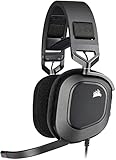
- Dolby Audio 7.1 Surround Sound: Brings your game to life, putting you directly in the middle of the action.Note : If the size of the earbud tips does not match the size of your ear canals or the headset is not worn properly in your ears, you may not obtain the correct sound qualities or call performance. Change the earbud tips to ones that fit more snugly in your ear.
- Catch Every Sound: From a faint whisper to a resonating blast, a pair of custom-tuned 50mm high-density neodymium audio drivers deliver sound in exquisite detail with a massive frequency range of 20Hz-40,000Hz.
- Hours of Long-Lasting Plush Comfort: Equipped with memory foam earpads with a breathable microfiber cloth exterior and a stress-free adjustable floating headband design.
- Broadcast-Grade Omni-Directional Microphone: Captures your voice with the utmost clarity, with a flip-up mute function and a built-in LED mute indicator.
- High-Fidelity 24bit/96kHz Sound: Experience true high-fidelity audio over a USB wired connection.
What “HS80” actually refers to
The name HS80 appears across multiple generations. The original HS80 RGB Wireless uses Corsair’s SLIPSTREAM 2.4 GHz wireless receiver and is listed for PC, Mac and PlayStation. It does not appear in Corsair’s mobile Bluetooth or Xbox compatibility listings.
The HS80 MAX models add Bluetooth. That changes phone support, but it does not automatically make every MAX model an Xbox headset. Corsair lists the standard HS80 MAX for mobile, PC and PlayStation use, while the HS80 MAX Wireless for Xbox has the Xbox One and Series X|S designation and an Xbox-specific receiver.
Look for the complete product name on the retail box, product page, receiver packaging and headset label. “HS80” by itself is not enough to establish Xbox or Bluetooth support.
Do these 3 things before closing this tab:
1Clear out junk files and repair common Windows errors2Fix the driver behind crashes, sound loss and screen glitches3Repair Windows errors before they cause bigger problemsUsing the HS80 on PS5
Original HS80 RGB Wireless setup
The original HS80 RGB Wireless connects to a PS5 by plugging its wireless USB transmitter into a USB port on the console. Corsair’s quick-start instructions give the USB-receiver setup directly, and Corsair lists the headset as working natively with PS5.
- Insert the HS80 wireless USB transmitter into a PS5 USB port.
- Turn on the headset and allow the console to detect the receiver.
- Use the PS5 audio settings to select the headset for output and microphone input if the console does not choose it automatically.
The USB receiver is essential to the original model’s wireless PS5 connection. The headset is not listed as a Bluetooth PS5 headset, so pairing it directly to the console as a generic Bluetooth device is not the supported route.
When PS5 identifies the receiver as a keyboard
Some original HS80 receivers can appear to the PS5 as a keyboard instead of an audio device. Corsair’s fix is to change the receiver to PlayStation mode in iCUE before reconnecting it to the console.
Rank #2
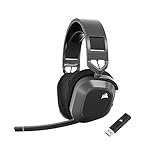
- Low-Latency 2.4Ghz Wireless Plus Bluetooth: Enjoy low-latency 2.4Ghz wireless audio with an amazing range of up to 50ft and high-fidelity 24bit/96kHz sound – double that of typical gaming headsets – plus Bluetooth connectivity.
- Multiplatform compatibility for PC, Mac, PS5, PS4, and Mobile: Use the same headset for PC, Mac, or PlayStation, or connect via Bluetooth to mobile devices and more.
- Long-Lasting Battery Life: Enjoy up to 65 hours of battery life over 2.4GHz wireless or up to 130 hours with Bluetooth. (With RGB off. Up to 24 hours over 2.4GHz with RGB on.)
- Hours of Long-Lasting Plush Comfort: Memory foam ear pads with breathable cloth fabric and stress-free floating headband design deliver incredible comfort and are reinforced with lightweight aluminum to endure years of competitive gaming.
- Package Contents: CORSAIR HS80 MAX WIRELESS Headset - Steel Gray | Wireless USB Receiver | USB Charging Cable, 1.8m | Safety Leaflet | Warranty card | CA-9011295-WW
- Connect the wireless receiver to a Windows PC or Mac.
- Open Corsair iCUE and select the receiver.
- Open the receiver’s Connections menu.
- Select PlayStation mode.
- Disconnect the receiver from the computer and plug it back into the PS5.
Corsair says the HS80, HS80 MAX and HS80 RGB USB work natively with PS5. The PlayStation-mode procedure is specifically useful when the original receiver is detected incorrectly.
HS80 MAX on PS5
Both HS80 MAX versions use a USB receiver for PS5. The Xbox-specific MAX model does not lose PS5 support because it is the Xbox variant; Corsair lists it for PS5 as well as Xbox. Use the receiver supplied with that exact headset rather than assuming receivers from different HS80 generations are interchangeable.
Using the HS80 with a Mac
Corsair lists “PC;MAC;Playstation” as audio-compatible platforms for the HS80 RGB Wireless. On a Mac, connect the supplied USB wireless receiver, then choose the headset as the sound output and microphone input in macOS sound settings if necessary.
iCUE is Corsair’s configuration software. The HS80 MAX guide states that iCUE can be installed on macOS. Some MAX features, including SoundID, require the USB receiver even when the headset also has Bluetooth. Bluetooth alone should therefore not be treated as a replacement for the receiver when configuring every feature.
Mac connection checklist
- Use the USB wireless receiver supplied with the headset.
- Wait for macOS to recognize the receiver before opening iCUE.
- In macOS sound settings, select the HS80 as both output and input when you want headset audio and microphone access.
- Keep the receiver connected for iCUE functions that Corsair identifies as receiver-dependent, such as SoundID on the HS80 MAX.
The original HS80 also has a USB wired mode. That provides a second computer connection method, but it does not add Bluetooth support for phones or Xbox certification to the original model.
Does the HS80 have Bluetooth for a phone?
Original HS80 RGB Wireless
The original HS80 RGB Wireless has no mobile Bluetooth entry in Corsair’s compatibility chart. Its wireless design is based on the USB SLIPSTREAM receiver, so it should not be presented as a phone-Bluetooth headset.
Rank #3

- Hours of Comfortable Gaming: Leatherette memory foam ear cups with soft fabric, a mesh grill ear cup design, and an adjustable headband with aluminum-reinforced construction provide lightweight comfort just 282g and durability
- Great Gaming Audio: High-quality, custom-tuned 50mm neodymium audio drivers deliver excellent sound with the range needed to hear everything on the battlefield, plus support for Sony Tempest 3D audio on PS5
- Dolby Atmos Spatial Audio on PC: Place the sounds of the game all around you with three-dimensional staging, so you can truly hear and experience the finest details your games have to offer
- SonarWorks SoundID Technology: For customized sound control that tailors your headset settings to your personal audio tastes on PC and Mac
- Omni-Directional Microphone: Accurately captures all your calls and commands, with a convenient flip-to-mute function
HS80 MAX and HS80 MAX Wireless for Xbox
HS80 MAX models add Bluetooth for phone calls and Bluetooth audio. Pair the headset with the phone in Bluetooth mode, then use that mode when you want music, video sound or other media.
Corsair notes an important mode distinction: when an HS80 MAX remains in RF mode while paired to a phone, it accepts and receives phone calls only. Music and other phone audio require switching to Bluetooth mode. A phone may therefore appear paired while media still plays through another output until the headset is changed from RF to Bluetooth.
The Xbox-specific HS80 MAX is listed for mobile use and Corsair describes RF and Bluetooth operation together. That makes it the MAX choice for someone who wants an Xbox wireless connection while retaining phone connectivity, subject to the exact mode behavior and regional product listing.
Bluetooth limitations to expect
HS80 MAX uses a different wireless radio from earlier HS80 models and does not support multipoint or SLIPSTREAM connections with other devices. Do not assume that adding a second device will create the same seamless multi-device switching offered by headsets that explicitly advertise multipoint. Plan which device will use RF and which will use Bluetooth, and switch modes when required.
Independent reader supportYour contribution helps us test, update, and keep practical guides available for everyone.Is the Corsair HS80 compatible with Xbox?
Original HS80 RGB Wireless
The original HS80 RGB Wireless is listed for PC and PS4/PS5, not Xbox. It should not be described as Xbox-compatible, and changing a software setting cannot turn its PlayStation/PC receiver into an Xbox-certified wireless receiver.
HS80 MAX Wireless for Xbox
For wireless Xbox use, choose the model Corsair names HS80 MAX Wireless for Xbox or HS80 MAX XB. Corsair lists it for Xbox One and Xbox Series X|S, alongside mobile, PC and PS4/PS5. Its Xbox-specific receiver is the key distinction from the standard HS80 MAX and the original HS80 RGB Wireless.
Rank #4

- Massively multiplatform: Plug in the universal 3.5mm connector for immersive audio wherever you play – PC, Mac, PlayStation, Nintendo Switch, and more
- Enhanced comfort: A new adjustable floating headband design and soft fabric earpads provide long-lasting comfort perfect for marathon gaming sessions
- Clear omnidirectional mic: Get better teamwork and enjoy chatting with friends thanks to the crystal-clear communication from the HS35 v3’s omnidirectional mic
- 50mm neodymium drivers: Enjoy detailed, immersive audio thanks to custom-tuned 50mm neodymium drivers
- Convenient volume and mic mute: Mute your mic and quickly adjust the volume with convenient controls on the earcup
- Confirm that the packaging explicitly says Wireless for Xbox or HS80 MAX XB.
- Use the receiver supplied with that Xbox model and connect it according to the headset’s quick-start instructions.
- For phone music or calls, pair the headset over Bluetooth and switch to Bluetooth mode for media audio.
If a listing says only “HS80 RGB Wireless” and does not mention Xbox, treat Xbox support as unconfirmed rather than relying on the shared HS80 name.
What’s actually slowing this PC down?
Pick the symptom - the matching free tool is one click away.
Choosing the right HS80 for your devices
Choose the HS80 RGB Wireless when
- Your main devices are PS5, Mac or PC.
- You want the original SLIPSTREAM USB-receiver design.
- You do not need phone Bluetooth audio.
- You do not need wireless Xbox support.
Choose the standard HS80 MAX when
- You need Bluetooth calls and music from a phone.
- Your consoles are PS5 or another platform listed by Corsair for that model.
- You use a Mac or PC and want macOS-compatible iCUE features.
- Xbox is not a requirement, because the standard MAX is not listed for Xbox in Corsair’s chart.
Choose the HS80 MAX Wireless for Xbox when
- You need wireless Xbox One or Xbox Series X|S support.
- You also want PS5, PC/Mac and phone connectivity.
- You are willing to use the Xbox-specific receiver and the headset’s RF/Bluetooth modes rather than assuming one universal connection.
This decision is about compatibility, not measured sound quality, battery life, latency or range. Corsair’s official compatibility material does not establish independent numeric performance results for those characteristics, so they should not be inferred from the platform list.
Troubleshooting common connection problems
PS5 sees a keyboard instead of a headset
Connect the receiver to a computer, open iCUE, choose the receiver’s Connections menu, select PlayStation mode, and reconnect the receiver to PS5. This addresses the specific detection problem documented for the original HS80.
Phone is paired but music is silent
Check whether the headset is still in RF mode. Corsair says RF mode handles phone calls while paired, but Bluetooth mode is required for music and other phone audio. Switch to Bluetooth mode and select the HS80 as the phone’s media output.
Xbox does not connect
Verify the exact model first. The original HS80 RGB Wireless is not listed for Xbox, and the standard HS80 MAX is not listed for Xbox in Corsair’s compatibility chart. Wireless Xbox support is tied to the HS80 MAX Wireless for Xbox/HS80 MAX XB variant and its Xbox-specific receiver.
The Tool Desk
Outbyte PC Repair FREERepair Windows errors before they cause bigger problemsFix Now →Outbyte Driver Updater FREEFix the driver behind crashes, sound loss and screen glitchesFind Drivers →iCUE cannot access a MAX feature on Mac
Connect the USB receiver even if Bluetooth audio works. Corsair’s HS80 MAX guide identifies the receiver as required for some functions, including SoundID. Bluetooth pairing alone may provide audio without exposing every configuration feature.
A receiver from another HS80 is being used
Return to the receiver supplied with the headset and verify the model designation. The HS80 family uses different wireless hardware across generations and variants, so a shared headset name does not guarantee receiver interchangeability or platform certification.
What to verify before purchase
- Read the complete model name, including “MAX” and “for Xbox” or “XB.”
- Confirm the regional listing, because retail availability and compatibility pages can change.
- Check whether your priority is USB-receiver audio, phone Bluetooth, Xbox certification or all three.
- Make sure the package includes the receiver required by your target console or computer.
- For a Mac, confirm that the receiver is available for iCUE features you plan to use.
In practical terms, the original HS80 RGB Wireless is a PS5 and Mac/PC headset, not a universal mobile-and-Xbox headset. Phone support begins with the HS80 MAX family, and wireless Xbox support requires the HS80 MAX Wireless for Xbox model. Identify that exact variant before ordering or diagnosing a connection problem.
Quick Recap
Product prices and availability are accurate as of the date/time indicated and are subject to change. Any price and availability information displayed on Amazon at the time of purchase will apply.

