What’s actually slowing this PC down?
Pick the symptom - the matching free tool is one click away.
No. The Star Wars: Galactic Racer FAQ says split-screen multiplayer is not supported. Two people cannot play a local couch race on one console and one display. The game does offer online multiplayer with crossplay between PC and consoles, but each participant needs a separate device, connection and game access.
At a glance
| Question | Answer |
|---|---|
| Can two people race on one console in split-screen? | No. The game FAQ says split-screen multiplayer is not supported. |
| Is there online multiplayer? | Yes. The FAQ describes online multiplayer with crossplay between PC and consoles. |
| How many players can join an online party now? | Up to three players, according to the FAQ. |
| Will online parties expand to six? | The developers stated a plan to increase the limit to six in a future update targeted for the first few weeks after launch. That plan is not confirmation that the update has shipped. |
| Which platforms launched the game? | StarWars.com announced availability on PlayStation 5, Xbox Series X|S and PC. Steam lists October 6, 2026, as the release date. |
What “local co-op” means here
Local co-op, couch co-op and split-screen all describe playing together in the same physical location, usually on one console connected to one television. In a racing game, the screen is divided into views so each driver can see their own vehicle and race position. A second controller alone does not create this mode; the software must provide a local multiplayer session and render multiple views.
| # | Preview | Product | Price | |
|---|---|---|---|---|
| 1 |
|
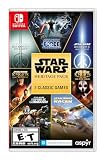
Star Wars: Heritage Pack - Nintendo Switch | $35.48 | Buy on Amazon |
| 2 |

|
Star Wars Zero Company | Sony PlayStation 5 | Disc | English | $47.97 | Buy on Amazon |
| 3 |

|
LEGO Star Wars Skywalker Saga for Nintendo Switch | $24.88 | Buy on Amazon |
| 4 |

|
Star Wars Battlefront II - PlayStation 4 | $11.33 | Buy on Amazon |
| 5 |

|
Star Wars Galactic Racer: Deluxe Edition - PlayStation 5 | $79.99 | Buy on Amazon |
As an Amazon Associate I earn from qualifying purchases.
Online multiplayer is a different arrangement. Each player runs the game on a separate console or computer, connects through the internet and joins the same online session. Crossplay means those players can use different supported platforms, such as one person on PS5 and another on PC. It does not turn one console into a two-player split-screen system.
What the game FAQ actually confirms
The Star Wars: Galactic Racer FAQ, hosted on the game’s r/StarWarsGalacticRacer community, gives the direct answer: split-screen multiplayer is not supported. That is the most specific published statement available for the local-play question, so buyers should treat the title as a single-player or online-multiplayer game rather than a couch co-op racer.
#1 Best Overall
- The following games are included in the cartridge: STAR WARS Jedi Knight: Jedi Academy (3.6 GB)
- STAR WARS Jedi Knight II: Jedi Outcast (1.1 GB)
- STAR WARS Episode I Racer (254 MB)
- STAR WARS Republic Commando (2.5 GB)
- STAR WARS: The Force Unleashed (3.4 GB)
The FAQ discusses online play separately from split-screen. Its online information should not be read as an indirect local-player count: the stated numbers apply to connected online parties, not to people sharing one screen. The FAQ is community-hosted rather than a platform technical specification, so a later developer or publisher announcement could change the feature set. Until such an update is published, there is no confirmed local multiplayer mode to enable.
How online multiplayer works instead
Current party size
The FAQ says online multiplayer currently supports parties of up to three players. “Currently” matters: this is a launch-period capacity described by the FAQ, not a guaranteed permanent limit or a local-player allowance.
For a two-person race, that means each participant joins from their own supported system. A third friend can join while the party remains within the stated limit. Nothing in that figure indicates that three people can occupy one console through split-screen.
Recommended Free Tools
Rank #2
- Standard Edition for PlayStation 5 (disc) includes the full Star Wars Zero Company game. Single-player turn-based tactics set in the twilight of the Clone Wars—lead Hawks and Zero Company in an intense campaign.
- Build your squad from clone troopers, scoundrels, astromechs and even a Jedi—combine abilities and gear in deep Tactical-Strategy combat.
- Plan at your base, adapt on dynamic battlefields and make decisions that shape missions and replayability in this cinematic Star Wars story.
- Customise Hawks and your operatives, tailor loadouts and unlock powerful squad synergies designed for Strategy, Turn-Based and Sci-Fi fans.
Planned increase to six players
The developers announced a plan to raise online party capacity to six in an update aimed at the first few weeks after launch. It is a stated intention, not proof of delivery. The FAQ does not establish the exact release date, regions, modes or platform rollout for that change. Check the latest in-game notice or developer announcement if six-player parties are essential to your purchase decision.
Crossplay requirements
The FAQ describes crossplay between PC and consoles. In practical terms, every participant still needs a separate supported device, a copy or entitlement that permits online play, an internet connection and whatever account or platform sign-in the game requires. Crossplay expands which platforms can meet in one online lobby; it does not remove the need for separate hardware.
Platforms and launch timing
StarWars.com’s launch announcement listed worldwide availability on PlayStation 5, Xbox Series X|S and PC. Steam lists October 6, 2026, as the release date. Storefront availability can vary by region, edition and platform, so confirm the listing for the country and system you intend to use.
Rank #3
- The galaxy is yours with Lego Star Wars: The Skywalker Saga, Play all nine saga films and experience fun filled adventure in a galaxy far, far away
- Play through all nine films in a new, fun filled adventure
These platform details help answer a common buying question: two players can potentially use different systems in an online crossplay session, such as PS5 and PC, but neither platform listing adds local split-screen. A console’s ability to connect multiple controllers does not change the game’s supported multiplayer modes.
Do these 3 things before closing this tab:
1Repair Windows errors before they cause bigger problems2Fix the driver behind crashes, sound loss and screen glitches3Clear out junk files and repair common Windows errorsPhysical editions and what they do not change
The game FAQ identifies physical Standard and Deluxe editions for PS5 and Xbox Series X|S. It also identifies a physical Collector’s Edition for PS5, Xbox Series X|S and PC. Those statements describe product forms, not current retailer stock, pricing or regional availability.
Edition names do not indicate different multiplayer technology. Buying Deluxe or Collector’s Edition does not add split-screen support. If local play is the deciding feature, compare the game’s documented modes rather than choosing a higher-priced edition. Before purchase, verify the platform printed on the box or shown in the store listing, the edition contents and whether the seller can deliver to your region.
Rank #4
- A new hero, a story untold in an emotionally gripping new Star Wars campaign that spans over 30 years
- The ultimate battleground
- Galactic scale space combat: Space combat has been designed for Star Wars Battlefront II from the ground up with distinct handling, weapons and customization options
- Battery: No battery used
Can another controller, console setting or accessory enable couch play?
No supported workaround is documented. Adding a second controller, creating another console profile or changing display settings cannot implement a multiplayer mode that the game itself does not provide. Split-screen requires code for local session management, player views, input assignment and race synchronization; those functions are not supplied by a controller accessory.
Do not confuse local wireless or network play with split-screen. Even if a future update supports additional local or nearby-network features, it would need an explicit developer announcement. The available FAQ only confirms online multiplayer and does not describe a same-console option.
Quick wins for a faster PC:
Fix the driver behind crashes, sound loss and screen glitchesFind Drivers →Repair Windows errors before they cause bigger problemsFix Now →Scan for outdated or missing drivers - takes under a minuteDriver Scan →How to play with a friend online
The exact menu wording can change between platform builds, but the setup follows this sequence:
Best Value
- COMPETE IN HIGH-STAKES RACES - Slam, shunt, and takedown rivals across varied circuits as you pilot land speeders, speeder bikes, skim speeders, and pod racers. The greater the risk, the greater the reward.
- SURVIVE A DANGEROUS UNDERGROUND SPORT - Join The Galactic League - an unsanctioned racing circuit born in the lawless Outer Rim. Become Shade, a lone racer chasing revenge and glory.
- BUILD AND CUSTOMIZE YOUR CRAFT - Pilot different classes of repulsorcraft each with distinct physics and playstyles. Build a ride that showcases your style and gives you a competitive edge.
- BATTLE RIVALS IN MULTIPLE GAME MODES - Ride solo through a story-driven campaign of shifting alliances or brave strategic PvP grudge matches where reputation rides with you.
- CLIMB THE RANKS AND EARN REWARDS - Prove yourself through intense rivalries and escalating challenges. Every choice shapes your prospects as you build your status in The Galactic League.
- Confirm both systems. Make sure each player is using PS5, Xbox Series X|S or PC, the platforms identified for the game, and that the relevant storefront offers the title in your region.
- Install the same current version. Apply available game updates before trying to form a party. Version mismatches can prevent invitations or matchmaking even when both players own the game.
- Prepare separate accounts and connections. Each player should be signed in to the account required by their platform and have a reliable internet connection. Crossplay does not allow two people to share one account on one console.
- Open the game’s online multiplayer option. Use the multiplayer or online-play entry shown by your build, then create or join a party. Do not select a local, exhibition or split-screen option expecting one to appear if the build does not list it.
- Invite the other player through the platform or game party system. Cross-platform invitations may require the game’s own friend system or a linked account. Follow the on-screen friend and invite prompts available to your platform.
- Stay within the active party limit. The FAQ’s current limit is three online players. If the planned six-player update has not been confirmed as installed on your systems, organize the session around the existing three-player limit.
- Choose the online race or event. Once everyone appears as connected, select an available online race and wait for the lobby or matchmaking process to complete.
Troubleshooting an online session
The friend cannot join
First check that both players are online, updated and using supported platforms. Confirm that the invitation was sent through the same account or friend method the game recognizes. If one player is on a platform or regional storefront where the title is unavailable, crossplay cannot compensate for that restriction.
The party is full
Use the FAQ’s current three-player limit as the safe assumption. A future plan for six does not increase capacity before the relevant update is installed and enabled. Remove an inactive member or wait for an officially confirmed capacity change rather than repeatedly sending invitations.
One player expected split-screen
Explain the mode distinction before starting: the game’s documented multiplayer is online, so the second player must use another device. Connecting an additional controller to the first console will not create a second on-screen racing view.
The game appears to have different options after an update
Read the update notes or current developer FAQ for the exact platform and date. A newly mentioned local feature would need explicit confirmation; an increase in online party size, private lobbies or crossplay improvements would still be online features rather than proof of couch co-op.
Buying checklist for a two-player household
- Decide whether both players have separate PS5, Xbox Series X|S or PC systems. One shared console and one television are not enough for the documented multiplayer.
- Confirm that both intended platforms can access the same game version and online service in your region.
- Budget for two game entitlements if the store requires a separate purchase for each account or platform.
- Check the current online party limit before planning a group larger than three.
- Verify edition, platform, region and stock when considering a physical copy; the listed physical editions do not add local play.
- If couch co-op is non-negotiable, do not buy on the assumption that a patch, extra controller or premium edition will supply it.
What to watch for in future updates
A genuine change to local multiplayer would normally be identified explicitly as split-screen, local multiplayer or same-console support in official patch notes or a developer FAQ. An announcement about six-player online parties, improved crossplay or new matchmaking remains online functionality. Keep those labels separate when evaluating updates, reviews and storefront descriptions.
For now, the reliable buying distinction is simple: Star Wars: Galactic Racer supports online races with crossplay, while the game FAQ does not list a local split-screen mode. Players who need same-screen racing should choose a title that explicitly advertises local multiplayer.
Quick Recap
Product prices and availability are accurate as of the date/time indicated and are subject to change. Any price and availability information displayed on Amazon at the time of purchase will apply.

