What’s actually slowing this PC down?
Pick the symptom - the matching free tool is one click away.
No. Replacing a nozzle or print core changes the printer’s hardware; it does not automatically remove melted filament from a single nozzle or make a color or material change waste-free. When new filament enters a shared melt zone, it pushes out residue from the previous filament. You must purge that residue, route it into useful infill or another object, or use a printer architecture that keeps materials on separate tools.
What a nozzle change actually changes
A hardware swap changes configuration
A nozzle replacement is normally a change in the hot end’s physical configuration. You might install a different diameter to alter detail, speed or extrusion requirements, or select a nozzle intended for a particular material. On systems built around exchangeable print cores, the replaceable unit can include the nozzle, heater block, heater and temperature sensor. UltiMaker describes a print core as a compact hot end that can be exchanged without tools, with the printer guiding the user through the change.
As an Amazon Associate I earn from qualifying purchases.
That operation is not the same as changing filament during a print. It does not promise that a shared melt zone is empty, and it does not provide a general mechanism for separating one color from the next. If a core or nozzle is removed between jobs, follow the printer’s unloading, heating and safety procedure; do not assume that a new nozzle has purged the old material for you.
The Tool Desk
Outbyte PC Repair FREEClear out junk files and repair common Windows errorsFree Scan →Outbyte Driver Updater FREEScan for outdated or missing drivers - takes under a minuteDriver Scan →A filament swap changes what is inside the melt zone
A filament change asks the same nozzle to process a different material or color. In a single-nozzle arrangement, melted plastic remains in the nozzle during the change. As the new filament loads, it melts and pushes the previous nozzle contents out. The result is a gradual transition rather than an instant switch. A clean boundary therefore requires a controlled amount of purging, even when the nozzle itself is brand new.
#1 Best Overall

- Large Storage Volume -Filament Dry Box Inner Size: 9.29*6.49*9.13 inch. Comgrow dryer box can store 2 rolls of 1kg spools, compatible with PLA ABS SILK filament. Works perfectly with all standard filament diameters 1.75mm/2.85mm.
- Setting Notes - Set the temperature and duration after turning on the filament dehydrator. The machine will work only when the work state is displayed on the screen. If the work mode is not displayed, the motherboard will automatically shut down after 3 minutes. If you have any unsolvable problems with the COMGROW filament dryer box, please feel free to contact us, our after-sales technical team will provide you with detailed solutions within 24 hours.
- Filament Dryer and Remove Moisture - Comgrow 3d printer filament dryer box is designed to keep filament dry and remove moisture from kinds of filaments. Internal heating during printing provides a dry storage environment for 3D printer filaments and keeps the filament dry. Avoid entanglement, clogging, poor adhesion, and layer migration caused by the dampness of the printing wire. (Note: Only used for the drying of 3D printer Filament)
- Real-time Monitoring of Temperature and Humidity - Adjustable temperature range 40°~ 50 °C, the maximum temperature is only 50°C,。setting time from 6 hours to 12 hours. A 2-inch LCD screen and touch buttons make it easy to operate, it is more comprehensive and clear of the information display. Press the power button to start, and hold the function button(M) to change the dry time and the temperature setting.
- Great Sealed Filament Dry Box -The outlet structure adopts a silicone cable sheath and Teflon tube, the outlet is smooth and can be covered with a plug when not in use. The upper cover has a snap button structure, and the sealing performance is good.When the drying box is working, the sealing hole needs to be opened to allow moisture to drain out. When not in use, the sealing hole needs to be closed to keep the consumables dry.
Why single-nozzle changes create waste
The amount to purge depends on the previous and incoming filaments, the nozzle and melt-zone geometry, temperatures, loading and unloading behavior, and the color contrast you need. A dark filament can remain visible in a light one long after the extruded strand appears to have changed color. A chemically or mechanically different material may also need more careful clearing than two similar colors.
There is no universal “waste per nozzle change” number. A nozzle swap and a filament transition are different events, and manufacturer settings are often tuned to a particular printer, feeder and material combination. Treat any quoted purge value as a system-specific setting or product claim, not as a rule for every 3D printer.
How different hardware designs handle transitions
Waste behavior is determined more by the material-routing design than by the fact that a nozzle can be replaced. The following examples illustrate the distinctions documented by manufacturers.
Recommended Free Tools
| Configuration | What happens during a material change | Tower or purge behavior | Documented figure or qualification |
|---|---|---|---|
| One nozzle with a filament-changing unit | The incoming filament pushes melted residue from the shared nozzle. | Purge is required for reliable color or material separation. Slicer settings can redirect some of it. | Prusa’s documentation explains the residual-plastic mechanism and provides a purge-volume matrix. |
| Original Prusa XL multi-tool setup | Different tools can handle different materials instead of repeatedly flushing one nozzle. | Prusa says true multi-material prints can run without a purge or wipe tower. | This is a claim about the XL and its configuration, not every toolchanger. Dry filament is important because moisture can cause leakage from a preheated parked nozzle. |
| INDX system | The system uses its own material-change and pressure-stabilization process. | A purge collector and nozzle wiper are part of the design; “no tower” should not be interpreted as “no extrusion.” | Prusa publishes approximately 13 milligrams (0.013 grams) per material change. It is a manufacturer figure, with no publication year shown on the accessed product page and no independent test attached. |
| MMU3 filament-changing system | Filament is unloaded and the next filament is loaded through the same extrusion path. | Residual material is purged to limit color contamination. Wipe-to-infill and wipe-to-object options can reuse some of the purge. | Prusa reports average filament changes of 35 to 45 seconds; the page does not state a publication year. |
| Manual nozzle or print-core replacement | The physical hot-end component changes; the old filament problem is not automatically solved. | No general purge or waste value is established for the hardware swap itself. | UltiMaker identifies the print core as an exchangeable compact hot end containing the nozzle, heater block, heater and sensor. |
A multi-tool design can therefore reduce flushing, but its residual extrusion, leakage control and cleaning routine remain design-specific. A small priming deposit, pressure-stabilizing purge or wipe may still be necessary.
Rank #2

- [Fast Drying with Fan] SUNLU 3D printer filament dry box can help you solve the problem of stringing, clogging and poor adhesion caused by wet filament.Upgraded filament dryer adds a fan design,speeding up the discharge of excess water from 3D printer filaments and reducing the impact of wet weather on 3D filament printing.
- [Visual Display] SUNLU dry box can accurately detect and display the temperature,time,humidity in the 2 inch LCD screen.Hold the left button to change the dry time, press the right button to change the temperature setting.
- [Personalized Settings] You can adjust the temperature and time of 3d filament dryer according to different filament and environment.Adjustable temperature range is 35℃-55℃.After using the drying box, the print quality is better,surface smoother,good layer adhesion.
- [High Compatibility] Maximum capacity of filament box is 210*89(H)mm. Ideal for all 3d printing filament 1.75mm/2.85mm/3.00mm PLA PETG ABS TPU Nylon PA filament material. Compatible with all major 3D printer filament brands.
- [Customer Service] After-Sales Service and Technical Support are provided.If you have any question about SUNLU 3D printer filament dryer S1 Plus, please don't hesitate to contact us.You can add the dryer box to shopping cart first to help quick finding.
Reduce waste with slicer controls
If your printer shares one nozzle, software settings are usually the least disruptive way to reduce waste. They reduce or reuse purge; they do not repeal the physical need to clear the melt zone.
Set a transition-specific purge volume
PrusaSlicer provides a purge-volume matrix, allowing values to be set for individual filament transitions rather than applying one number to every pair. Start with the printer or filament profile’s established value. Reduce it in small increments while printing a test with the same colors and temperatures as the real job. Stop lowering it when you see dark streaks, a delayed color change or a surface that no longer matches the intended material.
Use a smart wipe tower when a tower is still needed
The smart wipe tower is sized from the purge requirement. Its sparse infill can reduce the amount of plastic committed to a solid tower while retaining a structure for wiping and stabilizing extrusion. A tower cannot always be eliminated: high-contrast colors, demanding material changes and specific tool paths may still require enough purge volume to protect the model.
Free tools Windows power users keep installed
One-click scans. No signup required.
Wipe into infill
Wipe-to-infill sends some of the transition material into areas that will be enclosed by the part. This can greatly reduce material sent to a visible tower, but it is not free of consequences. The contaminated strand is still inside the object, so use the option only where the affected infill cannot become a visible wall, top surface or functional feature.
Rank #3

- 4 Spool Capacity: SUNLU 3D printer filament dryer S4 can dry up to four 1kg 3D printer filaments, enhancing drying efficiency and printing quality when drying while printing
- Large Dimensions: SUNLU filament dryer S4 is notably large in size with external dimensions of 460(L) * 220(W) * 310(H)mm, internal dimensions of 450(L) * 175(W) * 207(H)mm, and net weight of 4KG
- 8 Filament Exit Holes: SUNLU filament dryer S4 features eight filament outlets for multiple printers and various filament loading angles, ensuring smoother loading and printing
- 350W PTC Heater: SUNLU filament dryer S4 is equipped with a 350W PTC heater, offering safety and higher heating efficiency (50% higher than the FilaDryer S2)
- 3 Circulation Fans: Three high-quality fans circulate air inside, ensuring consistent temperature across the entire area for more even drying with 360 surround heating
Wipe into another object
Wipe-to-object directs residual material into a sacrificial or secondary object printed at the same time. This can be more useful than a dedicated tower when you already need another part, but the receiving object can contain mixed colors and may not be suitable for a customer-facing or dimension-critical component.
A practical adjustment sequence
- Choose a small test model with the same color order and material pair as the production print.
- Record the current purge values and whether the profile uses a tower, infill wiping or another object.
- Change only one transition value at a time, then inspect the first layers after every switch.
- If the model remains clean, test the revised value with a larger color block or a second transition; some contamination appears only after more of the old filament has been displaced.
- Keep a conservative value for transitions involving very dark, highly saturated or materially incompatible filaments, even if similar-color transitions work with less purge.
Why “tower-free” does not mean “waste-free”
A purge or wipe tower is only one destination for waste. A system can avoid the tower while still extruding a small amount into a collector, onto a wiper or as a priming line. Prusa’s XL documentation says the printer can make true multi-material prints without a purge or wipe tower, but the same guidance emphasizes dry filament to limit leakage from the preheated nozzle while a tool travels or remains parked. The absence of a tower is therefore a statement about that printer’s workflow, not proof that no material leaves a nozzle.
The INDX documentation makes the distinction measurable: approximately 13 milligrams per material change is a small quantity, but it is still a purge. Because this is a manufacturer-published value rather than an independent comparison, use it to understand the product’s design claim, not to rank all printers.
Quick wins for a faster PC:
Fix the driver behind crashes, sound loss and screen glitchesFind Drivers →Clear out junk files and repair common Windows errorsFree Scan →Scan for outdated or missing drivers - takes under a minuteDriver Scan →Moisture, leakage and the limited role of drying
For the XL mechanism described by Prusa, moisture is a main cause of filament leaking from a preheated nozzle during travel or while the tool is parked. Drying filament can address that leakage mechanism and may make tower-free operation more reliable. It does not remove the old color or material trapped in a shared nozzle during an ordinary single-nozzle transition. If you are seeing both leakage and color contamination, drying addresses the first symptom; purge settings and material routing address the second.
Rank #4
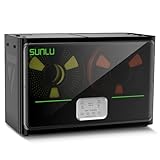
- 4 Spool Capacity: SUNLU 3D printer filament dryer S4 can dry up to four 1kg 3D printer filaments, enhancing drying efficiency and printing quality when drying while printing
- 3 Circulation Fans: Three high-quality fans circulate air inside, ensuring consistent temperature across the entire area for more even drying, 360 surround heating
- 350W PTC Heater: SUNLU filament dryer S4 is equipped with a 350W PTC heater, offering safety and higher heating efficiency (50% higher than the FilaDryer S2)
- 8 Filament Exit Holes: SUNLU filament dryer S4 features eight filament outlets for multiple printers and various filament loading angles, smoother loading and printing
- Personalized Temperature Setting and Timer: Temperature setting range is 35-70C, timer setting range is 0-99 hours. Users can adjust parameters to suit filament conditions
Choosing the right waste-reduction approach
If you change nozzles only to change print characteristics
Use the nozzle diameter or material capability that suits the job and follow the printer’s calibration procedure. Do not expect the replacement itself to reduce color-change waste. If the next print uses a single filament, there may be no color-transition purge to manage, but that is because the job has no transition, not because the nozzle swap removed waste automatically.
If you already own a single-nozzle printer
Begin with the purge-volume matrix and wipe destinations in your slicer. This avoids a hardware purchase and lets you tune the trade-off between material savings, color cleanliness and the appearance or suitability of the receiving object. Keep a test profile for each difficult transition instead of applying one aggressive reduction globally.
If you frequently print many materials
Compare multi-tool, toolchanger and dedicated-nozzle systems by the actual transition path. Check whether each material has its own hot end, whether a parked nozzle can ooze, how the printer collects or wipes purge, and which slicer features are supported. A system that eliminates a tower may still need a collector or priming deposit.
If transition time matters as much as mass
Look for measured or clearly qualified change-time data. Prusa’s MMU3 figure of 35 to 45 seconds is an average manufacturer statement for that system, not a prediction for another feeder or printer. Compare like with like: a mechanical filament change, a tool change and a manual nozzle replacement are not equivalent operations.
Best Value

- 【Upgraded PTC Solution】Creality Space PI SE heats up quickly and has a built-in fan that circulates the hot air through 360° inside the chamber, evenly heating the entire chamber. It can be heated to 65°C within 15 minutes. We have added thermal insulation cotton on the dryer box inner wall to keep warm and anti-scald when printing. Dryer box input voltage: 110V 50/60Hz
- 【Improved Print Quality】3D printing filaments are hygroscopic, moisture can cause printing failure. After using filament dryer box, it can effectively solve the problems of drawing, clogging, and poor adhesion of the filaments during printing and improve print quality
- 【Easy to Use】Creality filament storage box requires no assembly and can be used right out of the dry box. Display screen and knob make it easy to operate. Real-time humidity monitoring and drying hours are displayed via a countdown timer, allowing you to track drying conditions. After drying, it is best to store the filament in a vacuum bag to keep it dry and ready for use
- 【Personalized Drying Time/Temperature Setting】You can set different drying temperatures and time to dry the filaments fully according to different 3D filament type, ambient temperature, humidity and other factors. Adjustable temperature range 45℃~65℃, and the time setting range is 0~24 hours
- 【Wide Compatibility】Creality filament dryer compatible with most 1KG spool 3D Printer filament. It can perfectly fit filament diameters of 1.75mm/2.85mm. And can be used with a variety of filaments, such as PLA, PLA+, PETG, TPU, ABS, ASA, PP, PC,PA(nylon). Pairing with Teflon tubes can make the filament feeding smoother
Troubleshooting common waste and contamination problems
The new color starts dirty
- Increase the purge value for that specific transition rather than every transition.
- Check that the incoming filament is loading far enough to displace the previous melt.
- Verify temperature and material profiles; a transition that works between similar colors may fail between very different materials.
The wipe tower is larger than expected
- Review the transition matrix; one high-purge pair can determine the tower size.
- Enable sparse smart-tower infill where your model can tolerate it.
- Test wipe-to-infill or wipe-to-object, remembering that the receiving region can contain mixed material.
A parked nozzle drips or leaves blobs
- On systems such as the XL, check filament dryness because moisture is documented as a major leakage cause.
- Inspect the printer’s parking, wiping and collector routine rather than simply reducing purge.
- Do not treat drying as a substitute for clearing old filament during a color change.
You changed the nozzle but contamination remains
Recheck whether the operation was a hardware swap or a filament transition. A new nozzle or print core does not prove that the feeder path and melt zone contain only the new filament. Use the printer’s prescribed loading and purging sequence before judging the color-change settings.
What can and cannot be compared
The available official documentation establishes product-specific behaviors, not an independent printer-versus-printer ranking. The cited pages do not provide a universal waste figure for nozzle changes, and the INDX and MMU3 figures have no publication year shown on the accessed pages. Compatibility, firmware, slicer support and product configurations can change, so confirm the current documentation for the exact printer, tool count and materials you intend to use.
For a meaningful comparison, record seven items for the same job: residual purge mass per transition, whether a tower is required, the number of nozzles or print heads involved, transition time, contamination-control method, whether purge can go into infill or another object, and the total compatible system cost. Manufacturer claims are useful starting points, but they are not a substitute for testing the exact colors, materials and settings in your workflow.
Crashes, No Sound, or Screen Glitches?
Random freezes, missing sound and display glitches usually trace back to one bad driver. Find and replace yours safely.Free scan · under a minutePC Slower Than It Used to Be?
A free scan shows the junk files, broken settings and background clutter dragging Windows down - then fixes them in one click.Free scan · Windows 10 & 11Quick Recap
Product prices and availability are accurate as of the date/time indicated and are subject to change. Any price and availability information displayed on Amazon at the time of purchase will apply.

