For a single self-hosted document-management service on a home or small-office server, choose Docker Compose. Paperless-ngx identifies Compose as its easiest deployment method and publishes project-maintained Compose files and setup guidance. Kubernetes is the stronger fit when you already operate a cluster and need declarative rollouts, workload reconciliation, service discovery, persistent-volume abstractions, or multi-node scaling.
This is a fit decision, not a speed contest. There is no official, apples-to-apples benchmark showing that Compose or Kubernetes makes Paperless-ngx faster. Both can run the application, but each leaves you responsible for storage, backups, secrets, network exposure, upgrades, and recovery testing.
As an Amazon Associate I earn from qualifying purchases.
Quick wins for a faster PC:
Repair Windows errors before they cause bigger problemsFix Now →Scan for outdated or missing drivers - takes under a minuteDriver Scan →Clear out junk files and repair common Windows errorsFree Scan →Quick decision: which platform fits?
| Situation | Better starting point | Reason |
|---|---|---|
| One Paperless-ngx instance on one home or small-office server | Docker Compose | It is the project’s documented easy path and keeps the application stack in one readable project. |
| You already run a healthy Kubernetes cluster with persistent storage and monitoring | Kubernetes | You can reuse existing controllers, secrets, service discovery, rollout and backup processes. |
| You need several application replicas, controlled rollouts or workloads spread across nodes | Kubernetes | Deployments, services, probes and scheduling provide the required platform primitives. |
| You are learning containers and have no cluster operations experience | Docker Compose | The operational surface is smaller; Kubernetes would add a second platform to learn before solving the document problem. |
| Your main requirement is encrypted, recoverable document storage | Either, with a strong backup design | Neither orchestrator encrypts documents or creates an independent backup automatically. |
The choice should follow your existing infrastructure and recovery objectives. Running Kubernetes merely to host one archive on one machine usually adds moving parts without creating high availability.
What Docker Compose and Kubernetes actually manage
Docker Compose: a project-level stack
Compose describes related containers, networks, environment variables and volume mounts in one YAML project. A typical Paperless-ngx project includes the web and worker application, a database, and a Redis-compatible message broker. Optional Tika and Gotenberg services handle additional Office-document conversion and email-file parsing when you enable and configure them.
#1 Best Overall

- FAST DOCUMENT SCANNING — Document scanner with feeder allows you to speed through stacks with a 50-sheet Auto Document Feeder (ADF); Efficient office scanner to help you scan more productively
- INTUITIVE, HIGH-SPEED SOFTWARE — Quickly scan with this desktop document scanner; Epson ScanSmart Software lets you easily preview scans, email files, upload to the cloud, and more; Plus, automatic file naming saves even more time
- SEAMLESS INTEGRATION — Easily incorporate your data into most document management software with the included TWAIN driver; Office document scanner integrates seamlessly with business workflows
- EASY SHARING — Duplex scanner allows you to scan straight to email or popular cloud storage2 services like Dropbox, Evernote, Google Drive, and OneDrive for simple storage and sharing
- SIMPLE FILE MANAGEMENT — Scanner allows the creation of searchable PDFs with Optical Character Recognition (OCR) and convert scans to editable Word or Excel files effortlessly; Designed for home and office document scanning
The result is easy to inspect: one project file shows which services start together and where their data is mounted. A single host runs the containers, so host updates, disk failures and network outages affect the entire stack unless you design redundancy outside Compose.
Kubernetes: a cluster control plane
Kubernetes stores desired state as resources. A Deployment describes stateless application replicas and replaces failed Pods; Services provide stable discovery; ConfigMaps and Secrets hold configuration; controllers perform reconciliation and rolling updates. StatefulSets are intended for workloads that need persistent storage and stable identity.
The Tool Desk
Outbyte Driver Updater FREEFix the driver behind crashes, sound loss and screen glitchesFind Drivers →Outbyte PC Repair FREERepair Windows errors before they cause bigger problemsFix Now →Those mechanisms are valuable when a cluster already exists. They do not turn a stateful document archive into a distributed system by themselves. You still have to select a database topology, define probes, choose where files live, configure ingress and TLS, and prove that a restore works after a node or storage failure.
Paperless-ngx components you must plan for
Paperless-ngx is more than a web container. Its current setup guidance recommends PostgreSQL for new installations and describes a Redis-compatible broker for scheduled work such as email fetching and maintenance. Tika and Gotenberg are optional services for parsing or converting Office formats and email files.
| Component | Purpose | Compose expression | Kubernetes expression |
|---|---|---|---|
| Paperless web and workers | Web interface, ingestion, OCR and background processing | One or more services in the Compose project | Deployment, Service and worker configuration |
| PostgreSQL | Metadata, users, tags and search-related state | Database service with a persistent volume | Managed database, StatefulSet or another supported database service with persistent storage |
| Redis-compatible broker | Queues and scheduled-task coordination | Broker service and network name | Service plus its own persistent or ephemeral policy, according to the broker’s role |
| Tika and Gotenberg | Optional Office and email parsing/conversion | Additional services enabled in configuration | Additional Deployments and Services with matching application settings |
| Consume and media directories | Incoming files, originals, thumbnails and archived content | Host paths or named volumes | PersistentVolumeClaims or another storage integration |
Leaving out a database, broker or document directory produces an incomplete design regardless of the orchestrator. Treat the web container as one part of the application.
Deploying with Docker Compose
1. Check the host and recovery prerequisites
- Use a maintained Linux host or another system supported by your Docker installation.
- Reserve durable disk space for the database, original documents, thumbnails, OCR output and growth.
- Decide where backups will be stored independently of the host.
- Keep the host on a trusted network and plan how remote access will be protected.
Paperless-ngx warns that information is stored in clear text without encryption and advises against running it on an untrusted host. Its project repository states:
“The safest way to run paperless is on a local server in your own home with backups in place.”
2. Obtain the project-maintained Compose configuration
Use the Compose files and installation script supplied by the Paperless-ngx project rather than copying an unmaintained third-party stack. Read the release-specific environment file and record every value you set, especially database credentials, hostnames, URLs and time-zone settings.
Rank #2

- OUR MOST ADVANCED SCANSNAP. Large touchscreen, fast 45ppm double-sided scanning, 100-sheet document feeder, Wi-Fi and USB connectivity, automatic optimizations, and support for cloud services. Upgraded replacement for the discontinued iX1600
- CUSTOMIZABLE. SHARABLE. Select personalized profiles from the touchscreen. Send to PC, Mac, mobile devices, and clouds. QUICK MENU lets you quickly scan-drag-drop to your favorite computer apps
- STABLE WIRELESS OR USB CONNECTION. Built-in Wi-Fi 6 for the fastest and most secure scanning. Connect to smart devices or cloud services without a computer. USB-C connection also available
- PHOTO AND DOCUMENT ORGANIZATION MADE EFFORTLESS. Easily manage, edit, and use scanned data from documents, receipts, photos, and business cards. Automatically optimize, name, and sort files
- AVOIDS PAPER JAMS AND DAMAGE. Features a brake roller system to feed paper smoothly, a multi-feed sensor that detects pages stuck together, and skew detection to prevent paper damage and data loss
3. Select the database and optional services
For a new installation, follow the current guidance to use PostgreSQL. Configure the Redis-compatible broker required for scheduled work. Enable Tika or Gotenberg only when you need their formats; every extra service adds an image, configuration and another item to patch and back up.
4. Map persistent directories deliberately
Put the database directory and Paperless-ngx media and consumption directories on storage that survives container replacement. Do not treat a bind mount as a backup. If the files are on NFS, account for the project’s warning that NFS does not provide the filesystem notifications used by the default consumer behavior; polling must be enabled for that case. Test ingestion after changing the storage path.
Recommended Free Tools
5. Start and verify the project
- Change to the directory containing the project Compose file and environment file.
- Pull the declared images with
docker compose pull. - Start the stack in the background with
docker compose up -d. - Inspect
docker compose psand service logs. Confirm that the database and broker are healthy before diagnosing the web service. - Open the web interface, create an administrator, import a test document and verify OCR, search, scheduled tasks and export or download behavior.
Use a small, disposable test file first. A successful container start does not prove that the media directory is writable, that OCR workers can reach the broker, or that a restore will work.
6. Operate and update it
Before an upgrade, make a database and document backup and read the release notes for migrations or changed variables. The project administration guidance describes pulling newer images and bringing the Compose project up again. A container update is not a backup strategy: retain version information, keep a tested restore copy, and know how to roll back if a migration or image change causes trouble.
Designing a Kubernetes deployment
The reviewed Paperless-ngx material explicitly documents Compose, not a project-maintained Kubernetes installation recipe. If you choose Kubernetes, inspect the provenance, maintenance cadence and upgrade instructions of any chart or manifests. You will be translating the same application components into Kubernetes resources, not obtaining a turnkey official deployment.
1. Confirm that the cluster solves a real problem
Document the reason for Kubernetes before writing YAML: an existing production cluster, node-level failure tolerance, standardized rollouts, shared ingress, policy enforcement or a need to host several services. If the answer is only “Kubernetes is modern,” Compose is usually the lower-risk choice.
Do these 3 things before closing this tab:
1Clear out junk files and repair common Windows errors2Fix the driver behind crashes, sound loss and screen glitches3Repair Windows errors before they cause bigger problems2. Create the application boundary
Use a dedicated namespace and label every resource. Store passwords, signing keys and other sensitive values in Secrets, not in a public manifest or container argument. Put non-sensitive settings in ConfigMaps or environment declarations and keep them under version control separately from secret material.
3. Decide how PostgreSQL and the broker will run
A cluster can run these services, but stateful operation requires more than a Pod. Define persistent claims, upgrade and failover behavior, connection credentials, resource requests and health checks. A managed PostgreSQL service may reduce database operations; if you run it in the cluster, document who handles replication, backups and recovery.
Rank #3

- Up to 255 customize favorite scan file setting with "Single Touch" , Support Windows 7/8/10
- Turn paper documents into searchable, editable files - save scans as searchable PDF files; OCR function included
- Info Barcode function - automatic categorization of complicate documentation and data with 1D or 2D Barcode page.
- Intelligent color and image adjustments — Auto Rotate, Crop, Deskew and blank page remove with Plustek Image Processing Technology
- Easy send scanned files to FTP server or personal NAS (FTP) with PDFs , Jpeg , TIFF or Png format. User can download scanner driver from Plustek website
4. Express the Paperless workloads
Use Deployments for stateless web and worker processes when their shared state is externalized. Create Services for internal discovery and an ingress or gateway for controlled client access. Add startup, readiness and liveness probes that reflect actual application health; a process that merely accepts TCP connections may still be unable to reach its database or broker.
5. Attach document and database storage
Request PersistentVolumeClaims for media, consumption and database data. A PersistentVolume has a lifecycle separate from an individual Pod, while a claim requests storage from the cluster. Dynamic provisioning occurs only when a suitable StorageClass and provisioner are configured; it is not automatic in every cluster. Verify access modes, snapshots, expansion, encryption and failure behavior with the actual storage system.
Free tools Windows power users keep installed
One-click scans. No signup required.
6. Test rollout and recovery behavior
Perform a controlled image update in a non-production namespace. Watch Pods, events, probe failures and database migrations. Delete a test Pod and confirm that its replacement sees the same documents. Then perform a full restore into an isolated namespace or host, including the database and media, and verify login, search, OCR and downloads.
Storage, backups and document durability
Storage is the deciding engineering problem in both platforms. Keep at least one backup copy outside the machine or cluster that runs Paperless-ngx, protect it from accidental deletion, and schedule restore tests. Back up the PostgreSQL database and all document-related directories together; restoring only the database leaves metadata pointing to missing files, while restoring only files loses tags, users and workflow state.
Compose storage choices
- Local disk: simplest latency and permissions model, but tied to one host and its failure domain.
- Network storage: can separate data from the container host, but requires correct locking, permissions and consumer polling when using NFS.
- Host snapshots: useful for fast rollback, but not a substitute for an independent, restorable copy.
Kubernetes storage choices
- PersistentVolumeClaims: give workloads a stable request interface while the storage implementation remains cluster-specific.
- Dynamic provisioning: convenient only when a StorageClass and provisioner are installed and monitored.
- Replicated or distributed storage: may improve node-level availability, but introduces its own capacity, latency, upgrade and recovery requirements.
Neither a named volume nor a claim guarantees historical versions, off-site retention or protection from operator mistakes. Write down retention periods, encryption at rest, access controls, ransomware response and the exact restore order.
Availability and scaling: what changes in practice?
Kubernetes controllers can reschedule failed Pods, perform rolling updates and spread replicas across nodes. Service discovery and autoscaling can simplify a larger platform. Those capabilities matter only when the application and its dependencies support the pattern.
A single Paperless-ngx replica with one PostgreSQL instance and one storage backend is still a single-instance archive, even if the web Pod is managed by a Deployment. Running two web replicas does not duplicate documents, database writes or OCR queues safely without examining session handling, shared media, migrations and broker behavior. Compose can also be made resilient at the host or storage layer, but it does not supply a cluster scheduler.
There is no measured official comparison establishing higher Paperless-ngx uptime or throughput for either orchestrator. Choose Kubernetes for explicit operational requirements, not an assumed performance gain.
Rank #4
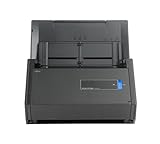
- One button searchable PDF creation
- Fast color, grayscale and monochrome scan speeds of up to 25 double-sided pages per minute
- Advanced paper feeding system with 50-page automatic document feeder (ADF)
- Scan wirelessly to Mac, PC, iOS or Android or via USB to Mac or PC
- Scan to cloud without a Computer or mobile device
Security boundaries for a sensitive archive
- Keep the host and cluster control plane patched and restrict administrative access.
- Expose the web interface through a controlled network path with TLS and authentication appropriate to your users.
- Use least-privilege database and broker credentials; rotate them through the platform’s secret mechanism.
- Restrict who can read media directories, backup archives and exported documents.
- Do not place the service on an untrusted host. Paperless-ngx’s clear-text storage warning means filesystem and backup protection are part of the application security model.
- Log administrative actions and monitor failed logins, storage exhaustion, queue failures and repeated Pod or container restarts.
Orchestration can centralize policy, but it cannot compensate for an exposed ingress, weak credentials or an unencrypted backup copied to an accessible share.
Outdated Drivers Are Slowing You Down
One free scan finds every outdated or missing driver and matches the right update for your exact hardware.Free scan · exact hardware matchWindows Errors? Fix Them Before They Spread
Repair common Windows errors and clear accumulated junk for a smoother, more stable PC - no reinstall needed.Free scan · no reinstallOperational comparison
| Operational concern | Docker Compose | Kubernetes |
|---|---|---|
| Initial setup | Install Docker, obtain the project files, set environment values and start one project. | Requires a functioning cluster, namespace, storage provisioner, networking and a maintained application definition. |
| Configuration visibility | One Compose project is easy to read and change on a small installation. | Resources are split across Deployments, Services, claims, Secrets, ConfigMaps and ingress objects. |
| Failure handling | Container restart policies help on one host; host failure remains your problem. | Controllers can reschedule workloads, subject to healthy nodes, probes and storage behavior. |
| Storage | Bind mounts or named volumes; you manage host paths and backups. | PV/PVC abstractions and StorageClasses; behavior depends on the configured provisioner. |
| Updates | Pull images, review release notes, apply the project and monitor migrations. | Roll out image or manifest changes while coordinating migrations, probes and stateful components. |
| Scaling | Manual and generally host-bound. | Replica, scheduling and autoscaling mechanisms are available, but application state still constrains safe scaling. |
| Maintenance burden | Lower for one host, with fewer platform components. | Higher unless the cluster is already operated, monitored and backed up for other workloads. |
Common failure modes and fixes
Containers are running but documents do not appear
Check the consumption directory mount, ownership and write permissions. For NFS, enable polling as required by the project guidance and confirm that the worker can read the share. In Kubernetes, inspect the claim mount inside the worker Pod rather than assuming that a bound claim is mounted at the expected path.
Scheduled tasks or email fetching fail
Verify broker reachability, credentials and the configured hostname. Confirm that the worker and scheduler use the same broker and that network policies or Compose networks are not blocking it.
Search or login data disappears after a restart
The database is probably using an ephemeral path or an unprotected host directory. Stop the service, locate the actual database volume, restore it from a known backup if necessary, and make the persistent mapping explicit before restarting.
An upgrade starts but the application is unusable
Read the release notes, inspect migration logs and stop making unrelated changes. Restore the pre-upgrade database and media backup in an isolated environment, identify the incompatible setting or migration, then retry with the documented version sequence. Do not delete the old backup until the new release has passed functional and restore tests.
Kubernetes Pods restart or remain Pending
Use events and describe output to distinguish image, probe, resource and storage problems. A Pending Pod often indicates unsatisfied capacity or a claim that cannot bind; a restarting Pod may have invalid configuration, failed migrations or a dependency outage. Fix the underlying condition instead of increasing replica counts.
When to move from Compose to Kubernetes
Migration is justified when the cluster is already a supported operational platform or when you have a documented need for multi-node scheduling, standardized ingress, policy controls, controlled rollouts or shared observability. Move only after you can restore the Compose installation and understand every data path.
- Inventory the Compose environment: image versions, environment values, database schema, media and consumption paths, broker settings and scheduled jobs.
- Take a verified database backup and a complete media backup. Restore them to a separate test location.
- Choose the Kubernetes storage class and access mode, then test permissions, throughput, snapshots and failure recovery with disposable data.
- Deploy PostgreSQL, the broker and Paperless-ngx in a private namespace. Keep the new ingress inaccessible until internal tests pass.
- Import the database and media, run OCR and search tests, and verify that newly consumed files are written to the intended claim.
- Plan a short cutover window: stop ingestion on Compose, take a final backup, restore or synchronize it, switch access, and monitor logs and queues.
- Retain the Compose host and backups until users confirm that documents, tags, permissions, search and exports work on Kubernetes.
Practical recommendation
Start with the official Paperless-ngx Compose path when you are building a personal archive, family server or small-office installation on one reliable host. Spend the saved complexity on disk monitoring, access control, off-host backups and a restore rehearsal.
Choose Kubernetes when it is already part of your operating model and its controllers, storage integration and rollout practices answer a concrete requirement. Treat any third-party chart or manifest as software that needs ownership, review and an upgrade plan; the existence of Kubernetes resources does not make the application deployment official or maintenance-free.
In either case, the durable outcome is determined by the database, document directories, security boundaries and recovery procedure. The orchestrator is only the layer that starts and coordinates those pieces.
Quick Recap
Product prices and availability are accurate as of the date/time indicated and are subject to change. Any price and availability information displayed on Amazon at the time of purchase will apply.

