What’s actually slowing this PC down?
Pick the symptom - the matching free tool is one click away.
Usually, no. Wi‑Fi can simplify file transfers or network storage on a configurable FPGA platform, but it is a convenience rather than a universal requirement. NFC has no essential use established by the current official documentation reviewed here. Storage depends on whether you play cartridges, load files from removable media, or maintain a network library; there is no evidence for a universal “large” bundled-capacity requirement.
The practical question is not which features appear on a generic specification sheet. It is how your particular console loads games and where you want those files to live.
As an Amazon Associate I earn from qualifying purchases.
Start with the console’s actual workflow
“FPGA console” covers several very different products. Some reproduce a cartridge system and are used much like the original hardware. Others are configurable platforms that load cores and game files from a microSD card, USB storage, a network share, or a combination of those paths. A feature that is valuable on the second type may be irrelevant on the first.
That distinction explains why there is no single connectivity checklist. Analogue Pocket accepts Game Boy, Game Boy Color, and Game Boy Advance cartridges, supports additional handheld systems through cartridge adapters, and also provides an openFPGA ecosystem. Analogue’s Super Nt is described as compatible with SNES and Super Famicom cartridges. Those are cartridge-first use cases: ordinary play does not depend on Wi‑Fi, NFC, or a large internal drive.
#1 Best Overall

- [Compatible with Various SOMs] Sipeed Tang Console FPGA development board enjoy powerful FPGA performance with configurations up to 60K/138K LUT4s, onboard Mega 138k/60K SOM CPU, 468Kbit SSRAM 2124Kbit BSRAM/1080Kbit SSRAM 6120Kbit BSRAM, 4Gbit 16bit DDR3 RAM/8Gbit 32bit DDR3 RAM. Ensuring smooth operation for your projects and games.
- Rich Expansion] Sipeed Tang Console FPGA Dev Board onboard PCIe Gen2/3 x 1 FPC connector, USB3 x 2 (Type-A, Device, 5Gbps or 10Gbps), USB2 x 2 (Type-A, Host, 1.5Mbps or 12Mbps), HDMI TX x 1 (1080P 30Hz/720P 60Hz), Soft-PHY USB2 x 1 (Typc-C, Device, 480Mbps), PMOD x 2 Standard Pitch Port, microSD slot x1 (Supports 4-bit SDIO/MMC or SPI mode). Support USB JTAG and UART.
- [High Performance] Sipeed Tang Console FPGA single board computer supports multiple Tang Core emulator cores,(NESTang/SNESTang/GBATang/MDTang/SMSTang), Onboard BL616 MCU, supports running TangCore firmware for BL616, which can be used as FPGA debugger. Able to meet different developers' needs.lts small size allows it to fit in a card box, making it highly portable and easy to integrate into any setup.
- [Multi-Mode Functionality] Sipeed Tang Console uses it as an FPGA development board, a RPi5 PCle FPC HAT, a retro gaming console, or a handheld device-endless possibilities in one versatile package. Equipped with dual PMOD and dual 40P interfaces, supports fast switching between emulator cores. The Tang Console offers strong expandability for your custom projects.
- [Gamestick HDMI Gaming Experience] Sipeed Tang Console FPGA Retro Game Console support 1080P HD HDMI output, suitable for different monitors, can be connected to TV/computer/TV set-top Box /PC/Laptop/Projector, perfect to meet your high resolution and game configuration needs. The retro game Console stick also support saving game progress, perfect for gaming at any time
MiSTer is a different example. Its documentation describes transferring game files to a MicroSD card, while also documenting USB and network/NAS methods. Networking can make administration easier, but the documentation does not establish that every MiSTer build includes wireless networking or that Wi‑Fi is required.
Is Wi‑Fi necessary?
Cartridge-first consoles
For a cartridge-oriented device, Wi‑Fi is not needed to insert a cartridge, select a game, and play. Pocket’s official feature information lists a microSD slot and openFPGA support, but does not present Wi‑Fi as a prerequisite. Super Nt’s cartridge compatibility likewise demonstrates a self-contained play path.
If you buy one of these systems primarily to use original cartridges, a missing Wi‑Fi radio is normally an omission you can ignore. Updates or optional software features may have their own procedures, so check the current manual for the exact model, but wireless networking is not part of the basic cartridge signal path.
Recommended Free Tools
File-based and configurable platforms
Wi‑Fi becomes useful when you frequently move files, keep a library on a NAS, or want to manage a console without removing its card. MiSTer documentation describes FTP/SSH transfer and Samba/SMB sharing, as well as network paths for cores and games. In that workflow, a network connection can save repeated card swaps and let a desktop copy files directly to the console’s storage.
Rank #2

- 🎮 20,000+ Classic Games: This retro gaming console comes preloaded with over 40,000 classic games from your favorite retro consoles. Play instantly—no downloads, no internet needed!
- 📡 Dual Wireless Controllers: Enjoy smooth, lag-free gaming with two 2.4GHz wireless controllers. Play comfortably from anywhere without tangled wires, making multiplayer fun hassle-free.
- 🖥 4K HDMI Output: Connect the game stick to your TV, PC, or projector via HDMI and experience stunning 4K visuals for an immersive and crystal-clear gaming experience.
- 🔌 Plug & Play: Setup is super easy! Simply plug in the console, connect to your TV, and start playing immediately—no complicated installation required.
- 🎁 Perfect for All Ages: Whether you're introducing the next generation to classic entertainment or reliving nostalgic moments, this system makes an ideal gift for any occasion. Perfect for family gatherings, holidays, or just downtime fun.
Convenience should not be confused with a built-in requirement. The same documentation describes removable MicroSD and USB routes. A wired Ethernet connection, an adapter, or a manually prepared card may be preferable depending on the particular MiSTer hardware and case. The documentation’s support for network paths does not prove that all configurations have integrated Wi‑Fi.
What to check before paying for wireless
- Look for an explicit wireless-network specification in the exact model’s manual, not merely “network support” in a project description.
- Confirm whether wireless requires a separate adapter, a particular motherboard, or a specific operating-system image.
- Check whether your intended transfer method is supported: FTP/SSH, SMB/Samba, a NAS path, or only local removable media.
- Consider where the console will sit. A short wired connection may be more reliable than adding a wireless accessory.
Does an FPGA console need NFC?
No essential NFC workflow is established in the official product and setup pages considered for this topic. The cited cartridge systems describe physical cartridge compatibility, and the MiSTer documentation focuses on MicroSD, USB, and network file locations. None identifies NFC as necessary for loading a core, launching a game, authenticating a cartridge, or transferring files.
NFC is a short-range identification and communication technology. A manufacturer could design a future accessory or authentication feature around it, but that would be a product-specific addition rather than a baseline FPGA-console requirement. Unless the exact console manual names an NFC function you intend to use, the absence of NFC should not affect a buying decision.
Free tools Windows power users keep installed
One-click scans. No signup required.
How much storage is actually required?
MicroSD is common, but “large” is not a universal specification
Pocket includes a microSD slot. MiSTer’s basic setup instructions say: “To play games on the MiSTer you will need to transfer them to your MicroSD.” The same MiSTer page immediately describes NAS and USB alternatives, so the sentence should not be read as saying that a card is the only possible location.
Rank #3

- MASSIVE 20,000 CLASSIC GAMES: Built-in 20,000 classic video retro stick with 4k hdmi, games and 23 emulators console for retro gaming, game emulators support arcade, tv game, video gaming nostalgia.
- ULTRA 4K HD EXPERIENCE: Retro gaming console 4k hdmi video game, hdmi tv game console, retro gaming console for tv in classic white, 4k hd hdmi tv retro stick design for gaming and console nostalgia.
- DUAL 2.4G WIRELESS CONTROLLERS: Wireless controllers for game console, 2.4g wireless tv game console with low-latency response, play video game console for tv with family, no tangled cables.
- EASY PLUG & PLAY SETUP: Plug and play video games for tv via hdmi tv gaming console with 4k hdmi game experience, connect the retro game console to hd hdmi tv in seconds, ideal for all ages.
- WHAT YOU GET: Retro wireless gaming console stick video retro stick built-in, console stick with 23 emulators, dual 2.4g controllers, hdmi cable, user guide, compact white retro stick for travel.
The reviewed documentation does not provide a universal capacity recommendation. Your requirement depends on the number and size of the cores, game files, firmware packages, artwork, save data, and other files you plan to keep locally. A person using a few cartridges or a small, curated file set has a different need from someone maintaining many systems on one card.
Three storage locations, three trade-offs
| Location | What it is good for | Trade-offs |
|---|---|---|
| Local MicroSD | Portable, self-contained operation and the basic MiSTer transfer path | Requires removing the card or using a card reader for some maintenance; capacity must match your local library |
| USB drive | Adding or expanding storage without replacing the system card | Uses a USB port and may require arranging the documented folder paths; portability depends on the drive and enclosure |
| Network or NAS share | Centralized storage and convenient transfers from another computer | Needs a supported network path and a functioning network connection; availability depends on the exact hardware and configuration |
MiSTer’s “Core Paths” documentation lists USB paths, CIFS/network paths, and local-card paths. Its documented search priority places USB and network locations ahead of the local MicroSD path in the described order. That indicates flexible placement for supported setups; it does not turn any one capacity into a universal requirement.
How to choose capacity without guessing
- List the systems and cores you will actually use during the first month.
- Estimate the size of the game files and support files you intend to keep locally.
- Reserve working room for updates, temporary transfers, save data, and troubleshooting copies.
- Choose a reputable card or drive with more room than the initial list requires, but do not pay for “large” capacity merely because a product page advertises it.
- If your library will live on a NAS or USB drive, size the MicroSD for the operating system and essential local files instead of duplicating everything.
Because the cited sources do not state a minimum or preferred card size, any exact number would be a personal planning choice, not an official requirement. Verify the file-system and capacity limits in the manual for your particular board or console before buying media.
What the documented examples tell you
| Example | Primary play or loading model | Documented storage or wireless detail | What it means for the buyer |
|---|---|---|---|
| Analogue Pocket | Original handheld cartridges, cartridge adapters, and openFPGA | MicroSD slot; Dock supports Bluetooth and 2.4 GHz controllers; Wi‑Fi and NFC are not listed as requirements | Cartridge play does not depend on Wi‑Fi or NFC. Storage needs depend on your openFPGA and file workflow. |
| MiSTer | Configurable cores and transferred game files | MicroSD, USB, NAS/network, FTP/SSH, and SMB/Samba methods are documented | Networking is useful, but removable storage remains a documented route. Confirm wireless hardware on your exact build. |
| Analogue Super Nt | SNES and Super Famicom cartridges | Cartridge compatibility is the highlighted use case; no NFC requirement is established | A cartridge-first console can work without a large local game-file library. |
Pocket’s support page lists firmware version 2.7 dated September 4, 2026, and a manual dated April 18, 2024. Those dates are useful when checking instructions, but firmware and package contents can change; consult the current support page for the exact unit you are purchasing.
Rank #4
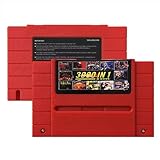
- Vast Retro Game Collection: Comes pre-loaded with thousands of classic 16-bit game ROMs on an 8GB mini SD card, offering instant access to an immense library right out of the box.
- Broad System Compatibility: Designed to be highly compatible with most original 16-bit Super Console systems (supports NTSC/PAL auto-switching), making it ideal for diverse retro gaming setups.
- Personalized Game Management: Easily add, delete, and rename your own game ROMs (supports up to 32GB TF cards, 8GB recommended for stability) with simple folder navigation for a truly customized experience.
- Reliable Battery-Free Saves: Features 32KB FRAM for automatic, persistent game progress saving, eliminating the need for internal batteries and ensuring your achievements are never lost.
- Authentic & Smooth Gameplay: Equipped with a low-latency FPGA chip that replicates original console performance, minimizing screen smearing and sound delays for a genuine, immersive retro gaming experience.
Choose by setup, not by a feature checkbox
If you mainly use original cartridges
- Prioritize cartridge compatibility, adapters, controller support, display output, and update procedures.
- Treat Wi‑Fi and NFC as nonessential unless the manufacturer documents a feature you specifically want.
- Buy storage sized for firmware, openFPGA files, saves, and any optional software you will actually install.
If you load a large file library
- Decide whether you prefer a removable MicroSD card, a USB drive, or centralized network storage.
- Confirm the console’s documented folder paths and search order before copying a large library.
- Check whether your build has Ethernet, Wi‑Fi, or neither; “network-capable software” is not proof of an integrated radio.
If several people maintain the console
Network storage can reduce card handling and make one library available to multiple devices, but it also introduces router, share-permission, and connectivity failure points. A removable card or USB drive is easier to isolate when troubleshooting. Pick the method that the person maintaining the library can reliably back up and restore.
Practical setup paths
Local MicroSD workflow
- Read the exact console or board manual and identify the required card format and directory structure.
- Prepare the card on a computer and copy firmware, cores, and legally obtained game files to the documented locations.
- Safely eject the card, insert it into the console, and test one known-good file before adding the rest of the library.
- Keep a backup of the card image or its folders so a failed update does not erase your only copy.
USB workflow
- Check the project’s documented USB paths and whether the drive must be formatted or labeled in a particular way.
- Create the required folders, copy a small test set, and connect the drive to the console.
- Confirm that the system detects the USB location and loads a test core or game.
- Add the larger library only after the path works; this makes a folder-name or permission error easier to diagnose.
Network or NAS workflow
- Verify that your exact hardware and software image support the documented CIFS/SMB or FTP/SSH method.
- Set up the network share or transfer account on the computer or NAS and record its address and permissions.
- Enter the path in the console’s documented configuration, then test with one small file.
- If the share is unavailable, fall back to MicroSD or USB so a network outage does not prevent local play.
Common mistakes and fixes
“It supports networking, so it must have Wi‑Fi”
Not necessarily. Network support may mean Ethernet, a USB adapter, or a software path available only on certain builds. Check the hardware bill of materials and manual for the exact configuration.
“The biggest card is automatically best”
Capacity does not solve an incorrect file path, unsupported format, or missing backup. Start with the library you can describe, then leave practical headroom. The official sources here do not endorse a universal large-card minimum.
Do these 3 things before closing this tab:
1Repair Windows errors before they cause bigger problems2Scan for outdated or missing drivers - takes under a minute3Clear out junk files and repair common Windows errors“Bluetooth controller support means Wi‑Fi”
Analogue’s Dock documentation lists Bluetooth and 2.4 GHz controller support. Those are controller links, not Wi‑Fi internet connectivity. Treat each radio and protocol as a separate feature.
“A network share is the only way to avoid removing the card”
USB storage is another documented option for MiSTer, and some users may prefer it because it avoids configuring a network share. Compare the paths your exact setup supports rather than assuming one workflow fits every build.
Buying checklist
- Identify whether the console is cartridge-first, file-based, or both.
- Confirm the exact storage interfaces: microSD, USB, network, or a combination.
- Verify whether Wi‑Fi is built in, requires an adapter, or is not supported.
- Do not treat NFC as necessary without a documented feature that uses it.
- Size storage from your real library and backup plan; no cited source establishes a universal capacity.
- Check the current manual, firmware notes, and package contents for the exact SKU, especially when documentation dates differ.
For the examples documented here, Wi‑Fi and NFC are optional at most, while removable storage is a practical requirement for file-based operation and simply an accessory for cartridge play. Choose the transfer method and capacity that match your own library rather than paying for connectivity or storage you will not use.
Quick Recap
Product prices and availability are accurate as of the date/time indicated and are subject to change. Any price and availability information displayed on Amazon at the time of purchase will apply.
Quick wins for a faster PC:
Clear out junk files and repair common Windows errorsFree Scan →Scan for outdated or missing drivers - takes under a minuteDriver Scan →Repair Windows errors before they cause bigger problemsFix Now →
