Crashes, No Sound, or Screen Glitches?
Random freezes, missing sound and display glitches usually trace back to one bad driver. Find and replace yours safely.Free scan · under a minuteWindows Errors? Fix Them Before They Spread
Repair common Windows errors and clear accumulated junk for a smoother, more stable PC - no reinstall needed.Free scan · no reinstallDisplayPort Adaptive-Sync can be cheaper to implement for a VESA member, but that does not make every DisplayPort connection variable-refresh capable or prove that HDMI VRR is inherently inferior. The practical advantage is clarity: DisplayPort added an optional, open-to-members implementation path in DisplayPort 1.2a, while HDMI VRR sits inside HDMI’s separately administered licensing ecosystem. For a buyer, the decisive facts are still the exact GPU or console, monitor input, supported refresh range, cable and operating-system settings.
Understanding that distinction prevents two common mistakes: assuming a DisplayPort logo guarantees smooth variable refresh, or assuming HDMI 2.1 is required for every FreeSync-over-HDMI setup. Adaptive refresh is useful because it lets a display time its updates around the frames the source actually renders, reducing tearing and judder when both ends support the feature.
As an Amazon Associate I earn from qualifying purchases.
What adaptive refresh actually changes
A conventional monitor refreshes on a fixed schedule, such as 60, 120 or 144 times per second. If the graphics processor finishes a frame halfway through a refresh, part of the old frame and part of the new one can appear together as a horizontal tear. If synchronization forces the processor to wait for the next refresh, uneven frame delivery can create judder or added latency.
Free tools Windows power users keep installed
One-click scans. No signup required.
Variable refresh rate (VRR) allows the display to vary the interval between refreshes. DisplayPort Adaptive-Sync describes frame-by-frame matching between the source and display; when the rendered frame arrives, the panel refreshes rather than blindly following one fixed clock. That can make motion smoother and reduce tearing without requiring the source to hit one exact frame rate.
#1 Best Overall
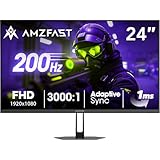
- 【24 Inch Gaming Monitor with Fast VA Screen】Amzfast 24 inch gaming monitor features a fast VA panel, offering 178°V/H Viewing Angle. With a resolution of 1920*1080, you can see every detail clearly no matter the angle.
- 【200Hz Refresh Rate 1ms & Adaptive Sync】This gaming monitor delivers a gaming experience of 200hz refresh rate, delivering smoother gameplay for FPS, RPG, and racing games; With a dynamic response time of 1ms and Adaptive Sync technology, it enables faster image capture while reducing screen tearing and stuttering through refresh rate synchronization, compatibility with FreeSync and G-SYNC.
- 【129% sRGB & Eye Care Function】Amzfast 24 inch monitor delivers vibrant visuals with 129% sRGB color gamut coverage,300nits brightness, a contrast ratio of 3000:1, and HDR Display.Eye-Care PC gaming monitor reduce the low blue light, Flicker-Free, and Anti-Glare technology to protect you from eye fatigue, irritation and strains. This enables you to work on your documents, watch movies, or play games more comfortably for extended periods.
- 【Support VESA Mount & Metal Stand】The metal stand provides sufficient stability and improves desktop utilization. The monitor gamer also support VESA mounts(75mm x 75mm) and tilt adjustment of -5°~15°(+/-2°).
- 【Multiple Interfaces】This gaming pc monitor equipped with versatile connectivity options including HDMI 2.1 TMDS, DisplayPort 1.4 port which support Desktop PC, Gaming Laptops, Switch, XBOX, PS gaming console etc
VRR cannot create frames that the GPU or console did not render. A game fluctuating between 45 and 70 frames per second may look steadier on a monitor whose supported VRR window includes that range, but the monitor’s maximum refresh rate, minimum refresh rate and low-frame-rate behavior still matter.
Where DisplayPort Adaptive-Sync came from
VESA added Adaptive-Sync to DisplayPort 1.2a in an announcement dated May 12, 2014. The feature is optional: a DisplayPort connector, cable or monitor is not automatically Adaptive-Sync capable simply because it uses the DisplayPort standard.
VESA’s announcement said, “Implementation of DisplayPort Adaptive-Sync is offered to VESA members without any license fee.” That sentence is narrower than the claim that DisplayPort is free. It describes the implementation for VESA members, not free access to every VESA specification or free membership.
VESA says DisplayPort standards are available only to members, and its FAQ explains that membership fees are based on annual sales revenue. In other words, a manufacturer may avoid a separate license fee for implementing Adaptive-Sync while still operating under VESA membership and standards-access requirements. Those are different costs and permissions.
Does HDMI support VRR?
Yes. HDMI has its own VRR feature, and the HDMI Licensing Administrator (HDMI LA) administers the HDMI technology and licensing program. The existence of that administrator does not, by itself, establish a particular manufacturer fee, a higher retail price or worse image quality. Current official materials do not provide an apples-to-apples total cost comparison between HDMI VRR and DisplayPort Adaptive-Sync.
AMD also states that FreeSync can operate over HDMI on qualifying displays. Some FreeSync displays supported HDMI variable refresh before HDMI 2.1 adopted its own VRR feature, so “HDMI VRR” and “HDMI 2.1 VRR” should not be treated as interchangeable labels. A monitor may support a vendor’s HDMI implementation without advertising the complete HDMI 2.1 feature set.
Rank #2

- 1500R Curved Immersion: The KOORUI 24 inch curved gaming monitor features an 1500R curvature, offering a wider, more comfortable,more immersive and natural viewing experience by enhancing depth and dimension in your gameplay,while FHD 1080p delivers crisp details.
- 180Hz Smooth Gameplay: Experience buttery-smooth visuals with 180Hz refresh rate and 1ms MPRT response time , perfect for competitive FPS, racing games, or fast-paced action. Adaptive Sync technology provides smooth, tear-free gameplay, delivering seamless performance for both gaming and business applications.
- Excellent Color: Enjoy vibrant, true-to-life colors with a 250 cd/m² brightness, 8-bit color depth, and a 16.7 million color gamut. HDR10 support brings out deeper blacks and vibrant highlights for cinematic visuals.The 3000:1 contrast ratio and 99% SRGB bring out rich details and exceptional image quality,ensuring stunning visual quality whether you're gaming or working.
- Eye Care: Equipped with Flicker-Free technology to eliminate screen flickering, reducing eye strain during extended gaming or work sessions. Combined with the Blue Light Filter, it cuts harmful high-energy blue light emission, providing maximum protection for your eyes.
- Versatile Connectivity: 3-sided bezel-less screen, this monitor features HDMI (v2.0)×2, DisplayPort 1.2×1, and an audio-out (No speakers). Compatible with a variety of devices, including PC, laptop, gaming consoles. It also supports VESA 100x100mm mounting and offers front and rear tilt adjustments (-5° to 15°) for comfortable viewing angles.
The safe conclusion is practical rather than ideological: DisplayPort has a clearly documented, license-fee-free Adaptive-Sync implementation for VESA members; HDMI has a separate licensing administration and its own VRR capability. Neither statement tells you whether a particular port will work with your particular source.
What’s actually slowing this PC down?
Pick the symptom - the matching free tool is one click away.
Protocol, brand and certification are separate things
DisplayPort Adaptive-Sync is the link feature
Adaptive-Sync is part of the DisplayPort link technology. It defines how source and display coordinate variable timing. Support must exist in the source output, monitor input and firmware or driver path.
FreeSync is a vendor program
FreeSync is AMD’s solution that uses DisplayPort Adaptive-Sync protocols. “FreeSync” on a monitor is therefore not a synonym for every possible Adaptive-Sync implementation. It identifies AMD’s compatibility and branding program, with its own requirements.
VESA AdaptiveSync is a different certification
VESA AdaptiveSync Display certification and AMD FreeSync certification are separate programs. A monitor can carry one, both or neither. Check the actual certificate or product specification instead of assuming that one logo guarantees the other program’s behavior.
Why certification details matter more than a logo
VESA’s Adaptive-Sync Display certification tests measurable performance rather than merely checking whether a menu contains a VRR switch. In its 2023 version 1.1 update, VESA expanded gray-to-gray test scenarios and described more than 50 test criteria. Those tests are intended to make variable-refresh behavior easier to compare across displays.
Quick wins for a faster PC:
Scan for outdated or missing drivers - takes under a minuteDriver Scan →Repair Windows errors before they cause bigger problemsFix Now →Fix the driver behind crashes, sound loss and screen glitchesFind Drivers →VESA distinguishes the gaming-oriented AdaptiveSync Display tier from the media-oriented MediaSync Display tier. The tiers address different use cases, so a media-focused certification should not be read as a promise of the same gaming performance. VESA reported more than 75 certified displays by May 16, 2023; that was a historical count, not a current market total.
Rank #3

- 27-Inch FHD Workspace: The 1920x1080 resolution and 16:9 format give racing sims, fast games, editing timelines, data dashboards, and multi-window entertainment room to stay visible on one screen. The layout reduces constant window switching and suits home desks, office workstations, studios, or entertainment setups that benefit from a larger working area.
- 240Hz Motion with 2ms OD: The refresh rate makes scrolling, cursor movement, video, and fast on-screen action feel smoother, while 2ms OD supports clearer motion. Adaptive-Sync can help reduce visible tearing with compatible hardware. Maximum refresh performance depends on the source device, input, cable, and system settings.
- 1500R Curved VA Image Quality: 4000:1 contrast and 99% sRGB / 72% NTSC coverage support clear text, deep dark tones, vivid media, photo review, presentations, and creative work, while HDR adds support for compatible high-dynamic-range content. The image profile is suited to mixed daily use where both readable detail and visual depth matter.
- Multi-Source Flexibility: HDMI 2.0 + DP 1.4 connect desktops, laptops, docks, and compatible entertainment devices, giving users practical options for dedicated work systems, personal computers, media sources, and shared desks. Supported resolution and refresh modes depend on the connected device and selected input.
- Flexible Connectivity: HDMI 2.0 + DP 1.4 support work, study, streaming, editing, and entertainment sources on one desk. Choose the input that matches the target resolution, refresh rate, and source-device capability. This helps keep a dedicated work computer and a separate personal or media source ready on the same desktop.
For a real purchase, look for the certified range and behavior: minimum and maximum refresh rates, whether low-frame-rate compensation is specified, response-time behavior across the range, and whether the certification applies to the input you plan to use. A certification logo without those numbers is incomplete evidence.
DisplayPort and HDMI VRR compared
| Question | DisplayPort Adaptive-Sync | HDMI VRR |
|---|---|---|
| What it is | An optional variable-timing feature added to DisplayPort 1.2a in 2014. | HDMI’s variable-refresh capability, administered within the HDMI technology program. |
| “Free” claim | VESA said implementation was offered to VESA members without a license fee. | No current, apples-to-apples manufacturer fee is established by the cited official materials. |
| Who must support it | The source output, DisplayPort input, cable path and software or firmware. | The source output, HDMI input, cable path and software or firmware. |
| Brand relationship | Used by programs such as AMD FreeSync; branding and certification are separate. | May be exposed through a GPU or display vendor’s own VRR or FreeSync support; HDMI 2.1 is not required for every HDMI implementation. |
| What to compare | Certified status, supported refresh window, response behavior and source compatibility. | The same performance details, plus the exact HDMI feature support of both devices. |
How to check compatibility before buying
- Identify the source. Record the exact GPU, laptop dock, console or other device and the output standards it supports. Do not rely on the device family name; ports can differ between models.
- Read the monitor’s input specification. Confirm whether VRR is supported on DisplayPort, HDMI or both, and note the supported refresh-rate range for each input. A monitor may offer a higher refresh rate on DisplayPort than on HDMI.
- Match the protocol and brand. If the source advertises Adaptive-Sync or FreeSync, verify that the monitor supports the same path. Treat VESA AdaptiveSync Display and AMD FreeSync badges as separate checks.
- Check the cable and adapters. Use a cable rated for the link speed and avoid adapters, docks or switches that omit VRR support. A cable cannot add VRR to a source or display that lacks it.
- Confirm firmware and drivers. Install the display firmware and graphics driver versions recommended by the manufacturers. VRR support can depend on firmware menus and driver options, not only on the physical connector.
- Enable the feature in both places. Turn on Adaptive-Sync, FreeSync or VRR in the monitor’s on-screen menu, then enable the corresponding variable-refresh option in the operating system, driver panel or console settings.
- Test inside the supported window. Use a game or moving test scene at several frame rates. Check for a stable image near the minimum, middle and maximum of the stated range; do not test only at the monitor’s maximum refresh.
Common failure modes and fixes
The monitor runs at a fixed refresh rate
Verify that the feature is enabled in the monitor menu and in the source settings. Reconnect directly to the monitor, bypassing a dock or switch, and confirm that the selected input is the one with VRR support. If the product specification lists VRR only for one connector, move the cable to that input.
VRR works but the image flickers
Flicker can occur near the edge of a monitor’s supported range or when frame rates move rapidly through it. Set an in-game frame-rate limit slightly below the monitor’s maximum, update the graphics driver and test with a direct cable. If the manufacturer specifies a narrower validated range, use that range rather than the panel’s headline refresh rate.
Recommended Free Tools
There is still tearing
Check that the game is using the same display and output mode for which VRR was enabled. A frame rate above the monitor’s maximum can exceed the VRR window; a frame-rate cap or conventional synchronization option may be needed. Also test without an adapter, capture device or overlay that could interrupt variable timing.
Low frame rates feel uneven
VRR does not guarantee smoothness below its minimum operating rate. Look for a stated low-frame-rate compensation range, reduce demanding graphics settings or use an in-game frame-rate cap. If the monitor has separate gaming and media VRR modes, select the mode intended for games.
FreeSync is missing over HDMI
Check the exact monitor model and HDMI input, not only the FreeSync name. AMD says HDMI support exists on qualifying displays, but it is not universal and does not require every display to implement HDMI 2.1 VRR. A different input, firmware version or cable may be required.
Rank #4
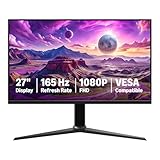
- IMPORTANT: Remove protective film (with date code) from panel surface before use. This film protects against shipping scratches.
- 27-inch IPS digital monitor for gaming and entertainment
- Crystal clear 1080P high definition picture and graphics relay
- Nearly zero lag with 1ms response time for smooth gaming experience
- Additional specs include adaptive sync, VESA compatibility, and 165Hz (Note: To achieve maximum refresh rate, ensure your computer ports and graphics card support FHD output at 165Hz. Use a DisplayPort 1.4 or HDMI 2.0 compatible cable. Consult your device manufacturer's manual for more information. Finally, select the maximum 165Hz refresh rate in your computer's advanced display settings.)
What the licensing difference means for buyers
Licensing affects how technologies are implemented and administered upstream; it is not a direct quality rating at the retail counter. VESA’s historical statement gives members a defined license-fee-free path for DisplayPort Adaptive-Sync implementation. It does not show that every DisplayPort monitor costs less, nor that HDMI’s licensing process adds a quantifiable amount to your purchase.
The Tool Desk
Outbyte PC Repair FREERepair Windows errors before they cause bigger problemsFix Now →Outbyte Driver Updater FREEFix the driver behind crashes, sound loss and screen glitchesFind Drivers →For shoppers, the more useful consequence is ecosystem transparency. DisplayPort Adaptive-Sync, AMD FreeSync and VESA AdaptiveSync Display are named separately, making it easier to ask which protocol, certification and input are actually supported. HDMI requires the same discipline: identify the exact VRR feature, input and source combination rather than inferring capability from the HDMI label alone.
Choosing between the two interfaces
Prefer DisplayPort when its documented path fits your equipment
DisplayPort is a sensible choice when your GPU and monitor both list Adaptive-Sync, the desired refresh range is available on that input and you want the VESA implementation and certification details to be explicit. This is especially straightforward for a PC gaming monitor with a native DisplayPort input.
Use HDMI when it is the supported path
HDMI VRR can be the right choice for a console, television or laptop whose hardware exposes VRR only through HDMI. Do not replace a working, documented HDMI connection solely because DisplayPort has a license-fee-free implementation statement; the source and display specifications determine the result.
Do not buy on the logo alone
Before paying for a monitor, write down the exact input, VRR range, maximum refresh rate, certification, required cable type and source compatibility. If any of those are not stated, treat the claim as unverified and ask the manufacturer for the model-specific specification.
The practical verdict
DisplayPort’s Adaptive-Sync story is genuinely attractive: VESA added the feature in 2014 and said members could implement it without a license fee. But “free” applies to that implementation scope, not to VESA membership or all standards access, and it does not make HDMI VRR invalid. HDMI supports VRR through its own ecosystem, while AMD documents FreeSync over HDMI on qualifying displays, including implementations that predate HDMI 2.1 VRR.
The buying decision should therefore be made from the port-by-port specification and measured performance. Confirm the source, monitor input, refresh window, certification and settings, then test the connection in the range you will actually use. That checklist matters more than any claim that one connector universally wins a licensing argument.
Quick Recap
Product prices and availability are accurate as of the date/time indicated and are subject to change. Any price and availability information displayed on Amazon at the time of purchase will apply.

