What’s actually slowing this PC down?
Pick the symptom - the matching free tool is one click away.
A credible monitor evaluation combines calibrated instruments, controlled test patterns and clearly separated human observations. The process must show the display’s exact test state, measure brightness and black levels under defined conditions, track grayscale and HDR tone curves, quantify color accuracy, and test motion and latency independently. That evidence lets you choose a screen for gaming, creative work, office use or HDR movies without relying on a single marketing number.
What a rigorous display test records first
Every result is tied to a documented test state. We record the display model, firmware, input, resolution, refresh rate, picture mode, HDR or SDR state and any calibration changes. Measurements are identified as factory-default, post-calibration or both, because a monitor can change substantially after adjustment.
As an Amazon Associate I earn from qualifying purchases.
The test log also records the signal format, test-pattern size, measurement instrument and software settings. Without those details, two apparently different brightness or color results may simply reflect different conditions.
Quick wins for a faster PC:
Scan for outdated or missing drivers - takes under a minuteDriver Scan →Clear out junk files and repair common Windows errorsFree Scan →Brightness, black level and contrast
SDR and HDR brightness answer different questions
Brightness is measured in candelas per square metre (nits), but one number is not enough. SDR brightness indicates how comfortably a desktop remains visible in normal lighting. Peak HDR brightness describes a highlight on a limited area of the screen. Sustained full-screen brightness shows how much light the display can maintain when most or all pixels are bright.
#1 Best Overall

- SPECIFICATIONS: Monitor calibration colorimeter with Easy 1 2 3 software workflow, USB C connection, compact body approx. 34mm tall x 37mm diameter, adjustable counterweight for screen placement, supports up to 2 displays, brightness target selection including Native or Photo with before and after check.
- EASY SETUP: Guided 1 2 3 workflow makes calibration fast and approachable, helping photographers and creators achieve more accurate color without complicated settings, so you can edit with confidence and trust what you see on screen.
- COLOR ACCURACY: Corrects common monitor color shifts to deliver truer tones and more reliable contrast, improving consistency across editing sessions and helping your images look closer to final output on other screens and devices.
- DUAL DISPLAY SUPPORT: Calibrates up to 2 monitors for matching color across a multi screen workspace, ideal for photo editing, video work, and creative setups where consistent viewing on both displays matters.
- BEFORE AFTER CHECK: Built in comparison view lets you instantly see the difference after calibration, making it easy to confirm improved accuracy and maintain consistent results by repeating the process on a regular schedule.
HDR measurements must state the test-window size. Automatic brightness limiting can reduce output as the bright area grows, so a small-window peak cannot be presented as the screen’s full-screen capability.
Black level and contrast
We measure white and black patterns to calculate native (static) contrast and record black level separately. A lower black level generally produces deeper-looking shadows, but local dimming can alter both values depending on the scene. Reviews therefore identify native contrast and local-dimming behavior rather than combining them into one headline figure.
Uniformity and panel variation
A full-black field reveals backlight bleed, IPS glow, blooming and bright hotspots. A multi-point grid then maps brightness variation across the panel. Tom’s Hardware’s published procedure samples nine points and compares each with the center baseline; the number and locations of sampling points are stated because a different grid can produce a different uniformity result.
Uniformity is a property of the tested unit, not a guarantee that every panel from the same product line will match it. A review should disclose visible deviations and remind readers that panel-to-panel variation exists.
Rank #2

- SPECIFICATIONS; Includes Calibrite Display Plus HL colorimeter measuring up to 10,000 nits plus ColorChecker Passport Video 2 for capture reference, designed for monitor calibration, white balance setup, exposure control, camera matching, and consistent color workflow.
- CAPTURE ACCURACY; Passport Video 2 helps set correct white point, verify exposure, and match cameras on set, delivering reliable reference for consistent footage and stills in changing or mixed lighting conditions.
- HIGH LUMINANCE CALIBRATION; Display Plus HL profiles mini-LED, OLED, and Apple XDR panels with extreme brightness capability, ensuring accurate color representation for professional photo editing and video grading workflows.
- EDITING CONFIDENCE; Built for creators who demand trustworthy color management, this kit reduces trial-and-error corrections, improves workflow efficiency, and supports accurate results from capture through final delivery.
- PRO CREATOR WORKFLOW; Ideal for videographers and photographers who require consistent color standards across multiple cameras, monitors, and software platforms, helping maintain professional results from on-set capture through final post-production.
Grayscale, gamma and HDR tone mapping
SDR gamma
Grayscale testing follows luminance from near-black through white. In SDR, gamma describes the tone-response curve: whether midtones are too dark, too bright or uneven. We report deviation from the target curve rather than assigning a pass based on a single gamma label.
HDR EOTF
HDR uses an electro-optical transfer function (EOTF) to map encoded signal values to luminance. Tracking the EOTF shows whether a display preserves intended shadow detail, midtone brightness and highlight roll-off. Peak-nit output alone cannot establish correct HDR reproduction; tone mapping and the measured curve must be reported.
For grayscale checks, Tom’s Hardware uses a 6500 K (D65) white-point standard for both SDR and HDR. Any deliberate alternate target should be identified instead of silently compared with D65.
The Tool Desk
Outbyte Driver Updater FREEFix the driver behind crashes, sound loss and screen glitchesFind Drivers →Outbyte PC Repair FREEClear out junk files and repair common Windows errorsFree Scan →Color gamut and color accuracy
A colorimeter or spectroradiometer measures saturation sweeps and color patches. Gamut coverage or volume indicates how many colors the panel can reach; it does not indicate whether those colors are correct. A wide-gamut screen can still oversaturate or mistint images.
Rank #3

- SPECIFICATIONS; Includes Calibrite Display 123 colorimeter for monitor calibration plus ColorChecker Passport Video 2 for video and photo capture control, designed for exposure reference, white balance setup, and consistent color workflow from capture through edit.
- CAPTURE CONTROL; Passport Video 2 helps set accurate white point, verify exposure, and match multiple cameras on set, giving filmmakers and hybrid shooters a reliable reference for consistent footage in changing or mixed lighting conditions.
- MONITOR CALIBRATION; Display 123 provides an easy monitor profiling workflow so photographers and creators can trust on-screen color when editing, grading, designing, or delivering work that must remain consistent across displays.
- CREATIVE CONFIDENCE; Built for content creators who want dependable color management, this kit reduces trial-and-error corrections, improves workflow efficiency, and supports accurate results for both still photography and professional video production.
- PRO CREATOR WORKFLOW; Ideal for videographers and photographers who require consistent color standards across multiple cameras, monitors, and software platforms, helping maintain professional results from on-set capture through final post-production.
Color error is reported with Delta E (or another named error metric) against a specified target. Lower error means the measured color is closer to that target. We test accuracy before calibration and again after a full calibration so readers can distinguish out-of-box behavior from what is achievable with adjustment.
Visual inspection cannot quantify Delta E, white-balance error or subtle viewing-angle shifts. A monitor colorimeter is therefore the practical instrument for anyone who needs repeatable calibration rather than a visual approximation.
Motion, response time and input lag
Pixel response
Response time is the time a pixel takes to transition between luminance states. We test multiple transitions because a quoted average can hide slow dark-to-light or light-to-dark changes. Results include refresh rate and overdrive setting; aggressive overdrive may shorten a transition while creating inverse ghosting.
Input lag
Input lag is the delay between a signal arriving and the corresponding image becoming visible. It is separate from pixel response: a panel can transition quickly yet process a signal slowly, or have low processing delay while pixels smear during difficult transitions.
Rank #4
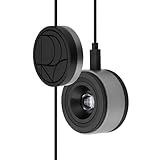
- 3-in-1 multiple function with Colorimeter, Display OSD control and ASUS Dial features
- Integrated colorimeter, both with Hardware and Software Calibration via ASUS exclusive software tool to keep long-term color accuracy and consistency
- Measuring up to 10000 nits for precise HDR calibration, seamlessly compatible with LED, OLED, Mini-LED, and more
- 5-way navigator and shortcut key provide intuitive Display OSD control accessible within the reach of your hand
- Integrate ASUS Dial provide customize shortcuts for easy, precise control of your creator software
Tom’s Hardware describes a procedure using a high-speed camera at 1,000 frames per second (published 2025) to measure pixel-response and input-lag behavior. Any timing method should state the tested refresh rate, resolution, connection and overdrive condition so the result is reproducible.
Viewing-angle behavior
Off-axis testing measures more than whether an image remains visible. We check color washout and hue shift, brightness loss, black-level rise and gamma change at stated viewing angles and with a stated pattern. This matters for large screens shared by several people and for multi-monitor setups where the outer panels are viewed obliquely.
Independent reader supportYour contribution helps us test, update, and keep practical guides available for everyone.How HDR compliance is checked
VESA’s DisplayHDR specification is an open standard covering luminance, color gamut, bit depth and rise time. Certification is useful only when the test level and behavior behind it are understood; a badge or peak-nit claim does not by itself prove accurate tone mapping.
Free tools Windows power users keep installed
One-click scans. No signup required.
The 2024 CTS 1.2 criteria add specific checks. Maximum luminance uses an 8% center patch. White-point tolerances are evaluated around D65 with Delta-ITP, and color performance uses a 96-color X-Rite ColorChecker SV set at three HDR luminance levels—nearly 300 color checks in total. A complete HDR report should explain which of these conditions were used and show the resulting curves or errors.
Best Value

- QUICK & EASY COLOR CALIBRATOR: Whether you're editing photos, designing graphics, or producing content, SpyderExpress helps you view colors with precision and confidence; Ideal for creators who want accurate, lifelike colour in both digital and print
- READY FOR THE LATEST DISPLAYS: The only calibrator of its kind to currently support the latest Liquid Retina XDR displays, including the MacBook M4 mini-LED screen, alongside everyday monitors; Upgrade the software for OLED and advanced mini-LED support
- 3x FASTER THAN TYPICAL ENTRY-LEVEL TOOLS: Get edit-ready color in just 90 seconds - see skin tones, shadows, and highlights as they’re meant to be, with consistent, trustworthy results
- GROW YOUR TOOLKIT WITH SOFTWARE UPGRADES: Unlock advanced features like ambient light adjustment, multi-display profiling, and DevicePreview - shows how your work will appear across different devices; No new hardware needed, upgrade when you're ready
- REAL COLOUR, REAL EASY: Download the software, plug in the device, and follow the 3 simple steps. Save profiles, calibrate up to 3-connected displays per workstation, and recalibrate before editing to ensure your screen always shows true-to-life color
Human-use observations that instruments cannot replace
Measured data is paired with observations kept clearly separate from the numbers. We note:
- Reflection handling in bright and mixed lighting.
- Text sharpness and fringing at the native resolution and operating-system scaling.
- Blooming around subtitles or bright objects on local-dimming displays.
- Motion artifacts, including overshoot, stutter and VRR flicker.
- Tone-mapping behavior in games and video.
- Fan or other operating noise.
- Menu logic, control placement and useful picture-mode options.
- Stand adjustment, mounting and other ergonomic controls.
These observations explain how a display behaves in use; they do not replace instrument measurements.
Which measurements matter for each reader?
| Use case | Priority measurements | Important observations |
|---|---|---|
| Gaming | Input lag; response-time behavior across transitions; refresh rate; VRR range; contrast; HDR brightness | Ghosting, overshoot, VRR flicker, tone mapping and menu controls |
| Photo and video creation | Gamut coverage; grayscale and gamma/EOTF tracking; post-calibration Delta E; uniformity; viewing angle | ICC-profile stability, reflections and text rendering |
| Office and productivity | Consistent SDR brightness; uniformity; viewing-angle stability | Text clarity, reflection handling and ergonomic adjustment |
| HDR movies | Peak and sustained HDR luminance; black level; local dimming; EOTF tracking; DCI-P3 and BT.2020 behavior | Blooming, subtitle performance and tone mapping |
How to read a monitor test without being misled
- Check the test state. Confirm resolution, refresh rate, picture mode, HDR/SDR status, firmware and whether calibration was applied.
- Separate peak from sustained brightness. Look for the window size and full-screen result, not only the brightest highlight measurement.
- Read contrast with dimming context. Native contrast and local-dimming results describe different behaviors.
- Pair gamut with color error. Coverage tells you the available color range; Delta E tells you accuracy against the target.
- Compare response time and lag independently. Verify refresh rate, overdrive and the transitions included in the test.
- Look for curves and deviations. Gamma and HDR EOTF tracking reveal errors that a label such as “HDR” or “2.2 gamma” conceals.
- Allow for sample variation. Uniformity and some backlight defects can differ from one physical unit to another.
Why the method matters
RTINGS describes its aim as “Testing aims to measure objective-based scientific data and evaluate subjective elements.” That combination is essential: instruments establish repeatable luminance, color, timing and tone-response results, while labeled observations describe reflections, artifacts, ergonomics and other factors that numbers cannot capture. A useful review makes both parts visible, states the limits of each measurement and never treats one spectacular specification as a complete picture of screen quality.
Outdated Drivers Are Slowing You Down
One free scan finds every outdated or missing driver and matches the right update for your exact hardware.Free scan · exact hardware matchPC Slower Than It Used to Be?
A free scan shows the junk files, broken settings and background clutter dragging Windows down - then fixes them in one click.Free scan · Windows 10 & 11Quick Recap
Product prices and availability are accurate as of the date/time indicated and are subject to change. Any price and availability information displayed on Amazon at the time of purchase will apply.

