What’s actually slowing this PC down?
Pick the symptom - the matching free tool is one click away.
Most TVs do not have a universal setting that electrically turns off one HDMI port. What you can do depends on your goal: disable HDMI-CEC to curb automatic input switching, hide an input from the on-screen menu on supported TVs, check your model’s manual for an input lock, or unplug the connected device.
Choose the change you actually need
| Your goal | What to try | What it changes |
|---|---|---|
| Stop the TV switching to HDMI by itself | Turn off HDMI-CEC or the relevant automatic-switching control on the TV, and check the connected device. | Can stop CEC-related control or switching; it does not establish that the HDMI video input is disabled. |
| Remove an input from the Home screen | Hide the input tile if your TV supports it. | Changes menu visibility, not whether the connector can receive a signal. |
| Prevent a child or guest from selecting one port | Check the exact TV model’s manual for an input-lock feature. | Availability is model-specific; the official guidance cited here does not establish a universal lock. |
| Leave the port unused | Unplug the device or leave the port empty. | Removes that device’s physical connection; it does not change TV software settings. |
Stop automatic HDMI input switching
HDMI-CEC is a control feature that lets compatible devices communicate with a TV. It can support functions such as power control and input switching. Turning CEC off may stop a device from requesting a switch, but it is not the same as electrically disabling the HDMI port or blocking video through it. The setting can also affect CEC-based control or power features.
| # | Preview | Product | Price | |
|---|---|---|---|---|
| 1 |

|
TUOTUOJIA 10/5Pack HDMIs Port Blockers Key Lock Security with 1 Key Data Guard for PC Laptop... | $12.00 | Buy on Amazon |
| 2 |
|
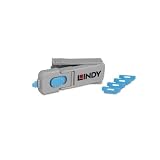
Lindy UK HDMI Port Blocker Key with 4 Blockers, Blue | $31.97 | Buy on Amazon |
As an Amazon Associate I earn from qualifying purchases.
LG TVs: SIMPLINK
LG calls its HDMI-CEC feature SIMPLINK. LG USA Support says turning it off prevents connected devices from sending a signal to change the TV input. The menu path varies by webOS version and TV model; LG lists different paths for webOS 26 and later, webOS 6.0 and later, and webOS 5.0 and earlier. Use the instructions for your specific TV rather than assuming one path applies. If switching continues, LG also suggests checking Quick Start+ and deleting connection history; the available controls are model-dependent. See LG USA Support, “If Your LG TV Switches to an HDMI Input by Itself” (September 28, 2026).
Samsung TVs: Anynet+
Samsung calls HDMI-CEC Anynet+. Its troubleshooting instructions for a TV that switches sources by itself use different button sequences depending on whether you have a Smart Remote or an infrared remote. Samsung also notes that a software update may be needed for the relevant option to appear and that a connected device can send a signal in error. Follow Samsung’s current instructions for your TV and remote rather than applying a generic menu path: Samsung US Support, “Samsung TV switches sources by itself.”
#1 Best Overall
Sony TVs: HDMI CEC Settings
For the software covered by Sony’s guide, the path is Settings > Channels & Inputs > External inputs > HDMI CEC Settings > CEC. Options listed there include Device auto power off and TV auto power on. Sony says available options vary by model and region; power controls should not be treated as a universal way to stop a port accepting video. See Sony Help Guide, “Adjusting HDMI CEC settings.”
Hide an HDMI input from the TV menu
Some TVs can remove an input tile from the interface without disabling its connector. On Roku TV, the official guide describes opening the input tile’s star menu, selecting Hide, and confirming. A hidden input no longer appears on the Home screen or in Quick Access. To restore it, go to Settings > TV inputs and unhide it. This changes what appears in the menu, not the input’s signal capability. See Roku Support, “Switch your TV’s HDMI inputs with your Roku streaming player” (updated October 1, 2026).
Check whether your TV can lock a specific HDMI input
If the goal is to stop a child or guest from selecting one physical input, look in the manual for your exact model and software version for an input-lock or parental-control option. The manufacturer guidance cited here does not establish a universal way to lock an HDMI port, so do not assume another TV’s menu instructions apply to yours.
Rank #2
- PHYSICAL PORT SECURITY: Prevents unauthorised access to HDMI ports by physically blocking connections, protecting against unwanted cable attachments, device connections or foreign object insertion in schools, offices and public environments.
- QUICK INSTALLATION: Simple insertion and removal using the specially designed key tool; blockers latch securely into HDMI ports just like standard cables and remain firmly in place until removed with the key.
- COMPACT STORAGE SOLUTION: The key doubles as a storage unit, holding up to 4 HDMI port blockers inside for convenient transport and management, ideal for IT administrators overseeing multiple devices.
- DURABLE CONSTRUCTION: Made from robust ABS plastic housing material with dimensions of 69 x 19 x 12mm, weighing just 0.01kg per blocker for long-lasting performance and easy handling.
- COMPLETE PACK: Includes 4 blue HDMI port blockers with insertion/removal key, backed by a 2 year warranty for reliable physical security and port management.
Make the port physically unused
Unplug the device from the HDMI port, or leave the port empty. This is reversible by reconnecting it. It does not disable the connector in software, and disconnecting one device does not prevent other connected devices on other ports from sending CEC signals. Samsung’s connection guidance explains how to connect devices to an available HDMI input and select that source; it describes source setup, not port deactivation. See Samsung US Support, “Connect your cable box and other devices to your Samsung TV.”
Find instructions that match your TV
Before following a menu path, identify the TV’s brand and model number, software version, and—where relevant—remote type. The controls and labels can vary by model, software, region, and remote; Samsung notes that software updates can affect whether automatic-switching controls are available. If the manual does not clearly document a lock for a specific input, contact the manufacturer with the model number rather than relying on instructions for a different TV.
Quick Recap
Product prices and availability are accurate as of the date/time indicated and are subject to change. Any price and availability information displayed on Amazon at the time of purchase will apply.

