The Dell OptiPlex All-in-One 7420 is a configurable business desktop, not one fixed machine. Dell documents a broad range of processors and operating systems, plus memory and M.2 SSD replacement procedures. Those facts make it possible to assess its flexibility and serviceability, but they do not establish how fast, quiet, or comfortable a particular unit is. For a useful review, start with the exact CPU, memory, storage, operating system, and regional SKU.
What the OptiPlex 7420 is—and what this review can establish
Dell’s product name is OptiPlex All-in-One 7420. Dell provides an owner’s manual and support documents for it; its support page lists the manual as updated April 3, 2025. The manual covers specifications and hardware replacement procedures, which helps identify the product family’s documented options. It does not mean every retail listing has the same parts.
As an Amazon Associate I earn from qualifying purchases.
This is a configuration-aware review based on Dell’s published documentation, not hands-on testing of a specific unit. Dell’s documents establish supported choices and service procedures. They do not establish benchmark results, real-world responsiveness, display quality, fan noise, temperatures, or camera performance on calls. Those require measurements or testing of the particular configuration.
Do these 3 things before closing this tab:
1Repair Windows errors before they cause bigger problems2Fix the driver behind crashes, sound loss and screen glitches3Clear out junk files and repair common Windows errorsWhich processor configurations are documented?
Dell lists both higher-performance desktop processors and lower-wattage T-series options. The model name alone does not identify which processor a seller is offering, and a listed option should not be mistaken for the processor in every 7420.
#1 Best Overall

- ■ Dell 23.8" OptiPlex 7420 All-in-One CPU ■ 14th Gen Intel Core i5-14500T, 14C (6P + 8E) / 20T, P-core 1.7 / 4.8GHz, E-core 1.2 / 3.4GHz, 24MB. Complete your daily tasks and streamline productivity with the Dell 23.8" OptiPlex 7420 All-in-One Computer. Combining your computer components and display into one convenient device, professional users can save space within their work area without compromising performance.
- ■ Display ■ 23.8" Full HD (1920 x 1080) IPS LED Alti-Glare Display, FHD Pop-Up Webcam; Intel UHD Graphics 770.
- ■ RAM ■ 16GB DDR5 Memory, 512GB PCIe NVMe M.2 Solid State Drive, No Optical Drive.
- ■ Wireless ■ Wi-Fi 6 AX201 2x2 + Bluetooth 5.2; 10/100/1000 Network. 1 USB 3.2 Gen 2x2 Type-C port, 1 DisplayPort 1.4a/HDCP 2.3 port, up to 5120 x 3200 @ 60Hz, 2 USB 3.2 Gen 1 Type-A ports, 2 USB 2.0 Type-A ports with Smart Power On, 1 RJ45 Ethernet Port 10/100/1000 Mbps port, 1 Audio line-out port, retaskable, 1 USB 3.2 Gen 2 Type-A port with PowerShare, 1 Universal audio por.
- ■ Operating system ■ Windows 11 Professional (64-bit). Dell KB216 Wired Keyboard and
| Processor family | Dell-documented examples | What the listing tells you |
|---|---|---|
| Higher-performance options | Intel Core i3-14100 (4 cores); Core i5-14500 vPro (14 cores); Core i5-14600 vPro (14 cores); Core i7-14700 vPro (20 cores); Intel 300 (2 cores) | These are supported options in Dell’s owner’s manual, not a claim that one unit includes them all. Verify the exact CPU and vPro designation for the SKU. |
| Energy-efficient T-series options | 12th-generation Core i3-12100T and Core i5-12500T vPro; 14th-generation Core i3-14100T, Core i5-14500T vPro, Core i5-14600T vPro, and Intel 300T | Dell also documents lower-wattage choices. The precise processor and its power class matter when comparing configurations. |
Core counts and supported-model names above are specifications Dell lists, not independent performance results. A higher core count by itself cannot tell you how the machine will perform in a particular workload; that depends on the exact configuration and should be checked against testing relevant to your use.
Sources: Dell OptiPlex All-in-One 7420 Owner’s Manual, processor options and Dell OptiPlex All-in-One 7420 Desktop System Guide.
Rank #2
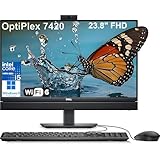
- Complete your daily tasks and streamline productivity with the Dell 23.8" OptiPlex 7420 All-in-One Computer. Combining your computer components and display into one convenient device, professional users can save space within their work area without compromising performance. At the heart of the OptiPlex is an 14th Gen Intel Core i5-14500T, 14C (6P + 8E) / 20T, P-core 1.7 / 4.8GHz, E-core 1.2 / 3.4GHz, 24MB.
- The 23.8" Full HD (1920 x 1080) IPS LED Alti-Glare Display gives you clear and smooth visuals backed by integrated Intel UHD Graphics 770 engine; A user-facing webcam flips out from the chassis and uses High Dynamic Range (HDR) technology to automatically adjust clarity for a clear picture. Using the DisplayPort 1.4 port, you can input video from an external device, or output video to an external display.
- RAM: 32GB DDR5 Memory, 1TB PCIe NVMe M.2 Solid State Drive, No Optical Drive.
- Wi-Fi 6 AX201 2x2 + Bluetooth 5.2; 10/100/1000 Network. 1 USB 3.2 Gen 2x2 Type-C port, 1 DisplayPort 1.4a/HDCP 2.3 port, up to 5120 x 3200 @ 60Hz, 2 USB 3.2 Gen 1 Type-A ports, 2 USB 2.0 Type-A ports with Smart Power On, 1 RJ45 Ethernet Port 10/100/1000 Mbps port, 1 Audio line-out port, retaskable, 1 USB 3.2 Gen 2 Type-A port with PowerShare, 1 Universal audio por.
- Operating system: Windows 11 Professional (64-bit). Dell KB216 Wired Keyboard and Mouse Included. Easily adjust your screen up and down with Dell's All-in-One Height Adjustable Stand. Bundled with vent-hear Cable.
Operating systems vary by configuration and deployment
Dell lists Windows 11 Home 64-bit, Windows 11 Pro 64-bit, Windows 11 Pro National Education 64-bit, and Ubuntu Linux 22.04 LTS 64-bit among the supported operating systems. The documentation also lists Dell Hybrid Client on Ubuntu, Dell ThinOS, Windows 10 IoT Enterprise LTSC 2021, and Windows 11 IoT Enterprise LTSC 2024 for thin-client uses. These options do not mean every OS is offered with every retail SKU. Confirm the installed OS and license with the seller, especially if your organization depends on Pro features, a particular Linux distribution, or a managed thin-client deployment.
Source: Dell OptiPlex All-in-One 7420 Owner’s Manual, operating systems.
Rank #3
- Complete your daily tasks and streamline productivity with the Dell 23.8" OptiPlex 7420 All-in-One Computer. Combining your computer components and display into one convenient device, professional users can save space within their work area without compromising performance. At the heart of the OptiPlex is an 14th Gen Intel Core i5-14500T, 14C (6P + 8E) / 20T, P-core 1.7 / 4.8GHz, E-core 1.2 / 3.4GHz, 24MB.
- The 23.8" Full HD (1920 x 1080) IPS LED Alti-Glare Display gives you clear and smooth visuals backed by integrated Intel UHD Graphics 770 engine; A user-facing webcam flips out from the chassis and uses High Dynamic Range (HDR) technology to automatically adjust clarity for a clear picture. Using the DisplayPort 1.4 port, you can input video from an external device, or output video to an external display.
- RAM: 16GB DDR5 Memory, 512GB PCIe NVMe M.2 Solid State Drive, No Optical Drive.
- Wi-Fi 6 AX201 2x2 + Bluetooth 5.2; 10/100/1000 Network. 1 USB 3.2 Gen 2x2 Type-C port, 1 DisplayPort 1.4a/HDCP 2.3 port, up to 5120 x 3200 @ 60Hz, 2 USB 3.2 Gen 1 Type-A ports, 2 USB 2.0 Type-A ports with Smart Power On, 1 RJ45 Ethernet Port 10/100/1000 Mbps port, 1 Audio line-out port, retaskable, 1 USB 3.2 Gen 2 Type-A port with PowerShare, 1 Universal audio por.
- Operating system: Windows 11 Professional (64-bit). Dell KB216 Wired Keyboard and Mouse Included. Easily adjust your screen up and down with Dell's All-in-One Height Adjustable Stand. Bundled with vent-hear Cable.
Memory and SSD serviceability
Dell’s documentation includes procedures for replacing memory and M.2 SSDs. That supports the conclusion that these components have documented service procedures; it does not establish how much memory or storage a given unit ships with, which slots are occupied, or what upgrade parts are compatible with that unit.
Before planning an upgrade, identify the exact SKU and check its manual and system configuration. Confirm the supported memory type and capacity, M.2 drive requirements, slot availability, and service steps before buying parts or opening the system.
Rank #4
- ■ Dell 23.8" OptiPlex 7420 All-in-One CPU ■ 14th Gen Intel Core i5-14500T, 14C (6P + 8E) / 20T, P-core 1.7 / 4.8GHz, E-core 1.2 / 3.4GHz, 24MB. Complete your daily tasks and streamline productivity with the Dell 23.8" OptiPlex 7420 All-in-One Computer. Combining your computer components and display into one convenient device, professional users can save space within their work area without compromising performance.
- ■ Display ■ 23.8" Full HD (1920 x 1080) IPS LED Alti-Glare Display, FHD Pop-Up Webcam; Intel UHD Graphics 770.
- ■ RAM ■ 16GB DDR5 Memory, 1TB PCIe NVMe M.2 Solid State Drive, No Optical Drive.
- ■ Wireless ■ Wi-Fi 6 AX201 2x2 + Bluetooth 5.2; 10/100/1000 Network. 1 USB 3.2 Gen 2x2 Type-C port, 1 DisplayPort 1.4a/HDCP 2.3 port, up to 5120 x 3200 @ 60Hz, 2 USB 3.2 Gen 1 Type-A ports, 2 USB 2.0 Type-A ports with Smart Power On, 1 RJ45 Ethernet Port 10/100/1000 Mbps port, 1 Audio line-out port, retaskable, 1 USB 3.2 Gen 2 Type-A port with PowerShare, 1 Universal audio por.
- ■ Operating system ■ Windows 11 Professional (64-bit). Dell KB216 Wired Keyboard and Mouse Included. Bundled with vent-hear Cable.
Source: Dell OptiPlex All-in-One 7420 Desktop System Guide.
Recommended Free Tools
What Dell’s specifications do not tell you about the experience
The manual organizes specifications for the display, camera, ports, memory, storage, wireless, audio, power, and dimensions. But without the exact SKU or a tested unit, that is not enough to make reliable claims about the panel, touch support, port layout, included peripherals, ergonomics, image quality, microphone performance, heat, or noise. No benchmark performance or comparative value is established by the cited product documents.
Best Value
- ■ Dell 23.8" OptiPlex 7420 All-in-One CPU ■ 14th Gen Intel Core i5-14500T, 14C (6P + 8E) / 20T, P-core 1.7 / 4.8GHz, E-core 1.2 / 3.4GHz, 24MB. Complete your daily tasks and streamline productivity with the Dell 23.8" OptiPlex 7420 All-in-One Computer. Combining your computer components and display into one convenient device, professional users can save space within their work area without compromising performance.
- ■ Display ■ 23.8" Full HD (1920 x 1080) IPS LED Alti-Glare Display, FHD Pop-Up Webcam; Intel UHD Graphics 770.
- ■ RAM ■ 32GB DDR5 Memory, 1TB PCIe NVMe M.2 Solid State Drive, No Optical Drive.
- ■ Wireless ■ Wi-Fi 6 AX201 2x2 + Bluetooth 5.2; 10/100/1000 Network. 1 USB 3.2 Gen 2x2 Type-C port, 1 DisplayPort 1.4a/HDCP 2.3 port, up to 5120 x 3200 @ 60Hz, 2 USB 3.2 Gen 1 Type-A ports, 2 USB 2.0 Type-A ports with Smart Power On, 1 RJ45 Ethernet Port 10/100/1000 Mbps port, 1 Audio line-out port, retaskable, 1 USB 3.2 Gen 2 Type-A port with PowerShare, 1 Universal audio por.
- ■ Operating system ■ Windows 11 Professional (64-bit). Dell KB216 Wired Keyboard and Mouse Included. Bundled with vent-hear Cable.
Check the target-region listing for the display resolution and touch option, stand adjustments, camera and microphone details, ports, wireless configuration, included keyboard and mouse, warranty, and installed components. For screen quality, webcam results, acoustics, thermals, and speed, seek measurements or reviews that identify the actual configuration and testing conditions rather than treating the model name as a complete specification.
How to compare a 7420 listing with another configuration
Compare the machines as sold, not just by family name. Start with the components and software Dell documents, then verify listing-specific details that the manual alone cannot settle.
- Identify the exact processor. Record its full model number, vPro status where applicable, and whether it is a T-series option.
- Check memory. Compare installed capacity and arrangement, and verify the supported upgrade path for the exact unit.
- Check storage. Record the SSD capacity and confirm M.2 compatibility and slot use before assuming an upgrade is straightforward.
- Verify the display and ergonomics. Confirm resolution, touch option, stand adjustment, and other display details on the specific listing.
- Match the work setup. Check camera, microphone, ports, wireless, and whether the peripherals you need are included.
- Confirm software and support. Verify the installed OS and license, manageability requirements, regional warranty, and support terms.
- Compare total price for that configuration. Use the price for the actual CPU, memory, storage, OS, warranty, and seller—not a generic 7420 label.
Dell’s documentation supports checking the processor, memory, storage, and OS choices; the remaining details depend on the exact SKU, seller listing, or hands-on verification.
Should you consider buying one?
The documentation makes the 7420 a plausible candidate when you want a business all-in-one with multiple processor and OS choices and documented memory and M.2 SSD replacement procedures. It is not enough to conclude that a particular configuration is fast, quiet, has a good screen or webcam, or represents good value. Those judgments depend on evidence about the specific unit and its price.
No current market price or region-specific stock is established here. Before buying, confirm that the listing is for the All-in-One 7420, then verify its exact configuration, seller, warranty, and availability in your region. Dell’s OptiPlex All-in-One 7420 support page provides the manual and support materials.
Quick Recap
Product prices and availability are accurate as of the date/time indicated and are subject to change. Any price and availability information displayed on Amazon at the time of purchase will apply.

