Recommended Free Tools
Connect the monitor’s power cable securely to the monitor and a working outlet, then press its power button. If the power light comes on but the screen stays blank, check the video connection and input selection separately; the monitor may be on even when it is not receiving a picture.
Turn on the monitor
- Connect power. Firmly seat the power cable at the monitor and at a working wall outlet or power strip. If you are unsure the connection is secure, unplug and reconnect it.
- Find and press the power button. Press it firmly and wait a few seconds. Depending on the model, the button may be on the lower front bezel, integrated with the power light, or elsewhere. Dell’s instructions say to press the button firmly (Dell Support). Check the model’s manual if you cannot locate it.
- Check the power light. A white or green light can indicate power with a video signal; amber or orange, or a blinking white light, can indicate power without a signal. No light usually points to a power issue. These examples are not universal, so use the manual for your model if its indicator behaves differently.
If there is no power light
Start with the power path rather than the video cable:
As an Amazon Associate I earn from qualifying purchases.
- Unplug and firmly reconnect the cable at both ends.
- Test the outlet with another device. If you are using a power strip or surge protector, connect the monitor directly to a wall outlet.
- If available, try another cable only after confirming it is compatible with your exact monitor model. Dell notes that a desktop computer power cable may work as a substitute, but there is no single power-cable specification established for every Dell monitor.
If the light remains off after checking the cable and outlet, contact Dell Support. Have the model or Service Tag ready and describe the checks you have already completed.
If the power light is on but the screen is blank
A lit or blinking light can mean the monitor has power but is not receiving a usable video signal. Check the signal path:
#1 Best Overall
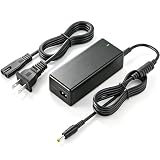
- Output: 12V 5A (Also work for 12V 2A 2.5A 3A 3.3A 3.5A 4A), Input: 100-240V 50~60Hz, Tip Size: Round Connector 5.5×2.5mm barrel jacks. This ac adapter compatible with dell monitor power cord 12v and aoc monitor power supply12v. Do not compatible with 19v device.
- 12V AC adapter compatible with dell monitor power supply 16" 20" 21.5" 22" 23" 24" 27" Screen S2216H S2216Hc S2216M S2216Mc S2218H S2218Hc S2218M S2218Mc S2230MX S2230MXf S2240L S2240Lc S2240M S2240Mc S2240T S2240Tb S2316H S2316Hc S2316M S2316Mc S2318H S2318HN S2318HX S2318M S2318Mc S2318Nc S2318NX S2318NX S2330MX S2330MXc S2340L S2340Lc S2340M S2340Mc S2440L S2440Lb S2740L S2740Lb LED IPS Monitor. (Requires 12V DC, 5.5×2.5mm Center Positive Port) Not Compatible Monitor charger 19v and 2.1mm connector.
- 12V AC DC adapter compatible with Zebra Technologies Znl-U150100 ZQ500 ZQ510 ZQ500 ZQ520 QLN320 QLN220 QLN420 ZQ600 ZQ610 ZQ620 ZQ630 ZR658 ZR668 Direct Thermal Mobile Label Power Cord; Compatible with AK18913-002 AT18486-1 FSP048-DBCA2 QLN220 QN2-AUNA0E00-00 QN2-AUGA0E00-00 QN2-AU1A0M00-00 QN4-AUNA0E00-00 QN4-AUNA0M00-00 QN4-AUCA0M00-00 QN4-AUCA0E00-00 Mobile Thermal Printer.
- 12V Power Supply Compatible with AOC 16 20 22 23 24 27 inch E2043FK E2243FW E2243FWK E2343FK 2043FK-DT E2050Swd E2228swdn E2351F I2353PH I2367F E2425SWD E2460Sd E2470swhe E2752She E2775SJ I2757FH I2757FH-B LM520 LM720 LM729 LM800 LM914 I2421VWH Monitor. (Requires 12V DC, 5.5×2.5mm Center Positive Port) Not Compatible Monitor charger 19v and 2.1mm connector.
- 60W AC Adapter prevents the internal parts from being damaged and deformed. The built-in security chip can prevent your products from overcharging, over-discharging, over-voltage, over-heating and short circuit and other bad conditions.
- Make sure the computer is awake and powered on.
- Reseat the video cable at both the monitor and computer.
- If the computer has a separate graphics card, connect the cable to one of that card’s video outputs, not to an unused output on the motherboard.
- Use the monitor’s input controls to select the input that matches the connected cable, such as HDMI or DisplayPort. Button placement and menu controls vary by model; consult its manual if needed.
For a basic check of the monitor itself, leave its power cable connected, disconnect the video cable, and turn it on. A “No Signal” message or similar display shows that the monitor has power and can display its own message. More complete built-in diagnostics and button sequences vary by model, so follow the manual for your monitor (Dell Support; Dell monitor guide).
Independent reader supportYour contribution helps us test, update, and keep practical guides available for everyone.Use the manual for model-specific controls
Power-button placement, input controls, indicator behavior, and diagnostic procedures are not identical across Dell monitors. Find the manual for your exact model through Dell Support if the controls are unclear or the steps above do not resolve the problem.
Quick Recap
Best Value

- 12V 5A AC Adapter: Output 12V 5A, also works for 12V 2A 2.5A 3A 3.3A 3.5A 4A. Input 100-240V 50~60Hz. Tip: 5.5×2.5mm round barrel jack, center positive. A reliable 12V power supply for Dell monitor power cord and AOC monitor power supply 12V. Not for 19V devices.
- Monitor Power Supply Compatible: Fits Dell 16" 20" 21.5" 22" 23" 24" 27" LED IPS monitors, including S2216H S2218H S2240L S2240M S2316H S2318H S2340L S2440L S2740L and more. Requires 12V DC, 5.5×2.5mm center positive port. Not compatible with 19V monitor charger or 2.1mm connector.
- Zebra Printer AC Adapter: Compatible with Zebra ZQ500 ZQ510 ZQ520 ZQ600 ZQ610 ZQ620 ZQ630, QLN220 QLN320 QLN420, ZR658 ZR668 thermal mobile label printers. Replaces AK18913-002, AT18486-1, FSP048-DBCA2 and more. A dependable Zebra printer power cord for daily work.
- AOC Monitor Power Cord: Compatible with AOC 16 20 22 23 24 27 inch monitors, such as E2043FK E2243FW E2343FK E2351F I2353PH I2367F E2460Sd E2752She I2757FH LM520 LM720 LM914 and more. Requires 12V DC, 5.5×2.5mm center positive port. Not for 19V devices or 2.1mm tips.
- 60W Safe Power Adapter: Built-in security chip helps prevent overcharging, over-discharging, over-voltage, over-heating and short circuit. This 60W AC adapter protects internal parts from damage and deformation, giving you safer, more stable power for monitors and Zebra thermal printers.
Rank #4

- The right length: 6 feet is just the right length, neither too long nor too short, to provide a stable power source for computer monitor and other small devices.
- Universal Design:Replace lost or worn out power cords, say goodbye to your cluttered power cords, universal design with 3-pin power connection for your PC monitor TV printer or other devices
- Product Advantages: Pure copper core, low resistance, strong current load, excellent conductivity. Adopting quality PVC material, the wire body is tough and soft,giving you a comfortable experience
- Safety Protection: Rigorous testing (UL listed). Bend resistant, heat resistant, flame retardant, giving you full electrical safety protection. Let you use your device with peace of mind
- After-sales service: 30 days exchange or refund. Your satisfaction is extremely important to us. If you have any doubts, please consult us,Professional and friendly customer service will be provied for you
Rank #3
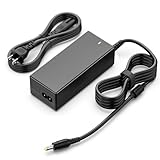
- 【12V 5A 60W Output】 This AC to DC adapter provides stable energy for displays. It is downward compatible with devices drawing 3A or 4A, as long as the voltage is exactly 12V.
- 【Compatible Models】 Compatible with selected Dell S-Series, HP Pavilion, and AOC monitors. It also serves as a replacement for part numbers like ADP-40DD B and PA-1041-0.
- 【Connector Specifications】 Features a standard 5.5x2.5mm center-positive barrel plug. Please visually check your monitor's power port size before ordering.
- 【Verified 2.63m Reach】 The total cable length measures roughly 2.63 meters (8.6ft). This allows sufficient length to connect from floor outlets to motorized standing desks.
- 【Not for Laptops】 This power supply is designed for monitors. It is not suitable for 19.5V laptops, USB-C devices, or displays requiring more than 60 watts.
Rank #2

- HZPOWEN products are CE / FCC / RoHS certified, tested by the manufacturer to match and / or exceed the OEM specifications.
- Input: 100-240V 50/60Hz; Output: 12V 3.33A
- Compatible with Dell LED-Lit Monitor S2216H S2216Hc S2216M S2216Mc S2218H S2218Hc S2218M S2218Mc S2230MX S2230MXf S2240L S2240Lc S2240M S2240Mc S2240T S2240Tb S2316H S2316Hc S2316M S2316Mc S2318H S2318HN S2318HX S2318M S2318Mc S2318Nc S2318NX S2318NX S2330MX S2330MXc S2340L S2340Lc S2340M S2340Mc S2440L S2440Lb S2740L S2740Lb
- Compatible with P/N ADP-40DD B, PA-1041-0, PA-1041-71, ADP-40DD BA, PA-1041-71TP-LF, PA-1041-81
- 12V AC Adapter Charger for Dell 22'' 23'' 24'' Screen LED LCD Monitor S2340Mc S2340M S2440L S2440Lb S2740L S2340L S2240T S2340T ADP-40DD B PA-1041-71 Power Supply Cord
Product prices and availability are accurate as of the date/time indicated and are subject to change. Any price and availability information displayed on Amazon at the time of purchase will apply.
What’s actually slowing this PC down?
Pick the symptom - the matching free tool is one click away.

