A satellite frequency band is a named range of radio frequencies used by satellite communications or another satellite service. Labels such as L, S, C, X, Ku and Ka are shorthand. They tell you roughly where a link operates, but they do not by themselves establish what a particular satellite system is allowed to transmit. That depends on the radiocommunication service, the ITU region, footnotes in the Radio Regulations, coordination with other operators, and the rules of the national regulator.
What a satellite frequency band actually is
Radio spectrum is divided into ranges measured in hertz. A band is one of those ranges, given a short name so engineers, regulators and operators can refer to it quickly. A satellite system uses bands in pairs. The ground station sends a signal up to the satellite, and the satellite sends a signal back down to one or more ground stations.
As an Amazon Associate I earn from qualifying purchases.
- Uplink: transmission from an earth station to the space station.
- Downlink: transmission from the space station to an earth station.
Because the two directions use different frequencies, a band is usually described by its pair. “Ku band” in practice means a Ku-band uplink and a Ku-band downlink, each at its own frequency within the Ku range.
What’s actually slowing this PC down?
Pick the symptom - the matching free tool is one click away.
Typical uplink and downlink pairs for each label
The International Telecommunication Union (ITU) gives representative figures in its Handbook on satellite communications, Edition 3, published in 2002. The table below uses those figures as examples of common satellite links. They are not universal band edges, and they are not a substitute for the allocation that applies to any specific network.
#1 Best Overall

- FULLY AUTOMATIC SATELLITE ANTENNA: The PL‑7000 DISH Playmaker uses automatic acquisition technology to locate DISH satellite positions without you having to manually aim it.
- RUGGED PORTABLE DESIGN: Compact and lightweight with a high‑strength military‑grade aluminum reflector and easy‑grip handle, the Playmaker offers enhanced durability and signal gain for outdoor use on RVs, campers, cabins, or tailgating.
- INCLUDED ACCESSORIES AND EASY INSTALLATION: Supplied with a 25‑foot RG‑6 coaxial cable and powered via the DISH Solo HD receiver through a single coax connection, this antenna is easy to install.
- DISH COMPATIBILITY: Designed exclusively for DISH network programming, the Playmaker integrates with Solo HD receivers and optional mounts such as the TR‑1518 tripod and RK‑4000 RV roof kit.
- TRUSTED U.S.-BASED DESIGN: Built on decades of Winegard technology expertise, delivering dependable performance, and U.S.-based servers for privacy and security, eliminating foreign monitoring concerns.
| Common label | Representative uplink | Representative downlink | Qualification |
|---|---|---|---|
| C | About 6 GHz | About 4 GHz | A common fixed-satellite-service pairing in the 2002 ITU handbook. |
| X | About 8 GHz | About 7 GHz | The handbook says military and governmental systems traditionally used these ranges. That is a historical pattern, not an exclusive assignment. |
| Ku | About 14 GHz | About 11–12 GHz | One representative pairing, not a definition of Ku band as a whole. |
| Ka | About 30 GHz | About 20 GHz | The handbook notes higher meteorological attenuation at these ranges, so real link performance depends on design and weather conditions. |
Treat these numbers as orientation. A satellite operator’s filing, or the licence for a particular system, will state the frequencies that system actually uses.
Why the same label can mean different ranges
Band names are conventions, not regulatory terms. A 2012 ITU report, Regulation of Global Broadband Satellite Communications, lists representative broadband categories. It gives C band as 4/6 GHz for the fixed-satellite service, Ku as 11/14 GHz for the fixed-satellite service, Ka as 20/30 GHz, and L as 1.5/1.6 GHz for the mobile-satellite service. The report states explicitly that L, Ku and Ka are not defined or referred to as such in the ITU Radio Regulations. Its figures are a representative taxonomy, not binding global assignments.
Rank #2

- [YAGI OUTDOOR ANTENNA] Enjoy FREE local HD Channels and without cable bills. Outdoor antenna receives 4K, 1080P, 1080i ,720p HD Channels as local news, ABC, CBS, NBC, PBC, Fox, sitcoms, kids, sports programs and SO MUCH MORE. Cut the cable and with this powerful outdoor antenna, you can save now and No Cable, No Problem. Compatible with Radio/FM Antenna.
- [ENHANCED SIGNAL RECEPTION] Antenna can pick up VHF and UHF Channels. With this antenna it allows to reach signal as far as 200 miles (depends on your distance from nearest signal tower, the obstructions between your house and signal tower), and meanwhile reducing the signal noise interference.
- [NEW AND INNOVATION DESIGN] Extended Antenna Length designed for more stable and strong signal reception, longer and larger receiving elements than any of the other Yagi antennas. Unlike other brand antenna, Five Star antenna has innovation on the structure and powerful reception.
- [WEATHER PROOF STRONG PERFORMANCE] This Yagi outdoor antenna has updated outdoor performance. Antenna has well built material with durable design, lightning protected, prevents from strong wind, heavy rain, and receives high definition and digital signals.
- [SAVE NOW AND ENJOY FREE CHANNELS] Package included: FiveStar Yagi antenna, 40 ft coax cable, Mounting Pole 20 inch Height. Freely mount our FiveStar antenna with the pole on roof, attic, chimney, eave, mast or outside the house with or without line of sight. Antenna has pre-assembled for some parts. Fully assembly required. ---100% Customer Satisfaction Contact Seller or Support for questions and troubleshooting.
Other ITU material uses the labels with different scopes. Recommendation ITU-R S.2049-0 (2013) describes 4/6 GHz as “widely referred as C-band” and 11–12/13/14 GHz as “widely referred as Ku-band,” but only for the purposes of that recommendation. ITU’s satellite-network status explanation lists entries such as L, S, C, X, Ku and Ka with particular minimum and maximum frequencies. Those entries describe how a database is organised. They are not a universal definition of the bands.
The practical rule is simple. When someone gives a boundary for a band, ask which service, region, document or system it refers to.
Rank #3
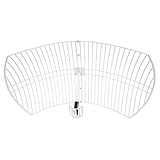
- This 21dB antenna is designed to be used in conjuntion with an RF system (SDR, filter & LNA) to provide detailed, high-resolution, near real-time images from orbiting weather satellites. Applications include GOES (HRIT & LRIT), NOAA HRPT, Meteor M2 HRPT, Metop, FengYun and other satellites that operate near 1.6GHz-1.8GHz
- Can be deployed for both linearly and circularly polarized signals (RHCP and LHCP)
- Software is required for the decoding of images. The recommended option is SatDump, which is cross-platform and available for Windows, Linux, MacOS and Android. There are also other free Linux-based decoders, or the paid version of XRIT Decoder for Windows (license not included with purchase)
- Full support and service directly through Nooelec! Additional information and assembly instructions: support.nooelec.com/hc/en-us/articles/360058812593
How allocations and coordination shape use
The formal framework is the allocation table in Article 5 of the ITU Radio Regulations. It divides frequency ranges among radiocommunication services and separates the world into three ITU regions. Footnotes and the status of each service can change how a range may be used in a given region, which is why a band label alone cannot tell you what is permitted. The current edition of the Radio Regulations is the authoritative text, and it is worth checking against any older handbook.
Allocation is only the start. Satellite systems also need coordination, which the ITU describes as a bilateral or multilateral process for avoiding harmful interference between existing and planned systems. In its 2023 article on frequency coordination for satellite radio services in the S, X and Ka bands, ITU quotes Jean Pla, an expert in frequency management at CNES: “Satellite coordination is an essential part of frequency management that all satellite operators, under the auspices of their respective administrations, should perform to ensure interference-free operations.”
Rank #4

- AUTOMATIC SATELLITE ACQUISITION: Self-pointing portable antenna locates DISH satellites in minutes without manual pointing. Designed for RV and mobile use, the antenna locks onto signal quickly and maintains stable HD reception.
- WATCH TWO CHANNELS SIMULTANEOUSLY: Independent viewing capability allows two compatible DISH receivers to operate simultaneously. This makes it easy to watch different channels on separate TVs.
- RUGGED OUTDOOR CONSTRUCTION: Engineered for field-ready durability with a weather-resistant housing to withstand road travel and extended outdoor exposure. Compact dome design measures approximately 14.3” in diameter and 13.5” in height.
- BROAD DISH COMPATIBILITY: Works with DISH Wally and select ViP receivers for seamless integration into existing satellite setups. Compatible with pay-as-you-go programming, which is great for RVs, tailgating, and camping.
- TRUSTED U.S.-BASED DESIGN: Built on decades of Winegard technology expertise, delivering dependable performance, and U.S.-based servers for privacy and security, eliminating foreign monitoring concerns.
Propagation and weather
Higher bands are not automatically better or worse. The 2002 ITU handbook notes higher meteorological attenuation at the Ka ranges, which is why link design for Ka systems has to account for rain and other weather effects. The same 2023 ITU article discusses S, X and Ka in scientific and satellite contexts, which shows that band choice depends on the mission and the environment, not on a single ranking. No source in this set supports a universal ranking of speed, cost or reliability across bands.
Do these 3 things before closing this tab:
1Scan for outdated or missing drivers - takes under a minute2Clear out junk files and repair common Windows errors3Fix the driver behind crashes, sound loss and screen glitchesHow to check the band for a specific satellite system
- Identify the service. A fixed-satellite link, a mobile-satellite terminal and a scientific mission can use different ranges for the same label.
- Obtain the uplink and downlink frequencies from the operator’s documentation or the network’s filing. Do not infer them from the band name.
- Check the allocation for that service in the current ITU Radio Regulations, including the footnotes that apply in the relevant region.
- Confirm the licence and any national requirements with the regulator in the country where the earth station or terminal operates.
- When comparing two bands, evaluate five things: the allocation and service, the uplink and downlink pair with the bandwidth that network actually receives, propagation and weather sensitivity, the coordination and interference environment, and the antenna and terminal requirements for that service.
Sources cited here date from 2002, 2012, 2013 and 2023. They explain the structure and the common examples well, but they do not replace the current regulatory text or a specific network’s licence.
Quick Recap
Best Value
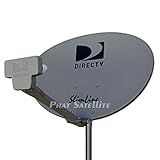
- PHAT SATELLITE INTL COMPLETE COMPLETE PACKAGE FOR DIRECTV HD SATELLITE DISH KIT WITH LOW PROFILE MOUNT
- LATEST RELEASE DIGITAL SWM3 (DSWM3 GEN2 - FOR UP TO 20 TUNERS) LNB, (for NEW RECEIVERS: H24, H25, GENIE)
- 50ft and 9ft RG6 COAXIAL CABLE with PROFESSIONAL COMPRESSED CONNECTORS
- 8" FLAT CABLE TO RUN THE SIGNAL LINE INTO YOUR INTERIOR UNDERNEATH DOOR OR WINDOW SILL WITHOUT HAVING TO DRILL HOLE THROUGH YOUR WALL. AND HIGH SPEED HDMI CABLE FOR YOUR HIGH DEFINITION TV, POWER INSERTER NOT INCLUDED.
- PLEASE ASK OUR HELPDESK FOR COMPATIBILITY. SUBSCRIPTION WITH SERVICE PROVIDER IS REQUIRE, NOT INCLUDED WITH THIS PURCHASE
Product prices and availability are accurate as of the date/time indicated and are subject to change. Any price and availability information displayed on Amazon at the time of purchase will apply.

