Quick wins for a faster PC:
Scan for outdated or missing drivers - takes under a minuteDriver Scan →Repair Windows errors before they cause bigger problemsFix Now →Fix the driver behind crashes, sound loss and screen glitchesFind Drivers →Connect the Xbox One’s HDMI OUT port to an HDMI input on your monitor, select that input, then set a display mode supported by both devices. The console model determines whether 4K and HDR are available; the monitor’s specifications determine which modes its HDMI input accepts. Audio may need a separate solution if the monitor has no speakers or audio output.
What you need to connect an Xbox One to a monitor
- An Xbox One console and a monitor with an HDMI input.
- A working HDMI cable. Microsoft recommends using the cable included with the Xbox One S for its described 4K setup; replace it only if it is missing or damaged. Microsoft’s Xbox One S 4K guidance
- The monitor’s manual, to confirm the resolution and refresh rate supported by the specific HDMI input you plan to use.
Connect the console directly to the monitor while setting up or troubleshooting. In Microsoft’s One S 4K guidance, an intervening receiver or device must support 4K UHD and HDCP 2.2 for that setup to work as intended. Microsoft’s One S connection guidance
As an Amazon Associate I earn from qualifying purchases.
How to connect the console
- Turn off the Xbox One and the monitor.
- Plug one end of the HDMI cable into the Xbox’s HDMI OUT port. Do not use the console’s HDMI IN port to connect it to the monitor.
- Connect the other end to an HDMI input on the monitor.
- Turn on the monitor and select the HDMI input you used. Then turn on the Xbox.
- If the picture does not appear or the display mode is unexpected, reseat both cable ends and check the input selection. For testing, remove any receiver, switch, or adapter between the console and monitor.
If a direct connection still does not produce the expected image, check the monitor manual and the Xbox display settings. For 4K or HDR, confirm that the selected monitor input supports the required mode; some monitors offer different modes on different inputs. Microsoft makes that general port-specific point in its Series X display guidance, but those Series X output capabilities should not be treated as Xbox One specifications. Microsoft’s display guidance
Which Xbox One models support 4K and HDR?
The original Xbox One does not support 4K or HDR. Among Xbox One family consoles, Microsoft identifies the Xbox One S and Xbox One X as supporting 4K and HDR. The distinction matters if you want to play games in 4K:
#1 Best Overall

- RCA Female to HDMI Video Converters Adapter : The cable is used to convert analog composite input to HDMI 1080p output, displayed on a 1080p HD TV/TV/monitor.
- Input ports: 1xRCA Female (Yellow, White, Red), Output ports: 1xHDMI 1.3 1080p. NOT support 3D and 4K, NOT support HDMI Converts to AV
- AV to HDMI Converter: Plug and Play, Easy to Install and Operate, Powered by External USB Cable. Note: Please hook up the USB power cable (included) to 5V 1Apower source during use (not included power supply ).
- Support PAL, NTSC3.58, NTSC4.43, SECAM, PAL/M, PAL/N standard TV formats input. For PS2,PS3,Xbox,N64,STB, VHS, VCR, DVD Players and other devices with standard composite AV input.
- You Will Get : 1x RCA Female TO HDMI Converter, 1xHDMI cable, 1xUSB cable, 1xUser Manual. ONE YEAR WARRANTY - if you are not satisfied for any reason whatsoever, do not hesitate to contact us .
| Console | 4K video and Blu-ray | 4K gaming | HDR |
|---|---|---|---|
| Original Xbox One | No | No | No |
| Xbox One S | Yes, for supported streaming video and Blu-ray | No | Yes, with compatible content and display |
| Xbox One X | Yes | Yes | Yes, with compatible content and display |
These are Xbox One family distinctions, not claims about later Xbox consoles. Microsoft’s 2017 Xbox Wire article explains that One S supports 4K video streaming and Blu-ray playback, but does not render games in 4K; One X supports 4K gaming. A compatible monitor and appropriate settings are also needed for a 4K or HDR result. For HDR, Microsoft specifies HDR10 support and HDR content. Xbox Wire: Xbox One X, 4K and HDR
Check the monitor’s resolution, refresh rate, and HDR
A monitor’s HDMI connector alone does not guarantee that it supports every mode you want. Look up the specifications for the exact monitor model and the exact input: supported resolution, refresh rate, and HDR capabilities. If the manual lists different capabilities by port, use the input that supports your desired mode.
Rank #2

- The HD Link Cable for Original Xbox convert the original Xbox signal to an HDMI signal and connect to a new TV.
- Original Xbox to HDMI Converter cable length 1m/3.2ft. Male to male connector. Don't need extra hdmi cable. Easy to Use. No need to install drivers, portable, flexible, Plug and play.
- Original Xbox to HDMI Converter cable support HDMI 1080p / 720p output.
- NOTE: Compatible with Original Xbox only. If you have any questions, please contact us feel free for your after-sales service
- You will get: HD Link HDMI Cable for Original Xbox *1; Micro usb power cable(45cm) *1
- For 4K, verify the monitor’s supported resolution on that input and whether your console model can provide the type of 4K output you want.
- For HDR, verify HDR10 support on the monitor and use HDR-capable content. The original Xbox One does not support HDR.
- If you are using an Xbox One S and expect 4K gaming, adjust that expectation: the S supports 4K video streaming and Blu-ray, not 4K games.
Check the Xbox display settings after connecting the console to see which display capabilities are detected. Microsoft’s 4K and HDR explanation covers the One S and One X model differences. Xbox Wire’s model and display explanation
Do these 3 things before closing this tab:
1Fix the driver behind crashes, sound loss and screen glitches2Clear out junk files and repair common Windows errors3Scan for outdated or missing drivers - takes under a minuteHow to handle audio
The HDMI connection carries the display connection, but you should not assume the monitor has built-in speakers or a usable audio output. Check the monitor manual for speakers or an audio-out port. If you plan to use a headset, external speakers, or an adapter, confirm that the exact console, monitor, and audio device support that connection in their manuals; audio routing can vary by hardware.
Rank #3

- [YPbPr Signal Output] Convert YPbPr component signals of Original Xbox console to HDMI signals, and then transmit them to modern HDTVs and monitors through HDMI cable, without any delay.
- [Clear Image] Use YPbPr component signal conversion and transmission to provide the best image colors and details. (Transfer only, can't improve the video quality.)
- [Plug and Play] This adapter does not require external power supply, just connect the adapter and HDMI cable (Note: Without HDMI cable), and it is ready to use.
Troubleshoot a blank or incorrect picture
No picture
- Confirm that the cable runs from the Xbox’s HDMI OUT port to the monitor’s HDMI input.
- Select the matching HDMI input in the monitor’s controls.
- Reseat both ends of the cable and test with a direct console-to-monitor connection, bypassing intermediate devices.
- If you are troubleshooting a One S 4K setup through an intervening device, verify that it supports 4K UHD and HDCP 2.2, as Microsoft’s guidance requires for that setup. Microsoft’s One S 4K troubleshooting guidance
Picture appears, but the resolution or HDR is wrong
- Check the monitor manual for the modes supported by the HDMI input in use.
- Review the Xbox display settings and select a resolution supported by both the console and monitor.
- For HDR, confirm that the console model, monitor, input, settings, and content support it.
If the console or monitor still behaves differently from its documentation, consult the manuals for those exact models. The available Xbox One-specific guidance establishes the key direct-connection and display-capability checks, but not one universal fix for every monitor configuration.
Quick Recap
Best Value

- Composite to HDMI Converter: Converts analog AV composite (Yellow, White, Red) input to HDMI 720P/1080P (60HZ) output, displayed on smart TV, Projector or HD Display, which bring back your old and cherish memories.
- Plug to Play: This HDMI Converter no extra drivers need, just plug and play,easy to use. Please hook up the USB Power Cable (included) to 5V power source during use. Note: The Video Converters only support converts AV to HDMI, can't converts HDMI to AV.
- Widely Used: This composite to hdmi adapter is widely applied to PS1, PS2, PS3, Xbox, N64, Wii, STB, VHS, VCR, DVD Players and other devices with standard composite AV input. Note: It can only be used when PS2 is set to RGB output.
- Wide Compatibility: This Video Audio Converter Adapter supports source formats of PAL, NTSC3.58, NTSC4.43, SECAM, PAL/M, PAL/N standard TV. Provide advanced signal processing with great precision, colors, resolutions, and details. Important Note: This converter can't improve video quality!
- Attention & Package: Please ensure to connect this av hdmi converter to power source to make it work. Package include: 1*AV to HDMI Adaptor, 1*USB Power Cable(adapter not included), 1*User Manual.
Rank #4
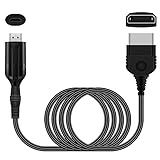
- The HD Link Cable for Xbox Convert Original Xbox signal to HDMI signal, the game console is connected to a new HDMI TV.
- HDMI signals to 1080p (60HZ)/720p(60hz) output(with the switch buttom)
- The Original Xbox to HDMI converter powers via a USB cable. (the package has not the power adapter)
- Don't need to install a driver,do not need a hdmi/x box cable, convenient and flexible, plug and play.
- if you have any question,please contact us at first . thank you
Product prices and availability are accurate as of the date/time indicated and are subject to change. Any price and availability information displayed on Amazon at the time of purchase will apply.

