Recommended Free Tools
For most single-location small businesses with someone who can maintain equipment, start with a local NVR and surveillance-rated hard drives. A local recorder can continue capturing video during an internet outage, avoids sending every stream upstream, and gives predictable retention once the drives are sized correctly. Choose cloud storage instead when off-site survival, multi-site administration, or minimal on-site hardware is more important than monthly fees and upload bandwidth. A hybrid design—continuous local recording with cloud copies of critical cameras or events—often provides the best balance.
Quick decision: which architecture fits?
| Priority | Best fit | Reason |
|---|---|---|
| Recording must continue when the internet fails | Local NVR | The recorder can keep writing to local drives while cameras, the recorder, network switch and power remain available. |
| Footage must survive theft, fire or destruction of the premises | Cloud or hybrid | Cloud copies are off-site by design; a local-only system needs a separate off-site backup. |
| Several locations need one administrative view | Cloud or hybrid | A provider-managed service can centralize access without installing a full recorder at every site. |
| Lowest recurring expense | Local NVR | After the recorder and drives are purchased, there is usually no storage subscription, although maintenance and drive replacement still cost money. |
| Little on-site IT capacity | Cloud | The vendor operates the storage service, while the business manages accounts, connectivity and subscriptions. |
| Both outage continuity and off-site protection | Hybrid | Local recording continues during an internet interruption while selected footage is copied away from the site when connectivity is available. |
The architecture changes where video travels, who operates storage and access control, what happens during an internet outage and who carries maintenance responsibility, as explained by OmniNVR’s local-versus-cloud overview.
As an Amazon Associate I earn from qualifying purchases.
How local, cloud and hybrid recording work
Local NVR
An NVR (network video recorder) receives IP-camera streams over the local network and writes them to internal surveillance-rated drives. Cameras, the recorder, storage, the network switch and power are all on the premises. The business controls the hardware, recording mode and retention capacity. Remote viewing normally requires an internet connection, but recording itself does not if the local components remain operational.
Cloud camera storage
Cloud cameras or a cloud video-management service send recordings to a provider over the internet. The provider supplies storage, account access and usually browser or mobile playback. Hardware at the site is lighter, but every continuously uploaded stream consumes upstream bandwidth and the service remains dependent on the provider, the account and the subscription tier.
#1 Best Overall

- CAPTURE CRIME FROM DETAILS: Discover potential crime has never been so easier with superior 5MP HD. With advanced IR lights, you can see up to 100ft in the dark, helping to protect your property and loved ones even at night.
- SMART PERSON/ANIMAL/VEHICLE DETECTION – Smart PoE IP cameras can identify people, animals, and vehicles, minimizing unwanted alerts triggered by bugs or leaves (please upgrade to the latest firmware version). Filter out true threats and get to know what happened simply by glancing at the lock screen. General motion detection is also available.
- PLUG & PLAY: With everything needed, the poe security camera system can be easily installed even by yourself. Just hook all the poe cameras up with the NVR and you can enjoy your whole new security system day and night.
- HEAR THE EVIDENCE: Watch and also hear every detail of surroundings and make sure everything is under control. With the built-in microphone, you won’t miss any suspicious noise or conversation when the crisis arises with just one click to turn the function on.
- HDD Storage and Remote Playback – Including a pre-installed 2TB HDD, videos can be recorded and stored for ten days without overwriting occurring. Users can add one additional external 8TB HDD via the camera’s e-SATA port. With the free Reolink app, all videos can be played back through your smart device anywhere, anytime.
Hybrid recording
A hybrid system keeps a local copy—often continuous recording for every camera—and uploads selected channels, motion events or alarm-triggered clips. Entrances, cash areas, loading doors and other high-value views can receive off-site protection without uploading every stream at full quality. The design must state exactly which streams are copied, how long they remain online and how much bandwidth is reserved.
What happens when the internet goes down?
Local NVR behavior
A local NVR can continue recording during an internet outage when the cameras, recorder, drives, network switch and power are still working. Remote viewing, push notifications, cloud integrations and off-site copies may stop until connectivity returns. If the outage is caused by a failed router, a local network that depends on that router can also fail, so the camera VLAN, switch and recorder should be tested as a self-contained path.
Cloud behavior
Cloud recording generally cannot upload a continuous stream without an internet path. Google’s support documentation states: “Important: Your camera needs to be connected to both Wi-Fi and the Nest service to upload video to the cloud.” Some supported cameras buffer events internally while offline and upload them after reconnection, but buffering is product-specific. Do not assume that an offline camera preserves a complete continuous recording; ask for the exact buffer duration, event rules and recovery process. See Google Home and Nest’s offline-camera guidance.
Quick wins for a faster PC:
Repair Windows errors before they cause bigger problemsFix Now →Scan for outdated or missing drivers - takes under a minuteDriver Scan →Clear out junk files and repair common Windows errorsFree Scan →Power and site outages are different
An internet outage is not protection against a power failure, theft or fire. A local NVR needs an uninterruptible power supply (UPS) sized for the recorder, drives, network switch and any essential cameras. A cloud system still needs powered cameras and network equipment to capture new footage; its advantage is that already-uploaded footage remains away from the site. A hybrid system provides both benefits only for streams that have successfully reached the cloud.
Require an outage demonstration
- Disconnect the internet at the router while leaving the local network powered.
- Confirm that each camera continues writing locally or buffering according to its documented design.
- Restore connectivity and measure how long synchronization takes.
- Export a clip that spans the outage, checking timestamps, continuity and whether any gap is clearly marked.
- Repeat the test with a brief power interruption using the UPS, then document which devices shut down and how recording recovers.
Cost: compare total ownership, not just the first invoice
Published figures illustrate the scale but are not universal prices. Seneca Security gives example ranges of $400–$900 upfront for an NVR plus drives, 30–90 or more days of local retention and $20–$80 per camera per month for cloud examples. Those figures are provider examples from 2026; camera count, resolution, retention, installation and region can change the result. See Seneca Security’s cost comparison.
Rank #2

- 5MP SUPER HD & STUNNING NIGHT VISION: Capture crystal clear videos day & night with 5MP super HD cameras. The 18pcs infrared LEDs allow you to get high-quality night vision up to 100ft, helping you to protect your property even at night.
- SMART PERSON/ANIAL/VEHICLE DETECTION – Smart PoE IP cameras can identify people, animal and vehicles while minimizing unwanted alerts such as animals or shadows. This home security camera system can also be configured to specify the type of detection when sending alerts to you. Know what happened simply by glancing at the lock screen.
- PLUG & PLAY POE SYSTEM: With a single network cable, you can connect each IP camera to Reolink NVR for both power supply and video transmission, making the installation easy enough for DIY enthusiasts and beginners.
- ENHANCED VIDEO RECORDING: Thanks to the built-in mic of Reolink cameras, the poe security camera system can pick up ambient sound and help to add another layer of security despite the reliable 24/7 continuous recording.
- 2-YEAR WARRANTY & LIFE-TIME TECH SUPPORT: Reolink products have a 2-year warranty and lifetime tech support. Feel free to contact Reolink anytime for any questions or problems via Amazon message or email.
| Cost item | Local NVR | Cloud storage | Hybrid |
|---|---|---|---|
| Initial hardware | Recorder, surveillance drives, network equipment, UPS and installation | Camera hardware and any required gateway; less recorder hardware | Local recorder and drives plus compatible cameras and cloud-capable equipment |
| Recurring storage | Usually none; budget for replacement drives and support | Per-camera or retention-tier subscription; check annual renewal terms | Subscription for selected channels or events plus local maintenance |
| Connectivity | LAN traffic and writes to local drives; no continuous internet upload for recording | Continuous upstream capacity scales with camera count and bitrate | Lower than full-cloud upload if only selected streams are copied |
| Resilience spending | UPS, spare drives and a separate off-site backup if site loss matters | Reliable internet, account security and possibly a higher retention tier | All local resilience costs plus cloud bandwidth and subscription |
| Exit costs | Hardware remains on site; export is under the owner’s control | Check export limits, downloadable format and what happens to footage after cancellation | Verify both local exports and cloud-account portability |
Use a five-year horizon so recurring charges are visible. Compare identical camera count, resolution, frame rate, codec, recording mode and retention days. Include installation, firmware and support time, drive replacement, UPS batteries, bandwidth upgrades, cloud export fees, renewal changes and a separate backup when required. Eagle Eye Networks evaluated a 12-camera, single-site example with 14 days of storage over five years; the practical lesson is to compare total cost over the intended service life rather than a purchase price alone. The methodology is described in its 2024 total-cost-of-ownership white paper.
Bandwidth and storage sizing
Cloud upload requirement
Upload demand is driven by the number of cameras, their bitrate, recording mode and whether audio or a secondary stream is included. A TP-Link example specifies at least 4 Mbps per 4MP camera for its VIGI cloud-storage service. This is a product-specific requirement, not a universal rule; obtain the vendor’s calculation for the exact camera settings you will deploy. The requirement is documented in TP-Link’s cloud-storage cost and trade-off guide.
As a sizing check, a continuous 4 Mbps stream produces approximately 43.2 GB of data per 24 hours before protocol overhead and any vendor-specific adjustments. Multiply the actual bitrate by the number of cameras, then reserve headroom for other business traffic and brief bursts. Ask whether the provider needs the main stream, a lower-resolution proxy or both, and whether upload is throttled when the connection is busy.
Local drive capacity
Local capacity is determined by aggregate bitrate, recording hours, retention days and the number of drives. The same arithmetic applies: convert the combined camera bitrate to bytes per day, multiply by the required days and add room for filesystem overhead, variable bitrates and drive-management policies. Surveillance-rated drives are designed for sustained camera workloads; a desktop drive may be cheaper but is not an equivalent reliability choice.
Continuous versus event recording
Retention figures are meaningful only when the recording mode is stated. Continuous recording consumes predictable capacity and preserves activity that motion detection might miss. Event-based recording uses less storage but depends on detection zones, sensitivity, lighting and camera analytics. Cloud plans may count camera-hours, event volume or a storage quota rather than raw drive capacity. Confirm whether audio, thumbnails, metadata and duplicate streams count toward the limit.
Rank #3

- 4K Ultra HD – Reolink 4K Ultra HD (8MP) PoE camera delivers almost 4 times the clarity of 1080p. Our complete camera system provides users vivid resolution, even when you digitally zoom in. Any flaw or distortion you’ve encountered before has been eliminated, ensuring you the highest quality view of your surroundings.
- Person/Vehicle/Animal Detection – Smart PoE IP cameras can identify people and vehicles in terms of their shapes, minimizing unwanted alerts such as animals or shadows. Cameras can also be configured to specify the type of detection when sending alerts to you. Know what happened simply by glancing at the lock screen.
- Remote Access and Playback – The free Reolink app allows you to access all your cameras remotely, no matter how many you have. Check in on your home or business whenever, wherever. Perform live views and playbacks on your smart device (iOS, Android) via WiFi or 3G/4G connection.
- Plug and Play PoE System – A simple PoE connection makes it easier to set-up and install your home security camera system. With a single network cable, stretching up to 330ft, users can enjoy smooth security coverage of their entire house. This is perfect for both beginners and DIY camera enthusiasts.
- Continuous 24/7 Recording – With a pre-installed 4TB HDD and the storage capacity of up to 16TB, users are provided with reliable 24/7 continuous recording and motion-triggered only recording.
How many days of footage should a small business keep?
Choose retention from the time between an incident and when someone is likely to discover it—not from a round number selected by the installer. A shop that reviews footage after a weekend, a warehouse with delayed inventory reconciliation and a regulated workplace may need different windows. Consider weekends, holidays, staff schedules, insurance reporting deadlines and whether police or legal requests commonly arrive weeks later.
Crashes, No Sound, or Screen Glitches?
Random freezes, missing sound and display glitches usually trace back to one bad driver. Find and replace yours safely.Free scan · under a minuteWindows Errors? Fix Them Before They Spread
Repair common Windows errors and clear accumulated junk for a smoother, more stable PC - no reinstall needed.Free scan · no reinstall- Define the latest realistic discovery date for theft, injury, vandalism or a dispute.
- Add time for preserving and exporting the relevant clip once discovered.
- Specify whether the target is continuous footage or motion/event footage.
- Confirm that the retention period applies to every camera, not only premium channels.
- Document automatic deletion and any legal hold or evidence-lock function.
Local retention scales with drive capacity and can be extended by adding or replacing drives. Cloud retention scales with the provider’s plan and camera count, so a longer window generally increases the recurring fee. Never advertise a number such as 30 or 90 days without stating the recording mode, resolution and whether it is a provider example or the configured result.
Privacy, security and access control
Local does not mean automatically secure
A recorder on the premises reduces routine third-party handling and may help with data-residency requirements, but it becomes a high-value target. Use unique administrator credentials, current firmware, network segmentation, restricted remote access and physical protection for the recorder and drives. Disable unused services, log access and test that an exported clip retains timestamps and any required audit information.
Cloud adds provider and account questions
Evaluate encryption in transit and at rest, key-management responsibilities, storage region, user-sharing controls, multi-factor authentication, retention deletion rules and service availability. Give each employee the least privilege needed for their role, and review accounts when staff leave. Determine whether the provider can access footage for support, how access is logged and how an investigation export is preserved.
Audio and workplace rules
Video and audio can be regulated differently. Before installation, review local privacy law, employee notice requirements, signage, consent rules, camera placement and restrictions on recording private areas. Document the business purpose and retention policy, and limit playback to trained personnel.
The Tool Desk
Outbyte Driver Updater FREEFix the driver behind crashes, sound loss and screen glitchesFind Drivers →Outbyte PC Repair FREEClear out junk files and repair common Windows errorsFree Scan →Rank #4

- Stunning True 4K Ultra HD Clarity - Capture every detail with 8MP (3840×2160) resolution—four times the clarity of 1080p. Ensure smooth, vivid footage with adjustable high bitrate and Clear Stream mode. Even when zooming in, you’ll enjoy crisp, distortion-free images.(Tip: For best results, use a 4K display and enable "Clear" stream in settings.)
- Person/Vehicle Detection – Smart PoE IP cameras can identify people and vehicles in terms of their shapes, minimizing unwanted alerts such as animals or shadows. Cameras can also be configured to specify the type of detection when sending alerts to you. Know what happened simply by glancing at the lock screen.
- Plug and Play PoE System – A simple PoE connection makes it easier to set-up and install your home security camera system. With one single network cable, users can enjoy smooth security coverage of their entire house. This is perfect for both beginner camera users and DIY enthusiasts.
- Reliable 24/7 Recording & Massive Storage - Comes with a pre-installed 4TB HDD for nonstop 24/7 or motion-triggered recording. Easily expand storage with an additional HDD (up to 8TB), supporting a total capacity of up to 16TB.
- Remote Access and Playback – The free Reolink app allows you to access all your cameras remotely, no matter how many you have. Check in on your home or business whenever, wherever. Perform live views and playbacks on your smart devices (iOS, Android) via WiFi or 3G/4G connection.
When hybrid is the better answer
Use local continuous recording for all cameras when uninterrupted capture and predictable retention are primary requirements. Add cloud backup for entrances, cash handling areas, loading doors, alarm-triggered events or another small set of critical views when off-site survival matters. This reduces upload and subscription costs compared with copying every stream while protecting the footage most likely to matter after a site-loss event.
Write the design as an explicit policy: name each cloud-copied camera, state whether the copy is continuous or event-based, specify cloud retention, reserve bandwidth, define behavior when the link is saturated and document the export path for an insurer, police report or legal request. A hybrid system is not automatically resilient if the cloud copy is delayed, the wrong camera is selected or the local recorder and network share one unprotected power source.
Step-by-step selection and deployment
1. Inventory the cameras and risks
List every camera, location, resolution, frame rate, codec, audio setting, field of view and recording mode. Mark entrances, cash areas, loading doors, server rooms and other views whose loss would be especially damaging. Note whether the business has one site or several and who will maintain equipment.
2. Set the availability target
Decide whether recording must continue through an internet outage, a short power failure, a provider outage or total site loss. These are different requirements. A local NVR addresses the first when powered; cloud addresses footage already uploaded before a site loss; UPS and off-site copies address the remaining gaps.
3. Calculate retention and bandwidth
Choose the discovery window, then calculate local drive capacity or the cloud tier using the actual bitrate and recording mode. For cloud, verify upstream capacity at the busiest time of day, not only the advertised access speed. Obtain a written vendor calculation and identify what happens when the connection cannot sustain every stream.
Best Value
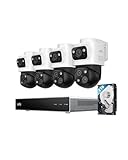
- 𝟒𝐊 𝐓𝐫𝐢𝐩𝐥𝐞-𝐋𝐞𝐧𝐬 𝐁𝐮𝐥𝐥𝐞𝐭-𝐏𝐓𝐙 𝐂𝐚𝐦𝐞𝐫𝐚 | The upper 4K wide-angle camera provides a 122° fixed view of the entire scene, while the lower 2K PTZ camera features 8× auto-zoom and 360° pan, integrate three fields of view - fixed, tracking and zooming - with one screen without the need to switch screens for complete security coverage
- 𝐔𝐩 𝐭𝐨 𝟏𝟔𝐂𝐇, 𝐋𝐢𝐯𝐞 𝐂𝐫𝐨𝐬𝐬-𝐂𝐚𝐦 𝐓𝐫𝐚𝐜𝐤𝐢𝐧𝐠 | When one camera detects motion, other cameras automatically adjust to track the subject, providing seamless coverage across your property or bussiness. The NVR supports 8 cams, expandable to 16 channels via a PoE switch.
- 𝟐𝟒/𝟕 𝐑𝐞𝐜𝐨𝐫𝐝𝐢𝐧𝐠, 𝐍𝐨 𝐏𝐨𝐰𝐞𝐫 𝐚𝐧𝐝 𝐍𝐞𝐭𝐰𝐨𝐫𝐤 𝐎𝐮𝐭𝐚𝐠𝐞𝐬 | POE Wired and pre-installed 4TB HDD (expandable to 16TB) truly enable 24/7 recording, allowing you to completely bid farewell to the predicament of power failure or network disconnection in traditional Wifi or Battery Cam systems。
- 𝐄𝐧𝐣𝐨𝐲 𝐥𝐨𝐜𝐚𝐥 𝐀𝐈 𝐀𝐠𝐞𝐧𝐭,𝐏𝐫𝐨𝐭𝐞𝐜𝐭 𝐲𝐨𝐮𝐫 𝐏𝐫𝐢𝐯𝐚𝐜𝐲 | Unlock proactive, real-time security with our local AI agent, fueled by 6T/8-Core power for instant analysis, genuine threat identification, and decisive action. Customize no-go zones and alerts, enabling AI to accurately detect real danger and ensure tailored responses.
- 𝟑-𝐘𝐞𝐚𝐫 𝐀𝐟𝐭𝐞𝐫 𝐒𝐚𝐥𝐞𝐬 𝐒𝐮𝐩𝐩𝐨𝐫𝐭 | Rest easy knowing your product is covered by our 3-year after-sales service. Our expert support team is on standby 24/7, ready to resolve any concerns swiftly and keep you up and running.
4. Build the five-year cost model
Put recorder, drives, UPS, installation, support, replacement drives, subscriptions, renewal changes, bandwidth upgrades and export fees in one worksheet. Add the cost of a separate off-site backup if local-only footage must survive site loss.
5. Secure and test the system
Segment cameras from ordinary office devices, enable multi-factor authentication where available, restrict remote access, update firmware and protect equipment physically. Test internet, power and service outages; then export a playable clip with timestamps and verify that the staff member responsible can complete the process without vendor assistance.
Questions to put to every vendor
- Can you list each camera’s resolution, frame rate, codec and recording mode in the proposal?
- What upload bandwidth is required, and what exactly happens during internet, power and provider-service outages?
- Is the quoted retention continuous or event-based, and how is it calculated?
- What are the recorder, drive, UPS, installation, subscription, renewal, replacement and support costs?
- How do remote access, multi-factor authentication, user roles, encryption, storage region and deletion work?
- Can you demonstrate exporting a playable clip with timestamps and audit information?
- Who owns the footage, and can the business retrieve it if the account is cancelled or the service changes?
- Which cameras and firmware versions are supported, and who performs maintenance?
Practical recommendations by business situation
Single retail shop or office with a capable manager
Choose a local NVR with surveillance-rated drives, a UPS and a documented export procedure. Add cloud backup for the entrance and cash area if a fire or burglary would make local footage unavailable. This keeps routine recording independent of the internet while protecting the most important views off-site.
Do these 3 things before closing this tab:
1Clear out junk files and repair common Windows errors2Fix the driver behind crashes, sound loss and screen glitches3Repair Windows errors before they cause bigger problemsSeveral branches or a business without on-site IT
Favor a managed cloud service or a hybrid design that centralizes administration. Confirm each location’s upload capacity, account roles, regional storage and cancellation process. A local recorder at each branch may still be worthwhile for outage continuity.
High-risk site or strict evidence requirements
Use local continuous recording, UPS protection, controlled remote access and cloud copies of critical channels. Define retention from the incident-discovery timeline, lock or export evidence promptly and test recovery on a schedule. If privacy or residency rules apply, obtain written answers about storage region, provider access and deletion.
Bottom line for a small business
For a maintained single site, a local NVR is the sensible starting point: it records through ordinary internet outages, offers predictable retention and avoids a subscription for every camera. Cloud storage earns its cost when footage must live away from the premises, several sites need centralized management or the business cannot support on-site recording hardware. When both sets of requirements matter, keep the authoritative continuous recording locally and send a carefully selected set of cameras or events to the cloud.
Quick Recap
Product prices and availability are accurate as of the date/time indicated and are subject to change. Any price and availability information displayed on Amazon at the time of purchase will apply.
What’s actually slowing this PC down?
Pick the symptom - the matching free tool is one click away.

