What’s actually slowing this PC down?
Pick the symptom - the matching free tool is one click away.
Yes. Apple Home can manage accessories from different manufacturers when each product explicitly supports Apple Home/HomeKit or a Matter device type that the Home app supports. The logo on the box is not enough: compatibility depends on the exact model, its firmware, the functions exposed to Apple Home, and— for some setups—your home hub, Thread network, or manufacturer bridge.
Matter also lets an accessory that was paired in another Matter ecosystem app be added to Apple Home. That does not guarantee every Matter feature will appear, or that every Matter product category is supported. Use the checks and setup steps below before you buy or pair anything.
As an Amazon Associate I earn from qualifying purchases.
What “multi-brand” compatibility means in Apple Home
Apple Home is a control platform, not a requirement that every accessory come from one company. You can place lights, outlets, locks, thermostats, sensors, and other supported accessories from unrelated manufacturers in the same rooms, scenes, and automations. The decisive question is whether the individual product has a connection path Apple Home understands.
Native Apple Home or HomeKit support
A product marked for Apple Home or HomeKit is designed to be added directly through the Home app. Its manufacturer may still require a companion app for firmware updates, account creation, or features that Apple Home does not expose. Read the compatibility statement for the exact model and hardware revision, not just the product family.
#1 Best Overall

- 【Easy Setup, One Control】With Matter, Skip the step of downloading and registering multiple manufacturers' apps every time you buy a new device. Instead, head straight to certified smart home platforms like Apple Home, Alexa, Google Home, SmartThings, or AiDot to control all your Matter devices.【TIP】Matter-certified hub or controller (HomePod, Echo Dot, Nest, SmartThings Hub) is required for Apple Home/Alexa/Google Home/SmartThings platforms. Alternatively, the AiDot app can be used without hub
- 【Offline-Ready Control】Once you've set up your Matter-certified devices on your LAN, they'll be able to communicate with each other directly, using the Matter protocol. This means that if your home internet connection goes offline, your Matter-certified devices will still be able to communicate and be controlled within your LAN, without relying on the internet or cloud services.
- 【Remote Control from Anywhere】Use the app to turn electronics on before you arrive home and off after you leave, no matter where you are. Using the smart plug that work with alexa manage your power usage and save money.
- 【Hands-free Voice Control】Control linkind homekit plug using simple voice commands through Apple HomeKit, Siri, Amazon Alexa, Google Assistant, and SmartThings, without the need for physical input such as buttons or switches.
- 【Flexible Scheduling & Timer】Effortlessly reduce energy usage with automatic device shutdown after a set time. For example Chrismas Tree, TV, Lamp, Fan, Humidifier,Blenders, Lightbulbs
Matter support
Matter is a cross-ecosystem standard. A Matter accessory can often be commissioned by more than one compatible platform, so a device first set up elsewhere may still be added to Apple Home. Apple says Matter accessories paired through another ecosystem can be added from the Home app, subject to the accessory and the Home app supporting that device type and function. See Apple’s Matter accessory guidance.
A manufacturer bridge
Some accessories communicate with a dedicated bridge rather than directly with your Wi-Fi or Thread network. Apple Home then sees the bridge and the accessories it exposes. The bridge must itself support Apple Home or Matter, and the maker may require its app, an account, or a firmware update. A bridge can also determine which advanced controls are visible in Apple Home.
Which Matter categories Apple Home supports
Apple’s support article currently lists these Matter categories for the Home app:
Do these 3 things before closing this tab:
1Clear out junk files and repair common Windows errors2Scan for outdated or missing drivers - takes under a minute3Repair Windows errors before they cause bigger problems- Air conditioners
- Bridges
- Lights
- Locks
- Outlets
- Switches
- Thermostats
- Blinds and shades
- Motion, ambient-light, contact, temperature, and humidity sensors
That list is a category-level boundary, not a promise that every model or every advanced feature works. For example, two products both sold as lights may expose different controls, and a sensor may report only the measurements Apple Home supports. Confirm the exact model, firmware version, regional edition, and advertised Apple Home functions with the manufacturer before purchasing. Apple’s wording and supported categories can change; consult the current Matter support page for your software version.
Rank #2

- 【Powerful Smart Matter】Linkind 120V smart light bulb is certified for Matter platform used for integrating all your smart home devices into one control system, fitting for users with multiple smart gadgets. It eliminates the need for switching between multiple apps, enhancing your smart home experience. It works seamlessly with Matter-certified hubs (HomePod, Echo, Nest etc.) allowing for multi-platform control, or directly via AiDot app with no extra hubs needed, offering flexible usage for different home setups.
- 【 Voice & App Remote Control 】This WiFi smart bulb works with Alexa, Apple Home and Google Home allowing for hands-free voice control to turn on/off, dim or change colors. It also supports remote control via the app fit for when you are away from home.
- 【16M Colors & 104 Preset Scenes for All Moods】Linkind alexa light bulb is equipped with 16 million RGB colors and 104 preset scenes used for movie nights, parties, reading or sleeping causing a perfect atmosphere for every occasion in your home. You can customize exclusive light effects freely via the app to match your mood anytime.
- 【 Music Sync & Dynamic Light Effects】The color changing light bulb supports music sync function via the AiDot App, suitable for family gatherings and birthday parties. Simply grant microphone permission to the AiDot App, which will detect the music rhythm in the environment through your phone's mic, letting the light color and brightness change in sync with the music beat. It turns your home into a mini party venue and brings immersive audio-visual enjoyment for you and your friends.
- 【 60W Equiv 800LM & High Quality 】The LED smart bulb provides 800 lumens of bright light equivalent to 60W traditional bulbs saving up to 85% electricity extending the life to over 25000 hours. It is perfect for daily lighting in living rooms, bedrooms and kitchens.
How to add a different-brand accessory
Use an iPhone or iPad with the current Home app. The accessory should be powered, in pairing mode, and close enough to the required network equipment. Apple’s setup instructions are at Set up accessories in Home.
- Check the product first. Look for an explicit Apple Home, HomeKit, or Matter logo and verify the exact model’s supported category. If it uses a bridge or Thread, identify that requirement before opening the box.
- Update software. Install available iOS or iPadOS updates and update the accessory or bridge in the maker’s app. Some Matter products cannot be commissioned until their firmware is current.
- Open Home and start pairing. Tap the Add Accessory control. For a new accessory, scan its HomeKit or Matter QR code, or enter the setup code printed on the product, label, or instructions.
- Bring in a device already paired elsewhere. Tap More Options, select the Matter accessory, and follow the prompts. The other ecosystem app may need to generate a pairing code or place the device in sharing mode.
- Complete the room and naming steps. Assign a room and a clear name, then test the controls Apple Home displays. Names and room assignments affect Siri commands, scenes, and automations.
- Finish maker-specific setup. Return to the manufacturer’s app if it requires an account, bridge configuration, calibration, or a firmware update. A successful Apple Home pairing does not necessarily complete those tasks.
Apple states that paired Matter accessories synchronize using iCloud Keychain regardless of which device or compatible app was used for setup. This is why a Matter device can participate in multiple Matter ecosystems, while still remaining subject to each platform’s supported categories and features.
Can one Matter device appear in more than one app?
Often, yes. Matter is designed for multi-admin operation: after an accessory is commissioned in one Matter ecosystem, another compatible ecosystem can receive a pairing code and add its own administrative access. In practical terms, you might set up an accessory in its maker’s app and then add it to Apple Home with More Options.
Recommended Free Tools
Multi-admin access is not the same as identical functionality everywhere. Each app may expose a different set of controls, and a product’s maker may reserve certain features for its own app. If Apple Home shows the accessory but not a setting you expected, check the model’s feature list and firmware notes rather than assuming the pairing failed.
Rank #3

- 【Matter: All-Round Compatibility】With Matter, users are no longer tied to specific platforms and works with all certified smart home platforms, such as Apple Home, Amazon Alexa, Google Home and Samsung SmartThings. You can control all your smart home devices from a single app, reducing the need for multiple apps for different devices.
- 【Matter: Smooth LAN Control】All Matter-certified devices in your local area network (LAN) will work smoothly even when your home internet goes offline. Matter allows effective communication directly between devices, without the need for a specific 'forwarding' device. For example, a Matter smart switch or sensor can turn on/off a Matter bulb directly without being connected to a cloud service, or other specific action. Once configured, communication and control between Matter devices can be achieved directly on the local network.
- 【Matter: Future-Proofing】Matter devices will be compatible with future updates and advancements in technology, ensuring that your smart home system remains up-to-date and compatible with new devices and features.
- 【Compact & Flame Retardant Design】Avoid blocking additional outlets with its compact design, and plug in your WiFi smart plug with confidence thanks to its UL certified flame retardant design and 2-year limited warranty.
- 【App & Voice Control】Control your WiFi smart plug from anywhere, anytime via the free Tapo App or just give voice commands to Siri, Amazon Alexa, Google Assistant or Samsung SmartThings. Your favorite smart assistant enables you to have a truly hands-free experience.
Do you need a HomePod or Apple TV home hub?
The answer depends on your iOS version, accessory transport, and what you want to do. Apple’s Matter article says iOS 18 or later can add and control Matter accessories without a home hub in applicable setups. Apple’s accessory setup guide also describes Matter accessories as requiring a hub and recommends one for the best experience. Treat these statements as setup- and software-dependent, not as a universal hub-free promise.
What a home hub adds
Apple describes a home hub as enabling control while you are away, sharing the home with other people, and automations. If those capabilities matter, plan for a supported hub even if local control works without one. A hub also gives the Home app a stable controller when your phone is not present.
Thread accessories need Thread infrastructure
Thread is a low-power mesh network used by some Matter accessories. A Thread accessory needs Thread-capable infrastructure for its Thread functions; ordinary Wi-Fi coverage alone is not a substitute. Apple identifies HomePod mini, HomePod (2nd generation), and certain Apple TV 4K models as Thread-capable, and also names compatible third-party Thread border routers. Exact model support matters, so check Apple’s Thread requirements and the accessory maker’s specifications.
Choose the hub for the job
For local control of a compatible Wi-Fi Matter device on a recent iPhone or iPad, a hub may not be necessary. For remote access, household sharing, automations, or Thread accessories, verify that your chosen hub or border router supports the needed protocol and model. Apple’s current list of home-hub requirements is available at Apple’s home hub support page.
Rank #4
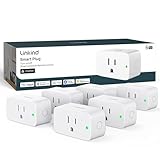
- 【Flexible Scheduling & Timer】Effortlessly reduce energy usage with automatic device shutdown after a set time. For example Chrismas Tree, TV, Lamp, Fan, Humidifier,Blenders, Lightbulbs
- 【Easy Setup, One Control】With Matter, Skip the step of downloading and registering multiple manufacturers' apps every time you buy a new device. Instead, head straight to certified smart home platforms like Apple Home, Alexa, Google Home, SmartThings, or AiDot to control all your Matter devices.【TIP】Matter-certified hub or controller (HomePod, Echo Dot, Nest, SmartThings Hub) is required for Apple Home/Alexa/Google Home/SmartThings platforms. Alternatively, the AiDot app can be used without hub
- 【Hands-free Voice Control】Control linkind homekit plug using simple voice commands through Apple HomeKit, Siri, Amazon Alexa, Google Assistant, and SmartThings, without the need for physical input such as buttons or switches.
- 【Remote Control from Anywhere】Use the app to turn electronics on before you arrive home and off after you leave, no matter where you are. Using the smart plug that work with alexa manage your power usage and save money.
- 【Design with Safty and Compact】Linkind alexa plugs are ETL & FCC certified with fire-resistant materials and provide 1800W 15A power capacity, as well as protection against short-circuits and overloads. Despite safety features, the smart outlet plug has a small form factor that won't take up too much space.
Wi-Fi, Thread, and bridge requirements
| Connection path | What to verify | Typical dependency |
|---|---|---|
| Wi-Fi accessory | Exact Apple Home or Matter certification, supported Wi-Fi band, and firmware | Some accessories require 2.4 GHz Wi-Fi; follow the maker’s network instructions |
| Thread accessory | Matter category plus Thread support for the model | Thread-capable home hub or border router |
| Bridge-based accessory | Apple Home or Matter support for the bridge and the accessories it exposes | Bridge power, network connection, maker app, and current firmware |
| Accessory paired in another app | Multi-admin or sharing support and a generated pairing code | Another Matter ecosystem app may be needed during commissioning |
Keep phones, hubs, bridges, and accessories on the network arrangement required by their documentation. Guest networks, client isolation, blocked multicast traffic, or a phone connected to a different Wi-Fi network can prevent discovery even when the accessory is otherwise compatible.
Troubleshooting when a device will not add or stops responding
Work through these checks in order rather than repeatedly resetting the accessory.
| Symptom | Likely cause | Action |
|---|---|---|
| No accessory appears during setup | Unsupported model, wrong pairing mode, or discovery blocked by the network | Confirm the exact model supports Apple Home or Matter, put it back into pairing mode, and connect the iPhone or iPad to the required accessory network. |
| QR code or setup code is rejected | Code belongs to another device, has expired, or the accessory was already commissioned | Use the code supplied for that unit. For a previously paired Matter product, choose More Options and obtain a fresh sharing code from the maker’s app. |
| Pairing stops at firmware or account setup | The manufacturer requires an update, bridge, or account before exposing the accessory | Complete the maker’s app steps, update the accessory and bridge, then retry Apple Home pairing. |
| Accessory appears but is offline | Power loss, Wi-Fi-band limitation, Thread path failure, or an unavailable bridge | Restore power, verify the required 2.4 GHz or Thread infrastructure, and restart the bridge or hub. Check the maker’s status indicators. |
| Several brands stop responding | Home hub, router, or shared network problem | Update controlling Apple devices, confirm they share the accessories’ Wi-Fi network, and restart the affected hub, router, or bridges. Apple’s guidance for this case is at Accessories not responding. |
| Remote control fails while local control works | No available home hub or the hub is offline | Check the hub’s power, network connection, and Home settings before resetting individual accessories. |
Apple’s broader setup troubleshooting page also recommends verifying model compatibility, software versions, network conditions, and any required manufacturer app or bridge: If you can’t add an accessory to Home.
Quick wins for a faster PC:
Fix the driver behind crashes, sound loss and screen glitchesFind Drivers →Repair Windows errors before they cause bigger problemsFix Now →How to evaluate a product before buying
Use this decision checklist for every candidate accessory, regardless of brand.
Best Value

- 7 in 1 Keyless Entry Door Lock: Fingerprint ID(stores up to 50 fingerprints) + Passcodes(up to 50) + Smartphone App(compatible with Android and iOS) + Web Portal + EKey / Code Sharing + Voice Control with Siri, Alexa or Google Assistant + 2 Mechanical Keys
- App Control via Built-in WiFi: Remotely lock, unlock, and manage your smart lock from anywhere. Share permanent, scheduled, or temporary eKeys and passcodes with family, guests, or service providers. Manage up to 50 fingerprints and 50 access codes, view activity history, and receive real-time notifications—all without a hub. Supports 2.4 GHz Wi-Fi only. For optimal connectivity, keep your router within 70 ft of the lock.
- Remote Access via Matter over Thread: Remotely lock, unlock, and manage your smart lock through Apple Home or other Matter-compatible apps. Enjoy simple setup, real-time notifications, event history, and secure access management—all from your smartphone. Requires a compatible Matter over Thread hub (Thread Border Router).
- Effortless Matter Smart Home Integration: Ultraloq matter smart lock seamlessly integrates with all matter-enabled ecosystems. Voice control with Siri, Alexa and Google Assistant. It can be used to automate your smart home by pairing multiple matter-enabled devices through the one app. No more compatibility headaches. Requires a compatible Matter over Thread hub (Thread Border Router).
- Reliable Connection: Enjoy fast, stable, and responsive communication with Matter over Thread. The self-healing mesh network automatically reroutes connections if a device becomes unavailable, helping keep your smart home connected with minimal interruptions. Requires a compatible Matter over Thread hub (Thread Border Router).
- Certification: Is Apple Home/HomeKit or Matter stated for the exact model and region?
- Category: Does the device fit one of the Matter categories Apple Home currently supports?
- Feature level: Which controls and sensor values are explicitly available in Apple Home, not only in the maker’s app?
- Transport: Is it Wi-Fi, Thread, Bluetooth-assisted commissioning, or bridge-based? Identify the infrastructure each path needs.
- Hub plan: Do you need away-from-home control, sharing, automations, or Thread? If so, select a compatible home hub or border router.
- Maintenance: How are firmware updates delivered, and can the product remain usable if the maker’s cloud or app is unavailable?
- Reset and recovery: Find the documented reset procedure and determine whether resetting removes the accessory from every Matter ecosystem or only one.
| Priority | Best-fit approach | Trade-off to expect |
|---|---|---|
| Simple local control | Direct Apple Home or Matter Wi-Fi accessory | Some models still require a 2.4 GHz network or maker app for updates. |
| Low-power sensors and locks | Matter over Thread with compatible Thread infrastructure | Requires a Thread-capable hub or border router and exact model verification. |
| Many accessories from one system | Apple Home-compatible bridge | The bridge becomes another device that must stay powered, connected, and updated. |
| Control in multiple ecosystems | Matter accessory with multi-admin support | Each platform may expose different features and automation options. |
Examples of sensible multi-brand setups
Mixed lighting and outlets
You can combine a Matter light from one manufacturer with a Matter outlet from another if both categories and models are supported by Apple Home. Place them in one room, then create a scene that controls both. Verify that the outlet is identified as an outlet rather than an unsupported appliance type.
A lock with a separate temperature sensor
A supported Matter lock and a supported temperature sensor can coexist in Apple Home even when their makers differ. The lock may need a Thread border router, while the sensor could use Wi-Fi or Thread; satisfy each device’s transport requirement independently.
A bridged legacy accessory
If an older accessory is not directly compatible, its maker may expose it through an Apple Home- or Matter-compatible bridge. Confirm which accessory types the bridge publishes and whether automations use the individual devices or only a generic bridge control.
Important limits to keep in mind
- Brand names do not prove compatibility. A manufacturer can sell products with different standards; verify the model number.
- Matter does not equal universal support. Apple Home supports the categories listed above, and feature exposure can vary by firmware.
- Hub-free operation is conditional. iOS version, accessory type, Thread use, remote access, sharing, and automations change the requirement.
- Support pages evolve. Apple’s regional documentation may be revised as software changes. Check the current instructions for your country and operating-system version.
- Cloud features are separate. A device may pair locally while advanced analytics, notifications, or settings remain available only in the manufacturer’s app.
Bottom line
Apple Home can be a genuinely multi-brand system. Start with explicit Apple Home/HomeKit or Matter support for the exact model, confirm that Apple Home supports its category and desired functions, then match its Wi-Fi, Thread, bridge, and hub requirements. Matter makes adding a device that was paired elsewhere practical, but it does not remove the need to check firmware, network conditions, and feature limitations.
Quick Recap
Product prices and availability are accurate as of the date/time indicated and are subject to change. Any price and availability information displayed on Amazon at the time of purchase will apply.

