Yes, you can use a projector in a bright room, but the image will usually have lower contrast and less saturated color than it would in a dark room. Light falling on the screen competes with the projector’s light, washing out shadow detail, color and dynamic range. Success depends on the projector’s measured brightness, image size, screen surface, light direction and how much daylight or artificial light you can control.
A brighter projector and a compatible ambient-light-rejecting (ALR) screen can make projection practical. Neither guarantees a television-like picture in every lit room, especially when strong daylight cannot be reduced.
As an Amazon Associate I earn from qualifying purchases.
Why bright rooms make projection look worse
A projector creates an image by sending light to a screen, which reflects that light toward your seating position. Ambient light uses the same screen. When sunlight or room lamps illuminate the screen, that competing light raises the screen’s black level. Dark areas become gray, colors look less saturated and the overall image loses punch.
Legrand AV describes the effect as a loss of contrast, color saturation and dynamic range when ambient light reaches a standard projection screen. The problem is not simply that the picture becomes less bright; bright and dark parts move closer together, so details that were visible in a dark room can disappear.
#1 Best Overall

- Short Throw WXGA Projector: Experience crisp visuals with WXGA (1280x800p) resolution and a 0.5 throw ratio; ideal for projecting large, clear images in classrooms or small meeting rooms without shadows
- Clear Performance in Ambient Light: Deliver punchy images with 4,000 ANSI lumens that hold up against moderate ambient lighting; ensuring presentations stay visible and detailed during daytime sessions
- Vibrant and Cinematic Colors: Enjoy stunningly beautiful images powered by proprietary SuperColor technology; providing a wide color gamut for lifelike visuals in educational or professional settings
- Big Images in Tight Spaces: Transform small rooms with screen sizes up to 150 inches; conveniently projecting a massive 100-inch image from just 4.5 feet away to maximize limited floor space
- Easy Setup and Image Adjustment: Achieve a perfectly squared display with vertical auto-keystone correction and digital zoom; ensuring a stress-free setup for mobile presenters or permanent installs
Room brightness is only one variable. A large image spreads the projector’s light over more area, reducing light per square foot. A smaller image from the same projector can look substantially stronger. Screen material, projector throw geometry and the direction of incoming light also change the result.
How bright does a projector need to be?
There is no single lumen number that guarantees a good picture in an unspecified room. Treat brightness figures as guidance tied to a particular image size and lighting condition, not as a universal pass/fail threshold.
Epson’s 2,500-lumen reference
Epson’s shopping guidance gives 2,500 lumens as a minimum best-fit reference for classrooms, conference rooms or rooms with windows. That is a manufacturer guideline, not an independently established rule for every home. It also advises comparing color brightness with white brightness rather than relying on one headline lumen figure.
Recommended Free Tools
White brightness and color brightness are different
Epson explains that when a projector lists only one lumen rating, its color brightness may be as little as one-third of the stated figure. Its white output is measured under ISO 21118, while color brightness is measured under IDMS 15.4. Compare projectors using like-for-like published measurements and check whether a specification is ANSI, ISO or another method.
A projector with a high white-lumen number but much lower color output can produce a bright-looking white menu while colored scenes appear weaker than expected. For presentations, sports and films, color output matters because most of the image is not pure white.
What manufacturer examples actually show
BenQ’s 2024 guidance for its 500 ANSI-lumen GV50 illustrates how image size and room light interact. BenQ gives these example sizes:
| Room condition | GV50 example image size | Qualification |
|---|---|---|
| Dark room | 80 inches | Manufacturer example for the 500 ANSI-lumen GV50 |
| Soft lighting | 60 inches | Manufacturer example for the 500 ANSI-lumen GV50 |
| Well-lit room without daylight | 40 inches | Manufacturer example for the 500 ANSI-lumen GV50 |
These figures are not a universal sizing chart. They show the trade-off: if you cannot darken the room, reducing the image size can preserve visibility. BenQ says a soft-lit or darker environment is suggested for a more enjoyable viewing experience.
What’s actually slowing this PC down?
Pick the symptom - the matching free tool is one click away.
Rank #2
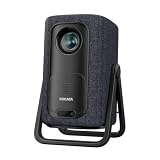
- 【1.1:1 Short Throw Ratio – Big Screen in Small Spaces】 Get a massive 100-inch image from just 2.44m (8 ft) away. Unlike long-throw mini projectors, this short throw portable projector fits apartments, dorms, or cozy bedrooms without rearranging furniture. True 1.1:1 ratio means you can place it on a coffee table or bookshelf and still enjoy giant, immersive visuals. Ideal for patios, balconies, or any tight space where you thought a big screen was impossible.
Another illustrative sizing guide
ProjectorCentral’s illustrative guide uses 2,500 lumens for a 100- to 150-inch image under high ambient light. This is a sizing illustration, not a guaranteed recommendation for a particular room, projector or screen.
Three ways to improve a bright-room setup
You can attack the problem at three points: reduce competing light, increase the projector’s useful output or use a screen designed to reject light from selected directions. The best result usually comes from combining modest improvements rather than relying on one specification.
1. Control the room first
- Darken the screen area. Close blinds or curtains, especially on windows that illuminate the screen directly.
- Move or switch off nearby lamps. A lamp aimed at the screen is more damaging than the same lamp behind the seating area.
- Change the projector or seating orientation. Avoid placing the screen where sunlight strikes it during the intended viewing time.
- Reduce reflections. Glossy walls, floors and furniture can bounce light back onto the screen; matte, darker surfaces reduce that secondary illumination.
- Check the room at viewing time. Daylight changes during the day, so evaluate the setup when you will actually watch or present.
These steps reduce the competing light that causes the washout. They do not increase the projector’s rated output, but they allow more of its existing contrast to reach your eyes.
2. Use the projector’s high-brightness controls carefully
Many projectors provide a high-brightness or daytime picture mode. BenQ’s GV50 FAQ specifically mentions a “Daytime” mode that brightens dim image regions. Use such a mode as a setup adjustment, not as a substitute for adequate output. High-brightness modes can alter color accuracy, fan noise or lamp/LED operating behavior depending on the model.
Crashes, No Sound, or Screen Glitches?
Random freezes, missing sound and display glitches usually trace back to one bad driver. Find and replace yours safely.Free scan · under a minutePC Slower Than It Used to Be?
A free scan shows the junk files, broken settings and background clutter dragging Windows down - then fixes them in one click.Free scan · Windows 10 & 11Start with the manufacturer’s normal or cinema mode when the room is controlled, then switch to the brighter mode only when ambient light requires it. Recheck focus, contrast and skin tones after changing modes.
3. Make the image smaller
Reducing diagonal size concentrates the same projector light on a smaller area. This is often the least expensive fix when the projector is already installed. BenQ’s 500 ANSI-lumen example—80 inches in darkness, 60 inches in soft light and 40 inches in a well-lit room without daylight—demonstrates how large the effect can be for one model.
If a large image is non-negotiable, a higher-output projector or a screen matched to the room becomes more important. Do not assume that digital zoom solves brightness; it changes the image size but does not create additional light.
Rank #3
![[4500 ANSI/Built in Apps/65W Audio] Outdoor 4K-Projector with WiFi and Bluetooth 5.4, Auto Focus Smart Projector Support DoIby Audio, Upgrade GO2 Short Throw Projector with 360°Stand](https://m.media-amazon.com/images/I/41WlmVV28sL._SL160_.jpg)
- 4500 ANSI Highest Brightness & Sturdy 360° Rotatable Stand---With upgrade LED lamp built in, the GO2 outdoor projector offers 100% brighter images than other smart projectors. It offers bright, vibrant and clear images even with some light on(not suitable for full light bright room). Perfect for rooms with little light or outdoor night movie. Plus, it comes with a exclusive 360° rotatable stand, offering ultimate flexibility—easily project onto ceilings, walls, or any surface from any angle. Redefine your space with brilliant, big-screen projection anywhere you desire. P.S: Brighter projectors will cause louder fan noise
- Built in Apps and Unparalleled Inner 65W Stereo DoIby Audio---The projector 4k with wifi and bluetooth is pre-installed apps like NetfIix, YouTube and prime video. No need to connect extra devices to watch these apps. Powered by an advanced built-in chip, it ensures smooth and seamless performance across all apps, no lag and slowdowns. Moreover, experience cinema-grade audio with our 65W DoIby-supported stereo speakers. Featuring deep bass and crystal-clear highs, it delivers room-filling sound—perfect for movie nights, parties, or outdoor gatherings. The inner sound ranks No.1 among USD 1000 outdoor 4k projectors. No need to connect with external speakers
- 1:1 Short Throw Ratio and 50000:1 Contrast Ratio and Giant Display Size---The GO2 projector for bedroom offers a 100" image from just 8 feet—30% closer than other home projectors (others require 10.8 ft). With same projection distance, the image size is 30% larger than others. Small rooms can enjoy big screens too. Contrast is the difference between the darkest part of the image and the brightest. 50,000:1 contrast ratio delivers deeper blacks and brighter whites—no washed-out images, just lifelike clarity. Moreover, the projector 4k+ offers 50" to 500" image(4-25 ft distance)—the largest scalable display in its class. (Recommended: 100" for optimal viewing)
- Native 1080P, MEMC and HDR10---GO2 movie projector adopted 0.47’’ DMD chip, which provides 2 times sharper and more detailed image compared to other native 1080P projectors with 0.33’’ chip. Every Frame in Stunning Detail. The MEMC function ensures smoother motion, reduced blur, and enhanced clarity for fast-moving content. With HDR 10, dark areas are deeper without losing detail, enhanced with advanced image processing, every scene comes alive with breathtaking clarity. Our proprietary image processing transforms your living room into a IMAX-level cinema, with image quality that rivals commercial theaters
- Smart AI Auto Focus & Auto Keystone Correction& Auto Screen Fit &Auto Obstacle Avoidance---Say goodbye to time-consuming manual adjustments! This proyector delivers a crisp, perfectly aligned image within just 3 seconds when we move it to a new place. The exclusive auto obstacle avoidance function detects and works around obstacles automatically and never let furniture or decor ruin your viewing experience. More, the intelligent screen alignment instantly adapts to your screen’s boundaries, keeping images perfectly framed. P.S: Please make sure the function is enabled before starting
When an ALR screen helps
An ambient-light-rejecting screen uses an optical surface designed to reflect projector light toward viewers while reducing light arriving from selected directions. It can preserve contrast when the room cannot be fully darkened, but it is directional rather than magical.
Match the screen to the light path
Before buying an ALR screen, identify where the projector’s light comes from and where the unwanted light comes from. A screen designed to reject ceiling or side light may perform poorly if the room’s dominant light arrives from another direction. Verify the screen’s stated rejection direction, throw compatibility and intended projector type.
Check throw type and mounting restrictions
Ultra-short-throw (UST) projectors send light upward at a steep angle from a position close to the wall. Their ALR screens use a different optical structure from screens intended for standard-throw projectors mounted farther back. Do not pair a UST screen with a conventional projector without explicit compatibility confirmation.
Optoma’s ALR101e specification is a concrete example: it is a 100-inch UST screen, claims greater than 90% ambient-light rejection and lists average ambient illumination of 500–600 lux. It requires table-top or desktop projector installation and does not support ceiling mounting. Those are product-specific constraints, not properties of every ALR screen.
Understand gain and viewing angle
Screen gain describes how strongly a surface reflects light in a preferred direction. Higher gain can increase brightness for viewers near the optical axis, but it may narrow the useful viewing angle or produce brightness and color changes for seats farther to the side. Compare horizontal and vertical viewing angles with your seating layout, not just the gain number.
The Tool Desk
Outbyte PC Repair FREERepair Windows errors before they cause bigger problemsFix Now →Outbyte Driver Updater FREEFix the driver behind crashes, sound loss and screen glitchesFind Drivers →An ALR surface can also reveal hotspotting, sparkle or texture more readily than a basic matte-white screen, depending on the material and projector. Request the manufacturer’s installation and viewing-angle information before committing to a fixed screen.
Choosing among a brighter projector, room changes and an ALR screen
| Option | Best when | What to verify | Main trade-off |
|---|---|---|---|
| Reduce or redirect room light | You can control blinds, lamps or screen placement | Light on the screen at the actual viewing time | May not be possible in sunlit rooms or shared spaces |
| Buy a brighter projector | You need a large image and cannot darken the room | ANSI/ISO method, white output, color output, image size and throw distance | Higher cost, heat, fan noise or power use may result; specifications remain model-specific |
| Add an ALR screen | Light comes mainly from directions the screen is designed to reject | Throw type, rejection direction, gain, viewing angles and mounting rules | Optical restrictions, off-axis brightness changes and compatibility limits |
| Reduce image size | The existing projector is dim but installation can change | Target diagonal and seating distance | Less immersive viewing area |
A practical setup procedure
- Measure the intended image. Record the diagonal or projected width you actually need rather than the maximum size advertised by the projector.
- Observe the room at the worst lighting time. Note direct sunlight, windows, ceiling fixtures and reflections that reach the screen.
- Record comparable brightness specifications. Look for ANSI or ISO measurements and separate white and color brightness figures. Do not compare an unspecified “lumens” claim with a verified ANSI figure as if they were identical.
- Test light control before spending money. Close blinds, reposition lamps and try a smaller image. These changes reveal whether the room or the projector is the dominant limitation.
- Select the screen type. Use a normal screen when you can control the room; investigate ALR when uncontrolled light arrives from a direction the screen is designed to reject.
- Confirm geometry. Check throw distance, lens offset, UST versus standard throw and whether the screen permits the planned tabletop, wall or ceiling installation.
- Set the picture mode. Try the projector’s high-brightness or daytime mode in the bright condition, then verify color, focus and shadow detail.
- Judge from the seating positions. View the image from the left, center and right seats. An ALR screen can look different off-axis, particularly at higher gain.
Common mistakes and how to correct them
Buying by the biggest lumen number
A single lumen figure may describe white output only. If color brightness is much lower, colorful content can still look muted. Correction: compare the same measurement standard and look for both white and color output.
Rank #4
![Portable Smart Projector [Bundled with Google TV Stick 14.0 & 4K Support & Dolby] with WiFi and Bluetooth HDR10,Ceiling Mini Movie Short Throw Projector Outdoor Auto Focus for Home Theater Bedroom](https://m.media-amazon.com/images/I/51NiI6zAPpL._SL160_.jpg)
- [Google TV 14.0 | 10,000+ Apps | Sports & Live TV | Voice Control] This 2026 smart mini projector with WiFi and Bluetooth features the latest Android 14.0 system, giving you direct access to 10,000+ apps—Netflix, YouTube, Prime Video, Disney+, Sling TV, Hulu + Live TV, YouTube TV, and more—all on one easy home screen, no TV stick needed. With 1+32GB storage for smooth performance, it offers personalized recommendations and a unified entertainment hub. Use the voice remote with built-in Google Assistant to watch live channels—ESPN, Fox Sports, CNN, NBC, etc.—perfect for live events. This Google TV projector transforms any room into a personal theater.
- [Native 1080P with 4K Support | Ultra Short Throw] This 4K projector features native 1080P resolution with 4K decoding support — it reads 4K content and displays it at 1080P, delivering vibrant colors, deep contrast, and sharp details. With a 0.8:1 ratio, this ultra short throw projector delivers 60" at 3.5 ft / 80" at 4.6 ft / 100" at 5.9 ft, and up to 120" from just 6.9 ft — ideal for small spaces. For best clarity, keep it closer to the screen; larger distances may soften image quality. HDR10 enhances brightness and color accuracy, bringing every scene to life with cinema-quality clarity. Whether you're watching movies or gaming, proyector 4k transforms any room into a personal theater.
- [AI Auto-Setup: Focus | Keystone | Obstacle Avoidance | Screen Fit] No more manual adjustments. This projector for bedroom features an advanced AI auto-setup system that delivers a perfectly rectangular, crystal-clear image within seconds of power-on. Auto focus, keystone correction, obstacle avoidance, and intelligent screen alignment work together for a flawless picture every time—whether you place this portable projector outdoor on a nightstand, shelf, or at an angle. Zoom-out allows flexible screen sizing. 【Pro tip】If kept in a fixed spot, turn off Auto Focus & Auto Four-Corner Correction. Manually adjust once, and this movie projector will remember—no need to readjust next power-on.
- [WiFi 6 | Bluetooth 5.3 | Multi-Device Screen Mirroring] Equipped with next-generation WiFi 6 technology, this bluetooth projector ensures buffer-free streaming and lag-free gaming, even for 4K content. Bluetooth 5.3 enables seamless connectivity for headphones, speakers, or mobile devices. This phone projector supports screen mirroring from iOS, Android, laptops, and more—cast movies, photos, or presentations instantly to the big screen. HDMI ARC/CEC and USB ports offer versatile connections for soundbars, gaming consoles, or Fire TV Stick, making this tv projector the central hub of your home entertainment setup.
- [Ultra-Compact & Built-in Rotatable Stand] Weighing just 2.6 lbs (1.2 kg) and as compact as an iPad Mini, this small projector is designed for true mobility—perfect for travel, RV trips, dorm rooms, or backyard movie nights. The built-in rotatable stand allows flexible projection onto walls, ceilings, or even attic spaces. Whether you're lying in bed, camping under the stars, or hosting a party, this mini projector for iphone delivers big-screen entertainment anywhere you go.
Keeping a very large image in a bright room
Large images dilute available light. Correction: reduce the diagonal, improve light control or choose a projector whose measured output is appropriate for that size.
Using the wrong ALR screen
A UST ALR screen is not automatically suitable for a standard-throw projector. Correction: match throw type, light direction, gain and viewing angles, and read mounting restrictions such as the ALR101e’s tabletop-only orientation.
Expecting full daylight to look like a self-emissive display
Projection remains vulnerable to light on the screen. Correction: set expectations, schedule viewing for lower daylight, add curtains or use a smaller image. The available guidance does not establish that any projector-screen combination will match a television in full daylight.
What to expect in real use
In a room with curtains, controlled lamps and moderate image size, projection can be enjoyable without complete darkness. In a room with strong uncovered windows, the same projector may still be watchable but lose shadow detail and color intensity. The visible result cannot be predicted from lumens alone: room brightness, image size, screen, projector model, throw geometry and viewing angle all matter.
Manufacturer figures should therefore be read as bounded examples. Epson’s 2,500-lumen reference, BenQ’s GV50 size examples, Optoma’s ALR101e specifications and ProjectorCentral’s 2,500-lumen illustration each describe particular guidance or products. None is a universal threshold for every bright room.
Bottom line
Use a projector in a bright room if you can reduce light on the screen, accept a smaller image, choose genuinely comparable brightness specifications or install a compatible ALR screen. Start with the room and image size before buying hardware. If strong daylight remains on the screen and you require deep blacks and highly saturated color, projection may remain a compromise regardless of the advertised lumen rating.
Do these 3 things before closing this tab:
1Scan for outdated or missing drivers - takes under a minute2Clear out junk files and repair common Windows errors3Fix the driver behind crashes, sound loss and screen glitchesQuick Recap
Product prices and availability are accurate as of the date/time indicated and are subject to change. Any price and availability information displayed on Amazon at the time of purchase will apply.

