Recommended Free Tools
Short answer: You can safely troubleshoot HomeView’s external power setup yourself, but Apple does not publish a HomeView internal repair manual, parts catalog, or supported self-service procedure. If the fault remains after cable, adapter, outlet, and mount checks, Apple or an Authorized Service Provider is the documented route.
What you can—and cannot—repair yourself
Apple’s published Self Service Repair program covers selected iPhone, iPad, Mac laptop, Mac desktop, Apple display, and Beats products. HomeView is not on that supported-product list. Apple also does not provide a HomeView-specific procedure for opening the enclosure or replacing a screen, logic board, battery, port, speaker, or other internal component.
As an Amazon Associate I earn from qualifying purchases.
That distinction matters. A self-service repair is normally based on a model-specific manual, approved parts, specified tools, and, where required, post-repair software configuration. Without those instructions for HomeView, opening the device means improvising around unknown fasteners, adhesives, cables, shielding, and electrical connections. Apple’s documentation supports external diagnosis only; it does not establish a safe internal repair method.
You can still perform useful checks without opening the unit. Those checks isolate a failed outlet, cable, adapter, or wall-mount installation and may restore operation without replacing a HomeView part. If they do not, stop before disassembly and obtain a service estimate.
#1 Best Overall

- The original electronics toolkit: Designed for computer, smartphone, tablet, and gaming repair, backed by thousands of free instructions.
- Intentional selection: All the tools you need. A 64 precision bit driver set, tweezers, flex extension, opening tools, and anti-static wristband.
- Secure design: Magnetic case and foam insert ensure secure storage and transportation. Additionally, the inside of the lid serves as a sorting/organization tray.
- Lifetime Warranty: We'll replace anything that breaks, as long as you own it.
Start with the correct power requirements
Tabletop and wall-mounted HomeView models do not use the same minimum power specification. Match the rating to the model before buying an accessory or judging a power fault.
| Model | What is included or required | Minimum USB-C power specification | What to verify when troubleshooting |
|---|---|---|---|
| Tabletop HomeView | USB-C cable and USB-C power adapter included | Adapter rated at least 30W and supporting 15V at 2A or higher | Adapter rating, cable condition, firm connections, and outlet operation |
| HomeView (Wall Mounted) | Compatible third-party mount and power solution sold separately | USB-C cable and adapter rated at least 20W and supporting 9V at 2.22A or higher | Mount compatibility, installer wiring or power solution, cable routing, adapter rating, and direct-to-device testing |
For a tabletop unit, the practical accessory search phrase is “30W USB-C power adapter for Apple HomeView.” For either model, search for a compatible USB-C cable and compare the electrical rating with the requirements above. Do not assume that any USB-C charger is suitable merely because the connector fits; the stated wattage and voltage/current support must meet the model’s minimum.
External checks you can perform safely
These steps require no enclosure opening and use only ordinary inspection and cleaning. Perform them in order so that each result narrows the possible cause.
The Tool Desk
Outbyte Driver Updater FREEScan for outdated or missing drivers - takes under a minuteDriver Scan →Outbyte PC Repair FREERepair Windows errors before they cause bigger problemsFix Now →Rank #2

- Design and Thought - This brand-new kit is specially designed with precision screwdrivers and interchangeable bits. These MUST-HAVE, frequently used sizes come as single-unit screwdrivers, providing ultimate convenience for quick access without the hassle of constantly switching bits for different screws. The 10-piece precision bit set covers all sizes you might need for various repair projects - you may not use them often, but they'll be ready when working with different MacBook models.
- Wide Application - This compact repair tool kit is primarily designed for various models of MacBook Pro and MacBook Air (Ideal for disassembly, repair, cleaning, opening, and screen replacement), while also being suitable for other brands of computers, laptops, PCs, eyeglasses, Oakley sunglasses, iPhone repairs, toys, and other small electronics.
- Complete & Versatile – This all-in-one MacBook Pro/Air repair kit includes 4 precision screwdrivers (P5 Pentalobe, PH000, PH00 Phillips, T5 Torx), 10 interchangeable bits (T3/T4/T5/T6/T8 Torx, P2/P5/P6 Pentalobe, PH0 Phillips, Y0 Triwing), a suction cup, ESD-safe tweezer, a pry tool, and a spudger for complete DIY repairs.This comprehensive kit delivers the precision and durability needed for seamless MacBook maintenance.
- Magnetic Screwdrivers and Bits - This compact and versatile precision screwdriver repair tool kit comes with a magnetic bit driver that firmly grips all interchangeable bits, making it easy to handle screws during repairs. The 4 precision screwdrivers also feature magnetic tips for effortless repair work.
- Compact & Portable Case – This sturdy, space-saving kit neatly organizes all your screwdriver bits and tools, making it ideal for office or home use. Its slim design fits effortlessly in drawers, bags, or toolboxes without cluttering your space. A practical and thoughtful gift for anyone who may need macbook repair/maintenance need.
- Inspect the adapter and cable. Unplug the adapter from the outlet and disconnect the cable from HomeView. Look for cuts, crushed sections, bent or loose connectors, discoloration, fraying, or heat damage. Do not continue using visibly damaged equipment.
- Reconnect firmly. Reinsert the cable into the adapter and HomeView until each connection is fully seated. A partially inserted USB-C plug can produce an intermittent or absent power connection.
- Clean the contact areas. With everything disconnected, wipe the adapter, HomeView’s port, and both cable ends with a soft, dry, lint-free cloth. Do not introduce liquid, metal tools, compressed debris, or household cleaners into the port.
- Try another outlet. Connect the known-good setup to a different wall outlet. This separates a HomeView power problem from an outlet, power strip, or switched-socket issue.
- Substitute a compatible cable and adapter. Use another USB-C cable and power adapter that meet the model’s minimum specification. For tabletop HomeView, the substitute adapter must be at least 30W and support 15V at 2A or higher. For the wall-mounted model, use at least 20W and support 9V at 2.22A or higher.
- Bypass a wall mount temporarily. If the unit is wall mounted, remove it from the third-party mount and connect HomeView directly to a compatible USB-C cable and adapter. If it works off the mount, the mount, installer-provided power path, or mounting connection needs attention rather than the HomeView enclosure.
- Record the result. Note which cable, adapter, outlet, and mounting arrangement produced each symptom. This information gives Apple or a service provider a useful fault history and prevents buying duplicate accessories.
If HomeView remains unresponsive with a known-good, correctly rated setup and—where applicable—direct connection outside the mount, the remaining fault may be internal or service-related. The published guidance does not provide a user procedure for diagnosing that stage internally.
Parts and tools: what is actually available
Parts for external troubleshooting
- A compatible USB-C cable is the first replacement to test when the original cable is damaged or suspect.
- A USB-C power adapter meeting the exact model requirement is needed for a meaningful power test: 30W, 15V at 2A or higher for tabletop HomeView; 20W, 9V at 2.22A or higher for the wall-mounted model.
- Wall-mounted installations also depend on a compatible third-party mount and its separate power solution. Those components are not included with the wall-mounted unit.
- A soft, dry, lint-free cloth is sufficient for the documented cleaning step.
Tools for internal work
No HomeView-specific tool list is published. Apple’s general Self Service Repair description assumes a model-specific manual, parts, tools, and appropriate technical experience, but it does not turn that general program into authorization for HomeView. A precision screwdriver set, pry tools, heat equipment, probes, or replacement boards purchased without an official procedure could damage the product and still leave you unable to complete or validate the repair. Buying tools before a documented procedure and confirmed parts source exists is therefore hard to justify.
Do not infer that a replacement display, battery, board, or port is available simply because similar components exist for other Apple products. No verified HomeView internal parts catalog or teardown is established here.
Rank #3

- 【Universal】These spudger kit and pry tools professional designed for disassembling a variety of electronics - iPhone, android phone, laptop, tablet, apple watch, iPad, iPod, Macbook, computer, LCD screen, battery and more
- 【Plastic Spudger】Nylon spudger set is made of quality carbon fiber plastic, tough-yet-soft, which makes the tools effective at prying & opening electronics cases and screen without scratching or marring their surface
- 【More Tools】Metal Spudger helps pry and poke when you need a little more power. Ultra thin opening tool easily slips between the tightest gaps and corners. Opening picks are useful for prying open iPad and other glue-laden devices
- 【Package】This electronics pry tool kit includes 1 x plastic spudger, 1 x metal spudger, 1 x ultra-thin opening tool, 1 x hook tool, 1 x pry tool, 2 x opening tools and 4 x opening picks
- 【Warranty】Each electronic pry tool kit is covered by STREBITO's lifetime warranty and 30 days money-back. If you have any issues with your toolkit, simply contact us for troubleshooting help, replacement, or refund
When professional service is the safer path
Use Apple’s service intake after the external checks fail, when the device shows physical damage, or when the fault involves an internal component. Apple’s official options are a Genius Bar, an Apple Authorized Service Provider, or mail-in service. AppleCare customers may also see an Express Replacement option, subject to the terms of their plan.
Do these 3 things before closing this tab:
1Repair Windows errors before they cause bigger problems2Scan for outdated or missing drivers - takes under a minute3Clear out junk files and repair common Windows errorsApple’s HomeView service page displays an estimated $279 other-damage fee for out-of-warranty service and a $39 accidental-damage fee with AppleCare where that option is shown. These are displayed estimates, not universal quotes: Apple says inspection is required for a personalized estimate, and Authorized Service Providers can set their own fees. Region, device condition, coverage, and provider can therefore change the amount.
| Route | Documented procedure | Likely cost information | Coverage and risk |
|---|---|---|---|
| External DIY checks | Yes, for cable, adapter, outlet, cleaning, and mount isolation | Usually limited to an appropriate cable or adapter if replacement is needed | Lowest risk when performed with power disconnected and no liquids or tools in the port |
| Apple service | Apple controls the inspection and repair process | Displayed estimate: $279 other damage out of warranty; $39 accidental damage with AppleCare where shown; final quote requires inspection | Maintains an official service path; AppleCare and warranty eligibility are assessed under their terms |
| Authorized Service Provider | Professional service, but procedures and fees are provider-controlled | Provider sets its own fees; request a written estimate | Ask how coverage, parts, and any service guarantee apply before authorizing work |
| Internal DIY opening | No HomeView-specific Apple procedure located | Unknown parts, tools, and total cost; failed attempts can add replacement expense | Highest uncertainty, with possible device damage and warranty or future-service consequences |
| Replacement | No repair procedure required | Compare the device’s replacement price with the inspected repair quote | Provides a predictable outcome but discards the value of a repairable fault such as a cable or adapter |
Warranty, AppleCare, and service guarantees
Apple’s one-year limited warranty covers manufacturing issues. It excludes accidental damage and batteries that have worn down through normal use. A power failure caused by a defective component may therefore be treated differently from damage caused by impact, liquid, or ordinary battery aging; the service inspection determines how Apple classifies the problem.
Rank #4

- 【Wide Application】STREBITO precision screwdriver set has 120 bits, complete with every driver bit you'll need to tackle any fix or DIY project. In addition, this precision tool kit comes with 22 accessories, such as magnetizer, magnetic mat, suction cup, spudger, cleaning brush, tweezers, etc. Whether you're a professional technician or a amateur, this computer toolkit has what you need to repair all PC, cell phone, Macbook, PS4, Xbox, game controller, tablets, glasses, watch, etc
- 【Humanized Design】Our pc building tool kit has been designed with the professional in mind to maximize your repair capabilities. The screwdriver features a rubberized, ergonomic handle with swivel top, provides a comfort grip and smoothly spinning. Magnetic bit holder transmits magnetism through the bit, helping you handle small screws and parts. The blade can be extended for working in hard-to-reach areas. And flexible extension shaft is useful for removing screw in tight spots
- 【Magnetic Design】We put 2 magnetic tools in this laptop repair tool kit that save your energy and time, make your fixing job easier. The 5.7 x 3.3" magnetic project mat can keep all tiny screws and parts organized, prevent from losing and messing up, make your repair work more efficient. Magnetizer demagnetizer tool helps strengthen the magnetism of the screw driver tips to grab screws, or weaken it to avoid damage to your sensitive electronics
- 【Organize & Portable】All screwdriver bits are stored in rubber bit holder which marked with type and size for fast recognizing. And the repair tools are held in a tear-resistant and shock-proof oxford bag, offering a whole protection and organized storage, no more worry about losing anything. The tool bag with nylon strap is light and handy, suit for your tool case, easy to carry out, or placed in the home, office, car, drawer and other places
- 【Lifetime Warranty】The precision bits are made of 60HRC Chromium-vanadium steel which is resist abrasion, oxidation and corrosion, sturdy and durable, ensure long time use. This small screwdriver set is covered by STREBITO lifetime warranty and 30 days money-back. If you have any issues with your electronics tool kit, simply contact customer service for troubleshooting help, parts, replacement or refund. Buy the STREBITO electronics toolkit with confidence
Apple states that service and replacement parts are guaranteed for 90 days or for the remainder of the applicable Apple warranty term, whichever is longer. Keep the service paperwork and confirm exactly what was repaired or replaced.
Opening HomeView yourself introduces an additional coverage question. The published HomeView pages do not quantify a penalty or state a specific automatic warranty cancellation rule, but an unsuccessful or visibly altered repair can affect Apple’s ability or willingness to service the device. Before removing any panel or seal, ask Apple or the provider how the proposed work would affect warranty, AppleCare, and later service eligibility.
Risks of opening HomeView without a manual
- Unknown construction: Without an illustrated procedure, you may damage clips, adhesives, cables, shielding, or the enclosure while trying to reach a suspected part.
- Wrong-part purchases: There is no confirmed HomeView replacement display, board, battery, or port catalog in the published material described above.
- Electrical damage: Probing or reconnecting an unknown circuit can create a short or worsen a power fault.
- No validation method: Even if a component is replaced, there is no published HomeView post-repair calibration or software workflow to prove the repair is complete.
- Higher eventual cost: A failed attempt can turn a single-part service case into additional physical damage and may remove the option of an uncomplicated service intake.
- Unquantified outcome: Apple does not publish a HomeView DIY failure rate or repair-time estimate, so claims that an opening attempt is quick, cheap, or likely to succeed are not supported.
These risks are practical rather than a prediction that every opening attempt will fail. The decisive issue is the absence of model-specific instructions and verified parts, not a particular screwdriver technique.
Best Value
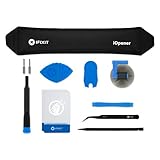
- LOOSEN ADHESIVE: This separator is designed to apply heat directly and evenly to screens to loosen the adhesive for removal during DIY repair.
- UNIVERSAL: Made for iPad, but also works with many tablets, iPhones, Android phones, PC laptops, or other electronics needing heat temperature application in the disassembly process.
- COMPLETE: Fix Kit includes tools that are commonly used for repairs that involve use of the iOpener.
- SAFE: Repair with confidence! This iOpener is easy-to-use, non-toxic, and food-safe.
Is HomeView worth repairing?
Make the decision after the external test and an inspection-based quote, not before. A simple decision framework is:
- If a cable, adapter, outlet, or wall-mount path is at fault, replace or correct that external item. This is the least expensive and least invasive outcome.
- If Apple or a provider quotes a covered manufacturing repair, use the covered service route rather than opening the device.
- If the estimate is $279 for other damage out of warranty, compare that inspected quote with the current cost of a replacement HomeView and the value you place on the existing installation and accessories.
- If AppleCare shows a $39 accidental-damage fee, compare that fee and any plan terms with replacement; the displayed amount is conditional on eligibility and inspection.
- If no provider can offer a documented repair or the quote approaches replacement cost, replacement may be more predictable than buying unverified internal parts and tools.
For a wall-mounted unit, include the cost and compatibility of the third-party mount and power solution in any replacement comparison. A replacement device that cannot use the existing mount or power path may require additional installation work.
What to tell Apple or a service provider
Provide the model style (tabletop or wall mounted), the adapter’s wattage and voltage/current markings, the cable used, the outlet tests performed, and whether direct connection outside the mount changed the symptom. Describe visible damage without attempting to repair it first. Ask three specific questions before authorizing service:
- What is the inspection-based estimate for this condition in my region?
- Will the quoted work be covered by the limited warranty or AppleCare, and what fee applies if it is classified as accidental damage?
- What service or replacement-part guarantee applies after the repair?
This information lets the technician distinguish an accessory or installation fault from a device fault and gives you a documented basis for comparing repair with replacement.
Bottom line
Repair HomeView yourself only at the external-accessory level: verify the outlet, clean and reseat the connections, test a correctly rated USB-C cable and adapter, and bypass a wall mount when applicable. Apple does not publish a HomeView internal repair manual or supported parts-and-tools workflow, so opening the enclosure is an unsupported experiment with uncertain parts, validation, and service consequences. If those checks fail, obtain an inspection and quote through Apple or an Authorized Service Provider before deciding whether the repair is worth its cost.
Quick Recap
Product prices and availability are accurate as of the date/time indicated and are subject to change. Any price and availability information displayed on Amazon at the time of purchase will apply.

