No—not as a universal built-in Google TV feature. Google documents limited customization for the Google TV Streamer Voice Remote: its star button can open Google Home, a favorite app or the device-input screen, and Google documents a separate option for changing which YouTube app the YouTube button opens. A third-party remapping app may handle additional keys on some Android TV and Google TV devices, but support depends on the exact television or streamer, remote, firmware and button. There is no supported basis for promising that every key on every Google TV remote can be reassigned.
What “remap every button” would mean
Remapping means changing the action generated by a physical key. For example, a shortcut key might open an app instead of its printed service, or a key might launch a settings panel. That is different from changing the order of apps on the home screen, pairing a replacement remote or using HDMI-CEC controls from another device.
As an Amazon Associate I earn from qualifying purchases.
Google TV hardware does not expose one universal button-remapping system. A Google TV television, a Google TV Streamer, and an Android TV device using a paired remote can process the same-looking key differently. Some keys are handled by the operating system, some by the television manufacturer and some by the remote itself. A remapping app can only change a key that the device exposes to it, and an accessibility service cannot guarantee control over keys intercepted earlier in that chain.
Recommended Free Tools
What Google officially lets you change
The Google TV Streamer Voice Remote star button
Google’s documented built-in feature applies to the Google TV Streamer Voice Remote, which has a star icon button. Google describes that button as a shortcut that can open the Google Home panel, open a favorite TV app selected from the available list, or display the input source for the television or another display device. The feature is therefore a small set of supported destinations, not a general “assign any command” editor.
#1 Best Overall
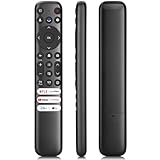
- 【Support TV Models】RC813 remote Only for TCL Google Smart TV 65QM850G 75QM850G 85QM850G 98QM850G 98QM851G 85QM851G 75QM851G 65QM851G 115QM891G 98QM751G 85QM751G 75QM751G 65QM751G 55QM751G 98S550G 43S551G 50S551G 55S551G 65S551G 75S551G 85S551G 75S571G 65S571G 55S571G 43S571G 55S470G 43S470G 50S470G 58S470G 65S470G 70S470G 75S470G 85S470G 43S450G 50S450G 55S450G 58S450G 65S450G 75S450G 85S450G 50S45G 32S370G 40S370G 43S370G 32S250G 55Q750G, 65Q750G 75Q750G 85Q750G 55Q670G 65Q670G 75Q670G 85Q670G 85Q650G 75Q650G 65Q650G 55Q650G 43Q651G 50Q651G 55Q651G 65Q651G 75Q651G 85Q651G 98Q651G 85Q681G 75Q681G 65Q681G 55Q681G 55Q550G 50Q550G 65Q550G 50Q570G 55Q570G 65Q570G 75Q570G etc.
- 【No Pairing Required】Replacement remote control compatible with TCL RC813 remote, no programming and no pairing needed, just put 2*AAA batteries in and it will work immediately. (Note: Batteries and manual are not included) (Not for TCL Roku TVs) (Not for TCL Fire TVs)
- 【Stable & High-Quality】 Strongest signal by Infrared technology further transmission for multi-angle induction. Precisely control far from 12 meters/40 feet.Fastest response not over 0.2 second to your TV, It supports over 120,000 clicks approved test
- 【6 Popular Shortcut Keys】One key quickly access to popular streaming channels --- NFLX, p-video, YouTube, Channel, Dis and Apple TV. Save you searching time and enjoy a good leisure time faster
- We test it before delivery to make sure it's working. If you are caught in some problems when using our products, welcome to contact us at any time. We are committed to providing you with a satisfactory solution promptly.
Google’s official instructions are at Set up the Google TV Streamer Voice Remote customizable button. They are specifically for the Streamer remote. The existence of the menu on that remote does not establish that the same control appears on every Google TV television or every remote sold for Android TV.
The YouTube button
Google’s remote overview also documents changing the YouTube button so that it opens a preferred YouTube app. This is a specific behavior for that key. It should not be read as permission to assign arbitrary apps, settings or commands to every other shortcut key. Details and supported behavior are described in Google’s Google TV Streamer Voice Remote overview.
What is not established as a built-in feature
Google’s documentation does not provide a universal editor for Home, Back, directional navigation, voice-assistant, power, volume or every branded shortcut key. It also does not publish a compatibility table showing that a particular setting works across all Google TV televisions, streamers, remote revisions and firmware versions. Treat a key as remappable only when your device exposes an explicit setting or a remapping tool detects and successfully changes it.
Rank #2

- 【Compatibility】Replacement for white Google-Chromecast-Remote, for Snow Chromecast with Google TV HD/4K & Google TV Streamer 4K.
- 【Voice Search】Pressing the voice button on the remote, not only can you use voice search to find your favourite entertainment, but you can also use voice to control the volume, switch inputs, play music, and get answers on-screen
- 【EASY TO PAIR】Pair your new remote in just two steps: ①. Press the pairing button on your device; ②. Press and hold the Back and Home buttons simultaneously for 10 seconds until the LED on your new remote starts flashing
- 【BATTERIES COMPATIBLE】Insert 2 * AAA batteries. (Package not included batteries)
- 【FEATURES】32ft Range, 0.2s Response, 120K+ Clicks Tested. Features Anti-Slip Dot Design & Multi-Angle Control for Stable Operation.
How to configure the Streamer’s built-in shortcut
Use these steps only when the remote is the Google TV Streamer Voice Remote and the star-button setting is present:
- Press the customizable star button on the remote. This opens the shortcut setup prompt on supported Streamer installations.
- Select the shortcut type offered by the screen: Google Home panel, a favorite app from the available list, or device inputs.
- Follow the on-screen instructions to choose the app or input, if that shortcut type requires a selection.
- Test the button from more than one screen. Confirm that it opens the intended destination and that returning to normal navigation still works.
You can also edit the assignment by holding the customizable button for one to two seconds, according to Google’s instructions. If the hold gesture does not open an editor, use the settings route instead: All Settings → Remotes & Accessories → Set up remote buttons → Customizable button. Menu wording can vary with the device software; if that path is absent, the remote may not support Google’s documented shortcut feature.
Can a third-party app remap more keys?
Possibly. The Google Play listing for Button Mapper TV QuickActions describes support for Android TV and Google TV and says actions are assigned after its Accessibility Service is enabled. The listing mentions examples such as Home and streaming-service keys. Those are the developer’s claims, not a guarantee that every named key is detectable or overrideable on every television, streamer, remote or firmware version.
Rank #3

- 【Compatibility】Voice replacement for white Google-Chromecast-Remote, for Chromecast with Google TV Remote, for Google TV HD/4K Streaming Stick, for Google TV Streamer (4K). Only for Snow Chromecast Google!!
- 【Incompatible Devices】NOT Compatible with Google Chromecast lst Gen, NOT for Google Chromecast 2nd Gen, NOT for Google Chromecast 3rd Gen, NOT for Chromecast Ultra, NOT for Chromecast Audio
- 【Easy to Pair】Pair your new remote ①Press the pairing button on your device; ②Press and hold the"Back" and "Home" buttons simultaneously for 10 seconds until the LED on your new remote starts flashing
- 【Voice Control】Pressing the voice button on the remote, you can use voice to search for specific shows, or by mood, genre, actress, and more. Talk to Google and say, "What should I watch?" And use the remote to control the volume switch inputs, play music, and get answers on-screen
- 【Preferred Features】The replacement remote for Google Chromecast TV has 2 shortcut buttons for popular streaming channels,and needs to install new 2*AAA batteries to use(batteries are NOT included in package)
A cautious installation and test process
- Identify the exact device receiving the remote input: a Google TV television, a Google TV Streamer or another Android TV product. Record the remote model and, if visible, the device software version.
- Read the app’s current Google Play description and install it only if you are comfortable granting the requested Accessibility Service. That service can observe or act on interface events, so enable it deliberately rather than treating it as a harmless toggle.
- Assign one low-risk key first. A shortcut that you can easily undo is safer than beginning with Home, Back, directional controls, power or volume.
- Press the physical key repeatedly in different contexts and verify both the old and new behavior. A key may be recognized on one screen but intercepted by the system on another.
- Keep a reliable route to the home screen before changing navigation. If the app offers a disable, reset or clear-assignment control, note where it is before testing.
- Remove the assignment or disable the Accessibility Service if the result is inconsistent, a key stops working or normal navigation becomes difficult.
Do not infer compatibility from another person’s success. A remote can send a code that one device exposes to an app while another device consumes internally. Manufacturer restrictions and firmware updates can also change what the service sees.
Do these 3 things before closing this tab:
1Repair Windows errors before they cause bigger problems2Scan for outdated or missing drivers - takes under a minute3Clear out junk files and repair common Windows errorsWhich buttons are most likely to be difficult?
| Button category | What the available documentation establishes | Practical implication |
|---|---|---|
| Streamer star button | Google officially supports Google Home, a favorite app or device inputs. | Use the built-in setup before installing an app. |
| YouTube shortcut | Google documents opening a preferred YouTube app. | This is a specific remap, not a universal action picker. |
| Home, Back and directional keys | A third-party listing claims examples including Home, but no complete compatibility matrix is supplied. | Test cautiously and preserve another way to reach Home. |
| Voice-assistant key | No source establishes universal replacement. | It may be handled specially by the device or remote. |
| Power and volume | No source establishes universal replacement. | These may be controlled by television hardware or HDMI-CEC behavior rather than ordinary app events. |
| Branded streaming-service keys | The third-party listing refers generally to streaming-service keys. | Detection and override must be checked on the individual setup. |
Why the same remote can behave differently
“Google TV remote” describes a family of products, not one hardware standard. A television may add manufacturer-specific keys and firmware. A separate streamer may expose its own remote settings. A remote paired with a different Android TV device can send the same physical signal to software with different interception rules. Even two devices that show the same Google TV interface can differ in whether a key reaches an accessibility service.
Remote pairing is another variable. If a key is sent over Bluetooth, infrared or a device-specific protocol, the receiving hardware may translate it before Android sees an input event. The available sources do not identify which transport is used for every key or provide a success percentage. Consequently, a remapping guide can give a process, but it cannot promise a result for an unspecified remote and device combination.
Rank #4

- Voice search function:Press the for Google Assistant button on the remote to use your audible to find your favorite content, control volume, switch inputs, play music, and get answers, quickly search thousands of popular channels, and play entertainment by voice.
- Sensing Distance: Excellent response between the new G9N9N remote control and the TV with an optimal distance of 5 meters. Maximum length is 10 meters.
- High quality:The G9N9N Replacement telecontrol Control is made of high quality ABS with no odor, lightweight and ergonomic design makes it very comfortable with soft and very responsive buttons. Combining the functionality and performance of the original remote control, with all the basic buttons and functions you can easily control your for Google Chromecast 4K Snow with a stable signal and comfortable grip.
- Easy pairing:Press the Chromecast button to turn on pairing mode and notify you via the TV screen. Next press and hold the BACK and HOME buttons at the same time until the light on the remote starts blinking, release the buttons when the light comes on and the remote pairing is complete.
- Applicable models:G9N9N Replacement telecontrol for Chromecast (for Google TV), Chromecast for Google TV, for GA01409-US, GA01920-US, GA01923-US, GA01919-US, GA02463-Us, GA02464-US requires Chromecast (for Google TV).
Troubleshooting a failed or unsafe remap
The app does not detect the key
Confirm that the Accessibility Service is enabled and that the app is running on the device receiving the remote signal. Try the key in a different app and on the home screen. If it remains invisible, the device may consume it before the remapper can observe it; choose another key rather than repeatedly changing unrelated settings.
The key works only sometimes
Record where it works and where it fails. System screens, playback screens and manufacturer overlays can process events differently. Remove the assignment if the behavior is unpredictable, then test a single action again after restarting the device. Do not assume intermittent behavior will correct itself after normal use.
The Tool Desk
Outbyte PC Repair FREEClear out junk files and repair common Windows errorsFree Scan →Outbyte Driver Updater FREEFix the driver behind crashes, sound loss and screen glitchesFind Drivers →Home or navigation no longer works
Use any remaining physical Home or navigation route, the on-screen controls available in the current interface or a second paired input device to reach settings. Disable the remapping app’s Accessibility Service and clear its assignment. If you cannot reach those controls, unpairing or resetting hardware may be required; the exact recovery path is device-specific and is not supplied by the compatibility information available here.
Best Value

- 【COMPATIBILITY】 Voice Remote Replacement for Google TV Streamer 4K Remote, for Chromecast with Google TV Remote(4K/HD).
- 【VOICE INTERACTION】Control your entertainment hands-free with Google Chromecast Remote—powered by voice interaction. Just speak to search shows, adjust volume, or launch apps instantly.
- 【QUICK PAIR】Quick 2-Step Pairing①Press the button on the back of your Google device ②Hold "Back" + "Home" on the remote for 10 seconds until the LED flashes.
- 【SHORTCUT KEYS】Upgrade your streaming experience with replacement remote featuring dedicated YouTube and Netflx buttons.
- 【RAPID RESPONSE】26 feet long-distance remote control, 0.2 seconds fast response, 50,000 times presses for durability, requires 2 * AAA batteries. (Batteries not included in package)
The built-in star-button menu is missing
Check the hardware first. Google’s instructions target the Google TV Streamer Voice Remote. A Google TV television remote or an older remote can lack the star button or the documented menu. Installing a third-party app does not add Google’s built-in shortcut screen; it provides a separate, app-dependent method with its own limitations.
A practical decision guide
- Identify the hardware. Write down whether you have a Google TV television, Google TV Streamer or another Android TV device, and which remote is paired.
- Use Google’s feature when it fits. On the Streamer Voice Remote, assign the star button to Google Home, a favorite app or device inputs through the documented menu.
- Check the YouTube-specific option. If your goal is to choose which YouTube app opens, use the behavior documented in Google’s remote overview rather than a broad remapper.
- Use third-party software only for a specific remaining need. Install a compatible remapping app, enable its Accessibility Service only after considering the permission, and test the exact key on your own device.
- Protect recovery. Leave at least one known path to Home and avoid changing essential navigation until a low-risk assignment has worked reliably.
- Remove what fails. If a key is not detected, becomes inconsistent or interferes with normal control, undo the assignment and disable the service.
The bottom line on “every button”
Google TV does not offer a universal built-in way to remap every button on every remote. The clearest official options are the Google TV Streamer Voice Remote’s star-button shortcuts and the documented choice of a preferred YouTube app for the YouTube key. A third-party accessibility-based remapper can expand the possibilities on some Android TV and Google TV hardware, but its results are device- and key-dependent. The only dependable answer for a particular button is to test that button on the exact remote and device while keeping a recovery route to Home.
Quick Recap
Product prices and availability are accurate as of the date/time indicated and are subject to change. Any price and availability information displayed on Amazon at the time of purchase will apply.

