You can connect a keyboard that makes its own sounds to an amp using an audio cable from the keyboard’s audio output to the amp’s audio input. A MIDI-only controller cannot send sound to an amp by itself: it needs a sound module or computer with a software instrument, and that sound source must then send audio to the amp.
Can you connect a MIDI keyboard directly to an amp?
Usually, not through the keyboard’s MIDI port. MIDI carries note, timing, and control messages; it is not an audio signal. An amp needs audio to reproduce what you play.
As an Amazon Associate I earn from qualifying purchases.
First check whether your keyboard has built-in sounds. If it does, use its audio output. If it is a MIDI-only controller, add a sound source such as a hardware sound module or a computer running a software instrument, then connect that source’s audio output to the amp.
The Tool Desk
Outbyte PC Repair FREEClear out junk files and repair common Windows errorsFree Scan →Outbyte Driver Updater FREEFix the driver behind crashes, sound loss and screen glitchesFind Drivers →Choose the signal path that matches your keyboard
Keyboard with built-in sounds
Connect the keyboard’s audio output to the amp’s audio input:
#1 Best Overall

- Connector A: MIDI DIN 5-pin male; Connector B: 6.35 mm female. Packing quantity: 1x 5-Pin Din Male to 6.35mm Female Audio Cable.
- Applies to: DIN 5-pin to 6.35mm adapter cables are used to connect speakers, amplifiers, mixers and recorders to MIDI keyboards, synthesizers, organs, electric pianos, guitars and other stereo equipment with DIN 5-pin connectors.
- Anti-interference: Nickel-plated contacts for rugged durability and efficient signal transfer. Oxygen-Free Copper (OFC) conductors for enhanced signal clarity OFC spiral shield for effective EMI and RFI rejection and flexibility.
- High-Quality Material: Durable thick PVC jacket helps protect the cable from abrasion, reduce cable stress to protect the cable, high-quality copper core ensures model transmission, nickel-plated connectors are corrosion-resistant and have a longer service life.
- MEIRIYFA MIDI Cable is used Compatible to connect MIDI devices and instruments, and other peripheral devices 6.35mm audio convert.
Keys → internal sound generator → keyboard audio output → amp audio input
For example, Roland’s AX-Edge manual says the instrument has no internal amp or speakers and instructs users to connect its rear-panel OUTPUT jacks to an external audio device. See the AX-Edge Owner’s Manual for that model’s connection instructions.
MIDI controller with a sound module
Connect the controller’s MIDI OUT to the module’s MIDI IN, then connect the module’s audio output to the amp’s audio input:
Free tools Windows power users keep installed
One-click scans. No signup required.
Rank #2

- Package Content: You will get 2 pieces of Type A 3.5mm/0.14in TRS to male 5-pin DIN MIDI Cables in the package, measuring about 1.5m/59in long, providing a hassle-free setup without tangling, perfect for studio and stage use.
- Excellent Material: Made of good quality PVC and copper wire, our cables are reliable, long-lasting uses, not easy to wear, break or damage. You can buy them with confidence.
- Compatible With: Works with all MIDI devices featuring a 5-pin DIN and 3.5mm/0.14in TRS port, including drum machines, synthesizers, and DAW controllers, ensuring good quality MIDI transmission.Please note that our styles are not compatible with MIDI TRS Type B. Please confirm your device’s interface before purchasing.
- Portable Design: This compact cable easily fits into your gig bag or studio desk, making it an essential MIDI cable for musicians on the move who require dependable Type A TRS to MIDI connectivity.
- Plug-and-Play Setup: No drivers required—simply plug in your MIDI-compatible equipment and start making music. Ideal for music producers, DJs, and live performers who need seamless MIDI-to-audio conversion on the spot.
Controller MIDI OUT → sound module MIDI IN → sound module audio output → amp audio input
Yamaha’s MU50 setup illustrates this arrangement: its manual shows a MIDI keyboard connected to the MU50 over MIDI, with the MU50’s LINE OUT/PHONES connected to an amplifier or speaker system. For an amp with one input, Yamaha directs users to use the module’s L/MONO output. See the MU50 Owner’s Manual.
MIDI controller with a computer
The controller sends MIDI to the computer, where a DAW or other software instrument generates audio. Send that audio from the computer’s audio output—or from an audio interface, if your setup uses one—to the amp’s audio input. The precise routing depends on the computer, software, and connected equipment.
Rank #3

- Package Included: You will receive 2 Type A MIDI to 3.5mm adapters to ensure smooth signal transmission between MIDI controllers, synthesizers, and audio interfaces. The 9.5-inch long flexible cable between interfaces provides easy and convenient connection.
- Universal Compatibility: Compatible with devices with 3.5mm Type A MIDI and 5-pin DIN interface devices, including drum machines, synthesizers, and DAW controllers, it is an ideal choice for modern MIDI to 3.5mm devices.
- Durable and Reliable: Our adapters are made of high-quality PVC shielding, which is sturdy and wear-resistant, ensuring a secure connection to devices equipped with traditional MIDI jacks to prevent accidental disconnection during performances.
- Plug and Play: Just connect a MIDI-compatible device to start creating, no drivers required, convenient and fast, perfect for musicians in the studio and on stage performances.
- Compact and Portable: Small size and light weight, can be carried with you, easily put into your bag or studio. Perfect for music producers, DJs and live who need instant MIDI to audio conversion.
Do not assume that a computer’s USB connection carries audio just because it carries MIDI, or vice versa. Check the relevant manuals to see what each USB port supports.
Do these 3 things before closing this tab:
1Scan for outdated or missing drivers - takes under a minute2Clear out junk files and repair common Windows errors3Fix the driver behind crashes, sound loss and screen glitchesConnect the audio output and amp input correctly
- Identify the sound source. Confirm that the keyboard has built-in sounds. If it does not, choose and connect a sound module or software instrument before expecting to hear notes.
- Find the audio jacks. Look for an audio output on the keyboard or sound source and an audio input on the amp. MIDI IN and MIDI OUT are not audio jacks.
- Match the cable to both devices. Check the connector type and whether the output and input require mono, stereo, balanced, or unbalanced wiring. Follow the manuals for the exact models.
- Set levels low before powering up. Follow the equipment manuals, then turn on the devices and raise volume gradually.
- Choose the correct output for mono. If the keyboard or module labels an output L/MONO and the amp has one audio input, use that jack when the manual specifies it.
What cable do you need?
Use an audio cable that matches the keyboard or sound module’s audio output and the amp’s audio input. There is no one cable that suits every keyboard and amp. For the AX-Edge specifically, Roland specifies a 1/4-inch unbalanced mono cable for its outputs; other instruments may have different connectors or output arrangements.
A 5-pin DIN MIDI cable serves a different purpose: it carries MIDI control data between compatible MIDI OUT and MIDI IN ports. It does not carry the keyboard’s audio to the amp.
Rank #4

- Product: 5-pin DIN male to 3.5mm female cable (L=1ft, 0.3M).
- The product cable is made of high-quality oxygen-free copper and has high signal output.
- The product is used to connect speakers, recorders, amplifiers to MIDI keyboards, electric pianos, guitars and other stereo equipment.
- The product is suitable for: 6.35mm interface professional audio microphone connected to MIDI interface equipment or instruments, conventional wiring method.
- Product package contains: 1 piece 5-pin DIN male to 3.5mm female cable.
Mono output, stereo output, and the headphone jack
If the amp has one audio input, the instrument’s labeled L/MONO output is commonly the intended connection when the manufacturer specifies it. Roland’s AX-Edge manual directs users to L/MONO when connecting to a mono device; Yamaha gives the same guidance for the MU50 when an amplifier has one input. Follow your own instrument’s manual rather than assuming every left output behaves the same way.
A headphone output may let you monitor a keyboard directly with headphones. Roland’s AX-Edge manual says headphones can be connected to PHONES without connecting another audio device. That does not make every headphone jack the right match for every amp: verify the connector and level requirements before using one as an amp output.
Quick wins for a faster PC:
Fix the driver behind crashes, sound loss and screen glitchesFind Drivers →Clear out junk files and repair common Windows errorsFree Scan →Scan for outdated or missing drivers - takes under a minuteDriver Scan →What if the amp has a MIDI input?
An amp’s MIDI input may control amp functions, but it does not necessarily turn incoming keyboard notes into sound. For example, Roland documents 5-pin MIDI control of channels and effects for specified KATANA Original, MKII, and GEN 3 models. That procedure applies to the listed models and their supported functions, not to every amp. See Roland’s KATANA MIDI control instructions for the compatible models and setup details.
Best Value
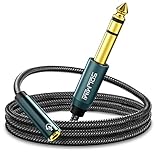
- Universal Audio Adapter - SOLMIMI 1/4 to 3.5mm adapter cable is TRS 6.35mm male plug to a 3.5mm female jack adapter, for connecting smartphones, tablets, or headphones with standard 3.5mm plugs to audio devices with a 6.35mm stereo jack. Eg: mixer, guitar amp, piano, amplifier, speaker, and more.
- Plug and Play - You can listen to the music from guitar, piano keyboard, or amplifier with a headphone through this 1/4 to 1/8 headphone jack adapter cable. It can also be used as a headphone extension cable which gives you a little more flexibility when you need to move around the stage or studio.
- Premium Materials - SOLMIMI 6.35mm to 3.5mm headphone adapter is made of oxygen-free copper, to ensure high fidelity sound quality without current noise; polished 24K gold-plated connector, to minimizes noise and interference; top-notch construction, premium conductors, and ingenious design for a clean and dynamic sound at the price of generic cables; aluminum shell protects cables from damage.
- User-friendly Design - Firstly, this SOLMIMI 3.5mm to 1/4 adapter audio cable is covered by strong nylon braids, it's soft touchable, tangle-free, and last. Secondly, it has a recessed portion on the plug, which makes it easier for plugging in and out. Thirdly, the step-down design is more friendly for a phone case. Fourth, this lightweight headphone adapter will be a great partner for your headphones, silently sleep in your little pocket, or, vividly sing in your ear!
- Reliable Warranty - 24/7 customer support and 12-month unconditional warranty will solve any issues for you. Buy with confidence and contact us freely!
Troubleshoot silence, distortion, or missing control
No sound from the amp
- Check that the keyboard has an internal sound generator, or that a connected module or software instrument is producing sound.
- Make sure an audio output—not just a MIDI port—is connected to an audio input on the amp.
- Check that the devices are powered and their volume controls are raised. Increase levels gradually and consult the manuals for appropriate settings.
The sound module does not play notes
- Check the connection direction: controller MIDI OUT to module MIDI IN.
- Confirm that both devices are powered and that the module is set to receive notes on a compatible MIDI channel.
Audio is missing on one side or mono does not work
- Check whether the amp accepts one input or a stereo pair.
- Consult the keyboard or module manual for its mono-output instructions; use L/MONO when the manufacturer specifies that jack for a mono connection.
- Verify that the cable’s connectors and wiring match the devices.
The sound is distorted or too quiet
Lower the keyboard output and amp input gain, then bring the levels up carefully. Check the manuals’ level guidance and confirm that the amp input is suitable for the source.
The amp does not change channels or effects
Verify that the exact amp model supports the MIDI function you want, that the controller transmits on the required channel, and that any model-specific settings are configured. An amp’s MIDI control capability is separate from the audio connection needed to hear the keyboard.
Quick Recap
Product prices and availability are accurate as of the date/time indicated and are subject to change. Any price and availability information displayed on Amazon at the time of purchase will apply.

