Two DGX Station GB300 systems can be linked for larger workloads, and NVIDIA describes a combined coherent-memory architecture that can make very large models accessible locally. But the published specifications do not show that every model will run at GPU-memory speed, establish a validated two-cable setup, or prove that a two-station system avoids the performance cost of accessing slower memory. Treat “without the offload penalty” as an unproven claim, not a demonstrated result.
What two DGX Station GB300s can—and cannot—establish
NVIDIA documents DGX Station as a desktop system built around its GB300 Grace Blackwell Superchip, with a Blackwell Ultra GPU connected to a 72-core Grace CPU over NVLink-C2C. The DGX Station Development Guide, updated July 22, 2026, specifies up to 20 petaFLOPs of sparse FP4 AI compute. Those are manufacturer specifications; they do not predict the token rate of a particular model or workload.
As an Amazon Associate I earn from qualifying purchases.
NVIDIA says ConnectX-8 networking can link multiple DGX Stations, and its product specifications describe up to 800 Gb/s connectivity when a second station is paired. That supports the intended use of multiple systems for larger workloads. It does not, by itself, establish how a particular model is partitioned between two machines, how much traffic crosses the link, or what throughput and latency the resulting setup will deliver.
What’s actually slowing this PC down?
Pick the symptom - the matching free tool is one click away.
The distinction matters because “can run” may refer to a model being addressable or executable, while a practical deployment also has to meet a target for speed, context length, concurrency, and reliability. The cited NVIDIA materials do not provide an independent controlled test of the exact two-station, two-DAC configuration in the headline.
#1 Best Overall

- Support for upto four 5K displays
- Four Mini DisplayPort 1.4 connectors with latching mechanism1
- DisplayPort with audio
- HDCP 2.2 support
- 3 Years warranty
Does 748 GB of coherent memory all run at GPU speed?
No. NVIDIA’s 748 GB figure combines two physically distinct memory pools. “Coherent” describes how the CPU and GPU can address and maintain consistency across memory; it does not turn system memory into additional HBM or give both pools the same bandwidth.
| Memory pool | Capacity | Published maximum bandwidth | What the distinction means |
|---|---|---|---|
| GPU HBM3e | 252 GB | Up to 7.1 TB/s | The GPU’s high-bandwidth memory pool. |
| CPU LPDDR5X | 496 GB | Up to 396 GB/s | A separate system-memory pool accessible in the coherent address space; not equivalent in bandwidth to HBM. |
These are NVIDIA’s published specifications for DGX Station in its 2026 materials. The maximum bandwidth figures are not a guarantee that an application will achieve those rates. NVIDIA also specifies up to 900 GB/s for NVLink-C2C, the CPU–GPU connection; that figure does not make CPU memory as fast as GPU HBM.
What happens when a model exceeds HBM capacity
If a workload’s working set is larger than the 252 GB HBM pool, the additional LPDDR5X capacity can make local execution possible. Performance then depends on what the workload accesses in each pool: weights, activations, and the key-value (KV) cache can all affect memory traffic. This is an architectural implication of the published capacities and access behavior, not a measured result for a specific model.
Crashes, No Sound, or Screen Glitches?
Random freezes, missing sound and display glitches usually trace back to one bad driver. Find and replace yours safely.Free scan · under a minuteWindows Errors? Fix Them Before They Spread
Repair common Windows errors and clear accumulated junk for a smoother, more stable PC - no reinstall needed.Free scan · no reinstallNVIDIA’s development guide describes a default Coherent Driver-based Memory Management mode in which CPU memory allocated by the system is not migrated into GB300 GPU memory. It also says GPU access to CPU memory is uncached and warns that crossing the CPU/GPU boundary is limited by NVLink bandwidth. NVIDIA recommends Unified Memory as a programming convenience when a working set exceeds GPU memory; that recommendation is not a claim of zero latency or throughput cost.
What does “offload penalty” mean here?
The phrase can refer to different situations. A model may access CPU-side LPDDR5X because it does not fit in HBM, or a workload may be distributed across two networked stations. Neither is the same as sending inference to a cloud service. The performance consequences depend on the memory placement, software, model partitioning, and traffic pattern.
NVIDIA’s materials describe coherent memory, local model use, and multi-station networking, but they do not establish that these arrangements have no performance penalty. Nor do they provide a controlled comparison of the headline’s two-tower configuration against a cloud or other on-premises baseline. NVIDIA’s June 2026 Windows announcement presents local token generation as a way to offload costs; that is manufacturer positioning, not a measured total-cost comparison for this setup.
What is documented about connecting two stations?
NVIDIA’s 2026 product specifications list two QSFP112 Ethernet ports rated at 400 Gb/s per port and identify ConnectX-8 networking. NVIDIA also describes up to 800 Gb/s connectivity when a second DGX Station is paired. These are the published port and connectivity details; they do not confirm that two cables are required, that two links aggregate in a particular way, or that a specific application will use both links efficiently.
Rank #2
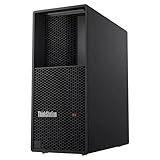
- Processor: Intel Core Ultra 9 285 vPro Processor (E-cores up to 4.60 GHz P-cores up to 5.40 GHz)
- Memory: 128 GB DDR5 Storage: 2 TB SSD M.2 2280 PCIe Gen4 Performance
- Graphic Card: NVIDIA RTX 4000 Ada Generation 20GB GDDR6 Warranty: 1 Year Lenovo Warranty
- Dimensions (H x W x D): 415mm x 180mm x 370mm / 16.3″ x 7.1″ x 14.6″ Weight: Starting at 13.61kg / 30.0lbs
A 400G QSFP112 DAC cable is a plausible category to investigate for a direct connection, but the reviewed NVIDIA materials do not give a validated cable part number, cable length, passive-versus-active choice, switch arrangement, or exact two-cable topology. Before ordering, ask the system OEM to confirm the compatible cable and the supported port-to-port or switched topology for the specific systems. The available documentation does not establish cable availability, price, or shipping details.
Which specifications matter when sizing a deployment?
| Specification | NVIDIA-published value | How to interpret it |
|---|---|---|
| AI compute | Up to 20 petaFLOPs, sparse FP4 | A peak manufacturer specification for the stated precision and sparsity mode, not a model-serving benchmark. |
| CPU–GPU link | Up to 900 GB/s NVLink-C2C | The documented connection between Grace CPU and GB300 GPU; it does not equal HBM bandwidth. |
| Networking | Two 400 Gb/s QSFP112 ports; up to 800 Gb/s described with a second station | Port and vendor connectivity figures, not evidence of a specific cable layout or application throughput. |
| Total system power | 1,600 W | NVIDIA’s published system specification; actual draw depends on workload and configuration. |
| Storage expansion | Four M.2 Gen 5 slots | Published expansion capability; the cited figure does not specify installed drives or usable capacity. |
NVIDIA also lists optional RTX PRO Blackwell-generation GPUs, including RTX PRO 6000 Workstation Edition, RTX PRO 6000 Blackwell Max-Q, RTX PRO 4000 Blackwell SFF, and RTX PRO 2000 Blackwell. Support varies by system, so confirm the exact configuration with the OEM rather than assuming an option applies to every DGX Station.
Independent reader supportYour contribution helps us test, update, and keep practical guides available for everyone.What NVIDIA’s frontier-model examples do—and do not—show
In a January 5, 2026 blog post, NVIDIA said DGX Station can run models up to one trillion parameters and named Kimi-K2 Thinking, DeepSeek-V3.2, Mistral Large 3, Meta Llama 4 Maverick, Qwen3, and OpenAI gpt-oss-120b as local examples. These are NVIDIA-reported capability examples. The cited passage does not give a complete benchmark for each model’s revision, quantization, context length, token rate, or concurrent request count, so it cannot establish performance for every variant or configuration.
The same post includes comments from ecosystem participants about local development and large-model use. Those comments are attributed statements reproduced by NVIDIA, not independent performance tests. A model name alone is not enough to determine how it will perform on one station, two stations, or a cloud service.
How to evaluate a two-station claim fairly
A useful comparison needs to make the workload and measurement conditions explicit. At minimum, ask for:
- The exact model revision and quantization, and the precision used for inference.
- Prompt length, generated-token length, context size, batch size, and concurrent requests.
- The serving framework and version, plus any relevant configuration.
- Whether weights and KV cache fit in HBM or access LPDDR5X, and how memory placement is managed.
- Whether inference runs on one station or is split across two, along with the partitioning method.
- The network topology, link utilization, and measured network traffic.
- Token throughput and latency percentiles, rather than only a peak compute figure or a single average.
- Wall power under the stated workload and the utilization level.
- The comparison system or cloud baseline, with the deployment period and fully loaded cost stated.
Without those details, claims such as “no offload penalty” cannot be checked against a defined workload. The official material establishes system capabilities and intended workflows, not a result on these comparison axes.
Practical decision
Two DGX Station GB300s are a documented multi-station option, and the coherent address space gives software access to more capacity than the GPU’s HBM alone. That can matter when a model or working set exceeds HBM, but it does not make all 748 GB equally fast. NVIDIA’s published information also does not validate a two-DAC bill of materials or demonstrate frontier-model throughput, latency, or cost savings for the exact two-system arrangement. Treat the hardware specifications as a basis for configuration planning, and require an OEM-confirmed network design and workload-specific measurements before relying on a claim of penalty-free inference.
Quick Recap
Product prices and availability are accurate as of the date/time indicated and are subject to change. Any price and availability information displayed on Amazon at the time of purchase will apply.
Do these 3 things before closing this tab:
1Clear out junk files and repair common Windows errors2Scan for outdated or missing drivers - takes under a minute3Repair Windows errors before they cause bigger problems
