For some of your week, yes. For all of it, probably not. The Galaxy Tab S7 FE can handle browsing, email, note-taking, video calls, streaming, and document reading well, and with a keyboard and Samsung DeX it can feel close to a laptop for light work. It cannot replace a laptop for any workflow that depends on desktop-only software, and because it runs Android, you have to verify each essential app before you commit.
The short answer
The Galaxy Tab S7 FE is a credible laptop substitute only when three conditions hold: your core apps run well on Android or in a browser, you are willing to add a keyboard, and your work does not require a desktop operating system. If any one of those fails, the tablet becomes a second device rather than a replacement. Treat the question as a test of your own app list, not a general verdict on the hardware.
As an Amazon Associate I earn from qualifying purchases.
Where the tablet can genuinely stand in for a laptop
Samsung positions the tablet as a productivity device, and several everyday tasks suit it well:
Recommended Free Tools
- Web research and browsing. A 12.4-inch screen gives you more room than a phone for multiple tabs and long pages.
- Email and messaging. Mobile apps and webmail work without friction in most cases.
- Notes and sketches. The S Pen is included in the launch configuration, which makes handwritten notes and markups practical.
- Video calls. The larger display and front camera are adequate for meetings, though the tablet has not been independently rated for call quality.
- Streaming and reading. The 2560×1600 panel suits video, PDFs, and e-books.
- Light document work. Viewing and light editing work in many cloud-based or mobile apps, provided the file formats you use are supported.
Where it falls short
The limits are mostly about software, not screen size or power. Four issues matter most:
#1 Best Overall
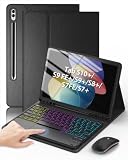
- Compatible Models: Compatible only with the Samsung Galaxy Tab S10+ 2024 12.4-inch models (Model: SM-X820, SM-X826B/ X820N/ X826N), S9 FE+ 2023 12.4-inch models (Model: SM-X610/ X616B), S9+ 2023 12.4-inch models (Model: SM-X810/ X816B/ X818U), S8+ 2022 12.4-inch models (Model: SM-X800/ X806/ X806B/ X806U/ X806N), S7 FE 2021 12.4-inch models (Model: SM-T730/ T733/ T736B/ T735), S7+ 2020 12.4-inch models (Model: SM-T970/ T976B/ T975/ T978). Not compatible with other models.
- Responsive Multi-Touch Trackpad: The trackpad supports multi-touch gestures and comes with a Bluetooth mouse. Whether you are working or playing, it makes controlling your tablet easier than ever. The trackpad also features a row of dedicated shortcut keys (Brightness, Volume, etc. ) that makes the tablet feel much more like a real laptop.
- Magnetic Detachable Keyboard: The keyboard is magnetic. You can detach from the case easily to switch to tablet mode and reattaches securely when you need to type. To use the keyboard, you need to turn it on, activate the Bluetooth function, and follow the pairing instructions displayed on the tablet.
- Adjustable 7-Color Backlit Keyboard: Featuring 3 brightness levels, 7 adjustable RGB pure backlight colors, and 3 lighting modes, you can easily switch between different lighting effects with a single key. It not only satisfys lighting requirements but also enhances the overall sense of sophistication.
- Adjustable Viewing Angles: There are 3 anti-slip grooves design inside of the case. You can choose a comfortable tilt angle to enjoy reading, painting, watching, etc. Built-in Pen holder to reduce the risk of losing your pen. (NOTE: Stylus not included!).
- Android, not Windows or macOS. DeX gives you a desktop-style layout, but the underlying system is still Android. Desktop-only programs, many engineering and accounting tools, and software that depends on specific plug-ins or drivers will not run.
- Office editing requires a separate license. Samsung’s US datasheet states that a Microsoft 365 license is required for purchase to edit Excel, Word, or PowerPoint documents, and that the license is sold separately.
- Some DeX apps will not run, or need a paid license. Samsung’s US datasheet says: “Certain apps may not run or may require license (for purchase) on Samsung DeX.”
- Specialized peripherals. Hardware that needs a desktop driver, a specific dock, or a particular port layout may not work. Check each device before you rely on it.
Hardware specifications that matter for this decision
The table below reflects Samsung’s 2021 launch announcement and US datasheet. These are manufacturer specifications, not independent measurements.
| Item | Value as stated by Samsung | Relevance to a laptop replacement |
|---|---|---|
| Display | 12.4-inch TFT, 2560×1600 (WQXGA) | Large enough for two windows side by side; resolution suits text and video |
| Operating system | Android 11 at launch | Determines which apps you can install; check the current version on your unit |
| Memory and storage | 4 GB RAM / 64 GB, or 6 GB RAM / 128 GB, depending on region | Storage can be expanded with microSD up to 1 TB; the 6/128 GB configuration is the better choice for multitasking |
| Weight | 608 g | Light enough for handheld reading, but the keyboard case adds weight |
| Ports | USB-C 3.2 Gen 1 with DisplayPort output | Required for a wired external monitor setup |
| Wireless | Wi-Fi 5, Bluetooth 5.0 | Adequate for most office use; Wi-Fi 6 is not included |
| Battery | 10,090 mAh typical capacity | A capacity figure only; the 45W charger is sold separately in some markets |
| Chipset (Wi-Fi model, US datasheet) | Qualcomm SM7225 | Confirms the Wi-Fi SKU; LTE or 5G variants differ |
Two cautions apply. First, the battery is a capacity specification. Samsung’s launch-era phrasing about long battery life is marketing language, and no independent workday battery test for this model is part of Samsung’s published material. Do not translate the mAh figure into an hours-of-use estimate. Second, regional configurations and connectivity variants differ. Confirm the exact model number under Settings > About tablet before you compare specifications with a listing or another model.
Rank #2

- !!!IMPORTANT: DO NOT update your tablet software to One UI 8.5 manually. Please turn off auto-update: Settings → Software update → (tap the ⋮(three dots) at the top right) → Auto download over WLAN → OFF. One UI 8.5 currently has a widely reported compatibility issue with our keyboard cases. After updating, the trackpad may stop working.
- 【!!!NOT FOR TAB S10 FE+ PLUS/S10 FE/S10 LITE/S11/S11 ULTRA/S10 ULTRA/S9 ULTRA/S9 FE/S9】Only compatible with Galaxy Tab S10+ Plus 12.4 inch 2024 (SM-X820/SM-X826B), Galaxy Tab S9 FE+ Plus 12.4 inch 2023 (SM-X610/SM-X616B), Galaxy Tab S9+ Plus 12.4 inch 2023 (SM-X810/SM-X816B), Galaxy Tab S8+ Plus 12.4 inch 2022 (SM-X800/SM-X806), Galaxy Tab S7 FE 12.4 inch 2021 (SM-T730/ SM-T733/SM-T736B), Galaxy Tab S7+ Plus 12.4 inch 2020 (SM-T976B/SM-T975). NOTE: Tablet and S Pen not included.
- 【EASY-SET MAGNETIC STAND】The durable aluminum alloy hinge guarantees a sturdy magnetic connection, instantly transforming your tablet into a laptop. Enjoy a floating cantilever stand with customizable angles tailored for typing, reading, and immersive viewing. Ideal for the on-the-go lifestyle, it's the perfect companion for travel, business, and work, ensuring seamless adaptability to your needs. (!!!The keyboard case ONLY fits 12.4 inch Samsung Galaxy Tab S10+ Plus/S9+ Plus/S9 FE+ Plus/S8+ Plus/S7 FE/S7+ Plus)
- 【HIGH-PRECISION MULTI-TOUCH TRACKPAD】Revolutionize your tablet experience with our keyboard case featuring an ultra-precise and dependable smart trackpad. Seamlessly supporting multi-finger gestures, it opens up a new realm of control with actions like tap, pinch, scroll, swipe, and more. Navigate through tasks with unparalleled speed, whether you're editing documents, browsing the web, or crafting presentations.
- 【S PEN HOLDERS】Keep your S Pen secure with two holders – a built-in magnetic holder in the keyboard for storage and a cut-out slot on the back cover for both charging and storage. Enjoy the convenience of quick access while preventing loss. The case folds into a slim folio for solid front and back protection, perfect for travel, business, or school.
DeX, multitasking, and external displays
DeX gives you a laptop-style layout
Samsung describes DeX as a PC-like experience. Its launch announcement states: “With Samsung DeX and a Book Cover Keyboard, you can use your tablet just like a laptop, transforming the UI to a PC-like experience while you power through your to-do list.” That is a fair description of the layout. It does not guarantee that every app behaves the way it does on a desktop, which is why the app check later in this article matters.
Quick wins for a faster PC:
Clear out junk files and repair common Windows errorsFree Scan →Scan for outdated or missing drivers - takes under a minuteDriver Scan →Multi-Active Window runs up to three apps
According to Samsung’s 2021 announcement, Multi-Active Window can show up to three apps at once. This is a stated software capability. Samsung has not published a sustained multitasking benchmark, so expect performance under heavy load to depend on the apps and memory configuration you choose.
Rank #3
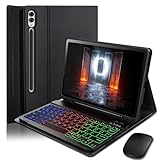
- ⌨【Models Compatibility】Designed ONLY for Samsung Galaxy Tab S10 Plus / Tab S9 Plus / S9 FE Plus / S8 Plus / S7 FE / S7 Plus 12.4 inch : Tab S10 Plus (Modelo: SM-X820/X826B/X820N/X826N) Tab S9 Plus/S9 FE Plus (Modelo: SM-X810/X816B/X610/X616B) Tab S8 Plus (Modelo: SM-X800/X806/X806B/X806U/X806N) Tab S7 Plus (Modelo: SM-T970/T976B/T975) Tab S7 FE (Modelo: SM-T730/T733/T736B/T735) You can check the model number before purchasing to make sure you get the correct size tablet keyboard case.
- ⌨【Magnetically Detachable Rainbow Backlit Keyboard】Case for Samsung Galaxy Tab S10 Plus / Tab S9 Plus / S9 FE Plus / S8 Plus / S7 FE / S7 Plus 12.4 inch comes with a removable 7-color rainbow magnetic keyboard. The ultra-thin, lightweight magnetic keyboard attaches securely to the case, turning it into a mini laptop in a second.Use the selectable backlight mode to choose your favorite color from 7 iridescent colors for smooth typing in the dark, even when working at night.
- ⌨【Adjustable Viewing Angles and Support for Pen】case supports 3 viewing angles and has anti-slip slots. Move the tablet forward or backward along the case to choose a suitable angle to use the tablet for writing, viewing, reading, drawing, etc. Built-in Pen holder makes it easy to carry the Pen with your device. (NOTE: Pen not included!).
- ⌨【Auto Sleep/Wake Function】The protective case has an automatic sleep/wake function to protect and save the battery life of your tablet. When the lid is opened, the tablet wakes up; when the lid is closed, the tablet goes to sleep. (NOTE: Tablet not included!).
- ⌨【Premium Protection】keyboard case for Samsung Galaxy Tab S10 Plus / Tab S9 Plus / S9 FE Plus / S8 Plus / S7 FE / S7 Plus 12.4 inch has full edge coverage and provides full 360° protection against scratches, bumps or dents, protecting your tablet from all kinds of dropping accidents. The inner layer provides cushioning with Honeycomb grid pattern, protects your tablet from overheating and increases its lifespan by more than 30%
Connecting a monitor
Samsung’s US datasheet says DeX on a monitor requires a supported display and can use an HDMI adapter, a multiport adapter, or a cable. Not every monitor or adapter is supported, so confirm compatibility with the exact display and adapter before buying either. If you plan to use a monitor for long sessions, check whether your adapter supplies power to the tablet during use.
What the full setup costs
The tablet itself is only part of the bill. Samsung’s materials indicate which items are included and which are sold separately:
Rank #4

- All Around Protection plus Possibility: Do More In A Snap With A Protective Cover That Doubles As A Keyboard
- Slim Yet Sturdy: Durable But Ultra-Lightweight Design Unfolds Easily
- Type On The Go: Type On Your Tablet Like You Would On A Pc, Anywhere You Go
- Large Keys: The Keyboard's Large Key Sizes Make For Confident Keystrokes
| Item | Included with tablet? | Source and notes |
|---|---|---|
| S Pen | Included in the launch configuration | Samsung launch specifications, 2021 |
| Book Cover Keyboard | Sold separately | Samsung launch announcement, May 27, 2021; needed for regular typing |
| 45W charger | Sold separately in some markets | Samsung launch announcement, 2021 |
| Monitor adapter or cable | Not included; required for an external display | Samsung US datasheet; a supported HDMI adapter, multiport adapter, or cable is needed |
| Microsoft 365 license | Sold separately; required to edit Office documents | Samsung US datasheet |
| Paid DeX-compatible apps | Varies by app | Some apps require a license for purchase on DeX, per Samsung US datasheet |
Current prices are not stated in Samsung’s materials for this model, and they vary by retailer and region. Get a current quote for every item in the table before comparing the total with a laptop.
Free tools Windows power users keep installed
One-click scans. No signup required.
Security updates and how long the tablet will be supported
Support horizon is the factor most often overlooked when a tablet is used for work. Samsung Mobile Security’s live update scope, checked on October 7, 2026, does not list the Galaxy Tab S7 FE among scheduled-update devices. Samsung states that the list changes periodically and that update availability and timing vary by market, carrier, and model.
Best Value

- Keyboard Case for Galaxy Tab S7 FE/S7Plus/S8Plus 12.4" - Smooth Touch Keyboard Cover Compatible for Samsung Galaxy Tab S7 FE 12.4 2021 (SM-T730/T736)/S7+ S7Plus 2020/S8+ S8Plus 2022 (Model SM-X800/X806), Equipped with a smart touchpad that can accurately control and navigate, realize the combination of tablet and computer functions, and enjoy an excellent notebook experience, bringing a special feeling to your Tab s7 fe/s7 plus/S8 plus, perfect for travel needs, business or school use
- Backlit Keyboard S8 Plus S7 Plus - Tab S7 FE tablet case with keyboard Type comfortably and accurately using the familiar laptop-like keyboard. Auto sleep and wake function not only can reduce daily charging, but also helps to extend the battery life of the tablet. Flexible keyboard keys for more responsive and accurate typing, US layout, with a full row of shortcut keys and well-spaced 3 level backlit keys, the 3 brightness levels let you work comfortably on the go, day or night, anytime, anywhere
- Bluetooth Keyboard with Trackpad Tab S8 Plus - Ergonomic touchpad Galaxy s7 plus wireless keyboard with trackpad uses the familiar multi-gesture control tablet for precise touchpad responsive control of your s7 fe tablet navigation without the need for a separate mouse, Multi-touch trackpad allowing you to Use it like a laptop to edit documents, navigate applications and build presentations with unmatched speed, precision and accuracy
- Multiple Angles Viewing Stand & S Pen Holder - for Samsung Galaxy Tab S7 FE/S7 Plus Keyboard Case with S pen holder & 3 different adjustable horizontal stand angles groove allows you to easily use your Samsung tablet for typing, note, watching video, etc. Easily adjust to the most comfortable angle for you. You can find the most suitable angle whether you are reading, working, or watching videos
- Unique Precise Cutouts Design - Precise cutouts allow full access to all ports, sensors, speakers, microphone and cameras, convenience for daily use. Unique slot for the use of S Pen, which can perfectly cope with whether it is the magnetic attraction on the side of the Tab S8 Plus S7 plus or the charging on the back. The strength and structural integrity of the keyboard case makes it ideal for any environment
That absence is not a promise about every unit or every app update. It is a signal to confirm the support status of your exact model before you rely on the tablet for work that handles sensitive data. Check Settings > Software update on the device, and compare the model number and update history with Samsung’s current support pages for your region.
A decision checklist before you buy
- List the five tasks you perform most often on your current laptop, and the exact app you use for each.
- For each app, confirm whether it has a native Android version, a full web version, or only a desktop version. If it is desktop-only, the tablet cannot replace that task.
- Test the apps you can install on the tablet before buying. Check that editing, file handling, and sync work without limits you cannot accept.
- Confirm whether any document format you exchange with colleagues requires a license to edit, and whether your organization requires specific software.
- Price the full setup: keyboard, monitor adapter, external display, and any app or Microsoft 365 licenses.
- Verify the exact model number and its current security-update status.
- If any indispensable workflow fails these checks, keep the laptop or choose a Windows or macOS device.
How to compare the tablet with a laptop
Compare the options on the same five axes, and do not assume either device wins across the board:
- App compatibility: Can each required app run natively, in a browser, or through DeX?
- Typing and pointing comfort: How does the keyboard case or trackpad or mouse setup feel for your typical day?
- Multitasking and external display: Do you need more than three windows, or a dual-monitor layout?
- Total setup price: Include the keyboard, adapters, and licenses, not just the device.
- Support horizon: How long will the device receive security updates for your model and region?
Samsung’s materials document the tablet’s features and caveats, but they do not provide a directly comparable speed or endurance benchmark against laptops. Judge those points by testing your own workload.
Quick Recap
Product prices and availability are accurate as of the date/time indicated and are subject to change. Any price and availability information displayed on Amazon at the time of purchase will apply.

