Quick wins for a faster PC:
Clear out junk files and repair common Windows errorsFree Scan →Scan for outdated or missing drivers - takes under a minuteDriver Scan →Repair Windows errors before they cause bigger problemsFix Now →Yes. Spotify’s Crossfade setting overlaps two consecutive tracks, fading one out as the next fades in. Spotify lists Crossfade as a Premium feature. To set it up, open Playback in the app’s settings and adjust the Crossfade control; the steps differ slightly between mobile and desktop.
What Spotify’s song-transition settings do
Spotify offers three distinct ways to change what happens between tracks. Crossfade creates an overlap, Automix can make beat-matched transitions on select playlists, and gapless playback removes pauses without overlapping songs.
As an Amazon Associate I earn from qualifying purchases.
| Setting | What you hear | Where it applies | Eligibility noted by Spotify |
|---|---|---|---|
| Crossfade | The first track fades out while the next fades in, so they overlap. | Consecutive tracks when Crossfade is enabled. | Spotify lists it as a Premium feature. |
| Automix | Beat-matched, seamless transitions. | Select Spotify playlists; it also works in Shuffle. Spotify does not say it applies to every playlist. | Spotify lists it as a Premium feature. |
| Gapless playback | Removes gaps or pauses that may occur between tracks, without describing an overlap. | Between tracks. | Spotify’s help page does not state a Premium-only rule for this setting. |
Spotify describes Crossfade as overlapping two tracks by fading out the first while fading in the next. Automix is intended for beat-matched transitions where available, while gapless playback is useful when you want tracks to run without pauses but do not want a crossfade.
How to turn on Crossfade in Spotify
On a phone or tablet
- Open Spotify and tap your profile picture.
- Tap Settings and privacy, then Playback.
- Move the Crossfade slider to choose the transition length.
On desktop
- Open Spotify and select your profile picture.
- Choose Settings, then open Playback.
- Turn on Crossfade songs and move the slider to choose the transition length.
Spotify’s instructions describe a slider but do not specify a numeric range here. The available controls and labels can change with app updates, so use the options shown in your current version.
#1 Best Overall
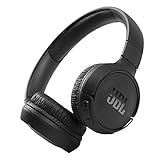
- The Tune 510BT wireless headphones feature renowned JBL Pure Bass sound, which can be found in the most famous venues all around the world.
- With Wireless Bluetooth 5.0 Streaming, you can stream wirelessly from your device and even switch between two devices so that you don't miss a call.
- For long-lasting fun, listen wirelessly for up to 40 hours and recharge the battery in as little as 2 hours with the convenient Type-C USB cable. A quick 5-minute recharge gives you 2 additional hours of music.
- Easily control your sound and manage your calls from your headphones with the convenient buttons on the ear-cup.
- Siri or Hey Google is just a button away: activate the voice assistant of your device by pushing the multi-function button.
How to find Automix and gapless playback
Both settings are under Track transitions in the Playback settings area:
- Mobile or tablet: Profile picture → Settings and privacy → Playback → Track transitions.
- Desktop: Profile picture → Settings → Playback → Track transitions.
Switch on Automix for supported beat-matched transitions, or enable gapless playback to remove pauses. Automix is limited to select playlists, not every playlist in Spotify.
Rank #2

- ✅ End Charging Anxiety with 90-Hour Marathon Battery Life: Designed for the long-haul commuter or international traveler, these wireless headphones deliver up to 90 hours of playtime. A quick 10-minute charge fuels 5 hours of listening, and the included aux cable is your zero-power backup plan, ensuring your music, podcasts, or movies never stop.
- ✅ Unlock Studio-Grade Sound Customization (A Flagship Feature at an Unbeatable Price): Take full control of your audio with 9 EQ modes, including 6 fully customizable profiles via the DOQAUS app. This rare feature in budget-friendly over ear headphones lets you craft perfect sound for bass-heavy workouts, crystal-clear podcasts, or immersive movie nights.
- ✅ Enjoy Rock-Solid Calls & Seamless Dual Connectivity with Bluetooth 5.4: Stay connected without drops. The advanced noise-reducing microphone ensures your voice is heard clearly on calls, even in noisy gyms or airports. Simultaneously connect to your phone and laptop, perfect for the multitasking professional or student.
- ✅ Experience Cloud-Like Comfort for Extended Wear During Work or Travel: Plush memory foam ear cups and an adjustable headband make these over the ear headphones disappear on your head. Whether you‘re on a cross-country flight, in a marathon study session, or at your work-from-home desk, pressure and fatigue are eliminated.
- ✅ Immerse in Rich Hi-Fi Audio with Powerful Deep Bass - The Ultimate Value Gift: Dual 40mm drivers deliver stunning, detailed sound. Combining flagship-level battery, customization, and comfort, these headphones wireless over ear offer incredible performance, making them perfect Christmas gifts for men and women who appreciate both quality and value.
Why a transition setting may be unavailable
Spotify says its transition features cannot be set while using Spotify Connect. If a control is unavailable, check whether Spotify is currently being controlled through Connect and try changing the setting in the app directly.
The Tool Desk
Outbyte PC Repair FREERepair Windows errors before they cause bigger problemsFix Now →Outbyte Driver Updater FREEFix the driver behind crashes, sound loss and screen glitchesFind Drivers →Also check the plan requirement: Spotify lists Crossfade and Automix for Premium. Its help page does not give the same Premium-only qualification for gapless playback.
Rank #3

- Dual Mode and Never Power Off - Enjoy up to 72 hours of playtime in wireless mode, or switch to wired mode using the included two audio jack cables (3.5mm to 6.35mm and 3.5mm to 3.5mm). With wired mode, your headphones will never run out of power.
- High-Resolution Sound Quality by Professional Audio Team - With custom-made aluminum fascia and 40mm neodymium drivers, we bring you powerful bass and dynamic stereo sound. Put on these over-ear headphones and experience every detail of your music in stunning quality.
- Maximum Comfort and Space-Saving Design - The over-ear, ergonomic design is comfortable for long-lasting wear, with a rotatable and foldable structure for a proper fit and great sound isolation. Soft memory cotton and skin-friendly protein leather add to the comfort, while the foldable headband saves space and makes it easy to carry.
- Music or Audio Sharing - This headphone's unique feature enables multiple people to play games or watch videos together. Simply pair the main headphones with your device via Bluetooth or connect to a 3.5mm audio cable and then plug the 6.35mm jack into the main headphones and the 3.5mm jack into additional headphones for a seamless audio sharing experience.
- Wired Aux Jack Lock Design - To ensure a stable connection, we've added a jack lock system to the aux plug. You can connect the jacks and sockets with confidence, knowing your connection won't be lost.
Crossfade is not audio quality or equalization
Crossfade changes how one track transitions into the next. Audio-quality settings affect the quality of streaming or downloaded audio, and the available choices depend on device and plan. Spotify can adjust quality automatically, and quality cannot be adjusted in its web player. Changing quality does not make songs fade into one another.
The equalizer changes tonal balance, such as bass and treble, using presets or manual controls. Spotify says equalizer settings cannot be changed when using Spotify Connect to play on another device. Equalization affects how music sounds, not how tracks transition.
Rank #4

- MARSHALL SIGNATURE SOUND: Experience powerful bass, smooth mids and crisp treble that are expertly balanced.
- 100+ HOURS OF WIRELESS PLAYTIME: Listen to your favourite music for days without needing to charge.
- RUGGED AND FOLDABLE DESIGN: Major V is built to last and to be easily packed away with you wherever you go.
- CUSTOMIZABLE M-BUTTON: Instantly access Spotify Tap or your EQ settings or voice assistant at the press of a finger.
- WIRELESS CHARGING: Experience quick charging without the hassle of wires.
For current steps and feature details, see Spotify Support’s Crossfade, Automix, and gapless playback instructions, audio-quality settings, and equalizer guidance.
Quick Recap
Product prices and availability are accurate as of the date/time indicated and are subject to change. Any price and availability information displayed on Amazon at the time of purchase will apply.

