What’s actually slowing this PC down?
Pick the symptom - the matching free tool is one click away.
LG says its TVs may discover compatible devices on a home network to support connectivity, but says that information is not used for household profiling or ad targeting. That is different from nearby Wi-Fi information that may help estimate location for Automatic Content Recognition (ACR), and different again from ACR’s identification of content. To reduce the TV’s optional data use, review its user agreements and the settings available on your model; LG’s published instructions do not establish a universal switch that turns off all device discovery.
What does “tracking devices” mean on an LG TV?
LG describes device discovery as a function that recognizes and communicates with compatible external devices—including set-top boxes, DVD players, game consoles, and IoT devices—so the TV can provide connectivity features. In a September 12, 2026 statement, LG said information identified through device discovery is used for connectivity, not household profiling, cross-device targeting, or advertising segmentation. That is LG’s description of its products, not an independent technical audit of how every model handles network traffic. LG’s privacy statement
As an Amazon Associate I earn from qualifying purchases.
Three functions are easy to conflate, but they have different purposes and controls:
Quick wins for a faster PC:
Fix the driver behind crashes, sound loss and screen glitchesFind Drivers →Repair Windows errors before they cause bigger problemsFix Now →Scan for outdated or missing drivers - takes under a minuteDriver Scan →| Function | What LG says it does | What to check |
|---|---|---|
| Device discovery | Recognizes and communicates with compatible external devices to support connectivity; LG says this information is not used for profiling or ad targeting. | The TV’s model-specific settings. LG’s reviewed materials do not document a universal discovery-off switch. |
| Nearby Wi-Fi processing | Nearby access-point and signal-strength information may support approximate location estimation for ACR where ACR is available and enabled and the relevant agreements have been accepted. | Review optional agreements related to viewing information and personalized features. |
| Automatic Content Recognition (ACR) | Identifies content from supported sources. LG describes ACR as an optional feature. | Review or withdraw the applicable agreement in the TV settings, where available. |
These descriptions and distinctions come from LG’s statement; availability and menu labels can vary by market and TV model. LG’s explanation of privacy functions
#1 Best Overall

- Full-Room 360° Auto Tracking Eliminates Blind Spots: These cameras for home security let you go effortlessly while capturing every mischievous moment, whether you're at work or on vacation. Our smooth pan-tilt motor delivers seamless 360° coverage, automatically following your pets, kids, or any movement. Plus, the included 6.6ft power cord and wall-mounting kit make installation a breeze—just plug the indoor camera in and you're ready to go. Truly Plug & Play.
- Your Multi-Tasker for Security and Smiles: This pet camera combines dual-band Wi-Fi with Bluetooth convenience, allowing even first-time users to set it up swiftly. Capture vivid details around the clock with 2K HD resolution, while monochrome night vision ensures no nighttime events go unnoticed. Invisible infrared and switchable indicator light guarantee undisturbed sleep. Baby Monitor? Nanny Cam? Dog Camera? Cat Camera? This security camera indoor handles it all.
- Always in the Know, Always in Control: AOQEE security cameras distinguish people from pets or shadows, so you can choose to receive only human-relevant alerts straight to your phone instantly. When human is detected, you hold the power: instantly activate the built-in deterrent siren with a single tap, whether you're home or away. It's more than inside cameras for house-it's your 24/7 intelligent guardian, giving you the clarity to act and the tool to deter. Experience security that thinks.
- Share the View, Share the Love: The pet camera indoor with phone app lets you to securely share the live stream with your family. Invite them to the live stream, whether it's your baby giggling or your pet playing, so they can be part of every moment. Watch the 10s recorded alert videos together when motion is detected, and with instant two-way audio, anyone can chime in to comfort, guide, or share a laugh. AOQEE indoor cameras for home turn moments into shared memories, no matter the distance.
- Your Storage Choice, Your Smart Home Cameras Indoor: The indoor security camera gives you peace of mind with dual storage options: back up moments to secure cloud (totally optional—the camera works normally without it), or save footage locally on an inserted TF card (8GB~128GB, FAT32 format, not included) at no ongoing cost. Plus, enjoy voice-commanded convenience with Alexa compatibility (only live streaming). Ask to see any room live on your screen-enabled Alexa devices. Your data, your rules.
How to review and change LG TV privacy agreements
For U.S. support guidance published September 2, 2026, LG directs users to Settings > Privacy & Terms > User Agreements to review or change agreement selections. The guide says agreements concerning viewing information, voice features, and personalized ads are optional and not required for basic smart services. Menu names and capabilities can differ by model, TV version, and market, so treat this as a starting path rather than a guaranteed universal route. LG’s guide to user agreements
- Open Settings on the TV and look for Privacy & Terms.
- Select User Agreements.
- Review the available agreements, especially those concerning viewing information, voice features, and personalized ads. Turn off or withdraw any optional agreement you do not want to accept.
- Check the on-screen confirmation and revisit the menu later if you want to verify your selections.
Changing an agreement is not proof that all device discovery or nearby Wi-Fi processing has stopped. LG’s published materials do not identify one agreement toggle as a universal control for those functions. Check your exact model’s settings and applicable agreements before assuming a particular data flow is disabled.
Rank #2

- 【No WiFi & No Electrical Power Needed】If you need an outdoor security camera for a place with no Wi-Fi or wired power, the 4G LTE solar security camera is a wise choice! This cellular security wireless camera can work anywhere with 4G LTE coverage. No need to worry about Wi-Fi or power at locations such as barns, farms, ranches, construction sites, vacation homes, warehouses, and RVs (The 4G camera doesn't support Wi-Fi connection).
- 【Built-in SIM & Compatible with Major U.S. Carriers】Includes an EIOTCLUB 4G LTE SIM card (U.S. only; compatible with AT&T, T-Mobile, Verizon) with a 7-day unlimited trial. Only the built-in SIM supports operation; after the trial, a subscription must be made ($19.9/month–$169.9/year) to continue cellular service. Please ensure the installation site has 4G coverage. A 30-day cloud storage trial is also included.
- 【Solar Powered & True Wireless】Our 4G lte security camera achieves true wireless connectivity, totally cordless. With a built-in large capacity battery and a 6W solar panel, the camera keeps working as long as there is sunlight. The camera must be fully charged using the power cable for the initial charge before powering on; thereafter, the solar panel may be used for long-term power.
- 【2K Color Night Vision & 360° View】Via the Ubox App, this cellular camera offers 2K high resolution with 4X digital zoom. The wide-angle lens supports both horizontal and vertical rotation, providing a broader and more flexible viewing angle. Even in the dark, the full-color night vision allows you to keep an eye on your assets at all times. (The spotlight needs to be manually enabled in the App.)
- 【PIR Detection & Two-Way Talk】With the sensitive PIR motion sensor, this cellular game camera can quickly and accurately detect any movement of people or animals, then immediately push an alarm notification to your mobile phone. (You can set the sensitivity of this function in the Ubox app) The built-in two-way talk function allows you to communicate through the camera anytime, anywhere.
Turn off Home menu content recommendations separately
If the concern is recommended content on the TV’s home screen, LG documents a separate control: Settings > All Settings > General > System > Additional Settings > Home Settings, then uncheck Content Recommendation. This changes the home-menu recommendation setting; LG does not describe it as a switch for device discovery, nearby Wi-Fi processing, or ACR. The path is from LG support guidance published November 5, 2025, and may differ on some models. LG’s instructions for home-screen recommendations
Free tools Windows power users keep installed
One-click scans. No signup required.
Does the ThinQ app control all device discovery?
No such conclusion follows from LG’s ThinQ registration instructions. For the registration workflow, LG says the phone and TV should be on the same Wi-Fi network, after which the user selects the TV from a device list. That explains how the app finds a TV for registration; it does not establish that the app controls every discovery function the TV may use. LG’s ThinQ TV registration instructions
Quick Recap
Best Value
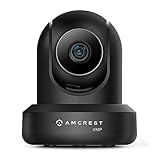
- 4MP H. 265 – 2. 4ghz WiFi IP camera features immaculate 4MP (2688x1520P at 30fps video using excellent low light capability utilizing the CMOS image sensor and chipset. Cover more ground using super-wide 90° viewing angle and remote pan/tilt. Works with Alexa through Amcrest Cloud. H. 265 video compression technology allows smoother video and reduces file sizes and bandwidth consumption. Due to hardware limitations, digital zoom is only available on the Amcrest View Pro App.
- SMARTER SECURITY – Receive motion alert notifications, review footage and engage in two-way communication via your smartphone using the Amcrest View app. Playback and record professionally on a PC using Amcrest Surveillance Pro for Windows and MAC or Blue Iris Professional. Works with Amcrest Cloud remote video storage, MicroSD, Amcrest NVRs, Synology and QNAP NAS, FTP, Chrome, Firefox, Edge, Safari, etc using Amcrest Web View Extension.
- LOW LIGHT NIGHT VISION – Features a CMOS 1/3” 4MP progressive low-light image sensor and built-in IR LEDs to achieve superior low lux performance and night vision up to 32 feet. Not all WiFi IP cameras are built the same and our Texas based team with over 10 years of WiFi camera experience has built-out the performance of this camera by using the highest quality components in order to deliver the ultimate best in class 4MP pan/tilt WiFi camera experience.
- SECURE CLOUD VIDEO BACKUP – The optional Amcrest Cloud remote video storage service allows you automatically store your videos in the cloud hosted and secured by AWS (motion based and 24/7 continuous recording available). If something happens to your local PC/NVR/MicroSDcard(256GB, FAT32)/NAS, the footage will be safely recorded in a secure off-site location and accessible to you through a web-based interface for PC (Windows & MAC) (Chrome/Firefox/Safari/Edge) and Amcrest Cloud smartphone app.
- SIMPLE. RELIABLE. SECURE. - This Amcrest 2.4Ghz wireless security camera features a secure SSL/HTTPS connection, wireless AES/WPA2 encryption, FCC and CE camera certificate, UL rated power supply, and receives regular security firmware updates (Supports 2. 4Ghz Only). Operating Temp: 14°F ~ 113°F. At Amcrest, we want to ensure the safety of our customers, their loved ones, homes, and businesses and you’ll receive a full 1-year US and Lifetime Support provided directly from Amcrest.
Rank #4
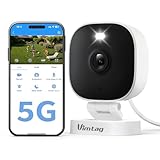
- Instant Motion and Sound Alerts with Spotlight - Stay informed with instant notifications sent to the app whenever it detects motion or sound. The outdoor security camera will alarm with sound and light. You can adjust sensitivity with Motion Detection or easily turn off notifications whenever needed
- 2.5K Live Streaming with Color Night Vision - Keep an eye on your home 24/7 with our security cameras, featuring 1080P HD video and vibrant color night vision, ensuring you never miss a moment, day or night.(Works with 2.4GHz/5GHz WiFi)
- Outdoor Durability (IP66) & Dual-Band WiFi – Reliable Vimtag outside camera can be placed on a shelf or wall-mounted with ease. It is IP66 rate, weatherproof design withstands rain, heat & cold for year-round protection. Dual-band 2.4/5GHz Wi-Fi ensures faster, more stable connectivity—ideal for monitor backyard, garage, or any outdoor spot
- Upgrade APP & Two Recording Options – With our upgraded app ( Canny Cam ) , enjoy an improved user experience and secure cloud recording (subscription required) for detecting people, motion, and sound. Alternatively, you can insert a microSD card (sold separately) into the home cameras outdoor for local video storage
- Enhanced Two-Way Audio - Communicate effortlessly with guests using the upgraded two-way audio feature of this cameras for outdoor home security, allowing you to see, hear, and speak from anywhere
Rank #3

- 🏆 【Improved Features for 2026】 2K UHD video & full-color night vision, free cloud storage, support for 2.4G & 5G WiFi, 1-6 months battery life, work with Alexa, IP66 waterproof and dustproof. Cameras for Home Security
- 🏆 【2K Ultra HD Video & Full-Color Night Vision – See Every Detail Clearly】 Experience crystal-clear 2K resolution with enhanced image quality, even when zooming in. Equipped with advanced night vision technology and built-in LED lights, this security camera delivers vivid full-color images even in complete darkness, ensuring 24/7 protection.
- ☁️ 【Free Cloud Storage & Local SD Card Support – Secure Your Footage】 Enjoy free cloud storage without additional subscription fees, ensuring your important recordings are always accessible. (NOTE:Free plan offers SD quality; HD available with paid plans). The outdoor camera also supports SD cards Local Storage (up to 256GB, Not included), giving you flexible storage options and enhanced security for your data.
- 🔋【 Long-Lasting Battery – Up to 6 Months of Power】 Powered by a high-capacity rechargeable battery and an intelligent power-saving mode. Say goodbye to frequent recharging and enjoy uninterrupted home security. Engineer's Test Data: When fully charged, the camera can run for 60 days with motion detection triggered 100 times per day. At a lower trigger frequency, its battery life can theoretically extend up to 6 months.
- 📶 【Easy Setup & Dual-Band WiFi – 2.4GHz & 5GHz Support】 Supports both 2.4GHz and 5GHz WiFi for a more stable and faster connection, reducing lag and disconnection issues. With a user-friendly setup process, you can get your camera up and running in minutes via the app—no technical skills required.
If you cannot find these controls
- Look up the instructions for your exact TV model and country; LG says menu paths and capabilities vary.
- Search the settings for privacy, terms, user agreements, viewing information, voice features, or advertising. The exact labels may differ.
- Do not assume that disabling home-screen recommendations or changing ThinQ registration disables network device discovery.
- If you need to know whether a specific discovery feature can be switched off on your model, check its model-specific LG support information or contact LG. The reviewed guidance does not establish a universal discovery-off control.
Product prices and availability are accurate as of the date/time indicated and are subject to change. Any price and availability information displayed on Amazon at the time of purchase will apply.

