Put external API calls behind a shared outbound boundary, then give each provider its own adapter, time and retry budget, rate controls, failure isolation, and recovery path. That keeps provider quirks out of business logic and helps one failing dependency avoid consuming capacity needed by the rest of the application. Resilience comes from these explicit policies—not from adding a gateway or retrying every failed request.
What should an integration layer own?
Application features should call an internal integration interface instead of calling outside providers directly. The boundary applies consistent rules for deadlines, retries, error reporting, observability, and routing work that can wait. Provider-specific adapters translate between that interface and each API.
As an Amazon Associate I earn from qualifying purchases.
Keep provider differences inside adapters
An adapter should own the provider’s endpoints, authentication lifecycle, pagination, request and response formats, error codes, quota scope, retry headers, and idempotency behavior. Normalize results and failures into internal types so callers do not need to understand every provider’s conventions. Retain useful diagnostic details—such as the provider’s error code and request identifier—rather than reducing every failure to a generic error.
Do not make the shared interface so generic that it hides differences that affect safety. For example, one provider may support idempotency keys while another does not; one may return a retry delay while another documents a reset time. Keep those capabilities configurable per API. There is no single standard schema that fits all providers.
#1 Best Overall
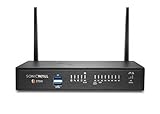
- The latest SonicWall TZ270W series, are the first desktop form factor nextgeneration firewalls (NGFW) with 10 or 5 Gigabit Ethernet interfaces. The series consist of a wide range of products to suit a variety of use cases.
- Reduce complexity and get the business running without relying on IT personnel with easy onboarding using SonicExpress App and Zero-Touch Deployment, and easy management through a single pane of glass
- Drive business growth by investing in next-gen appliances with multi-gigabit and advanced security features, to future-proof against the changing network and security landscape.
- SonicWall 24x7 support provides chat, email, web, and telephone support for technical assistance | Dynamic Support is designed for customers who need continued protection through ongoing firmware updates and advanced technical support
- Hardware: Operating system: SonicOS 7.0 | Interfaces: 8x1GbE, 2 USB 3.0, 1 Console | Management: Network Security Manager, CLI, SSH, Web UI, GMS, REST APIs | VLAN Interfaces: 64 | Access points supported (maximum): 16
Keep policy ownership deliberate
Choose where retries, deadlines, and breaker decisions are made, and avoid independently retrying the same request at several layers. Retries can multiply when each layer has its own policy, turning a partial outage into a surge of duplicate traffic. AWS Well-Architected guidance recommends determining whether an error is retryable, using exponential backoff with jitter when retrying, and capping retries.
How should timeouts and retries work?
Give the whole operation a deadline, then allocate that time across connection setup, the response, any retry delays, and processing. Set both a maximum attempt count and a maximum elapsed time or delay. A retry policy that outlives the caller’s deadline does not fix the failure; it merely shifts where the caller experiences it.
Retry only failures that may recover
Decide retry eligibility using the target API’s documented behavior and the operation being performed, not just the HTTP status. A transient connection failure or selected server error may justify another attempt. Authentication, validation, and other permanent errors usually need correction rather than repetition. Do not treat every 500-level response as safe to retry: providers differ in their semantics and recovery guidance.
Do these 3 things before closing this tab:
1Fix the driver behind crashes, sound loss and screen glitches2Clear out junk files and repair common Windows errors3Scan for outdated or missing drivers - takes under a minuteA timeout does not prove that a write failed. The remote service may have completed the operation before the response was lost. Retry a write only when repeating it is safe—for example, because the operation is naturally idempotent, the provider supports an idempotency key, or the application can otherwise prevent duplicate effects. AWS explicitly warns that retries of non-idempotent calls can create duplicates.
Back off, add jitter, and cap the policy
For eligible failures, use exponential backoff with jitter so many clients do not retry in lockstep. Set a maximum delay and a hard cap on attempts or total time. Coordinate the policy at a deliberate layer; adding a retry loop in both a provider adapter and its caller can exceed the intended budget.
Treat 429 and 503 responses according to the provider contract
For a 429, honor Retry-After or the provider’s documented quota-reset guidance. If no retry hint is supplied, use bounded backoff rather than an immediate retry loop. Track rate limits at the quota scope the provider actually enforces, which may be an account, credential, endpoint, tenant, or another documented boundary.
Do not assume that every 503 should be retried. Microsoft’s Azure throttling guidance advises against retrying a 503 unless it includes retry headers in the context of that guidance. That is not a universal rule for all APIs: consult each provider’s contract and coordinate retry behavior with its stated limits.
How do you stop one failing provider from taking down the rest?
Use a circuit breaker around a dependency when repeated failures or high latency make continued synchronous calls waste workers, threads, or transaction time. Scope it to the unhealthy provider or deployment so a problem with one integration does not unnecessarily block unrelated ones.
Use closed, open, and recovery states
- Closed: calls proceed while the dependency is considered healthy.
- Open: calls fail fast instead of repeatedly waiting on an unavailable or unhealthy dependency.
- Half-open or equivalent recovery state: a limited probe tests whether normal traffic can resume.
Choose the failure and latency signals that affect breaker state based on the workload and its objectives; the cited architecture guidance does not establish universal thresholds. Make transitions visible to operators, including calls rejected while the breaker is open.
Define the caller’s experience
When a breaker is open, decide what the business flow should do: return cached data, use a safe default, defer the operation, show a retry-later response, or fail closed. A noncritical enrichment lookup might be skipped while an order continues; a payment authorization may need to stop the flow. The right fallback depends on the consequences of missing, stale, or incorrect data.
Rank #2
- The latest SonicWall TZ270W series, are the first desktop form factor nextgeneration firewalls (NGFW) with 10 or 5 Gigabit Ethernet interfaces. The series consist of a wide range of products to suit a variety of use cases.
- Reduce complexity and get the business running without relying on IT personnel with easy onboarding using SonicExpress App and Zero-Touch Deployment, and easy management through a single pane of glass
- Drive business growth by investing in next-gen appliances with multi-gigabit and advanced security features, to future-proof against the changing network and security landscape.
- SonicWall 8x5 Support provides chat, email, web, and telephone support for technical assistance | Dynamic Support is designed for customers who need continued protection through ongoing firmware updates and advanced technical support
- Hardware: Operating system: SonicOS 7.0 | Interfaces: 8x1GbE, 2 USB 3.0, 1 Console | Management: Network Security Manager, CLI, SSH, Web UI, GMS, REST APIs | VLAN Interfaces: 64 | Access points supported (maximum): 20
How do you manage rate limits across many APIs?
Keep outbound egress controls separate from controls for incoming requests to your application. Azure Well-Architected guidance distinguishes ingress, internal, and egress throttling and emphasizes that clients must cooperate with server limits.
The Tool Desk
Outbyte PC Repair FREEClear out junk files and repair common Windows errorsFree Scan →Outbyte Driver Updater FREEFix the driver behind crashes, sound loss and screen glitchesFind Drivers →- Meter each provider at its documented quota scope.
- Where needed, apply both per-customer fairness limits and a provider-wide safety limit.
- Honor provider retry windows instead of letting each caller retry independently.
- After a provider recovers, release queued work gradually rather than sending the backlog all at once.
Amazon API Gateway is an example of a managed gateway with rate and burst throttling using token-bucket behavior. AWS documents those limits as best-effort targets, not guaranteed hard ceilings. That capability illustrates a gateway option; it does not establish that the gateway is required or suitable for outbound calls to dozens of unrelated providers.
Independent reader supportYour contribution helps us test, update, and keep practical guides available for everyone.Which calls should be queued, and how do you recover them?
Separate interactive work, which must return within the user-facing request’s deadline, from durable work that can wait. For work that does not fit safely in a synchronous request, enqueue it durably and bound both queue depth and age. A queue is not a substitute for rate controls: workers still need to respect provider limits.
Make exhausted work visible and replayable
Route exhausted or stuck work to a dead-letter or other operator-visible failure path. Preserve enough context to investigate and replay safely, and define whether replay is automatic, operator-triggered, or blocked until someone corrects the data or configuration. Avoid storing credentials or unnecessary sensitive payloads in logs and queues; retention and privacy controls depend on the data and regulatory context.
During recovery, resume work gradually and continue respecting retry windows. This reduces the chance that a backlog will overwhelm a provider just as it comes back online. Salesforce architecture guidance describes queues and recovery patterns such as cached data, defaults, manual processing, and queued retries; those are design options, not a universal fallback for every business flow.
Crashes, No Sound, or Screen Glitches?
Random freezes, missing sound and display glitches usually trace back to one bad driver. Find and replace yours safely.Free scan · under a minuteWindows Errors? Fix Them Before They Spread
Repair common Windows errors and clear accumulated junk for a smoother, more stable PC - no reinstall needed.Free scan · no reinstallWhat should operators measure and test?
Measure dependency health by provider and operation so an aggregate success rate does not hide one failing integration. Useful signals include:
- Request volume, latency, timeouts, and status or provider error category.
- Retry counts, rate-limit responses, and time spent waiting to retry.
- Queue depth and age, exhausted work, and fallback use.
- Circuit-breaker state and transitions.
Set alerts around sustained changes that threaten user-facing objectives, rather than paging on every isolated transient error. AWS guidance calls for monitoring repeated failures and making open-breaker rejections diagnosable. Thresholds should come from the workload and its objectives; there is no universal retry count, timeout, or breaker threshold established for all integrations.
Exercise failure and recovery paths
Test timeouts, 429s, slow or malformed responses, provider outages, duplicate delivery, queue saturation, and recovery after an outage. Verify that attempts stop within the operation’s deadline, writes do not create duplicate effects, unrelated providers stay available, and recovery traffic does not create a surge. These are recommended failure-mode tests, not claims of completed testing.
Should you build an integration layer or use an API gateway?
A gateway can help with traffic management, but inbound gateway features do not automatically provide a complete outbound integration layer. Compare options by whether they govern calls to arbitrary external APIs and whether they cover the operational responsibilities your system needs.
Recommended Free Tools
| Option | What it may cover | What to verify |
|---|---|---|
| Custom integration middleware | Provider adapters and policies tailored to your application’s APIs and business flows. | Who owns implementation and operations for authentication rotation, quotas, retries, breakers, durable replay, and monitoring? |
| Managed API gateway | Gateway traffic controls such as rate and burst throttling for APIs it serves. | Does it govern outbound calls to unrelated providers, honor their retry headers, and support the required failure and recovery behavior? |
| Broader API management platform | Potentially broader API lifecycle and traffic-management capabilities. | Confirm outbound scope, provider-specific controls, deployment and regional behavior, data handling, monitoring integration, and total cost at expected volume. |
Also assess per-provider and per-tenant throttling, credential rotation, deadline handling, idempotency support, queueing and dead-letter recovery, correlation data, deployment topology, security ownership, and operating cost. Azure guidance supports coordinating egress controls; AWS API Gateway documentation establishes gateway throttling for APIs it serves. Neither fact alone shows that a particular platform is the right outbound layer for your providers.
Quick Recap
Product prices and availability are accurate as of the date/time indicated and are subject to change. Any price and availability information displayed on Amazon at the time of purchase will apply.

