The best wireless backlit keyboard depends on the way you type. For a full-size productivity board with automatic illumination, the Logitech MX Keys S is the clearest fit. For a full-size, low-profile mechanical board with configurable lighting, the Keychron K5 Pro is the stronger alternative. Neither is universally best: they use different switch designs, lighting behavior and wireless approaches.
Use the comparison and checklist below to choose by layout, key feel, lighting controls, connection method and battery expectations. Manufacturer battery figures are claims under stated conditions, not independent test results, and current prices, stock and package contents vary by market.
As an Amazon Associate I earn from qualifying purchases.
Quick picks
| Pick | Best suited to | Key design | Lighting behavior | Wireless and battery information |
|---|---|---|---|---|
| Logitech MX Keys S | Full-size office and general productivity use | Scissor-key, productivity-oriented design | Keys illuminate as your hands approach; illumination responds to ambient light | Bluetooth Low Energy or Logi Bolt USB receiver. Logitech advertises up to 10 days per charge with predefined settings, or up to five months with backlighting off; actual life varies with use and computer conditions. |
| Keychron K5 Pro | Users who want a full-size, low-profile mechanical keyboard | Low-profile mechanical switches | RGB and white-backlight versions exist. RGB configurations list 22 backlight options. | Wireless model with a 2,000 mAh rechargeable lithium-polymer battery. Hot-swapping applies to the RGB hot-swappable version, not automatically to every K5 Pro. |
This is a focused shortlist based on documented features, not a complete market ranking or a head-to-head laboratory test. Treat the Logitech and Keychron descriptions as manufacturer specifications and claims.
What “wireless backlit keyboard” actually means
A wireless backlit keyboard sends keystrokes without a permanent data cable and uses LEDs beneath or around the keycaps to make legends visible in low light. Those two functions are related but independent: a board can be wireless with no lighting, or illuminated while still requiring a cable for data. A buying decision therefore has two separate parts—how the keyboard connects and how its lighting works.
#1 Best Overall

- Wireless keyboard has 7 colors & 4 modes RGB backlit options and adjustable brightness to provide you with more visual aesthetics typing atmosphere.
- Computer keyboard designed with 8.7" convenient device holder to hold your phone or tablet, keep your desk clean and tidy.
- The wireless keyboard features lighted and responsive tactile keystrokes for a smooth and quiet typing experience, ability to increase your work efficiency.
- Keyboard wireless layout with convenient access to all the right shortcut and multimedia keys, achieve more with less effort.
- Backlit wireless keyboard with built-in 1500mAh rechargeable battery that reduce the hassle of traditional battery replacement and wiring.
Wireless connection types
Bluetooth is convenient for laptops, tablets and phones because it does not occupy a USB port. Bluetooth Low Energy, used by the MX Keys S, is designed for low power consumption. A USB receiver can be preferable on a desktop or in a crowded Bluetooth environment, but it requires an available port and the receiver must be included in the package you buy. Logitech identifies Logi Bolt as the receiver option for the MX Keys S.
Do not assume that a keyboard supports every operating system or device merely because it has Bluetooth. Check the market-specific listing for supported operating systems, pairing limits, key assignments and whether a receiver is supplied. A receiver sold separately changes the real cost and may matter if your computer has no convenient USB-A port.
Backlight is not one feature
Some keyboards keep a fixed brightness level; others provide brightness keys, effects or automatic control. The MX Keys S is designed to detect approaching hands and adjust illumination to the environment. That can reduce unnecessary light during the day, but it also means the keyboard may not be continuously bright when you are away from the desk.
What’s actually slowing this PC down?
Pick the symptom - the matching free tool is one click away.
The K5 Pro is configuration-dependent. Keychron lists RGB and white-backlight versions, and RGB configurations provide 22 backlight options. The color system, available effects and switch or hot-swap choices therefore depend on the exact variant rather than the K5 Pro name alone.
Why lighting changes battery expectations
LEDs consume energy, so the same keyboard can last very different lengths of time depending on brightness, effect, idle behavior and daily hours of use. A runtime number without those conditions is not a useful promise. Logitech states that the MX Keys S can last up to 10 days on a full charge with predefined settings, or up to five months with backlighting disabled, and notes that battery life varies with user and computing conditions. Those figures should be read as the company’s stated limits, not as a measured result for every owner.
Logitech MX Keys S: the productivity-oriented full-size choice
The MX Keys S is the better match when you want a conventional full-size layout and a restrained office-oriented typing experience. Its scissor-key design is aimed at productivity rather than the taller, more pronounced action associated with traditional mechanical keyboards. The full-size layout includes a number pad, which is useful for spreadsheets, accounting, data entry and other work that involves frequent numeric input.
Illumination that reacts to you
Logitech describes the MX Keys S as a wireless illuminated keyboard. Its keys light when your hands approach, and the illumination adjusts to the surrounding light. This proximity and ambient-light response is different from simply selecting a permanent brightness level. It is useful if your room changes from daylight to evening darkness, while people who want a constant glow may prefer manual controls on another board.
Recommended Free Tools
Rank #2

- Fluid Typing Experience: Laptop-like profile with spherically-dished keys shaped for your fingertips delivers a fast, fluid, precise and quieter typing experience
- Automate Repetitive Tasks: Easily create and share time-saving Smart Actions shortcuts to perform multiple actions with a single keystroke with the Logi Options+ app (1)
- Smarter Illumination: Backlit keyboard keys light up as your hands approach and adapt to the environment; Now with more lighting customizations on Logi Options+ (1)
- More Comfort, Deeper Focus: Work for longer with a solid build, low-profile design and an optimum keyboard angle that is better for your wrist posture
- Multi-Device, Multi OS Bluetooth Keyboard: Pair with up to 3 devices on nearly any operating system (Windows, macOS, Linux, Googlebook OS) via Bluetooth Low Energy or included Logi Bolt USB receiver (2)
Two ways to connect
You can pair the MX Keys S over Bluetooth Low Energy or use Logitech’s Logi Bolt USB receiver. The choice lets a laptop user avoid a dongle while a desktop user can reserve Bluetooth for other devices. Confirm the receiver’s inclusion in the regional package before ordering; product bundles can differ by market.
Battery claims in context
Logitech advertises up to 10 days on a full charge with predefined settings and up to five months with backlighting off. The five-month figure is not an illuminated-use figure, and neither number is an independent endurance test. Brightness, proximity activity, typing hours, charging habits and the host computer can all change the interval between charges. If you need maximum time away from a charger, disabling the lighting is the relevant mode to compare.
Who should choose it
- Choose it for a full-size layout with a number pad and a low-profile, scissor-key feel.
- Choose it when automatic proximity and ambient-light illumination is more appealing than animated RGB effects.
- Choose it when both Bluetooth and a receiver connection are useful.
It is a less obvious fit if your priority is mechanical switch customization, per-key lighting effects or hot-swappable switches; those are not the defining features documented for this model.
Keychron K5 Pro: the low-profile mechanical alternative
The K5 Pro targets a different user: someone who wants a full-size keyboard but prefers low-profile mechanical switches and more configurable backlighting. It is described as an ultra-slim, full-size wireless custom mechanical keyboard, preserving the number pad while using a mechanical design in a thinner form than many conventional mechanical boards.
PC Slower Than It Used to Be?
A free scan shows the junk files, broken settings and background clutter dragging Windows down - then fixes them in one click.Free scan · Windows 10 & 11Outdated Drivers Are Slowing You Down
One free scan finds every outdated or missing driver and matches the right update for your exact hardware.Free scan · exact hardware matchCheck the lighting variant before buying
Keychron distinguishes RGB and white-backlight versions. RGB configurations list 22 backlight options, while a white-backlight version does not provide the same color choices. The listing’s exact wording matters: do not treat every K5 Pro as an RGB board or assume that all lighting effects are available on the white model.
Battery and customization
The official specification lists a 2,000 mAh rechargeable lithium-polymer battery. That capacity is a component rating, not a guaranteed number of days. Keychron does not establish a single runtime in the supplied material, so compare charging frequency only after considering your chosen lighting mode and use pattern.
Hot-swapping is also variant-specific. Keychron applies it to the RGB hot-swappable version. If you intend to change switches without soldering, verify that the product title and specification explicitly say “RGB hot-swappable”; an RGB board that is not the hot-swappable edition does not provide the same upgrade path.
Rank #3

- EXPERIENCE THE MAGIC OF COLORS: The wireless keyboard feature a captivating 7-color switchable backlight, and 4 levels of brightness adjustable, while the RGB mouse changes color automatically. Whether it's late-night work or dimly lit environments, the illuminated keys make typing effortless, allowing you to enjoy flexible lighting adjustments according to different moods and atmospheres
- WINDOWS AND MAC LAYOUT: Enjoy a seamless typing experience with our portable wireless keyboard and mouse, offering both Windows & Mac keyboard layouts to match your device's system. Activate the Mac layout by pressing the Fn+W key (indicated by a red light), or switch to the Windows layout by pressing the Fn+Q key (indicated by a green light)
- RECHARGEABLE AND SMART ENERGY SAVING: The SABLUTE cordless combo comes equipped with a rechargeable battery, and easy recharging for the wireless keyboard and mouse using the provided Type-C cable. Moreover, an auto-sleep function conserves battery power when the keyboard mouse combo is idle, offering an impressive standby time of 365 days for the keyboard and 270 days for the mouse
- QUIET OPERATION: The scissor low-profile key structure design ensures a responsive and tactile typing experience with minimal noise. This feature enables you to concentrate on your work without the distraction of keyboard clatter, especially when using the silent wireless mouse and keyboard
- SLEEK AND QUICK ACCESS: The ultra-slim keyboard, measuring 14.8x5.4x0.78 inches, is designed to save space and ensure effortless portability. With 102 keys, including 12 convenient shortcuts and a number pad, this portable keyboard streamlines data entry and navigation. A 6-button mouse with Tracking Speed and forward/backward functions will help you navigate the web faster and easier than ever before
Who should choose it
- Choose it for a full-size layout with a low-profile mechanical feel.
- Choose it when selecting lighting effects or RGB colors is important.
- Choose it when you may want to replace switches, provided the exact RGB hot-swappable variant is selected.
It may be less suitable if you want the quiet, uniform behavior of a scissor-key office keyboard or automatic hand-proximity lighting rather than manually selected effects.
MX Keys S versus K5 Pro: the decision points
| Question | MX Keys S | K5 Pro |
|---|---|---|
| Do you need a number pad? | Yes; it is a full-size productivity keyboard. | Yes; it is a full-size keyboard. |
| What key mechanism is documented? | Scissor keys. | Low-profile mechanical switches. |
| How does lighting operate? | Proximity activation with adjustment for ambient light. | RGB or white-backlight variants; RGB configurations list 22 options. |
| Can you use a receiver? | Yes, through a Logi Bolt USB receiver, alongside Bluetooth Low Energy. | Confirm the exact wireless configuration and included accessories on the regional listing. |
| What battery information is established? | Logitech claims up to 10 days with predefined settings, or up to five months with backlighting off; conditions apply. | 2,000 mAh rechargeable lithium-polymer battery; a comparable runtime figure is not stated here. |
| Is hot-swapping universal? | Not identified as a feature in the supplied specifications. | Only the RGB hot-swappable version is identified as hot-swappable. |
| What should you verify before purchase? | Regional layout, operating-system support and whether the Logi Bolt receiver is included. | RGB versus white backlight, switch type, hot-swap status, layout and regional availability. |
The table shows why a single “best” label can mislead. The two boards solve different problems even though both are wireless, illuminated and full-size.
How to choose the right layout
Full-size with a number pad
A full-size board is the safest choice for spreadsheet work, finance, inventory and frequent numeric entry. Both documented examples use this layout. The trade-off is desk width: the number pad pushes the mouse farther right and leaves less room in a compact workstation.
Compact layouts
A compact or tenkeyless design removes some keys, commonly the number pad, to save horizontal space. The supplied examples do not establish a specific compact model, so do not infer performance, battery life or lighting behavior for one without checking its own specifications. If you rarely enter numbers, measure your available desk width and consider whether moving the mouse closer is worth giving up dedicated numeric keys.
How to choose key feel
Scissor-key productivity feel
Scissor mechanisms use a low-profile stabilizing structure and are common in thin office keyboards. The MX Keys S is the documented example in this guide. Pick this direction when you want a restrained, laptop-like profile and do not need to change switches.
Low-profile mechanical feel
Low-profile mechanical switches retain mechanical switch construction while reducing height compared with many conventional mechanical boards. The K5 Pro is the documented example. Mechanical feel is highly dependent on the selected switch, so verify whether the listing offers the switch type you want rather than assuming all K5 Pro configurations feel identical.
Specifications cannot establish whether a particular keyboard will feel comfortable to you. If possible, buy from a seller with a suitable return policy or try the same switch type before committing.
Rank #4
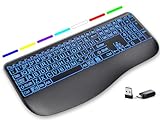
- Large Print Keys for Easy Reading: Oversized, high-contrast letters make each key easier to see, helping reduce eye strain and typing mistakes. The full-size 16.54 x 8.01 x 0.94 in layout offers a familiar typing feel for home or office use. (Keyboard only, mouse not included)
- 7 Colored Backlights with Smart Memory: First plug the USB receiver into your device, then choose from 7 backlight colors and 3 brightness levels for clearer typing in dim rooms or at night. The keyboard remembers your last light setting after power-off, so you do not need to readjust it every time.
- Scissor-Switch Keys & Quiet Typing: Low-profile scissor-switch keys provide a responsive, laptop-like typing feel while helping reduce tapping noise. Ideal for offices, libraries, shared workspaces, or anyone who prefers a quieter typing experience.
- Wide Curved Wrist Rest & Adjustable Stand: Designed with a wider, curved wrist rest, this keyboard provides better hand support and a more comfortable resting position during long typing sessions. The adjustable stand lets you raise the keyboard to a more natural typing angle to help reduce wrist and hand strain.
- Long-Lasting Rechargeable Keyboard: This large print keyboard is equipped with a type-c charging cable, standby time is up to 3 months, 25 days of continuous use with backlight off. With smart multi-stage power management, the keyboard conserves energy when idle but wakes instantly with a single keystroke. No more battery waste
How to evaluate lighting
- Decide whether you need visibility or effects. A single-color backlight can make legends readable without visual animation. RGB effects add customization but can consume more power at higher brightness.
- Check automatic behavior. The MX Keys S uses approaching-hand detection and ambient-light adjustment. Confirm that this behavior matches how you work, especially if you want the keys lit continuously while not typing.
- Match the version to the feature. For the K5 Pro, identify RGB versus white backlight. The 22-option figure applies to RGB configurations, not automatically to the white model.
- Look for physical controls or software requirements. The supplied specifications do not establish a universal control method. Verify whether brightness and effects are changed with keyboard shortcuts, software or both.
Wireless and compatibility checklist
Before paying, open the exact regional product page and record the following details:
- Wireless protocols supported: Bluetooth, receiver, or both.
- Operating systems and device types officially supported.
- Number of devices that can be paired or switched, if that matters to your setup.
- Receiver type, connector and whether it is in the box.
- Keyboard layout, language legends and regional Enter, Shift and modifier-key shapes.
- Charging connector, cable inclusion and whether the keyboard can be used while charging.
- Backlight version and, for the K5 Pro, the exact switch and hot-swap specification.
These checks prevent a common mistake: buying a product name that is correct while receiving a different regional layout or a different lighting and switch configuration.
Do these 3 things before closing this tab:
1Repair Windows errors before they cause bigger problems2Fix the driver behind crashes, sound loss and screen glitches3Clear out junk files and repair common Windows errorsBattery planning for an illuminated keyboard
Think of battery life as a range controlled by settings, not as one permanent number. Set a practical brightness level, turn off effects you do not need and use automatic sleep if the keyboard provides it. Keep the charging cable accessible if the board is your primary work input, and check the manufacturer’s charging guidance rather than relying on a generic USB power claim.
For the MX Keys S, the relevant documented comparison is illuminated use versus backlighting off: Logitech’s up-to-10-day and up-to-five-month figures describe those two different conditions. For the K5 Pro, the documented fact is the 2,000 mAh battery capacity; no equivalent runtime should be assumed from that number alone.
Common buying mistakes and fixes
Mistake: treating “backlit” as a guarantee of RGB
Fix: Read the version name. The K5 Pro has RGB and white-backlight configurations, while the MX Keys S uses responsive illumination rather than a documented RGB-effects system.
Mistake: comparing battery numbers without lighting conditions
Fix: Keep the condition beside the figure. Logitech’s five-month claim is with backlighting off, while its 10-day claim uses predefined settings. Do not turn either into a universal runtime promise.
Mistake: assuming every K5 Pro is hot-swappable
Fix: Select the RGB hot-swappable version explicitly. The feature is not stated for every K5 Pro configuration.
Best Value

- ✅ INSTANT CONNECTIVITY. Plug in the USB receiver and you can use the KLIM Chroma wireless keyboard instantly, from up to 30 feet away. There is no need to install any drivers!
- ✅ LONG-LASTING BATTERY. There's no need to buy batteries anymore! The gaming keyboard comes with premium-quality built in rechargeable batteries. You will spend lesser money while helping the environment.
- ✅ RGB BACKLIGHTING. Bring your desk to life! Choose static or breathing mode, or turn off the lights completely if you prefer. Note: colors are not customizable.
- ✅ IMPROVE YOUR TYPING SPEED. The membrane keys have a short travel distance, allowing for quick and easy typing.
- ✅ SPILL-RESISTANT & DURABLE. Engineered to handle everyday accidents. One of the only spill-resistant keyboards available at this price point.
Mistake: assuming a receiver is included
Fix: Confirm the regional package contents. The MX Keys S supports a Logi Bolt receiver, but the listing you purchase determines whether one is supplied.
Mistake: choosing by lighting before layout
Fix: Decide first whether you need a number pad and which key mechanism you prefer. Lighting cannot compensate for a layout that makes your daily work slower.
Availability and price checks
Current prices, stock and package contents are not established in the available evidence and can change by country, seller and configuration. Check the listing for your intended market on the day you buy. Compare like for like: an RGB hot-swappable K5 Pro is not the same product configuration as a white-backlight version, and an MX Keys S bundle with a receiver differs from one sold without that accessory.
The Tool Desk
Outbyte Driver Updater FREEScan for outdated or missing drivers - takes under a minuteDriver Scan →Outbyte PC Repair FREEClear out junk files and repair common Windows errorsFree Scan →Which one should you buy?
Choose the Logitech MX Keys S if your priority is a full-size productivity layout, scissor-key operation, automatic illumination and a choice between Bluetooth Low Energy and a Logi Bolt receiver. Its battery claims are clearly separated by lighting mode, which makes planning easier as long as you keep the stated conditions in view.
Choose the Keychron K5 Pro if you specifically want a full-size, low-profile mechanical keyboard and configurable lighting. Verify RGB versus white backlight, the selected switch, hot-swap status and regional layout before ordering; those details materially change the experience.
There is no evidence here for a universal overall winner, a current price leader or an independent endurance ranking. The defensible choice is the one whose layout, mechanism, lighting behavior and connection options match your desk and work.
Quick Recap
Product prices and availability are accurate as of the date/time indicated and are subject to change. Any price and availability information displayed on Amazon at the time of purchase will apply.
Quick wins for a faster PC:
Clear out junk files and repair common Windows errorsFree Scan →Fix the driver behind crashes, sound loss and screen glitchesFind Drivers →
