Free tools Windows power users keep installed
One-click scans. No signup required.
Can you install a VPN on Xbox Series X? Not as a native Xbox app, according to the console setup guidance reviewed here. Instead, connect the Xbox through a VPN running on a compatible router or a Windows or Mac computer sharing its VPN connection. Those workarounds can change how the console reaches the internet, but they do not guarantee lower ping, unchanged NAT behavior, or access to every region-locked service.
How to choose an Xbox VPN
For most gamers, a VPN is not necessary. It can be worth considering if you have a specific regional-access need or privacy and security concerns, but first decide whether you need an encrypted VPN tunnel or only a DNS-based location feature. Security.org’s setup guide describes router, computer-sharing and SmartDNS approaches; the first two use a VPN connection, while SmartDNS is not a full VPN substitute: Security.org’s Xbox VPN guide.
As an Amazon Associate I earn from qualifying purchases.
- Setup support: Check whether the service supports the exact router or computer-sharing method you plan to use.
- Router compatibility: Confirm that your router supports a VPN client and that the provider supplies instructions for your hardware and configuration.
- Performance evidence: Treat published latency and speed figures as results from a specific test setup, not forecasts for your home connection.
- Service terms and price: Confirm current subscription terms and any offer directly before buying; current prices and promotions are not established here.
- Need: Be clear about the problem you want to solve. A VPN can add latency and can affect NAT or multiplayer behavior.
What the Xbox VPN reviews actually show
Security.org’s guide, updated September 10, 2026, reports tests of Xbox Series X VPN connections using a Windows virtual router. Its reviewers played Apex Legends, Fortnite and Forza Motorsport, used the console’s network test, and ran three sessions per VPN, averaging the results to account for variation. These are Security.org’s measurements under its setup, not guaranteed results for another player, network, server or time: Security.org’s testing and comparison.
Do these 3 things before closing this tab:
1Clear out junk files and repair common Windows errors2Scan for outdated or missing drivers - takes under a minute3Repair Windows errors before they cause bigger problems| Provider | Closest-server latency reported by Security.org | Closest-server download speed reported by Security.org |
|---|---|---|
| ExpressVPN | 25–40 ms | 223 Mbps |
| NordVPN | 40–60 ms | 212 Mbps |
| Surfshark | 30–70 ms | 207 Mbps |
| Proton VPN | 39–63 ms | 204 Mbps |
| Private Internet Access | 25–40 ms | 239 Mbps |
All figures in the table are publisher-reported measurements from Security.org’s 2026 comparison, using its described Windows virtual-router setup. They are not service specifications or a promise that a VPN will improve latency. Your result depends on factors such as your internet connection, VPN server, distance and local network.
#1 Best Overall

- This Certified Refurbished product is tested and certified to look and work like new. The refurbishing process includes functionality testing, basic cleaning, inspection, and repackaging. The product ships with all relevant accessories, a minimum 90-day warranty, and may arrive in a generic box. Only select sellers who maintain a high performance bar may offer Certified Refurbished products on Amazon.com
- Compact, high-performance design
- Ideal for larger homes, multiple rooms, and congested wireless environments
- Works with 802.11a, 802.11b, and 802.11g wireless routers and access points.
- Dual band 5 GHz and 2.4 GHz Wireless A/B/G home network compatible
Top10VPN’s guide, updated June 16, 2026, ranks ExpressVPN first among its Xbox recommendations and describes router-app, Windows connection-sharing and MediaStreamer Smart DNS routes. That is Top10VPN’s editorial recommendation, not proof of a universal best choice: Top10VPN’s Xbox VPN guide. The available comparisons do not establish current subscription prices or offers.
Three ways to connect an Xbox through a VPN
VPN on a compatible router
The router runs the VPN client, and the Xbox joins that router’s network. This keeps the connection available without leaving a computer running, but the instructions and compatibility depend on the specific router hardware, firmware and VPN provider. Depending on configuration, other devices may also use the VPN. Check the exact combination before purchase, and account for possible latency or NAT changes.
Rank #2

- - Adaptateur Réseau Sans fil Occasion [ Xbox 360 ]- Vendu sans boite
Share a VPN connection from Windows or Mac
A computer connects to the VPN and shares that connection with the console over Wi-Fi or Ethernet. This can avoid changing router firmware or configuration and can suit a temporary or single-console setup. The computer must stay awake, connected to the VPN and able to share its connection; it also adds a device and possible Wi-Fi or performance variables. Security.org and Top10VPN describe computer-sharing approaches, but the precise steps can vary by operating system and VPN app.
The Tool Desk
Outbyte Driver Updater FREEScan for outdated or missing drivers - takes under a minuteDriver Scan →Outbyte PC Repair FREERepair Windows errors before they cause bigger problemsFix Now →SmartDNS
SmartDNS changes DNS handling for supported region-access use cases and can be configured directly on a console. Security.org says this approach has little latency impact, but it does not encrypt the connection or reroute all traffic through a VPN tunnel. Do not treat it as equivalent VPN privacy or as equivalent protection from denial-of-service attacks.
Rank #3

- Compact, high-performance design
- Ideal for larger homes, multiple rooms, and congested wireless environments
- Works with 802.11a, 802.11b, and 802.11g wireless routers and access points
- Dual band 5 GHz and 2.4 GHz Wireless A/B/G home network compatible
How to set up the practical workarounds
There is no single set of steps that applies to every router, computer and VPN service. Use the provider’s instructions for your specific hardware and software; these are the general connection paths described by the Xbox VPN guides.
- For router VPN: Verify VPN-client support for your exact router and provider configuration, then follow the provider’s router setup instructions. Connect the Xbox to that router’s network and check the console’s network connection.
- For Windows or Mac sharing: Connect the computer to the VPN, enable its internet-connection sharing over Wi-Fi or Ethernet, then connect the Xbox to the shared network. Keep the computer awake and the VPN connected while playing.
- For SmartDNS: Confirm that your chosen service supports the relevant feature and region-access use case, then follow its console DNS instructions. Remember that this changes DNS handling; it does not create an encrypted VPN tunnel.
NordVPN’s support article likewise says consoles lack built-in VPN functionality and describes using additional setup steps: NordVPN: Set up NordVPN on a Smart TV or Console.
Rank #4
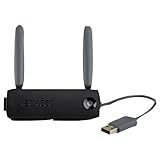
- Connect to Xbox LIVE wirelessly with ease.
- Highest Wireless N technology standard and dual band for maximum speed, coverage and reliability
- The best solution for streaming and downloading HD movies
What a VPN can—and cannot—do for Xbox gaming
- It can route the console’s connection through a VPN service when the router or sharing computer is configured correctly.
- It may help with a supported regional-access use case, but it cannot be assumed to bypass every restriction. Service availability and terms still matter.
- It does not promise lower ping. The published comparisons report nonzero latency, with results varying between providers even in one publisher’s test setup.
- It can affect connection behavior. Added routing can change latency and NAT behavior, so a setup that works for one player may not be suitable for another.
- SmartDNS is not VPN encryption. Its DNS-based location handling does not provide a full-traffic VPN tunnel.
Are current Xbox VPN offers verified?
No current prices, promotions, subscription terms or signup offers are established in the available provider comparisons. The listed services appear in publisher coverage, but that does not verify a current deal or a particular provider’s partner-program status. Check the provider’s own site for the price and terms in your region before subscribing.
Quick Recap
Best Value

- Connects Xbox 360 To WiFi: This adapter allows you to connect your Xbox 360 console to a wireless network for online gaming and streaming.
- 1 Port For Connectivity: The adapter provides 1 port for connecting your Xbox 360 console to the WiFi network.
- Compatible With Most Routers: Works with most home and office routers to provide a stable WiFi connection for your Xbox 360.
- Easy To Set Up: Simply plug in the adapter and configure the settings on your Xbox 360 console to establish a connection.
- Durable And Long Lasting: Made from ABS plastic with a black finish, this adapter is built to last for years of use.
Product prices and availability are accurate as of the date/time indicated and are subject to change. Any price and availability information displayed on Amazon at the time of purchase will apply.

