Short answer: Choose the Hisense C2 Ultra when a bright room and flexible placement matter most, the BenQ GP520 when purchase price is the priority, and the JMGO N1S Pro 4K when you can darken the room and want an RGB-laser value option. Keep the Valerion StreamMaster Plus 2 if 1080p high-refresh gaming, HDMI 2.1 and its broader home-theater feature set are more important than a lower price.
Do not compare a projector’s “low lag” or lumen number without its operating mode and measurement standard. The StreamMaster Plus 2’s published gaming figures change substantially with resolution and refresh rate, while its brightness is listed differently by region. Screen size, wall color and window light can matter as much as the projector specification.
As an Amazon Associate I earn from qualifying purchases.
At a glance: which alternative fits your room?
| Projector | Published brightness | Gaming and room fit | Main compromise |
|---|---|---|---|
| Valerion StreamMaster Plus 2 | 2,000 ISO lumens on ProjectorCentral; 3,500 ISO lumens on Valerion’s UK specification page | Closest feature match: 4K, RGB laser, HDMI 2.1 and high-refresh gaming modes | Brightness specification varies by region; confirm the exact local model and price |
| BenQ GP520 | 2,600 lumens | Price-led 4K choice for a large picture with ambient light present | LED light source, fewer HDR formats and less color/brightness headroom than premium RGB-laser options, according to TechRadar’s comparison |
| Hisense C2 Ultra | 3,000 lumens | Strong bright-room option with an RGB-laser engine and built-in gimbal stand | Uses VIDAA rather than Google TV; pricing can approach premium models |
| JMGO N1S Pro 4K | 2,400 lumens | RGB-laser value choice for rooms that can be darkened | No optical zoom and no 1080p/240Hz mode |
These are published figures, not a controlled brightness or latency test performed under identical conditions. The numbers are useful for narrowing a choice, but they do not predict identical on-screen performance.
The Tool Desk
Outbyte PC Repair FREERepair Windows errors before they cause bigger problemsFix Now →Outbyte Driver Updater FREEFix the driver behind crashes, sound loss and screen glitchesFind Drivers →What the StreamMaster Plus 2 sets as the baseline
ProjectorCentral lists the StreamMaster Plus 2 as a 4K home-theater and gaming projector released in March 2025, with a $1,499 street price and a $1,999 MSRP at the time of that listing. Its specification there is 2,000 ISO lumens, 3,840 × 2,160 resolution, an RGB-laser light source, 10,000:1 dynamic contrast and a stated 25,000-hour light-source life.
#1 Best Overall

- Speed and Power Like Never Before - Experience unmatched speed with the AI-9618 chipset, 4GB RAM/ 128GB ROM—delivering over double the power of other typical 2GB/32GB projectors, ensuring lightning-fast operation, smoother multitasking, and effortless 4K streaming. Its advanced architecture handles intensive tasks like gaming, AI-driven optimizations, and large content files without breaking a sweat, while others lag behind.
- Game-Changing Speed for Competitive Gamers - At just 4ms input lag and 240Hz refresh rate, the StreamMaster Plus is a dream for gamers. Special modes like RPG, FPS, and enhanced night vision crosshairs offer tailored settings, while ultra-low latency ensures smooth, responsive gameplay, giving you a competitive edge.
- All-in-One Entertainment Hub - With Google TV OS, you can instantly stream your favorite platforms like Netflix, YouTube, and Disney+, without needing extra devices. Built-in support for AirPlay 2, Miracast, and Chromecast makes sharing content from any device a breeze, making this projector the ultimate all-in-one solution for your entertainment needs, eliminating the need for extra devices or complicated setups.
- Next-Level Visuals & Immersion - Experience vibrant, lifelike images with deeper blacks and brighter highlights. Powered by Enhanced Black Level technology and a 10,000:1 contrast ratio, this projector ensures every detail pops. Dynamic Tone Mapping adjusts brightness and contrast in real time, delivering flawless 4K UHD performance, including Dolby Vision and HDR10, for an immersive cinematic experience.
- Voice-Controlled Convenience & Instant Setup - Set up and control your projector effortlessly with Alexa, Google Home, or Apple HomeKit. With automatic features like obstacle avoidance, alignment, focus, and keystone correction, the StreamMaster Plus adjusts to your space instantly — just speak to turn it on and enjoy hands-free operation.
Valerion’s official product information publishes three gaming modes: 15 ms at 4K/60Hz, 8 ms at 1080p/120Hz and 4 ms at 1080p/240Hz. The 4 ms claim is therefore a 1080p high-refresh result, not a 4K result. To use it, the console or PC must output 1080p at 240Hz and the entire signal path must support that mode.
The same product presentation highlights HDMI 2.1, Google TV, Wi-Fi 6E, Dolby Vision, IMAX Enhanced, HDR10+ and 110% Rec.2020 color coverage. Those features make it a particularly close match for buyers who want one projector for streaming, HDR films and competitive gaming rather than a simple display for occasional play.
There is a regional specification conflict that should be treated as a purchasing check, not averaged away. Valerion’s UK page lists 3,500 ISO lumens, while the US/Canada presentation and ProjectorCentral list 2,000 ISO lumens. Confirm the specification for the country and model number you will actually buy; do not assume the UK figure applies elsewhere.
What’s actually slowing this PC down?
Pick the symptom - the matching free tool is one click away.
How much brightness do you need with the lights on?
Is 2,000 ISO lumens enough? It can be, but “enough” depends on the image size and the light reaching the screen. A smaller image in a room with controlled lamps can remain usable, while a large image facing uncovered windows may look gray and low in contrast even from a nominally brighter projector.
Why lumen figures do not tell the whole story
- Measurement standards differ. ISO-lumen figures and unspecified “lumen” figures should not be treated as interchangeable laboratory results.
- Ambient light lifts black levels. More light on the screen makes dark scenes appear washed out; extra projector brightness cannot fully restore the lost contrast.
- Screen size changes brightness density. The same light output is spread over a larger area as the image grows.
- Screen surface matters. A neutral surface preserves viewing angles, while an ambient-light-rejecting (ALR) screen can direct more of the projector’s light toward viewers and reject some off-axis room light.
- Color modes trade output for accuracy. The brightest preset is not always the best choice for skin tones, HDR or game visibility.
Practical bright-room choices
The C2 Ultra has the highest published brightness among the three alternatives and adds a built-in gimbal stand, so it is the easiest recommendation when the projector must be moved, aimed at an irregular wall or used in a room where a permanent mount is inconvenient. The GP520 is the price-conscious route to a large 4K image, but its LED engine and narrower HDR support make it less compelling if vivid wide-gamut color is a major reason to upgrade. The StreamMaster Plus 2 can work in moderate ambient light, but buyers should resolve the regional brightness discrepancy before treating it as a bright-room specialist.
Rank #2
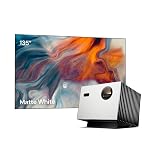
- Speed and Power Like Never Before - Experience unmatched speed with the AI-9618 chipset, 4GB RAM/ 128GB ROM—delivering over double the power of other typical 2GB/32GB projectors, ensuring lightning-fast operation, smoother multitasking, and effortless 4K streaming. Its advanced architecture handles intensive tasks like gaming, AI-driven optimizations, and large content files without breaking a sweat, while others lag behind.
- Game-Changing Speed for Competitive Gamers - At just 4ms input lag and 240Hz refresh rate, the StreamMaster Plus is a dream for gamers. Special modes like RPG, FPS, and enhanced night vision crosshairs offer tailored settings, while ultra-low latency ensures smooth, responsive gameplay, giving you a competitive edge.
- All-in-One Entertainment Hub - With Google TV OS, you can instantly stream your favorite platforms like Netflix, YouTube, and Disney+, without needing extra devices. Built-in support for AirPlay 2, Miracast, and Chromecast makes sharing content from any device a breeze, making this projector the ultimate all-in-one solution for your entertainment needs, eliminating the need for extra devices or complicated setups.
- Next-Level Visuals & Immersion - Experience vibrant, lifelike images with deeper blacks and brighter highlights. Powered by Enhanced Black Level technology and a 10,000:1 contrast ratio, this projector ensures every detail pops. Dynamic Tone Mapping adjusts brightness and contrast in real time, delivering flawless 4K UHD performance, including Dolby Vision and HDR10, for an immersive cinematic experience.
- Voice-Controlled Convenience & Instant Setup - Set up and control your projector effortlessly with Alexa, Google Home, or Apple HomeKit. With automatic features like obstacle avoidance, alignment, focus, and keystone correction, the StreamMaster Plus adjusts to your space instantly — just speak to turn it on and enjoy hands-free operation.
The N1S Pro 4K is better suited to a room where curtains or blinds can be closed. Its RGB-laser design supports strong color potential, yet the lack of optical zoom makes placement less forgiving when the desired image size does not line up with the available throw distance.
Gaming latency: compare the exact mode, not a headline number
For a gaming projector, input lag is the delay between a source changing a frame and that frame appearing on screen. A published value is meaningful only when resolution, refresh rate and picture mode are included.
| StreamMaster Plus 2 mode | Published latency | What it means for setup |
|---|---|---|
| 4K at 60Hz | 15 ms | Use for 4K console or PC play when image detail takes priority over maximum refresh |
| 1080p at 120Hz | 8 ms | Useful middle ground for systems that support 120Hz but not 240Hz |
| 1080p at 240Hz | 4 ms | Fastest published mode; requires a 240Hz-capable source and signal path |
Competitive players should connect the gaming device directly to the projector’s appropriate HDMI input, enable the console or GPU’s 120Hz or 240Hz output, and verify that the projector reports the intended signal. A cable or receiver that falls back to a lower bandwidth can silently force a different mode. If you choose the JMGO N1S Pro 4K, plan around its absence of a 1080p/240Hz mode; do not buy it expecting the StreamMaster’s fastest setting.
No equivalent latency figures are published for the GP520, C2 Ultra or N1S Pro 4K. Treat any retailer phrase such as “gaming projector” as a category description unless it states the tested resolution and refresh rate.
BenQ GP520: the lower-cost 4K alternative
Why it makes sense
The GP520’s published 2,600-lumen output gives it useful headroom for a large image when some room lighting remains on. It is the most price-led option in this group: TechRadar described it as costing about half as much as a $2,999 premium model in its comparison. That is a relative description, not a guaranteed current retail price, so check the live regional price before deciding.
Rank #3

- Speed and Power Like Never Before - Experience unmatched speed with the AI-9618 chipset, 4GB RAM/ 128GB ROM—delivering over double the power of other typical 2GB/32GB projectors, ensuring lightning-fast operation, smoother multitasking, and effortless 4K streaming. Its advanced architecture handles intensive tasks like gaming, AI-driven optimizations, and large content files without breaking a sweat, while others lag behind.
- Game-Changing Speed for Competitive Gamers - At just 4ms input lag and 240Hz refresh rate, the StreamMaster Plus is a dream for gamers. Special modes like RPG, FPS, and enhanced night vision crosshairs offer tailored settings, while ultra-low latency ensures smooth, responsive gameplay, giving you a competitive edge.
- All-in-One Entertainment Hub - With Google TV OS, you can instantly stream your favorite platforms like Netflix, YouTube, and Disney+, without needing extra devices. Built-in support for AirPlay 2, Miracast, and Chromecast makes sharing content from any device a breeze, making this projector the ultimate all-in-one solution for your entertainment needs, eliminating the need for extra devices or complicated setups.
- Next-Level Visuals & Immersion - Experience vibrant, lifelike images with deeper blacks and brighter highlights. Powered by Enhanced Black Level technology and a 10,000:1 contrast ratio, this projector ensures every detail pops. Dynamic Tone Mapping adjusts brightness and contrast in real time, delivering flawless 4K UHD performance, including Dolby Vision and HDR10, for an immersive cinematic experience.
- Voice-Controlled Convenience & Instant Setup - Set up and control your projector effortlessly with Alexa, Google Home, or Apple HomeKit. With automatic features like obstacle avoidance, alignment, focus, and keystone correction, the StreamMaster Plus adjusts to your space instantly — just speak to turn it on and enjoy hands-free operation.
Choose it when the main goal is a big 4K picture for games, sports and general streaming without paying for every premium feature. A buyer who uses standard HDR formats, accepts an LED light source and values initial cost over maximum color volume may find the GP520 the most rational purchase.
What you give up
TechRadar’s comparison characterizes the GP520 as less bright and less colorful than the higher-end RGB-laser reference it evaluated and notes support for fewer HDR formats. That does not make the picture poor; it means the GP520 is not the strongest match for someone specifically seeking the StreamMaster Plus 2’s RGB-laser color ambitions, broad HDR feature list and 1080p/240Hz gaming path.
No directly comparable 4K or 1080p lag figure is published.
Hisense C2 Ultra: the easiest bright-room and placement choice
Why it stands out
With a published 3,000-lumen rating, RGB-laser light source and integrated gimbal stand, the C2 Ultra addresses two common living-room problems: insufficient light control and awkward placement. The gimbal lets you aim the projector without immediately committing to a ceiling mount, which is useful in multipurpose rooms or rentals.
Its smart experience is based on VIDAA rather than Google TV. That distinction matters if your household relies on a particular app library, voice workflow or casting method. Check that the services you use are available in your region, or plan to connect an external streaming device.
Rank #4

- Designed for VisionMaster and StreamMaster Series, supports devices up to 10kg.
- 360° Horizontal and vertical angle adjustment.
- Crafted with a sturdy aluminum alloy base for long-lasting strength.
- Features dual-axis support for maximum steadiness.
- Equipped with silicone pads on the sides and bottom for added grip and protection, offers superior protection against scratches and damage to your devifce.
Trade-offs to weigh
The C2 Ultra can be priced close to premium Valerion models, so the brightness advantage should be considered alongside total system cost. If your room can be darkened and you already have a fixed mounting position, the gimbal may be less valuable than the StreamMaster Plus 2’s HDMI 2.1 gaming features and Google TV platform. TechRadar also noted a bonus subwoofer in its comparison; verify the contents of the package sold in your market rather than assuming every regional bundle is identical.
JMGO N1S Pro 4K: RGB-laser value for darker rooms
Best use case
The N1S Pro 4K combines a published 2,400-lumen rating with an RGB-laser engine, making it attractive to buyers who want laser color and long-term light-source consistency without moving to the most expensive class. It is a sensible shortlist option for a dedicated or controllable room where curtains, blinds or evening viewing reduce ambient light.
Important limitations
There is no optical zoom, so image size depends more tightly on the projector’s physical distance from the screen. Measure the throw location before ordering and leave room for power, HDMI and ventilation connections. The model also does not provide a 1080p/240Hz mode, removing the specific high-refresh path that makes the StreamMaster Plus 2 attractive to competitive players.
If your gaming is mostly cinematic single-player titles at 4K/60Hz and the room can be dark, those limitations may be acceptable. If you play fast esports titles and want 240Hz at 1080p, select a model that explicitly supports that mode instead.
Windows Errors? Fix Them Before They Spread
Repair common Windows errors and clear accumulated junk for a smoother, more stable PC - no reinstall needed.Free scan · no reinstallOutdated Drivers Are Slowing You Down
One free scan finds every outdated or missing driver and matches the right update for your exact hardware.Free scan · exact hardware matchFeature-by-feature buying framework
1. Start with the target gaming mode
- List the highest output your console or graphics card can sustain: 4K/60Hz, 1080p/120Hz or 1080p/240Hz.
- Require a published latency figure at that exact mode. Do not substitute a 1080p result for a 4K requirement.
- Connect the source directly during setup so an AV receiver or switch cannot become an unverified bandwidth bottleneck.
2. Match brightness to the room and image size
- Measure the planned screen diagonal and identify direct window light, ceiling fixtures and reflective walls.
- Decide whether blinds, curtains or viewing after sunset will be part of normal use.
- For persistent light, budget for an ALR projector screen rather than relying only on a higher lumen claim.
3. Check placement hardware
- Choose the C2 Ultra if a built-in gimbal’s quick aiming is valuable.
- Choose a model with optical zoom when you need flexibility to resize the image without moving the mount; the N1S Pro 4K lacks optical zoom.
- For a ceiling installation, verify the mount’s load rating, projector thread pattern, ventilation clearance and cable route before drilling.
4. Confirm the smart platform and ports
The StreamMaster Plus 2 advertises Google TV, Wi-Fi 6E and HDMI 2.1. The C2 Ultra uses VIDAA. A complete port list for every alternative is not published, so inspect the regional specification sheet for the number and bandwidth of HDMI inputs, audio return support and USB power before finalizing a soundbar or streaming-device plan.
Best Value

- Color Mastery with 15,000:1 Contrast - Experience a 15,000:1 ultra-high contrast ratio and Enhanced Black Level (EBL) technology, delivering true deep blacks in the darkest scenes. With a 110% Rec.2020 wide color gamut and 2500 ISO Lumens brightness, VisionMaster Pro delivers vivid, lifelike colors, free from rainbow effects. ISF-certified calibration ensures industry-leading color accuracy and consistency for cinematic perfection tailored to your preferences.
- Precision Optics for Any Space - With the OpticFlex Lens System (0.9-1.5 throw ratio) and auto-adjusting features like focus and keystone correction, get a flawless picture in any room without clarity loss, whether compact or spacious. You can project up to 300" with ease, offering a portable and flexible solution that delivers crisp clarity, surpassing the limitations of traditional TVs.
- Cinema, Reimagined - Get lost in 4K UHD clarity enhanced by AI Super Resolution for sharper, more vivid details. HDR10+ with Dynamic Tone Mapping optimizes brightness and contrast in real-time, eliminating the common issues of blurriness and color distortion. With IMAX-level immersion, every movie and game becomes an unforgettable, larger-than-life experience.
- Future-Proof 4K Streaming - Step into the future of projection with the cutting-edge Al-SoC MT9618 chipset, boasting 4GB RAM and 128GB ROM. and experience a significant leap in performance compared to traditional 2GB/32GB projectors. With enhanced memory and storage, you'll enjoy seamless multitasking, faster app switching, and smoother 4K UHD streaming—without the hassle of lag. This future-proof technology keeps you ready for upcoming content with lasting efficiency.
- 4ms Pro-Level Gaming - Enjoy ultra-smooth 4ms input lag and 240Hz refresh rate on ultra-wide 21:9 or 32:9 screens. Customize your gameplay with modes like RPG, FPS, and RCG, plus enhanced FPS crosshairs and night vision. Gain the edge and dominate the game with lightning-fast responsiveness.
5. Calculate the complete system price
Compare the projector, screen, ceiling mount or stand, long HDMI cable, power protection and any external streaming or audio hardware as one package. A cheaper projector can lose its advantage if it needs a replacement screen, special mounting hardware or a separate streaming box to reproduce the experience you expect.
Setup guidance for a bright-room gaming system
Before installation
- Place the screen away from direct sunlight where possible; side light is easier to manage than light aimed straight at the image.
- Use a matte neutral wall or screen if viewing angles and uniformity are priorities; select an ALR surface when rejecting off-axis light is more important.
- Allow clear airflow around the projector and keep vents away from enclosed shelves.
Signal and picture setup
- Connect the console or PC directly to the projector’s highest-bandwidth HDMI input.
- Set the source to the desired resolution and refresh rate.
- Enable the projector’s game or low-latency picture mode, then confirm the displayed signal information.
- Set HDR on the source only after SDR brightness and black-level behavior look correct; an incorrectly configured HDR handshake can make the picture appear dim or gray.
- Test a dark game scene and a bright daylight scene from the normal seating position. If highlights clip or shadows disappear, adjust the picture mode before raising room lighting.
Common buying mistakes and fixes
Assuming the brightest number wins
A lumen rating does not guarantee better contrast with lights on. Reduce window light, use an appropriate screen and compare the image at the actual size you will watch.
Buying for 240Hz without a 240Hz source
The StreamMaster Plus 2’s 4 ms figure requires 1080p/240Hz. If your console tops out at 120Hz, the 8 ms 1080p/120Hz mode is the relevant target; if you require 4K, use the 4K/60Hz figure instead.
Quick wins for a faster PC:
Repair Windows errors before they cause bigger problemsFix Now →Fix the driver behind crashes, sound loss and screen glitchesFind Drivers →Ignoring regional specifications
Confirm brightness, smart-platform features, included accessories and warranty terms for your country. The StreamMaster Plus 2’s 2,000- and 3,500-ISO-lumen listings demonstrate why a regional product page matters.
Forgetting throw distance
Measure from lens position to screen before ordering. This is especially important for the N1S Pro 4K because it has no optical zoom, and for any fixed ceiling mount where moving the projector later is difficult.
Which one should you buy?
- Pick the Valerion StreamMaster Plus 2 if you want the most complete combination of RGB-laser color, 4K presentation, HDMI 2.1, Google TV and a documented 1080p/240Hz gaming mode. Verify the local brightness specification and current price.
- Pick the BenQ GP520 if upfront cost and a large image in moderate ambient light outweigh RGB-laser color breadth, HDR-format coverage and premium gaming features.
- Pick the Hisense C2 Ultra if your room is bright, placement changes often or the built-in gimbal will save you a mounting problem. Confirm that VIDAA supports your required apps.
- Pick the JMGO N1S Pro 4K if you can darken the room, want an RGB-laser value option and can install it at the correct fixed distance without optical zoom.
Use the exact resolution-and-refresh combination you will play as the deciding gaming criterion, then evaluate brightness at your real screen size and lighting level. That process prevents a headline lumen figure or an unqualified “low-lag” claim from deciding a purchase that does not fit your room.
Quick Recap
Product prices and availability are accurate as of the date/time indicated and are subject to change. Any price and availability information displayed on Amazon at the time of purchase will apply.
Free tools Windows power users keep installed
One-click scans. No signup required.

