The best tumbler heat press is the one that matches your blank’s actual diameter, printable length, shape, and heating sleeve. A nominal label such as “20 oz” does not prove that a tumbler will fit. Before comparing timers or automation, measure the vessel and confirm the press’s supported range. Then choose between a dedicated tumbler press and a model with interchangeable heaters, and verify pressure control, temperature and timer limits, shutoff behavior, voltage, workspace size, and replacement-sleeve availability.
Manufacturer pages document useful specifications for several machines, but they do not provide controlled, independent comparisons of print quality or production throughput. The models below are therefore organized by fit and workflow rather than ranked as a laboratory-tested winner.
As an Amazon Associate I earn from qualifying purchases.
What a tumbler heat press does
A tumbler heat press wraps a sublimation transfer around a coated drinkware blank and applies controlled heat and pressure so the dye transfers into the coating. The heater must contact the printable area evenly. If the vessel is too narrow, too wide, tapered, unusually tall, or incompatible with the sleeve, the result can be pale patches, ghosting, blurred edges, or an unusable transfer regardless of how sophisticated the control panel appears.
Most systems have a heated cylindrical element, a way to hold the tumbler, and a digital controller for temperature and time. Some apply pressure automatically; others require you to adjust a clamp or handle. Some accept several interchangeable heaters for different mug and tumbler diameters. Those design differences affect what blanks you can run and how often you have to change hardware.
#1 Best Overall

- SET THEN AUTO-DONE: No more manual or repetitive pressing – the HTVRONT tumbler heat press machine has you covered. With a simple click, our tumbler press automatically applies the ideal pressure based on your tumbler's diameter, making professional-grade sublimation tumbler heat press projects a breeze in a single operation
- AUTO-OFF & QUICK EMERGENCY STOP: Our automatic mug press machine is designed with your safety in mind. It smartly powers down after 15 minutes of inactivity, and the mug press boasts an emergency stop feature for added protection. Just press the "R" button, and your tumbler heat press machine HALTS HEATING AND RELEASES THE HEAT PAD INSTANTLY, ensuring you're free from any worries about burns – HTVRONT is your safety partner
- FITS MORE MUGS, HOLDS MORE MAGIC: Thanks to its extended and larger heat plate, this mug heat press fits a wide array of mugs, tumblers, glassware, cups, water bottles, and sippy cups. It accommodates tumblers 2.9 inches to 3.2 inches in diameter and ranging from 280ml - 850ml(10-30oz). We recommend using the heat press parameters we provide for different materials
- FASTER & SUPERIOR SUBLIMATION: Opt for our mug press sublimation machine and save about 3 minutes on heat and transfer time compared to standard tumbler presses. Additionally, our heat press machine & soleplate use durable, high-temperature resistant materials without deformation or melting, reaching a maximum temperature of 390°F/200°C. Bid farewell to design mishaps with our automatic tumbler heat press
- YOUR SATISFACTION GUARANTEED: We are committed to providing the best customer service on Amazon. Should any issues arise with this heat press for tumblers, contact us immediately. We will tailor a solution to ensure your satisfaction
Start with the blank, not the machine
Measure the outside diameter
Measure the blank where the transfer will sit, not only at the rim or base. A straight-sided vessel may have one diameter; a tapered cup can have several. Record the smallest and largest points in the printable zone and compare them with the press’s stated range. MakerFlo states that its press fits a minimum diameter of 2.8 inches and a maximum diameter of 3.4 inches. Its page also states a maximum length of 9.5 inches. These are that product’s published limits, not universal tumbler standards. MakerFlo product specifications
Check printable length and shape
Measure the height you actually intend to decorate. A blank can be short enough to fit physically while still leaving part of the artwork outside the heated zone. Confirm whether the sleeve is intended for straight cylinders, tapered tumblers, handled mugs, bottles, or more than one shape. A machine advertised for several capacities may still require a different heater or a particular blank geometry for each size.
Confirm the heater or sleeve
On a multi-sleeve press, verify that the required diameter sleeve is included or available separately. Ask the seller for the current heater list and replacement procedure. An interchangeable system is useful only when the correct sleeve can be obtained and changed without excessive downtime. For a dedicated press, confirm what diameter range its fixed element covers.
Do these 3 things before closing this tab:
1Repair Windows errors before they cause bigger problems2Fix the driver behind crashes, sound loss and screen glitches3Clear out junk files and repair common Windows errorsImportant specifications compared
The table uses manufacturer-published information. “Not stated” means the cited product page does not establish a comparable figure; it is not an invitation to guess.
Rank #2

- SET THEN AUTO-DONE: No more manual or repetitive pressing – the HTVRONT tumbler heat press machine has you covered. With a simple click, our tumbler press automatically applies the ideal pressure based on your tumbler's diameter, making professional-grade sublimation tumbler heat press projects a breeze in a single operation
- AUTO-OFF & QUICK EMERGENCY STOP: Our automatic mug press machine is designed with your safety in mind. It smartly powers down after 15 minutes of inactivity, and the mug press boasts an emergency stop feature for added protection. Just press the "R" button, and your tumbler heat press machine HALTS HEATING AND RELEASES THE HEAT PAD INSTANTLY, ensuring you're free from any worries about burns – HTVRONT is your safety partner
- FITS MORE MUGS, HOLDS MORE MAGIC: Thanks to its extended and larger heat plate, this mug heat press fits a wide array of mugs, tumblers, glassware, cups, water bottles, and sippy cups. It accommodates tumblers 2.9 inches(7.5cm) to 3.2 inches (8.1 cm) in diameter and ranging from 280ml - 850ml. We recommend using the heat press parameters we provide for different materials
- FASTER & SUPERIOR SUBLIMATION: Opt for our mug press sublimation machine and save about 3 minutes on heat and transfer time compared to standard tumbler presses. Additionally, our heat press machine & soleplate use durable, high-temperature resistant materials without deformation or melting, reaching a maximum temperature of 390°F/200°C. Bid farewell to design mishaps with our automatic tumbler heat press
- YOUR SATISFACTION GUARANTEED: We are committed to providing the best customer service on Amazon. Should any issues arise with this heat press for tumblers, contact us immediately. We will tailor a solution to ensure your satisfaction
| Model | Published vessel compatibility | Heater design | Pressure | Controls and workflow features | Source |
|---|---|---|---|---|---|
| Microtec MP-10 | 20 oz and 30 oz tumblers | Exchangeable heaters | Adjustable | Digital time and temperature controller; maximum temperature 225°C/437°F | Microtec MP-10 listing |
| Microtec MP-10A | Multiple mug and tumbler sizes; the page uses differing model and compatibility descriptions | Confirm the exact heater configuration before purchase | Adjustable | Multi-size positioning is described; current control details should be verified on the listing | Microtec MP-10A listing |
| MakerFlo Tumbler Press | 2.8–3.4 inch diameter; maximum length 9.5 inches | Dedicated tumbler press design | Automatic | 30-minute inactivity shutoff; the maker recommends a two-cycle setting for its tumblers | MakerFlo product page |
| HTVRONT Auto Tumbler Heat Press | Intended for 10–30 oz products; confirm current dimensions for the exact blank | Automatic tumbler press | Adjustable settings are listed | Up to 390°F and 600 seconds; 15-minute inactivity shutoff | HTVRONT product page |
| SCHULZE Tumbler Press | Tumblers and bottles up to 74 mm diameter | Compatible heating sleeves | Manual press | Digital time and temperature controls | SCHULZE product page |
| Cricut Mug Press | Official generic guidance: straight 10–16 oz mugs, 3.2–3.4 inch diameter, up to 4.72 inches tall | Mug-focused fixed design | Not stated as an adjustable tumbler system | Use only within the official mug guidance | Cricut Mug Press FAQ |
Dedicated, automatic, and interchangeable designs
Dedicated tumbler presses
A dedicated press is built around a narrower use case. Its advantage is straightforward setup: install the supplied element, position the blank, and use the documented controls. The trade-off is limited flexibility if your product line expands to diameters or shapes outside that element’s range. Confirm the full dimensional envelope before assuming that every 10-, 20-, or 30-ounce blank will fit.
Interchangeable-heater presses
Models such as the Microtec MP-10 describe exchangeable heaters and adjustable pressure. This can make one machine adaptable to several diameters, provided the correct sleeves are supplied or sold and your operators can change them consistently. Record which sleeve belongs to each blank family and allow time for a safe changeover. A press that accepts many heaters is not automatically more productive if the required heater is unavailable or difficult to install.
Automatic pressure systems
Automatic pressure can make clamping more repeatable for a defined blank range. MakerFlo describes automatic pressure, while HTVRONT lists adjustable settings. Treat these as operating features, not proof of superior color or speed: the cited pages do not report independent tests that compare either outcome.
Quick wins for a faster PC:
Fix the driver behind crashes, sound loss and screen glitchesFind Drivers →Repair Windows errors before they cause bigger problemsFix Now →Manual pressure systems
A manual design, such as the SCHULZE press, lets the operator set pressure directly. That can be useful when vessels vary slightly or when you need to compensate for a particular sleeve and coating. It also makes operator training and repeatable clamp technique more important. Use a written pressure and positioning checklist so different people do not close the machine differently.
Rank #3

- Tumbler & Hat Combo Press Machine: The PlanetFlame 2-in-1 heat press integrates a tumbler mug and cap press. It's compatible with sublimation, HTV, and infusible ink projects, with simple host connection for operation
- Upgraded Design & Durable: The 30oz tumbler mug press has a 10.6" detachable heating tool (2.6"-3.4" diameter) compatible with all 11-30oz straight skinny sublimation tumblers, glasses, mugs, and water bottles. It also includes a 3.1" 5.9" curved heat plate for hat fitting
- Accurate Temperature & Time Setting: This press has a digital screen for selecting temp (0-400) and countdown (up to 999s). Hit "ENTER" and it'll do the rest. It beeps when done, avoiding overheating
- Easy & Safe to Use: Our tumbler mug & cap press, certified by CE, is safe and user-friendly. A handle insulator and a pair of gloves included prevent hand burns, and package contains a complimentary roll of high temp heat resistant tape and the user manual
- DIY Your Cups & Caps: The Tumbler and Hat Heat Press Machine caters to both creators and entrepreneurs, crafting unique cups and caps. Easy to adjust pressure, imprint designs on tumblers and hats, and enjoy your custom products
How to choose for your workload
One consistent tumbler size
If nearly every order uses one straight-sided blank, prioritize a press whose published diameter and length comfortably cover that blank. A dedicated element can reduce setup decisions. Leave margin around the measured diameter rather than buying at the absolute limit, and confirm that the artwork’s printable length fits the heated zone.
Several mug and tumbler sizes
Choose an interchangeable system only after confirming the exact sleeve set. The MP-10 lists 20-ounce and 30-ounce tumblers, adjustable pressure, exchangeable heaters, and a 225°C/437°F maximum temperature. The MP-10A page describes multiple mug and tumbler sizes but contains differing model and compatibility phrasing; obtain the current configuration in writing before ordering.
Small-batch, hands-on production
A manual press can be appropriate when you are willing to monitor each cycle and adjust pressure for different blanks. Digital time and temperature controls still matter because they make a documented recipe easier to repeat. Keep a log of blank model, sleeve, temperature, time, rotation, and result.
Repeated runs with minimal intervention
Automatic pressure and inactivity shutoff may simplify a repeated workflow. MakerFlo lists a 30-minute inactivity shutoff; HTVRONT lists 15 minutes. These timers protect against an unattended heated machine remaining on, but they do not replace supervision, ventilation, or the manufacturer’s safety instructions. Compare how the press signals cycle completion and how quickly an operator can unload and load the next blank.
Rank #4

- 360° Fully Seamless Auto Press: Just set it and then start it. T03 tumbler heat press will auto-press and rotate to achieve a 360° seamless sublimation, and the tumbler press will auto-release after completion. Saving the time of manually operating in the middle, with high efficiency, and is more suitable for small batch production
- Suitable For 11-32oz Cups: This auto tumbler heat press supports cup diameters from 2.55" to 3.3", making it the most versatile tumbler heat press available. Perfect for various mugs, tumblers, glassware, cups, water bottles, and sippy cups. The adjustable accurate pressure can achieve an even press and perfect sublimation results, and no ghosting anymore
- Fast and Even Heating: With an upgraded heating element, the distribution density of the heating wire is 3 times that of others, which can heat more evenly, and accurately, increasing the success rate by 70%. 3 layers of thickened silicone protection can double its lifespan, with 90% less odor, and is more suitable for people with odor sensitivity
- Easy Operation: The default settings are sufficient to fit most cup sizes. The temperature and time can be adjusted in two simple steps, so even beginners can quickly get started with this auto tumbler heat press
- Accurate Temp and Timer LCD Display: Equipped with a digital control panel, T03 mug press can easily control and track the temperature (0-400℉) and countdown time (0-600s). Additionally, made of durable, heat-resistant materials, our tumbler heat press machine will not warp or melt, ensuring a reliable and safe operation
Adjacent mug-only use
Do not substitute a mug press merely because a listing mentions cups. Cricut’s official generic guidance is limited to straight 10–16 ounce mugs, 3.2–3.4 inch diameter, and up to 4.72 inches tall. That guidance does not establish compatibility with tapered tumblers, handled vessels, bottles, or taller drinkware. Read the complete Cricut Mug Press FAQ before considering it for a mug-only workflow.
Controls, temperature, and time
Look for a controller that lets you set and read both temperature and time, and check the ranges against the recipes supplied for your blanks. The MP-10 lists a maximum of 225°C/437°F. HTVRONT lists settings up to 390°F and 600 seconds. A wider range is not automatically better; sublimation quality depends on the blank’s coating, transfer, pressure, and complete heating rather than on the highest available number.
Settings are not universal. MakerFlo recommends 355°F for 60 seconds for its own tumblers, then rotating the tumbler 180 degrees and pressing for another 60 seconds. That is a product-specific recommendation. Follow the instructions for the exact blank and press you purchased, and validate a new combination with a test piece before committing a customer order. MakerFlo’s stated tumbler settings
Recommended Free Tools
Step-by-step sublimation workflow
- Inspect and measure the blank. Confirm the coating is intended for sublimation, measure the printable diameter and height, and check for dents, seams, handles, or tapering that could prevent even contact.
- Select the heater. Install the dedicated element or the interchangeable sleeve specified for that diameter. Check that it is seated correctly and that the press can close without forcing the vessel.
- Prepare the artwork and transfer. Size the design to the measured printable area. Mirror the artwork when required by the transfer method, and keep ink, paper, and the coated surface clean and dry.
- Position the transfer. Wrap it evenly around the vessel, align the seam and top and bottom edges, and secure it with heat-resistant tape or the securing material recommended for your system. Remove wrinkles and prevent the paper from shifting.
- Set the recipe. Enter the temperature and time supplied for the exact blank. Do not copy a recipe from a different coating merely because the vessel has the same nominal capacity.
- Load and close the press. Center the printable area in the heated zone. Apply the specified pressure—automatic or manual—and verify that the clamp is not crushing the blank or leaving a visible gap.
- Run the cycle. Keep the press on a stable, heat-resistant surface and remain available to respond to alarms or an improperly seated vessel. Use the first cycle as a process check rather than assuming the display guarantees a finished transfer.
- Rotate when the recipe requires it. For MakerFlo’s cited tumbler recipe, rotate the tumbler 180 degrees after 60 seconds and run the second 60-second cycle at 355°F. Use a different rotation or cycle only when the blank or press instructions call for it.
- Unload safely. Open the press with heat protection, remove the vessel, and allow it to cool in the manner specified by the blank supplier. Avoid sliding the transfer while it is hot.
- Inspect and record. Check color uniformity, seams, edges, and coverage. Record the blank, sleeve, pressure, temperature, time, and rotation so a successful combination can be repeated.
Common failure modes and fixes
Faded or uneven color
- Check that the blank is sublimation-coated and that the entire design sat inside the heated zone.
- Look for a diameter mismatch or a gap between sleeve and vessel.
- Confirm the controller reached the set temperature and that the complete time elapsed.
- Repeat with the blank supplier’s recipe rather than increasing heat or time at random.
Ghosting or doubled edges
- Secure the transfer firmly so it cannot move when the press closes or opens.
- Keep the vessel centered and avoid sliding the paper during unloading.
- Check whether the sleeve is loose or the pressure is inconsistent.
White or blank patches
- Inspect the blank for dents, seams, taper, or a coating defect.
- Measure the actual diameter at the patch; it may be outside the sleeve’s effective range.
- For a multi-sleeve machine, verify that the correct heater is installed and fully closed around the vessel.
Crushed or deformed drinkware
- Reduce pressure to the level specified for the blank and confirm that the vessel is rated for heat pressing.
- Do not force a larger blank into a sleeve that does not support its diameter.
- Inspect the clamp and sleeve for damage before the next cycle.
Transfer sticks to the surface
- Use the paper and securing method recommended for the coating.
- Allow the vessel to cool as directed instead of peeling immediately when hot.
- Check whether excess ink, moisture, or an unsuitable coating is involved.
Workspace, electrical, and maintenance checks
Confirm the machine’s voltage and plug before purchase; the cited product pages do not provide one universal electrical specification for every region. Place the press on a stable, nonflammable, heat-resistant surface with clearance around moving parts and ventilation appropriate for heated sublimation materials. Keep children and flammable items away, and follow the supplied electrical, grounding, and burn-prevention instructions.
Best Value
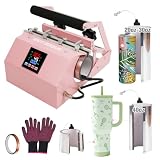
- 【All-in-One Compatibility for Every Cup Size】 This tumbler press includes 20–30oz and 40oz split attachments, compatible with 11/15oz mugs, 16/20/30oz skinny tumblers, and 40oz handle tumblers. Dual mug design allows simultaneous transfer on two 11oz or 15oz mugs, doubling your production efficiency. Expandable with optional BetterSub attachments (1.5–17oz) to cover DIY, small business, and event customization needs.
- 【Precise Digital Temperature & Timing Control】LCD panel allows 0–482°F / 0–250°C temperature and 0–999s timing adjustment with constant temperature maintenance. 110V 500W unit is UL certified for safe home and commercial use. Minor temperature drop during cup placement is normal.
- 【Durable Build with Even Heat Distribution】 High-grade aluminum heating element and silicone pads ensure uniform heat transfer for crisp, vivid sublimation results. Robust construction guarantees long service life. Avoid prolonged idle heating to protect the pads.
- 【Easy to Use with Adjustable Pressure】 Dual pressure knobs accommodate various cup sizes, and attachments are quick and simple to swap. No professional experience required—perfect for beginners, DIYers, and small craft workshops.
- 【Versatile Material Support for Endless Creations】Works with stainless steel tumblers, ceramic mugs, glass cups, metal cups, beer mugs, aluminum bottles, and shot glasses. Ideal for birthdays, weddings, corporate events, or everyday personalized gifts.
Before each production session, inspect the sleeve, clamp, wiring, controller, and heat-resistant surfaces. Remove scraps and adhesive residue only after the machine is switched off and cool. Keep a spare sleeve only when the manufacturer lists a compatible replacement, and record its size so it cannot be confused with another heater.
Buying checklist
- Measured minimum and maximum diameter of every blank you intend to press.
- Printable length, taper, handles, lids, seams, and other shape constraints.
- Dedicated element or interchangeable sleeve, including the exact required size.
- Manual or automatic pressure, and how pressure is adjusted or repeated.
- Temperature range, timer range, display readability, and cycle-completion indication.
- Automatic shutoff interval, if listed: MakerFlo states 30 minutes and HTVRONT states 15 minutes.
- Voltage, plug, physical dimensions, and available workspace for your region.
- Current warranty terms, technical support, and replacement-heater availability.
- A written recipe for each blank rather than one universal temperature and time.
- A test plan for new combinations of press, sleeve, transfer, and coating.
What “best” can and cannot mean here
A machine can be the best fit for your blanks without producing a proven better image than every alternative. The cited manufacturer pages provide dimensions, controls, pressure descriptions, and shutoff features; they do not report controlled tests that compare color accuracy, edge quality, failure rates, or units per hour across these models. Treat automatic pressure, a larger temperature range, and a longer timer as workflow options. Judge print quality with your own blank and transfer after a documented test.
For a straightforward decision, first eliminate every model that cannot accommodate the measured diameter, printable length, and shape. Among the remaining options, select the heater design that matches your product mix, then compare pressure control, controller limits, shutoff behavior, electrical requirements, support, warranty, and replacement parts. This fit-first process is more reliable than choosing by ounce label, marketing speed claims, or a generic “best” ranking.
What’s actually slowing this PC down?
Pick the symptom - the matching free tool is one click away.
Quick Recap
Product prices and availability are accurate as of the date/time indicated and are subject to change. Any price and availability information displayed on Amazon at the time of purchase will apply.

