Quick wins for a faster PC:
Clear out junk files and repair common Windows errorsFree Scan →Scan for outdated or missing drivers - takes under a minuteDriver Scan →The best Trello alternative in 2026 depends on what Trello is no longer doing well for you. Choose ClickUp for deeper planning and reporting, Asana for structured project schedules, Notion for documentation alongside tasks, monday.com for visual dashboards, Linear or Jira for engineering work, and Airtable for database-style project records. Compare each option with the Trello plan you actually use: Trello Standard and Premium already include more than the free tier.
Start with the ceiling you have hit
There is no universal replacement. The right choice follows the specific limitation that prompted your move:
- Need Gantt charts, sprint management, time tracking or reports: shortlist ClickUp.
- Want familiar task management with stronger ownership and schedules: consider Asana.
- Need project tracking and a shared knowledge base: consider Notion.
- Prefer highly visual work management and dashboards: consider monday.com.
- Run software engineering sprints and backlogs: compare Linear with Jira.
- Need custom records, linked data and multiple database views: consider Airtable.
A discussion titled “I’m Leaving Trello: Any Recommendations?” mentions Monday.com, Asana, Todoist and ClickUp while raising pricing and migration concerns. That is an anecdotal example of how one reader framed the decision, not evidence of a broad switching trend.
Quick comparison
| Alternative | Best fit | What changes from Trello | Main trade-off |
|---|---|---|---|
| ClickUp | Planning depth, views and reporting | Gantt charts, sprints, native time tracking and broader reporting options | More configuration and a steeper setup path |
| Asana | Structured project and schedule management | Timeline and Gantt views on Starter, with clearer ownership and dependencies | Check current free-tier terms and paid-seat economics |
| Notion | Tasks plus documentation | Flexible pages, databases and project information in one workspace | Boards and workflows require more deliberate configuration |
| monday.com | Visual tracking and dashboards | Customizable views, dashboards and status-driven workflows | Paid plans may require a minimum number of seats |
| Linear | Engineering teams wanting streamlined sprints | Purpose-built issue and cycle workflows with less Jira complexity | Specialized rather than a general-purpose replacement |
| Jira | Deep Scrum, backlog and engineering controls | More detailed issue, backlog and sprint administration | Higher process complexity for non-technical teams |
| Airtable | Data-heavy projects and custom records | Relational-style records with grid, calendar and other views | More setup and potentially higher cost than card-and-column work |
ClickUp: best for planning depth and reporting
ClickUp is the strongest shortlist candidate when Trello’s board-and-card model feels too shallow. The ClickUp Editorial Team positions it for teams needing Gantt charts, sprint management, time tracking and reporting. Its official pricing page, checked September 30, 2026, lists a Free plan with unlimited tasks and members, collaborative Docs, Kanban boards and sprint management. The Unlimited plan is listed at $7 per user per month, billed yearly, and includes Gantt charts and native time tracking.
Recommended Free Tools
#1 Best Overall

- DRY ERASE PROJECT MANAGEMENT PLANNER: Be made of 250 gsm construction paper, laminated by special formula film that is erasable, make the surface resistant to ghosting or staining. We can erase easily even months later and use this work schedule board over and over again
- PRODUCTIVE PROJECT MANAGEMENT TOOLS: This project management board is a game changer and something physical for managing personal or team projects efficiently. It allows you or members to quickly view and share the status of up to 12 projects at the same time, a very good practical kit of team building
- SCRUM WHITEBOARD FOR OFFICE ESSENTIALS: This project organizer worth the investment for business use. It's easy to use for products development, marketing strategic projects or as a sales goal tracking whiteboard. You can easily measure budget, milestones, resources, inventory and timeline at a glance. It helps you plan, execute, assign tasks efficiently
- MOUNTING IS A BREEZE: This vision board is lightweight and comes with removable mounting stickers. You can mount this program Management Board easily without tools. On the other hand, you can take it down easily too if you need to remount your project board to other place later
- COMPLETE ACCESSORIES INCLUDED: Our huge project manager planner for wall is cost-efficient for daily use in office, home office or family. It comes rolled in a study tube with, premium dry erase eraser, reusable fluorescent colored tabs for entrepreneurs, managers or person working at home
That feature spread can solve the “I need more than a board” problem, but it also creates more decisions about statuses, views, permissions and workspace conventions. Treat the comparison as a vendor-authored recommendation: ClickUp competes directly with Trello.
Asana: best for a structured transition
Asana is a natural move for teams that still want straightforward task management but need stronger structure around owners, schedules and dependencies. Asana’s official pricing page lists the Starter plan at $10.99 per user per month, billed annually, with Timeline and Gantt views.
Rank #2
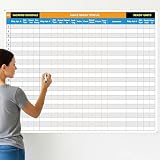
- Extra Large Surface: this large dry erase project management board provides 36 x 45 inches of reusable writing space for planning and tracking multiple projects; Whether applied as a property make ready board or office whiteboard, the generous size accommodates budgets, timelines, and task lists; It works nice in real estate offices, apartment communities, and corporate meeting rooms where visual project tracking is needed
- Smooth Dry Erase Surface: this make ready white board made from 250 g/M² cardstock paper with glossy lamination, this project vision board features a dry erase surface that writes smoothly and wipes clean without stains or shadows; Unlike standard paper planners, this reusable dry erase board with lines wall organizer allows for instant changes, keeping your project management tool accurate through multiple use cycles
- Pre-punched Corner Holes: each corner of this schedule board comes with pre-punched holes for simple wall mounting; You can hang it directly from the shipping tube without additional framing or hardware; This design allows busy property managers and real estate professionals to set up their project tracker board in minutes and begin organizing tasks right away
- Property Management Supplies: designed as a property make ready board, this visual planner helps real estate managers track maintenance status, cleaning schedules, and apartment turnover progress; Use it to monitor unit readiness and assign tasks to staff; The project management board format provides clear overview of properties, making it useful for apartment communities and housing facilities
- Works Across Different Settings: beyond real estate, this project planner board can be applied in construction, offices, and educational settings; Use it as a board to attach documents and photos, or write directly on the dry erase surface for quick updates; The design supports various tracking needs, from construction timelines to team tasks, making it a practical addition to any workplace
Before committing, verify the current free-plan rules and seat limits. The ClickUp and Zapier comparisons describe Asana’s free tier differently, so an older article should not determine your budget. Compare the plan required for your actual team size and schedule features.
Notion: best when documentation matters as much as tasks
Notion fits teams that want project tracking beside briefs, specifications, meeting notes and operating documentation. Its official pricing page lists Free, Plus and Business plans. The flexibility is the attraction: you can build databases and views around the team’s information rather than forcing every item into a fixed card workflow.
Do these 3 things before closing this tab:
1Repair Windows errors before they cause bigger problems2Fix the driver behind crashes, sound loss and screen glitches3Clear out junk files and repair common Windows errorsRank #3

- MAGNETIC DRY-ERASE SURFACE — The whiteboard design is permanently printed onto durable, industrial‑quality dry‑erase vinyl that won’t smudge and is resistant to stains and ghosting. Its smooth, long‑lasting writing surface is also magnetic, giving you added functionality for notes, magnets, and accessories
- EASY INSTALLATION — Comes complete with durable mounting brackets and hardware, ensuring a secure and effortless wall‑mounting
- DURABLE ALUMINUM FRAME — Built with a sleek 1" aluminum border and a spacious 2.5" deep aluminum tray to keep markers and accessories neatly within reach
- SPACIOUS WRITING SURFACE — Ample writing space with a usable area that extends nearly edge‑to‑edge, measuring just 2" shy of the board’s total dimensions
- Please inspect your whiteboard upon arrival — If you notice any issues, please contact us through Amazon's Buyer-Seller Messaging system
The same flexibility is the cost. A useful Notion workspace needs agreed properties, templates, permissions and navigation. Assess collaboration and plan limits for your team before migrating a large knowledge base.
monday.com: best for visual work and dashboards
monday.com is aimed at teams that want highly visual tracking, customizable views and dashboard reporting. Its pricing page, checked September 30, 2026, lists a Free plan for up to two seats and a Basic plan at $9 per seat per month, billed annually.
Rank #4

- Packages Includes: you will receive 1 magnetic task tracking poster with a size of 24 x 36 in, a Flannel blue and yellow wave eraser, 100 pages of arrow sticky notes, 1 Magnetic pen holder, a roll of Nano traceless double-sided tape and 6 colored erasable whiteboard pens
- Reusable and Quality: the full vacation schedule is made of magnetic material( note that the back is magnetic, while the front is less magnetic); With dry-erase design, write and wipe with ease, We can erase easily even months later and use this work schedule board over and over again
- Productive Project Management Tools: this project management board is a game changer and something physical for managing personal or team projects efficiently; It allows you or members to quickly view and share the status of up to 20 projects at the same time, a very good practical kit of team building
- Mounting is a Breeze: this vision board is lightweight and can be attached magnetically or with nano-traceless double-sided tape; ; You can mount this Board or take it down easily without tools; Notice : before use, please place heavy objects at the four corners of the poster and let it sit for 12-24 hours until the poster is flat again
- Practical and Versatile: it's easy to use for products development, marketing strategic projects or as a sales goal whiteboard for daily use in office, home or family; Whatever for entrepreneurs, managers or person working at home, buy the office white board for wall for try
Seat economics require particular care. The ClickUp comparison warns that paid plans have a three-seat minimum, so a small team may pay for more seats than it actively uses. Confirm the live checkout calculation for the intended seat count and check which views and dashboards are gated behind higher tiers.
Linear or Jira: choose an engineering workflow
Linear for a focused, lower-complexity engineering process
Linear is identified in the comparisons as a fit for engineering teams that want sprint management without Jira’s broader administrative complexity. It is a specialized choice, so confirm that its issue, cycle and integration workflow matches your development process before moving boards.
Best Value

- Product Includes: you will receive 1 erasable project management planner, approximately 36"x 45", to meet your planning needs; The whiteboard planner comes with 4 colored whiteboard markers (you can choose your favorite color), 1 magnetic eraser, a set of reusable adhesive labels, 1 mesh storage bag, and 1 sufficient amount of removable mounting tape; The mesh storage bag is ideal for storing all markers and other accessories, making it easy to install the planner without damaging the wall
- Erasable Project Management Board: made of 250 gsm cardstock, covered with a specially formulated erasable film, making the surface resistant to marks and stains; It can be easily erased even after several months, allowing for repeated use of the planner
- Efficient Project Management Tool: this project board is a revolutionary product that helps you efficiently manage individual or team projects in physical form; It allows you or team members to quickly view and share the status of up to 12 projects simultaneously, making it a highly practical team building tool
- Office Essential: this project planner is a worthwhile investment; Especially suitable for business use; It's easy to use and can be applied for product development, marketing strategy projects, or as a sales target tracking whiteboard; You can easily view budgets, milestones, resources, inventory, and timelines at a glance; It helps you plan, execute, and assign tasks efficiently
- Easy and Convenient Installation: this vision task board is lightweight and portable, and comes with removable mounting stickers; No tools are required to easily install this project management board; Furthermore, it can be easily removed if you need to reinstall the project board in another location later
Jira for deep Scrum and backlog control
Jira is the better direction when you need detailed Scrum, backlog and engineering controls. That depth can be unnecessary overhead for marketing, operations or general project teams. Verify current plan details and required integrations before switching.
Independent reader supportYour contribution helps us test, update, and keep practical guides available for everyone.Airtable: best for database-style project information
Airtable makes sense when a project is really a collection of structured records: assets, vendors, launches, content items or other data that needs linked fields and several views. The comparisons describe it as useful when project data needs richer database structure than a conventional board. Airtable’s Team plan is listed at $20 per user per month, billed annually on its official pricing page, checked September 30, 2026.
That price and the additional modeling work are hard to justify for simple card-and-column work. Define the records, relationships and views you need before choosing Airtable.
Compare prices with the Trello tier you actually use
| Product and plan | Published price | Billing qualification | Notable included capability |
|---|---|---|---|
| Trello Standard | $5 USD per user/month | Billed annually; Atlassian page checked September 30, 2026 | Unlimited boards |
| Trello Premium | $10 USD per user/month | Billed annually; Atlassian page checked September 30, 2026 | Calendar, Timeline, Table, Dashboard and Map views |
| ClickUp Unlimited | $7 per user/month | Billed yearly; ClickUp page checked September 30, 2026 | Gantt charts and native time tracking |
| Asana Starter | $10.99 per user/month | Billed annually; Asana page checked September 30, 2026 | Timeline and Gantt views |
| monday.com Basic | $9 per seat/month | Billed annually; monday.com page checked September 30, 2026 | Basic visual work-management plan; confirm seat minimums at checkout |
| Airtable Team | $20 per user/month | Billed annually; Airtable page checked September 30, 2026 | Team database plan |
These are live-page observations rather than permanent price guarantees. Currency, billing cadence, seat count and plan gates can change. Recalculate the recurring total using your current users, not a hypothetical per-user number. Also compare against Trello Premium if you already pay for its extra views; moving from Trello Free can exaggerate the apparent feature gap.
What’s actually slowing this PC down?
Pick the symptom - the matching free tool is one click away.
Migration checklist
- Write down the reason for leaving. Distinguish a board limit from missing timelines, reports, documentation, engineering workflows or data modeling.
- Inventory your Trello workspace. Record boards, lists, cards, members, labels, due dates, attachments, comments, Butler automations, integrations and permissions.
- Export before changing anything. Keep an export of each board so you have a reference and recovery copy.
- Map the destination model. Decide how Trello boards, lists, labels, members, due dates and automations map to projects, teams, statuses, fields and rules in the new product.
- Run a pilot import. Use one representative board, then inspect cards, attachments, comments, dates, member assignments, permissions and automations rather than assuming a clean transfer.
- Rebuild automations deliberately. Imported cards may not reproduce Butler rules or third-party integrations. Recreate only the rules the team still needs.
- Budget cleanup time. The ClickUp comparison estimates two to four hours of cleanup for boards with heavy automation. That is the publisher’s estimate, not a guaranteed duration for every migration.
- Keep Trello read-only during transition. Freeze edits or define a cutover time so changes do not diverge between systems.
- Confirm billing and permissions. Check paid-seat minimums, guest access, storage, integrations and the plan required for each view before inviting the whole team.
How to make the final choice
- Choose ClickUp if you need the broadest planning and reporting expansion from a board-centric starting point.
- Choose Asana if schedule visibility and structured ownership matter more than a highly customizable workspace.
- Choose Notion if task context and documentation should live together.
- Choose monday.com if dashboards and visual status reporting are central, and the seat minimum works financially.
- Choose Linear for streamlined engineering cycles or Jira for deeper Scrum and backlog administration.
- Choose Airtable when the work is fundamentally structured data rather than a sequence of cards.
The ClickUp comparison supplies one useful framing: “There is no single best replacement. It depends on which ceiling you have hit.” That statement comes from a competing vendor’s editorial team, so use it as a decision principle, not as an independent ranking. Zapier’s comparison offers a second editorial perspective and may earn commissions from links.
Quick Recap
Product prices and availability are accurate as of the date/time indicated and are subject to change. Any price and availability information displayed on Amazon at the time of purchase will apply.




